
Ginour HYD6001.8
Contents
Ginour Cordless Rotary Tool User Manual
Model: HYD6001.8
Introduction
Thank you for choosing the Ginour 8V Cordless Rotary Tool. This versatile tool is designed for a wide range of DIY and crafting projects, including drilling, engraving, polishing, grinding, cutting, and sanding. Its powerful motor, variable speed control, and ergonomic design make it an essential tool for both beginners and experienced users. This manual provides detailed instructions for safe operation, maintenance, and troubleshooting to ensure optimal performance and longevity of your tool.

Image: The Ginour 8V Cordless Rotary Tool, its black carrying case, USB-C charging cable, and a comprehensive set of 153 accessories laid out.
Safety Instructions
Always follow basic safety precautions when using electrical tools to reduce the risk of fire, electric shock, and personal injury.
- Read the Manual: Read and understand all instructions before operating the tool.
- Work Area: Keep your work area clean and well-lit. Cluttered or dark areas invite accidents.
- Electrical Safety: Do not expose power tools to rain or wet conditions. Do not abuse the cord.
- Personal Safety: Always wear eye protection. Use hearing protection when operating for extended periods. Dress properly; avoid loose clothing or jewelry.
- Tool Use and Care: Do not force the tool. Use the correct tool for your application. Disconnect the battery pack before making any adjustments, changing accessories, or storing the tool.
- Battery Care: Charge only with the specified charger. Do not incinerate the battery pack even if it is severely damaged.
Package Contents
Verify that all items listed below are included in your package. If any items are missing or damaged, please contact customer support.
- Ginour 8V Cordless Rotary Tool
- 2.0Ah Lithium-ion Battery (integrated)
- Type-C Charging Cable
- Universal Chuck
- Spanner
- Tool Bag
- Accessory Case
- 153-piece Accessory Kit, including:
- Collets (Ø1.6", Ø2.3", Ø3.2")
- Fiberglass Cut-off Wheels
- Cut-off Wheels
- Diamond Cutting Disc
- HSS Cutting Disc
- Felt Wheels
- Stainless Steel Brush
- Mandrel for Felt Wheel
- Whet Stone
- Sanding Bands
- Sanding Drum
- Sanding Paper
- Mandrel for Cut Wheels
- Grinding Stones with Shank
- Diamond Bits
- HSS Drill Bits
- HSS Cutter
- User Manual (this document)
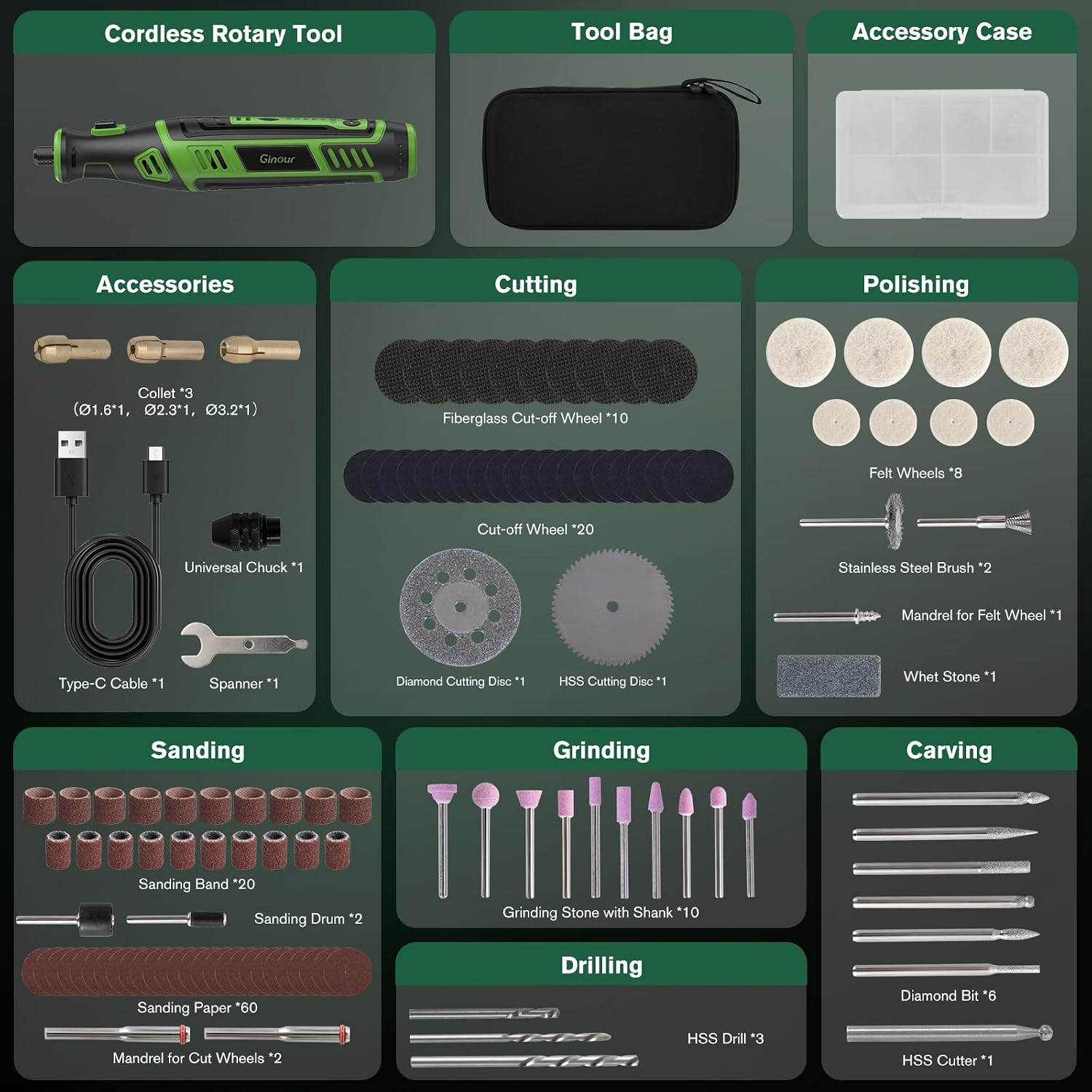
Image: A visual representation of the Ginour Cordless Rotary Tool and its extensive 153-piece accessory kit, categorized by function (cutting, polishing, sanding, grinding, drilling, carving), along with the tool bag and accessory case.
Product Features and Components
- Powerful Motor: Equipped with a robust motor for efficient performance across various materials.
- Variable Speed Control: Five adjustable speeds from 5,000 to 30,000 RPM for precision work.
- Integrated LED Light: Provides enhanced visibility in dimly lit work areas.
- Universal Chuck: Compatible with a wide range of accessories, allowing for quick and easy changes.
- Ergonomic Design: Compact and lightweight (approx. 0.86 lbs / 390g) with a comfortable rubberized grip to reduce fatigue during prolonged use.
- Cordless Operation: Powered by an integrated 8V 2.0Ah Lithium-ion battery for portability and convenience.
- USB-C Charging: Easy and convenient charging via a Type-C cable with a power indicator.

Image: An internal view highlighting the powerful motor and variable speed capabilities of the rotary tool.

Image: A close-up of the Ginour 8V Cordless Rotary Tool, illustrating its integrated 2.0Ah Lithium-ion battery and the convenient Type-C charging port.

Image: A hand holding the Ginour rotary tool, showcasing its ergonomic design and the illuminated LED light during a carving task on wood.

Image: The Ginour rotary tool held in one hand next to a power bank, illustrating its lightweight and compact nature, making it highly portable.
Setup
Charging the Battery
The Ginour rotary tool is powered by an integrated 8V 2.0Ah Lithium-ion battery. Before first use, fully charge the battery.
- Locate the Type-C charging port on the tool.
- Connect the provided Type-C charging cable to the tool and a compatible USB power source (e.g., wall adapter, computer USB port, power bank).
- The power indicator lights on the tool will show the charging status. When fully charged, all indicator lights will be solid.
- Disconnect the charging cable once charging is complete.
Attaching and Changing Accessories
The universal chuck allows for easy attachment and removal of various accessories.
- Ensure the tool is turned off and disconnected from any power source.
- Press and hold the spindle lock button to prevent the shaft from rotating.
- Unscrew the universal chuck counter-clockwise to loosen it.
- Insert the desired accessory shank into the chuck. Ensure the shank is fully seated.
- Tighten the universal chuck clockwise by hand. For a secure grip, use the provided spanner to gently tighten the chuck further. Do not overtighten.
- To remove an accessory, reverse the steps: press the spindle lock, unscrew the chuck, and pull out the accessory.

Image: A close-up view of the Ginour rotary tool's universal chuck, demonstrating how to insert an accessory and listing the compatible shank sizes (1/64", 1/32", 1/16", 3/32", 1/8").
Operating Instructions
Powering On/Off and Speed Adjustment
- To turn on the tool, press the power button. The LED work light will illuminate automatically.
- To adjust the speed, use the '+' and '-' buttons. There are five speed settings, ranging from 5,000 RPM to 30,000 RPM. Select the appropriate speed for your material and application.
- To turn off the tool, press the power button again.
Applications and Accessory Usage
The Ginour rotary tool is suitable for a variety of tasks. Always choose the correct accessory for the job and wear appropriate safety gear.
- Drilling: Use HSS drill bits for precise holes in wood, plastic, and soft metals.
- Sanding: Attach sanding bands or paper with the sanding drum for smoothing surfaces, shaping, or removing rust.
- Cutting: Utilize cut-off wheels (fiberglass, regular, diamond, HSS) for cutting various materials like plastic, thin metal, wood, or ceramic tiles.
- Engraving/Carving: Diamond bits and HSS cutters are ideal for intricate designs on wood, glass, metal, or stone.
- Polishing: Use felt wheels with polishing compound for shining metals, plastics, and other materials.
- Grinding: Grinding stones are suitable for sharpening, deburring, and general material removal on metal or stone.
- Cleaning: Stainless steel brushes can be used for cleaning and light rust removal.

Image: A composite image demonstrating various applications of the Ginour rotary tool, including drilling into wood, cleaning a surface, cutting metal, carving wood, sanding a wooden piece, and polishing jewelry.
Maintenance
Cleaning
Regular cleaning ensures the longevity and proper functioning of your tool.
- Always disconnect the tool from any power source before cleaning.
- Use a soft, damp cloth to wipe down the exterior of the tool. Do not use harsh chemicals or abrasive cleaners.
- Use a soft brush or compressed air to clear dust and debris from ventilation openings and the chuck area.
- Clean accessories after each use to maintain their effectiveness.
Battery Care and Storage
- Store the tool and accessories in a dry place, away from direct sunlight and extreme temperatures.
- For long-term storage, ensure the battery is partially charged (around 50%) to preserve battery health.
- Recharge the battery every 3-6 months if not in use to prevent deep discharge.
- Do not store the tool with a fully depleted battery.
Troubleshooting
| Problem | Possible Cause | Solution |
|---|---|---|
| Tool does not turn on. | Battery is depleted. | Charge the battery fully using the provided Type-C cable. |
| Tool stops during operation. | Overload protection activated; Battery low. | Reduce pressure on the tool; Recharge the battery. |
| Accessory is loose or wobbles. | Chuck not tightened properly; Incorrect accessory shank size. | Ensure the chuck is securely tightened with the spanner; Use accessories with compatible shank sizes (1/64", 1/32", 1/16", 3/32", 1/8"). |
| Reduced performance. | Worn out accessory; Battery not fully charged. | Replace the accessory; Fully charge the battery. |
Specifications
| Feature | Detail |
|---|---|
| Model Number | HYD6001.8 |
| Brand | Ginour |
| Voltage | 8 Volts |
| Battery Type | Lithium-ion (2.0Ah) |
| No-Load Speed | 5,000 - 30,000 RPM (5 variable speeds) |
| Power Source | Battery Powered |
| Special Features | LED Light, Lightweight, Keyless Chuck, Cordless, Variable Speed |
| Weight | 890 grams (approx. 1.96 lbs) |
| Package Dimensions | 28.4 x 16.7 x 7.9 cm |
| Included Components | Cordless Multi-tool, 153 Accessories, Type-C Cable, Tool Bag, Accessory Case |
Warranty and Support
Ginour products are manufactured to high-quality standards. For information regarding warranty coverage, technical support, or replacement parts, please refer to the warranty card included with your purchase or visit the official Ginour website. Please retain your proof of purchase for warranty claims.
For further assistance, you may contact Ginour customer service through the contact information provided on their official website or the retailer where the product was purchased.
Ask a question about this manual
Ask about setup, troubleshooting, compatibility, parts, safety, or missing instructions. Manuals+ will review the question and use this page’s manual context to help answer it.