
eppfun CR01
eppfun Bluetooth 5.2 FM Transmitter User Manual
Model: CR01
Brand: eppfun
Product Overview
The eppfun Bluetooth 5.2 FM Transmitter is designed to bring modern connectivity to your car's audio system. It allows you to stream music wirelessly from your Bluetooth-enabled devices, make hands-free calls, and play audio from TF cards or via an Aux connection. It transmits audio to your car's FM radio, providing a versatile solution for older vehicles.

Figure 1: eppfun Bluetooth 5.2 FM Transmitter and included cables.
Package Contents
- eppfun Bluetooth 5.2 FM Transmitter (Model: CR01)
- USB Charging Cable
- Auxiliary Audio Cable
- User Manual (this document)
Device Layout
Familiarize yourself with the buttons and ports on your eppfun FM Transmitter.
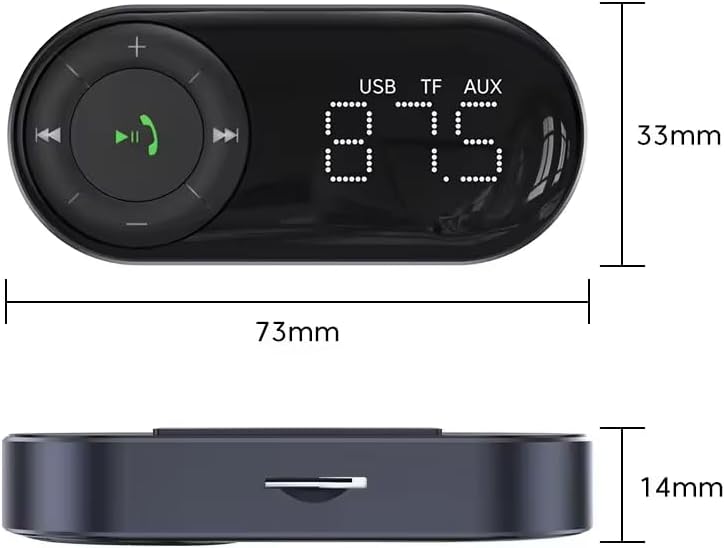
Figure 2: Device dimensions and port locations. The device features a USB port, TF card slot, and AUX port, along with an LED digital display and control buttons.
- LED Digital Display: Shows FM frequency and status.
- Multi-function Button (Call/Pause/Play): Used for answering/ending calls, playing/pausing music, and entering FM frequency adjustment mode.
- Previous Track/Volume Down Button (-): Short press for previous track, long press for volume down.
- Next Track/Volume Up Button (+): Short press for next track, long press for volume up.
- USB Port: For charging devices or playing music from a USB drive.
- TF Card Slot: For playing music from a TF (MicroSD) card (1G-32G, card not included).
- AUX Out Port: For connecting to car's AUX input (if available) for direct audio output.
Setup Instructions
- Insert into Car's Cigarette Lighter Socket: Plug the eppfun FM Transmitter into your car's 12V cigarette lighter socket. The device will power on automatically.
- Find an Empty FM Frequency:
- Tune your car's FM radio to an empty frequency (one with no static or existing radio station). This is crucial for clear audio.
- On the eppfun transmitter, long press the Multi-function Button (Call/Pause/Play) until the FM frequency on the LED display starts flashing.
- Use the + and - buttons to adjust the transmitter's frequency to match the empty frequency you found on your car radio. Long press the + or - button to quickly change the frequency.
- Once matched, the display will stop flashing.
- Pair with Bluetooth Device:
- Enable Bluetooth on your smartphone or other audio device.
- Search for Bluetooth devices and select "FM50" (or similar name) from the list.
- Once connected, a voice prompt will confirm the successful pairing.

Figure 3: Bluetooth pairing process. The device will automatically connect after the first successful pairing.
Operating Instructions
Music Playback
The eppfun FM Transmitter supports multiple audio input methods:
- Bluetooth Streaming: Once paired, music from your smartphone will automatically play through your car's speakers via the selected FM frequency.
- TF Card Playback: Insert a TF (MicroSD) card (up to 32GB, not included) with MP3/WMA format music files into the TF card slot. The device will automatically detect and play music from the card.
- USB Drive Playback: Insert a USB flash drive (U-Disk) with music files into the USB port. The device will automatically detect and play music from the drive.
- AUX Out: Connect the included auxiliary cable from the transmitter's AUX port to your car's AUX input (if available) for a direct wired audio connection. This port is for output only.
Use the + and - buttons for track navigation (short press) and volume control (long press). Press the Multi-function Button to play or pause music.

Figure 4: Enjoying Hi-Fi sound quality with lossless decoding through multiple audio modes.
Hands-Free Calling
The device supports hands-free calling for a safer driving experience.
- Answer Call: Short press the Multi-function Button (Call/Pause/Play) when an incoming call rings.
- End Call: Short press the Multi-function Button during a call to hang up.
- Reject Call: Long press the Multi-function Button when an incoming call rings to reject it.
- Redial Last Number: Double-press the Multi-function Button to redial the last dialed number.

Figure 5: One-key answering and hanging up for hands-free calls.
Charging Other Devices
The USB port can also be used to charge your mobile devices. Connect your device's charging cable to the USB port on the transmitter.
Maintenance
To ensure the longevity and optimal performance of your eppfun FM Transmitter:
- Keep the device dry and away from moisture.
- Avoid exposing the device to extreme temperatures.
- Clean the device with a soft, dry cloth. Do not use harsh chemicals or abrasive cleaners.
- Ensure the cigarette lighter socket is clean and free of debris for a stable connection.
Troubleshooting
| Problem | Possible Cause | Solution |
|---|---|---|
| No power/Device not turning on. | Loose connection in cigarette lighter socket; car socket not providing power. | Ensure the device is firmly plugged in. Check if the car's cigarette lighter socket is working (e.g., by testing with another device). |
| Static or poor audio quality. | FM frequency interference; weak signal; car radio not tuned correctly. | Find a clearer, unoccupied FM frequency on your car radio and match it on the transmitter. Ensure your car's antenna is extended. Avoid strong radio stations. |
| Bluetooth not connecting or frequently disconnecting. | Device too far from transmitter; interference; incorrect pairing. | Ensure your Bluetooth device is within range (typically 10 meters). Re-pair the device. Turn off and on Bluetooth on your phone. |
| Cannot change FM frequency. | Not in frequency adjustment mode; pressing buttons incorrectly. | Long press the Multi-function Button until the frequency flashes. Then, long press the + or - buttons to change the frequency. Short presses adjust volume. |
| Voice prompts are too loud or annoying. | Voice prompt volume is fixed or tied to main volume. | The device's voice prompts are part of its design. Adjusting the car's radio volume might help manage the perceived loudness. |
| TF card or USB drive not playing. | Unsupported file format; card/drive not inserted correctly; corrupted files. | Ensure music files are in MP3/WMA format. Reinsert the TF card/USB drive. Try a different card/drive. Ensure the card is not larger than 32GB. |
Specifications
| Feature | Detail |
|---|---|
| Model Number | CR01 |
| Bluetooth Version | 5.2 |
| FM Frequency Range | 87.5-108.0 MHz |
| Power Source | Corded Electric (Car Cigarette Lighter) |
| Supported Audio Formats | MP3, WMA (for TF Card/USB) |
| TF Card Support | 1G-32G (card not included) |
| Connectivity Technology | Bluetooth |
| Special Feature | Noise Cancellation |
| Material | Aluminum |
| Item Weight | 2.08 ounces |
| Package Dimensions | 4.69 x 3.58 x 0.67 inches |
Safety Information
Please read and adhere to the following safety guidelines:
- Ensure this device does not interfere with other essential wireless devices.
- Always use this product in accordance with local regulations and guidelines, especially regarding mobile device usage while driving.
- Do not disassemble, repair, or modify the product.
- Keep out of reach of children.
- Avoid exposing the device to water, fire, or high temperatures.
Warranty and Support
For warranty details, please refer to the product packaging or the official eppfun website. For further assistance, technical support, or inquiries, please visit the eppfun official website or contact their customer support channels.
Official eppfun Store: eppfun Store on Amazon
Ask a question about this manual
Ask about setup, troubleshooting, compatibility, parts, safety, or missing instructions. Manuals+ will review the question and use this page’s manual context to help answer it.