
1. Introduction
This manual provides essential information for the installation, operation, and maintenance of your DATOUBOSS 10200W Hybrid Solar Inverter. Please read this manual thoroughly before installation and operation to ensure proper use and safety. Keep this manual for future reference.
2. Safety Instructions
WARNING: Failure to follow these safety instructions may result in serious injury or damage to the equipment.
- The starting power of an inductive load must be at least three times the rated power of the inverter. Connecting loads with too high switching power can damage the inverter.
- Ensure all circuits are connected correctly and install appropriate circuit breakers for each circuit to prevent overcurrent and short circuits.
- Follow the correct ignition order during startup: First, connect the battery, then turn on the inverter, and finally connect the PV (solar panels), mains (utility grid), and load circuit breakers.
- Follow the reverse order when shutting down the system: Disconnect load, mains, PV, then turn off the inverter, and finally disconnect the battery.
- This inverter provides multiple protection methods including short circuit protection, over-current protection, over-voltage protection, under-voltage protection, overload protection, backfill protection, and over-temperature protection. However, proper installation and operation are crucial for safety.
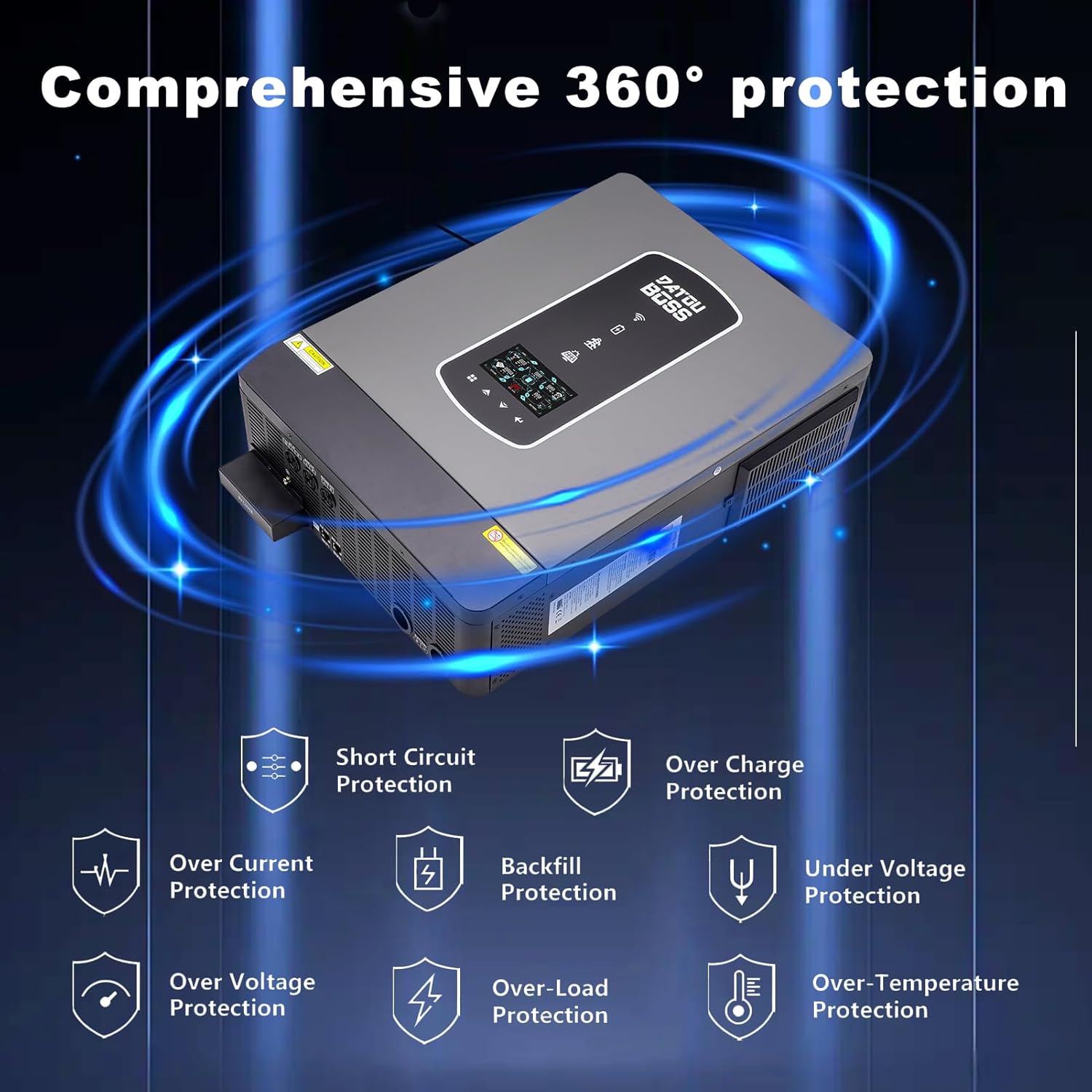
Image: Comprehensive protection features of the DATOUBOSS Hybrid Solar Inverter, including short circuit, over-current, over-charge, under-voltage, over-voltage, backfill, over-load, and over-temperature protection.
3. Product Overview
The DATOUBOSS 10200W Hybrid Solar Inverter is a 48V DC to 220V/230V AC pure sine wave inverter with an integrated 160A MPPT solar charge controller. It is designed to provide reliable power for various home or office appliances and supports both lead-acid and lithium batteries.
3.1 Key Features
- High Power Output: 10.2KW rated power, capable of powering various electrical appliances.
- Dual Photovoltaic Input: Features two independent MPPTs with a total of 36A, allowing connection of higher power solar panels for uninterrupted power supply.
- Dual AC Output: Provides a primary and secondary output. The secondary output remains active when the primary circuit turns off due to low battery voltage or lack of PV/grid power, similar to a super power-saving mode.
- Versatile Charging Modes: Offers 4 configurable charging modes: Solar Priority, Solar Only, Utility Priority, and Solar Hybrid and Utilities.
- Flexible Output Modes: Includes 3 output modes: Solar Priority (SUB), Utility Priority (USB), and SBU (Solar-Battery-Utility).
- Wide Compatibility: Compatible with various battery types including FLD, GEL, SLD, AGM, and Lithium.

Image: Front view of the DATOUBOSS 10200W Hybrid Solar Inverter, showcasing its compact design and integrated display.

Image: Overview of key specifications including 150V starting voltage, 10200W AC output power, 160A MPPT solar charge controller, and 500Vdc maximum PV array open circuit voltage.
3.2 Appearance Description
The inverter features an LCD display for monitoring, status and fault indicators, charging indicators, and touch function buttons for configuration. The rear panel includes various connection ports.
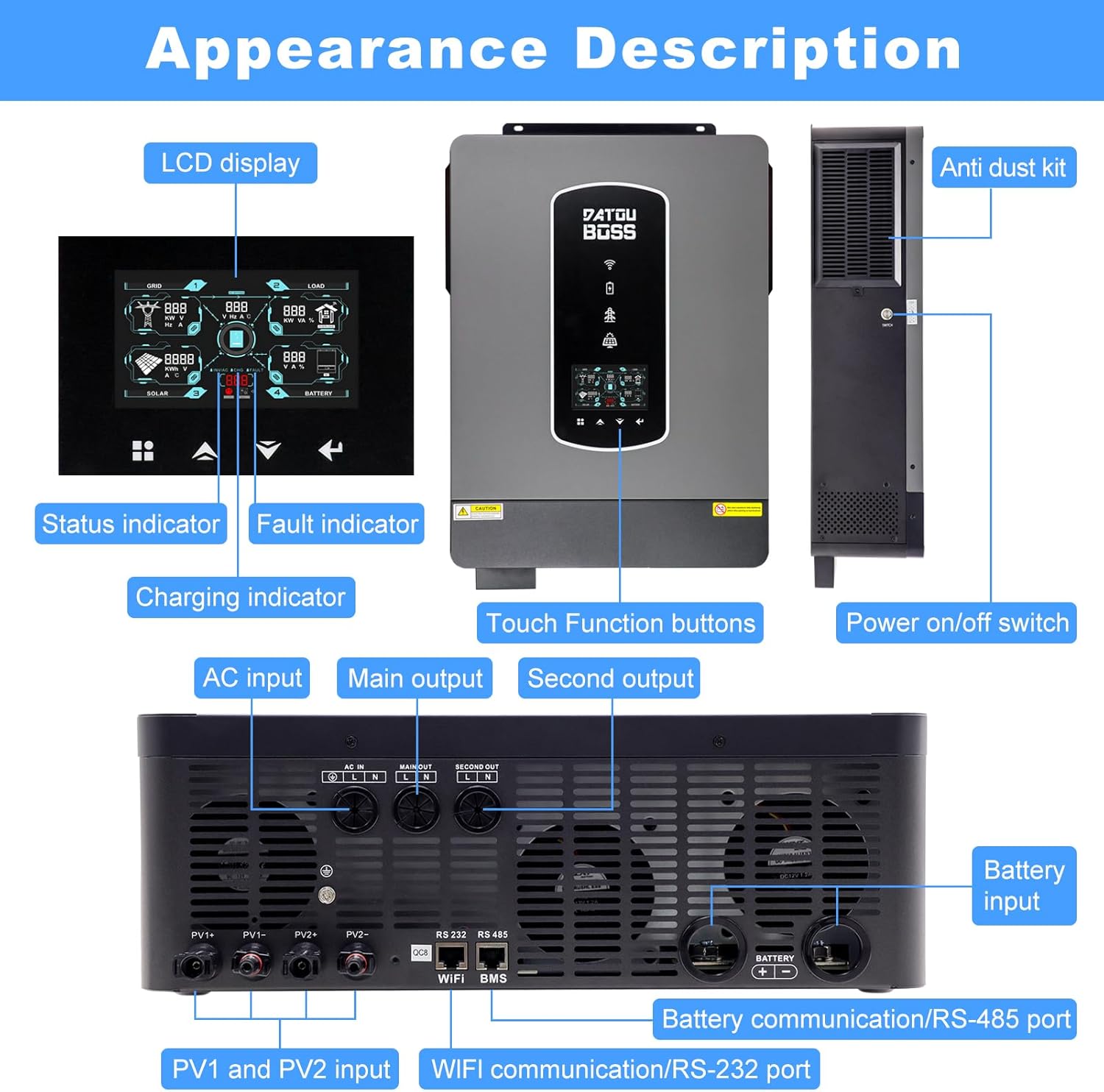
Image: Detailed appearance description showing the LCD display, indicators, touch buttons on the front, and AC input, main output, second output, PV1/PV2 inputs, battery input, and communication ports on the rear panel.
4. Setup and Installation
Proper installation is critical for the safe and efficient operation of your hybrid solar inverter. Ensure all connections are secure and follow local electrical codes.
4.1 Mounting the Inverter
Mount the inverter in a well-ventilated area, away from direct sunlight, moisture, and flammable materials. Ensure sufficient clearance around the unit for heat dissipation.
4.2 Electrical Connections
Refer to the system connection diagram for detailed wiring instructions. All wiring should be performed by a qualified electrician.
- Battery Connection: Connect the 48V battery bank to the designated battery input terminals. Ensure correct polarity.
- PV Input Connection: Connect your solar panels to the PV1 and PV2 input terminals. The inverter supports dual MPPT inputs, allowing for flexible solar array configurations. The PV operating voltage range is 90Vdc-450Vdc, with a maximum open circuit voltage of 500V DC.
- AC Input Connection: Connect the utility grid (mains power) to the AC input terminal.
- AC Output Connection: Connect your household or office appliances to the main output and second output terminals.

Image: Illustration of dual MPPT inputs for solar panels and compatibility with multiple battery types including FLD, GEL, SLD, AGM, and Lithium.

Image: System connection diagram showing solar panels, generator, power grid, external battery packs, and home appliances connected to the DATOUBOSS Hybrid Solar Inverter.
5. Operating Modes
The DATOUBOSS Hybrid Solar Inverter offers flexible charging and output modes to optimize energy usage based on your preferences and available power sources.
5.1 Charging Modes
The battery charging current can be configured via the LCD display. There are four available charging modes:
- Solar Priority: Prioritizes solar power for charging the battery.
- Solar Only: Charges the battery exclusively from solar power.
- Utility Priority: Prioritizes utility grid power for charging the battery.
- Solar Hybrid and Utilities: Utilizes both solar and utility power for charging.
5.2 Output Modes
The inverter provides three output modes to manage power distribution to your loads:
- Solar Priority (SUB): Prioritizes solar power, then battery, then utility grid for powering loads.
- Utility Priority (USB): Prioritizes utility grid power, then solar, then battery for powering loads.
- SBU Priority (Solar-Battery-Utility): Prioritizes solar power, then battery, then utility grid for powering loads.

Image: Diagram illustrating the four charging modes (Priority of mains power supply, Solar priority, Mixed loading, Solar only) and three discharge modes (SUB Solar First, USB Utility First, SBU Priority).
6. Maintenance
Regular maintenance ensures the longevity and optimal performance of your DATOUBOSS Hybrid Solar Inverter.
- Cleaning: Periodically clean the inverter's exterior and ventilation openings to prevent dust accumulation, which can hinder cooling. Use a dry, soft cloth.
- Connections Check: Annually inspect all electrical connections (PV, battery, AC input/output) for tightness and signs of corrosion. Tighten any loose connections.
- Environmental Check: Ensure the installation environment remains within the specified operating temperature range and free from excessive humidity or corrosive substances.
- Firmware Updates: Check the manufacturer's website for any available firmware updates to ensure your inverter has the latest features and bug fixes.
7. Troubleshooting
If you encounter issues with your inverter, refer to the following basic troubleshooting steps. For complex problems, contact customer support.
- No Power/Display Off: Check battery connections, battery voltage, and AC input power. Ensure the inverter's power switch is ON.
- Overload Alarm: Reduce the connected load. Ensure the total load does not exceed the inverter's rated power. Remember inductive loads require higher starting power.
- PV Input Error: Check solar panel connections, PV array voltage, and ensure no shading is affecting the panels. Verify PV operating voltage is within the specified range.
- Battery Low Voltage Alarm: Check battery charge level. Ensure solar panels are generating power or the utility grid is connected for charging.
- Over-temperature Alarm: Ensure the inverter is in a well-ventilated area and its cooling fins are not obstructed. Clean any dust from the vents.
8. Specifications
The following table details the technical specifications of the DATOUBOSS 10200W Hybrid Solar Inverter.

Image: Detailed specifications label found on the inverter, including model number, power ratings, input/output voltages, and operating conditions.
| Feature | Specification |
|---|---|
| Model Number | 48V 10200W |
| Rated Power | 10200W (10.2KW) |
| Input Voltage | 48V DC |
| Output Voltage | 220V/230V AC |
| MPPT Solar Charge Controller | 160A |
| Max PV Input Power | 10200W |
| PV Operating Voltage Range | 90Vdc-450Vdc |
| Max PV Open Circuit Voltage | 500V DC |
| Max PV Load Current | 160Amp |
| Rated Output Current | 44.3Amp |
| Conversion Efficiency | Up to 99% |
| Product Dimensions | 24.02 x 18.5 x 8.27 inches |
| Item Weight | 33 pounds |
| Operating Temperature Range | -10 to 50 ℃ |
9. Warranty and Support
DATOUBOSS products are designed for reliability and performance. For warranty information, please refer to the warranty card included with your product or visit the official DATOUBOSS website. For technical support, troubleshooting assistance, or spare parts, please contact DATOUBOSS customer service through the contact information provided on the product packaging or website.
When contacting support, please have your product model number (48V 10200W) and serial number (if applicable) ready.