1. Introduction
This manual provides essential instructions for the assembly, operation, and maintenance of your YITAHOME Vanity Desk Set. Please read this manual thoroughly before assembly and use to ensure safe and correct operation. Keep this manual for future reference.
Important Safety Information
- Ensure the vanity is securely anchored to the wall due to its weight to prevent tipping.
- Exercise caution with electrical components; do not overload power outlets.
- Handle the glass top with care to avoid breakage or injury from sharp edges.
- Keep all small parts and packaging materials away from children.
- Assembly requires two adults.
2. Package Contents
Before beginning assembly, verify that all components listed in the separate assembly guide are present and undamaged. If any parts are missing or damaged, contact YITAHOME customer support immediately.
Included Components: Instructions & Accessories
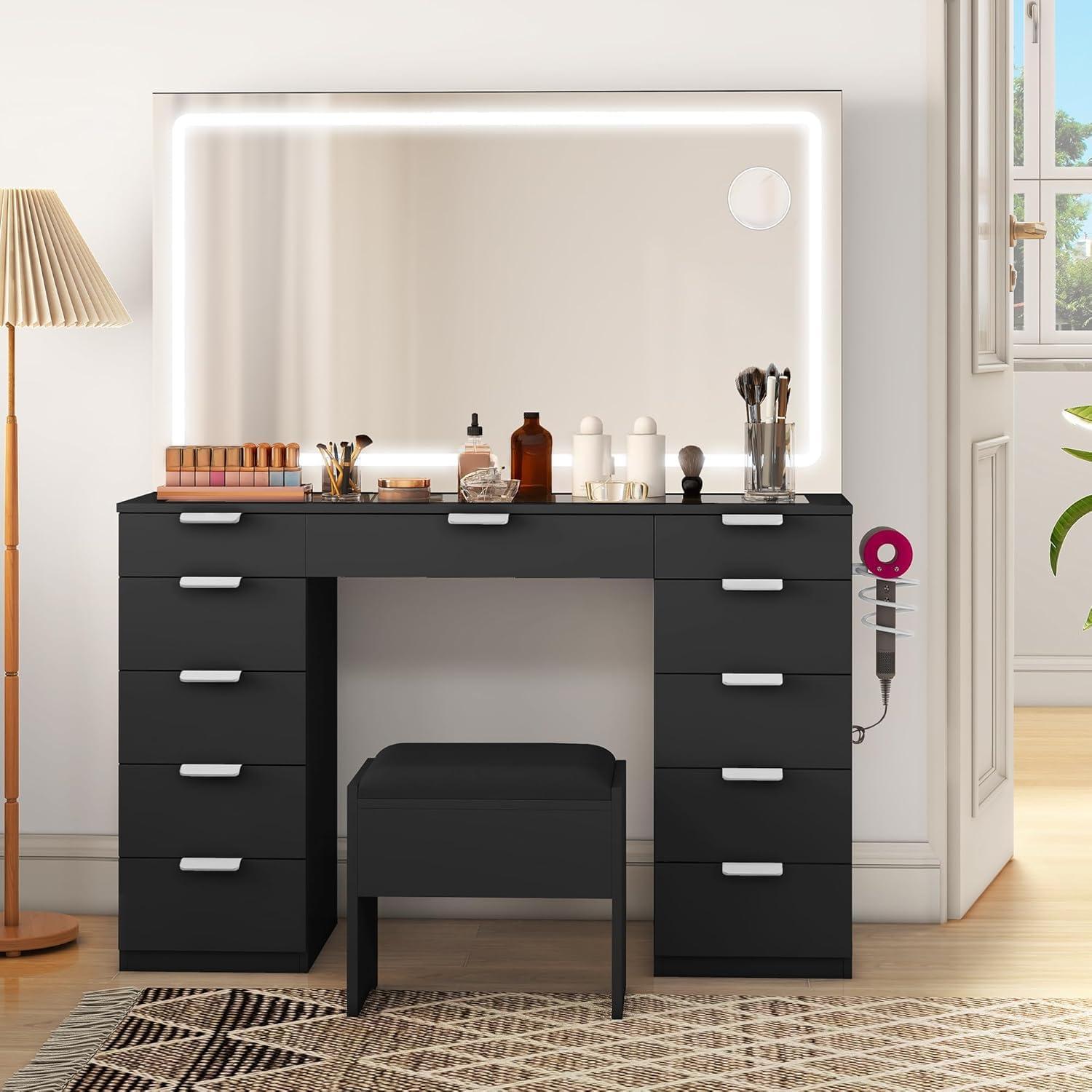
Image 1: The YITAHOME Vanity Desk Set, featuring a charcoal black finish, a large lighted mirror, and multiple storage drawers. A matching stool is positioned in front of the desk.
3. Setup and Assembly
Assembly of the YITAHOME Vanity Desk Set requires careful attention to detail. It is recommended to have two adults for the assembly process.
- Unpack Components: Carefully remove all parts from the packaging. Lay them out on a clean, soft surface to prevent scratches.
- Follow Instructions: Refer to the detailed step-by-step assembly guide included in your package. Ensure each step is completed accurately before proceeding to the next.
- Drawer Assembly: Pay close attention to the drawer bracket installation. Incorrect alignment can affect drawer functionality. Ensure drawers slide smoothly and close completely.
- Mirror Installation: Securely attach the lighted mirror to the vanity desk according to the instructions. Ensure all electrical connections are made correctly and safely.
- Wall Anchoring: For stability and safety, especially with children or pets in the household, it is highly recommended to anchor the vanity to the wall using the provided anti-tip kit.
Note: Some users have reported challenges with drawer assembly. Take your time and double-check all connections.
4. Operating Instructions
4.1. Lighted Mirror
- Power On/Off: Locate the touch sensor on the mirror surface. Lightly tap the sensor to turn the mirror light on or off.
- Adjust Brightness/Color Temperature: Press and hold the touch sensor to cycle through different brightness levels or color temperatures (if applicable). Release when the desired setting is reached.
- Ensure the vanity is plugged into a functional power outlet for the mirror lights to operate.
4.2. Power Outlet
- The integrated power outlet is designed for convenient use of small electronic devices such as hair dryers, curling irons, or phone chargers.
- Do not overload the outlet. Refer to the maximum wattage specified on the outlet itself or in the detailed product specifications. Overloading can cause electrical hazards.
- Ensure devices are unplugged when not in use.
5. Maintenance
- Cleaning the Vanity: Wipe the wood and glass surfaces with a dry, soft cloth. Avoid abrasive cleaners or harsh chemicals that may damage the finish.
- Mirror Cleaning: Use a glass cleaner specifically designed for mirrors and a lint-free cloth. Spray cleaner onto the cloth, not directly onto the mirror, to prevent liquid from seeping into the electrical components.
- Drawer Maintenance: Periodically check drawer slides for smooth operation. If drawers become stiff, a small amount of silicone lubricant can be applied to the slides.
- Electrical Components: Ensure all electrical cords are free from damage and are not pinched. If any electrical component is damaged, discontinue use and contact customer support.
6. Troubleshooting
6.1. Mirror Lights Not Working
- Check Power Connection: Ensure the vanity is securely plugged into a working wall outlet.
- Check Wall Switch: If the outlet is controlled by a wall switch, ensure it is in the "ON" position.
- Inspect Cord: Verify that the power cord is not damaged or frayed.
- Reset: Unplug the vanity for 30 seconds, then plug it back in.
6.2. Drawers Do Not Close Properly or Stick
- Check Assembly: Re-examine the drawer slide installation. Ensure they are correctly aligned and securely fastened.
- Obstructions: Check for any items inside the drawer or along the slides that might be preventing closure.
- Level Surface: Ensure the vanity is placed on a level surface. Uneven surfaces can cause misalignment.
6.3. Scratches or Minor Damage
- For minor scratches on the wood finish, touch-up pens or furniture markers matching the charcoal black color can be used.
- For significant damage, contact YITAHOME customer support for assistance.
7. Specifications
| Brand | YITAHOME |
| Model Number | MAYIHenA05 |
| Product Dimensions | 15.7"D x 46.1"W x 55.9"H |
| Item Weight | 61.9 pounds |
| Material | Wood |
| Color | Charcoal Black |
| Style | Glass Top |
| Product Care Instructions | Wipe with Dry Cloth |
| UPC | 197839995918 |
8. Warranty and Support
For warranty information, product support, or to order replacement parts, please contact YITAHOME customer service. Refer to the contact information provided in your original purchase documentation or visit the official YITAHOME website.
Manufacturer: YITAHOME
Website: YITAHOME Store on Amazon


