
Korfile CD0
Korfile 47 Inch Computer Gaming Desk User Manual
Model: CD0 (DDHK-CD-031)
Brand: Korfile
Introduction
Thank you for choosing the Korfile 47 Inch Computer Gaming Desk. This manual provides essential information for the assembly, operation, and maintenance of your new desk. Please read it thoroughly before beginning assembly and keep it for future reference.
Safety Information
For your safety and to prevent damage to the product, please observe the following:
- Always ensure the desk is level and stable by adjusting the feet as needed.
- Do not exceed the maximum weight limit of 180 pounds (approximately 81.6 kg) on the desk surface.
- Follow the detailed installation instructions, hardware, and tools provided to assemble the desk safely.
- Keep all small parts and packaging materials away from children and pets to prevent choking hazards.
- Ensure all electrical connections for the power outlets and LED lights are properly secured and not overloaded.
Product Components
Before assembly, verify that all components are present and undamaged. Refer to the included parts list in your packaging for specific item identification.

Figure 1: Desk dimensions and reversible design overview. The desk measures 47.2 inches wide, 18.8 inches deep, and 35 inches high. It features a reversible design allowing for flexible setup.
Setup and Assembly
The Korfile Gaming Desk is designed for straightforward assembly. It is recommended that one person assembles the desk, and all necessary tools and hardware are included.
Assembly Steps Overview:
- Unpack all components and lay them out on a clean, soft surface to prevent scratches.
- Identify each part using the labels and the provided instruction manual.
- Begin by assembling the main frame of the desk, ensuring all screws are tightened securely but not overtightened.
- Attach the desktop and monitor stand components.
- Install the power outlet and USB charging station into the designated slot on the desktop.
- Assemble the fabric drawers. These non-woven drawers can be freely combined and placed in various configurations (left or right, above or below) to customize storage space.
- Attach the adjustable feet to the desk legs to ensure stability on uneven surfaces.
- Connect the RGB LED light strips as per the separate LED light instructions.
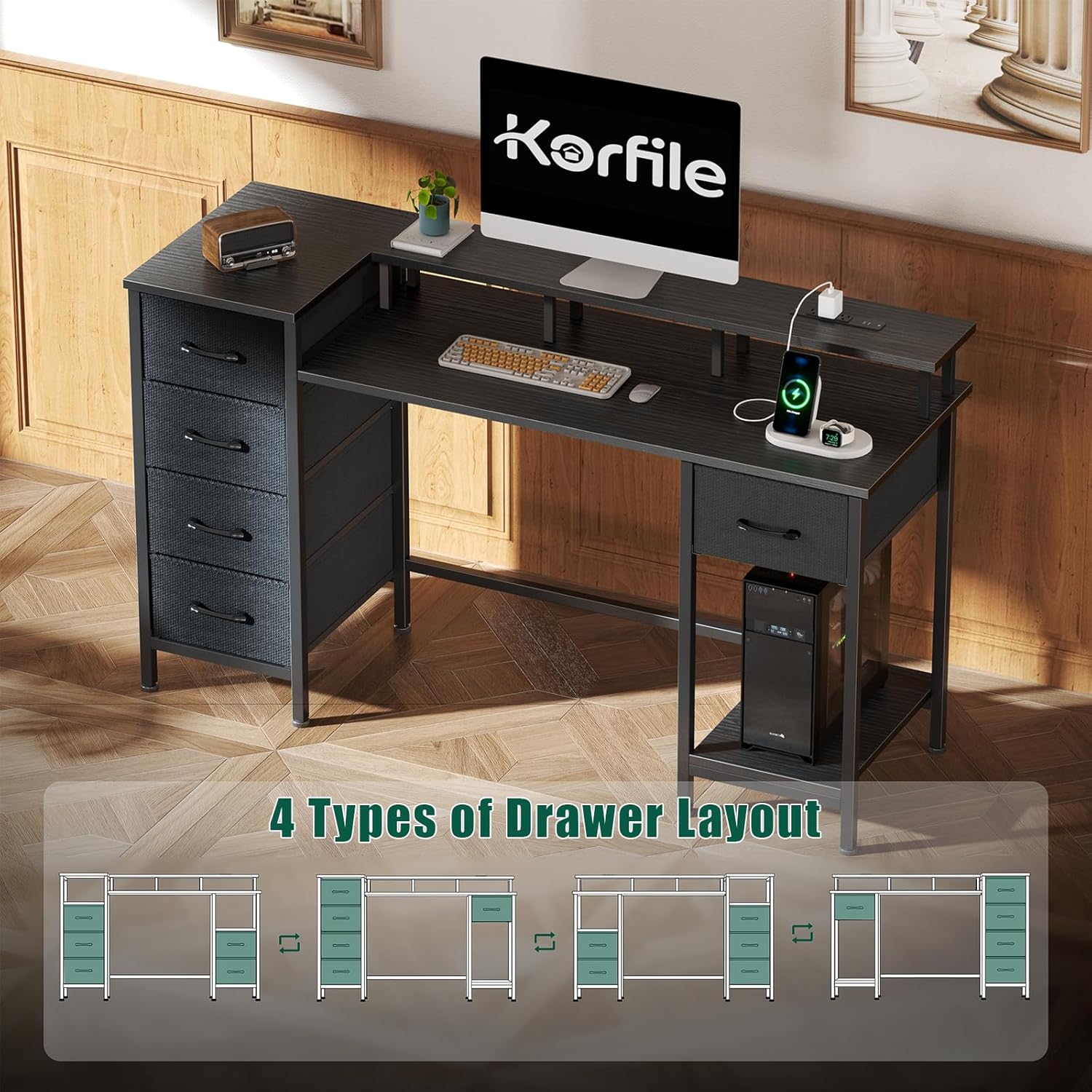
Figure 2: Four types of drawer layout options, highlighting the reversible design of the desk and the flexibility in positioning the fabric storage drawers.
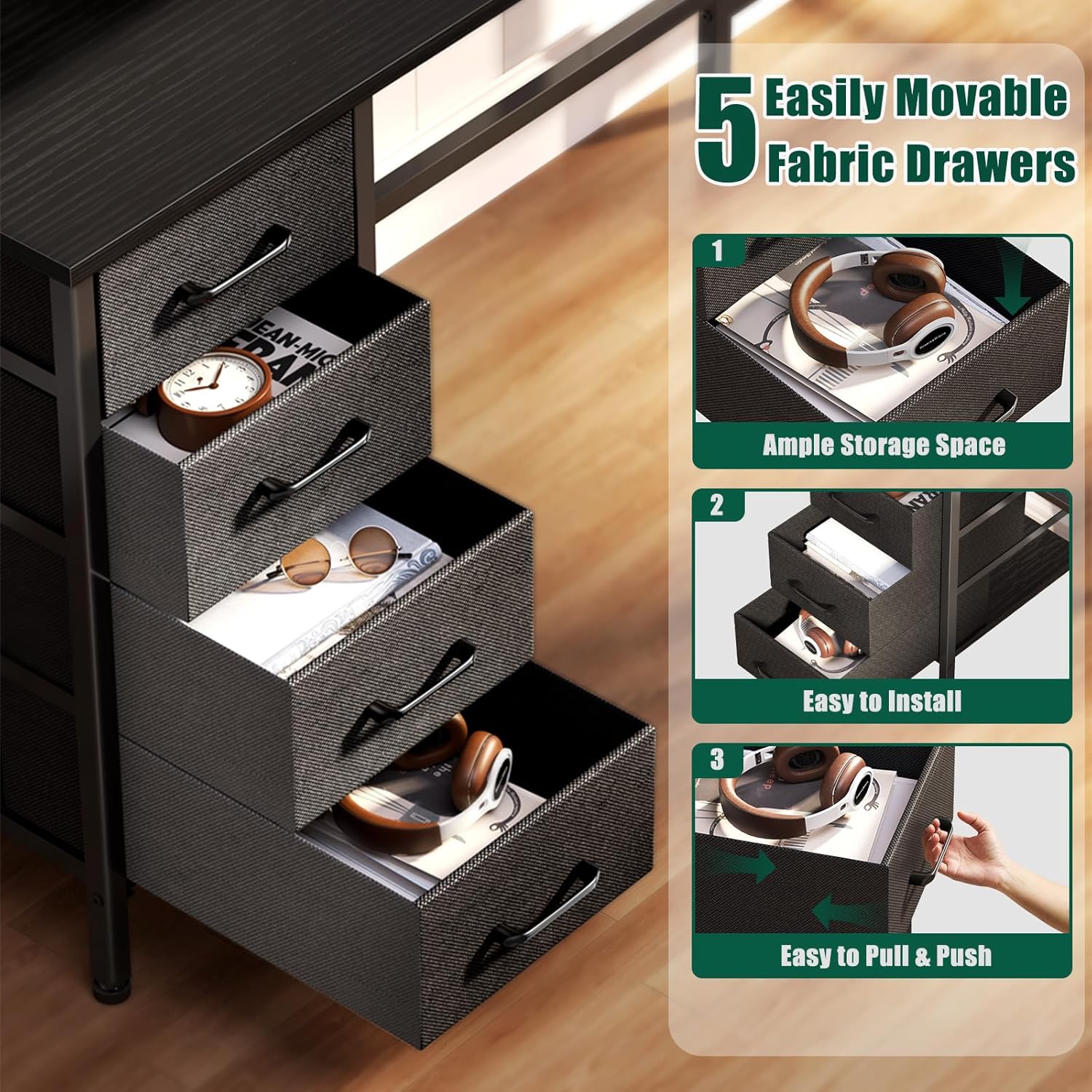
Figure 3: Detailed view of the five fabric drawers, emphasizing their ample storage capacity and user-friendly design for easy installation and access.
Operating Instructions
Charging Station:
The desk is equipped with a convenient charging station to power your electronic devices. It includes 3 standard AC power outlets and 2 USB charging ports.
- Plug the desk's power cord (4.9 feet long) into a wall outlet.
- Connect your devices to the AC outlets or USB ports for charging.
- Ensure devices are compatible with the power output (120V/12A for AC, 5V/2A for USB).
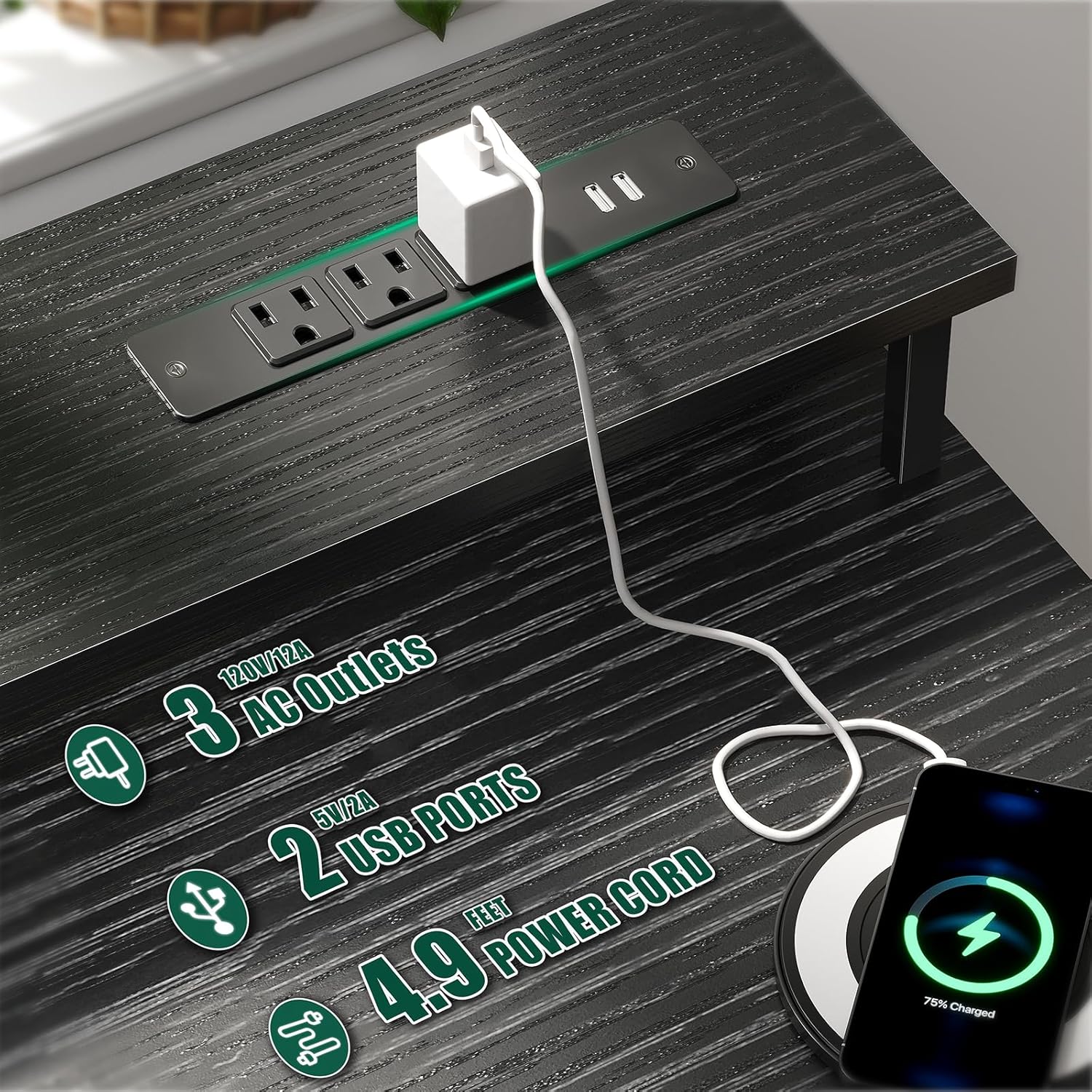
Figure 4: Integrated charging station with 3 AC power outlets and 2 USB charging ports, designed for convenient device charging directly on the desk.
RGB LED Lights:
Enhance your gaming or working environment with the built-in RGB LED light strips. These lights offer various modes and colors to suit your preference.
- The LED lights are controlled via a remote control (included).
- Choose from 20 different colors, 5 brightness levels, 10 flicker frequencies, and 22 dynamic modes.
- Refer to the separate LED light instruction sheet for detailed remote control functions.
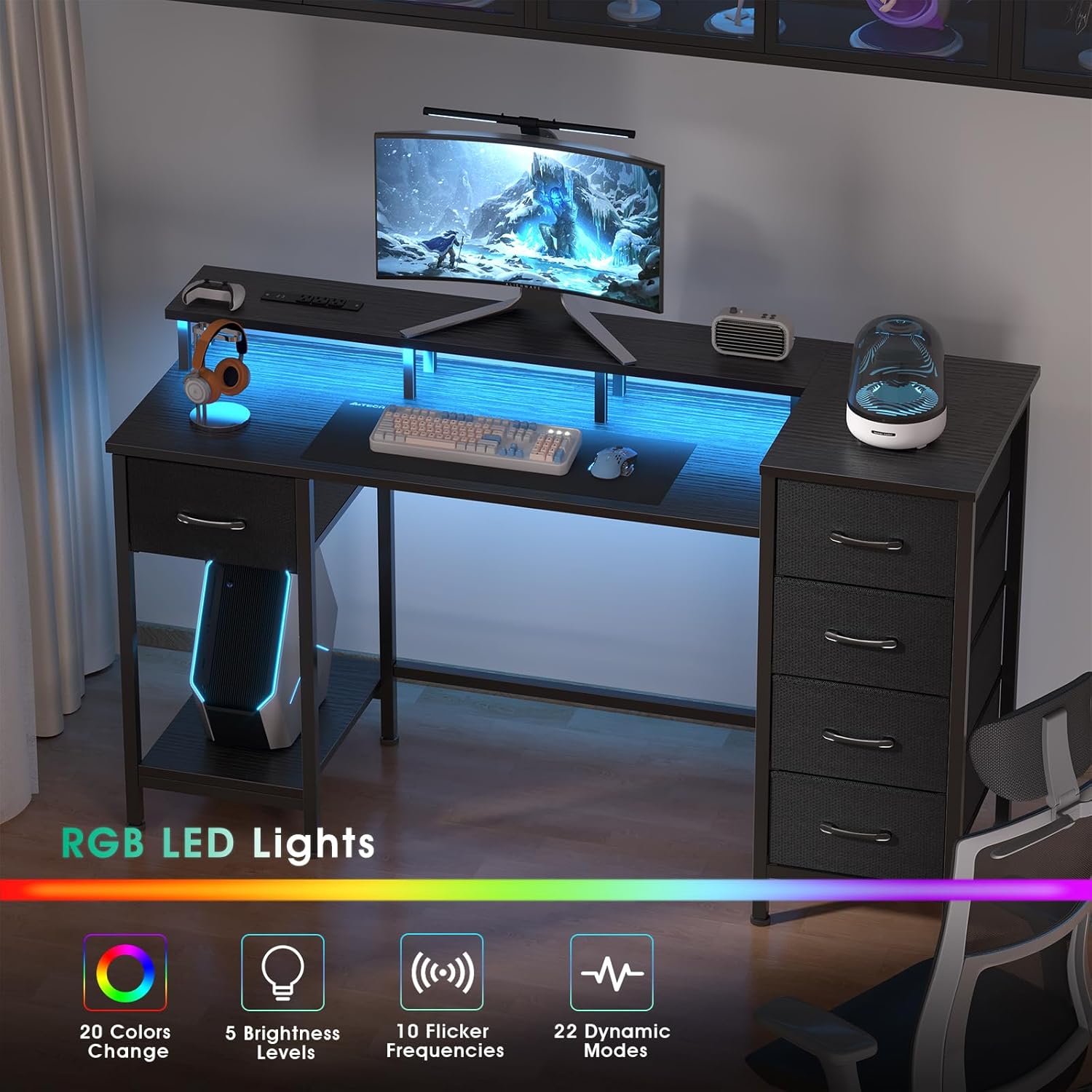
Figure 5: The desk featuring its RGB LED lights, which can be adjusted to various colors and modes to create a personalized ambiance.
Monitor Stand and Reversible Design:
The full monitor stand helps raise your screen to eye level, reducing strain on your neck and back. The reversible design allows you to configure the desk to fit your space and needs.
- The monitor stand provides additional storage space underneath for keyboards, mice, or other accessories.
- The desk can be set up with the storage drawers on either the left or right side, adapting to your room layout.
Video 1: An overview of the Korfile Gaming Desk, demonstrating its features including the LED lights, power outlets, and flexible configurations. This video highlights the desk's adaptability for various uses.
Maintenance
To ensure the longevity and appearance of your Korfile Gaming Desk, follow these simple maintenance guidelines:
- Cleaning the Surface: Wipe the desk surface with a dry cloth to remove dust. For spills or stains, use a damp cloth and mild detergent, then dry immediately. Avoid abrasive cleaners or harsh chemicals.
- Fabric Drawers: The non-woven fabric drawers can be spot cleaned with a damp cloth and mild soap. Allow to air dry completely. Do not machine wash.
- Hardware: Periodically check all screws and fasteners to ensure they remain tight. Retighten if necessary to maintain stability.
- Electrical Components: Keep the power outlets and LED light strips free from dust and moisture. Do not attempt to repair or modify the electrical components yourself.
Troubleshooting
If you encounter any issues with your Korfile Gaming Desk, please refer to the following common solutions:
- Desk Wobbles:
- Check if the adjustable feet are properly leveled. Adjust them until the desk is stable on the floor.
- Ensure all assembly screws are securely tightened.
- Power Outlets Not Working:
- Verify that the desk's main power cord is securely plugged into a functional wall outlet.
- Check if the power strip on the desk has a reset button (if applicable) and press it.
- Ensure the total power draw of connected devices does not exceed the station's capacity.
- LED Lights Not Functioning:
- Confirm the LED light strip is properly connected to its power source.
- Check the remote control battery and ensure it is pointed directly at the receiver.
- Drawers Not Sliding Smoothly:
- Ensure the fabric drawers are correctly assembled and inserted into their slots.
- Check for any obstructions in the drawer slots.
If the issue persists after attempting these solutions, please contact Korfile customer support for further assistance.
Specifications
| Feature | Detail |
|---|---|
| Brand | Korfile |
| Model Number | CD0 |
| Model Name | DDHK-CD-031 |
| Product Dimensions | 18.8"D x 47.2"W x 35"H |
| Color | Black |
| Material | Engineered Wood (Top), Metal (Frame), Non-woven Fabric (Drawers) |
| Maximum Weight Recommendation | 180 Pounds (approx. 81.6 kg) |
| Power Outlets | 3 AC Outlets (120V/12A) |
| USB Charging Ports | 2 USB Ports (5V/2A) |
| Power Cord Length | 4.9 feet |
| Special Features | RGB LED Lights (20 colors, 5 brightness, 10 flicker frequencies, 22 dynamic modes), Reversible Design, Full Monitor Stand, 5 Fabric Storage Drawers, Adjustable Feet |
| Assembly Required | Yes (Tools included) |
Warranty and Support
Korfile is committed to providing high-quality products. For any questions, concerns, or assistance with your product, please contact Korfile customer support. Please retain your proof of purchase for warranty claims.
For more information, visit the official Korfile store: Korfile Store on Amazon
Ask a question about this manual
Ask about setup, troubleshooting, compatibility, parts, safety, or missing instructions. Manuals+ will review the question and use this page’s manual context to help answer it.