
1. Introduction
Welcome to the nubia V60 smartphone user manual. This guide provides essential information to help you set up, operate, and maintain your new device. Please read this manual carefully to ensure proper usage and to maximize the features of your nubia V60.
2. What's in the Box
Upon unboxing your nubia V60, please verify that all the following items are included:
- nubia V60 Smartphone
- USB Cable (Type-C)
- Power Adapter
- SIM Ejector Tool (may vary by region)
- Quick Start Guide (this document)
3. Device Overview
Familiarize yourself with the physical components of your nubia V60 smartphone.

Figure 3.1: Front View. Features a large display with a punch-hole front camera at the top center.
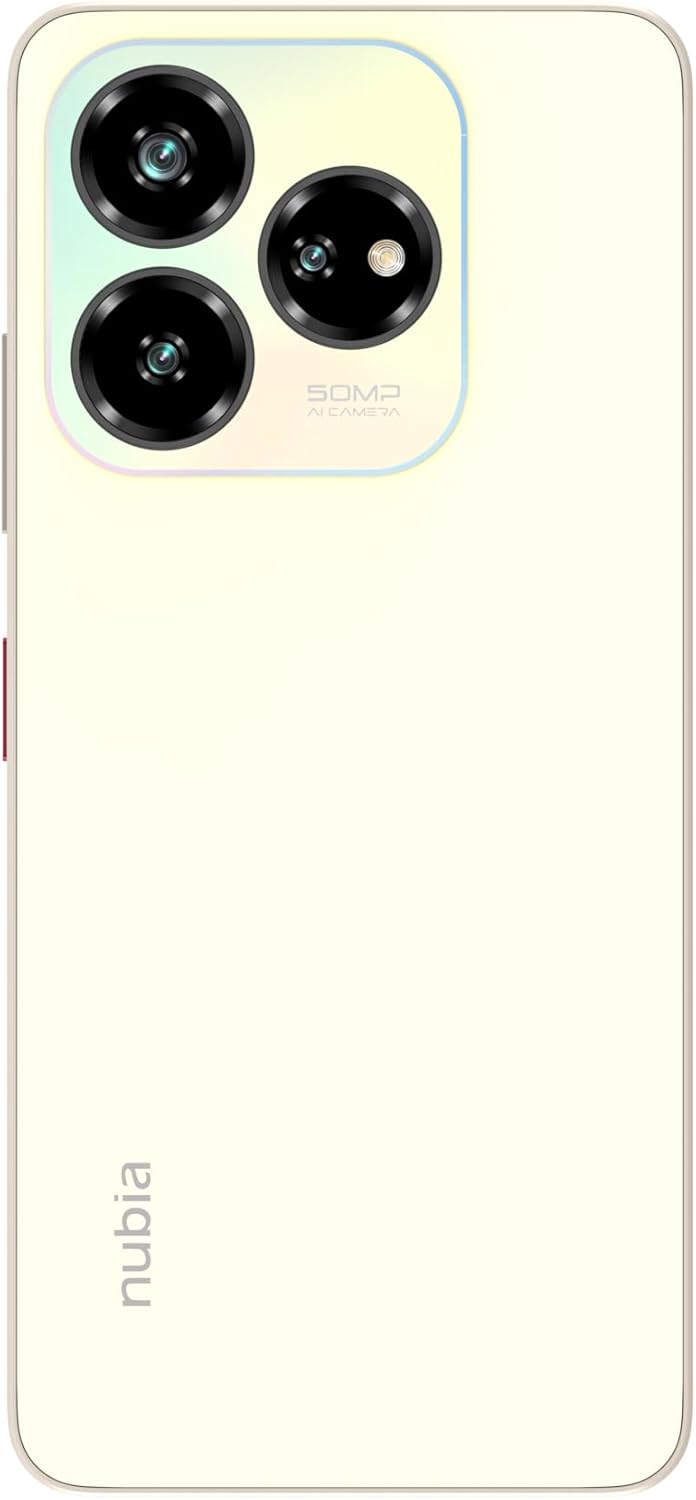
Figure 3.2: Back View. Shows the triple camera setup in a rectangular module and the 'nubia' logo.

Figure 3.3: Right Side View. Includes the power button (which may integrate a fingerprint sensor) and volume control buttons.

Figure 3.4: Bottom View. Features the USB Type-C port for charging and data transfer, along with the speaker grille and primary microphone.

Figure 3.5: All-Angle View. Provides a complete visual reference of the device's design and component placement.
4. Setup
4.1 Inserting the SIM Card
- Locate the SIM card tray on the side of your device.
- Insert the SIM ejector tool into the small hole next to the tray and press firmly until the tray pops out.
- Place your Nano-SIM card(s) into the designated slots on the tray. Ensure the gold contacts face downwards. The nubia V60 supports dual SIM cards.
- Carefully push the tray back into the phone until it is flush with the device body.
4.2 Initial Power On and Configuration
- Press and hold the Power button until the nubia logo appears.
- Follow the on-screen prompts to select your language, connect to a Wi-Fi network, and set up your Google account.
- Configure security features such as fingerprint unlock and facial recognition during the setup process.
5. Operating Instructions
5.1 Display and Navigation
The nubia V60 features a 6.6-inch HD+ display with a 90Hz refresh rate for smoother visuals. Navigate the interface using touch gestures:
- Tap: Select items or open applications.
- Swipe: Scroll through screens or lists.
- Pinch: Zoom in or out on images and web pages.
5.2 Dynamic Bar
The nubia V60 includes a dynamic bar feature that provides interactive notifications and status updates around the front camera area. This feature adapts to various activities such as timers, calls, and charging status, offering quick access to information without interrupting your current task.
Video 5.1: This video demonstrates the design elements of the nubia V60, including its slim profile, large display, and the interactive dynamic bar feature. It also highlights the camera system, storage capacity, and battery specifications.
6. Camera Features
Capture high-quality photos and videos with the nubia V60's advanced camera system.
- Rear Camera: The device is equipped with a 50MP AI triple camera system. This setup allows for detailed photography and includes various modes enhanced by Artificial Intelligence for optimal image quality in different scenarios.
- Front Camera: An 8MP front camera is available for selfies and video calls.
To access the camera, tap the Camera icon on your home screen or lock screen. Explore different modes like Portrait, Night, Pro, and Panorama for diverse photographic experiences.
7. Battery and Charging
The nubia V60 is powered by a large 5000mAh battery, providing extended usage time. It supports 22.5W fast charging to quickly replenish power.
- Charging: Connect the USB Type-C cable to the phone's port and the power adapter to a wall outlet. Use only the provided charger and cable for optimal performance and safety.
- Battery Optimization: To extend battery life, manage background app usage, reduce screen brightness, and enable power-saving modes when needed.
8. Security Features
Your nubia V60 offers multiple security options to protect your data and privacy.
- Fingerprint Recognition: The device features a fingerprint sensor for quick and secure unlocking. To set up, go to Settings > Security > Fingerprint and follow the instructions.
- Facial Recognition: Unlock your phone using your face. Set this up via Settings > Security > Face Unlock.
- PIN/Pattern/Password: Standard lock screen options are available for basic security.
9. Connectivity
The nubia V60 supports various connectivity options:
- 4G LTE: For high-speed mobile data.
- Wi-Fi: Connect to wireless networks for internet access.
- Bluetooth: Pair with wireless headphones, speakers, and other compatible devices.
- NFC: Near Field Communication allows for contactless payments and quick data sharing with other NFC-enabled devices.
- USB Type-C: For charging and data transfer.
10. Maintenance
To ensure the longevity and optimal performance of your nubia V60, follow these maintenance guidelines:
- Keep it Clean: Regularly wipe the screen and body with a soft, lint-free cloth. Avoid harsh chemicals.
- Software Updates: Keep your device's software updated to the latest version. Updates often include performance improvements, security patches, and new features. Check for updates in Settings > System > System Update.
- Avoid Extreme Conditions: Do not expose the phone to extreme temperatures, direct sunlight for prolonged periods, or excessive moisture.
- Backup Data: Regularly back up your important data to cloud storage or a computer to prevent loss.
11. Troubleshooting
If you encounter issues with your nubia V60, try these common troubleshooting steps:
- Device Not Responding: Press and hold the Power button for about 10-15 seconds to force a restart.
- Battery Draining Quickly: Check background app usage, reduce screen brightness, and disable unnecessary features like GPS or Bluetooth when not in use.
- Network Issues: Try restarting the device, toggling Airplane Mode on and off, or reinserting the SIM card.
- App Crashing: Clear the app's cache (Settings > Apps > [App Name] > Storage > Clear Cache) or reinstall the app.
- Overheating: Close demanding applications, reduce screen brightness, and avoid charging in direct sunlight.
If problems persist, contact customer support or refer to the official nubia support website.
12. Specifications
Key technical specifications for the nubia V60 smartphone:
| Feature | Specification |
|---|---|
| Brand | nubia |
| Model Name | V60 |
| Operating System | Android 13.0 |
| RAM | 6 GB (with additional 10GB dynamic RAM) |
| Storage Capacity | 256 GB |
| Screen Size | 6.6 inches |
| Display Resolution | 1280 x 720 (HD+) |
| Display Type | LCD |
| Rear Camera Resolution | 50 Megapixels (AI Triple Camera) |
| Front Camera Resolution | 8 Megapixels |
| Battery Capacity | 5000 mAh |
| Fast Charging | 22.5W |
| SIM Card Slots | Dual SIM |
| Connectivity | 4G, Wi-Fi, Bluetooth, NFC |
| Biometric Security | Fingerprint Recognition |
| Connector Type | USB Type-C |
| Color | Gold |
13. Warranty and Support
The nubia V60 smartphone comes with a two-year warranty. For warranty claims, technical support, or service inquiries, please refer to your purchase documentation or visit the official nubia support website. Keep your proof of purchase for warranty validation.
For further assistance, please visit the nubia Store on Amazon.


