1. Introduction
The HIFI WALKER H20 Pro is a portable Hi-Res audio player designed to deliver an immersive and clear sound experience. Equipped with dual ES9219 DAC chips, it supports native DSD256 and 32-bit/192kHz audio playback. Its compact design, intuitive touchscreen, and versatile connectivity options make it an ideal choice for audiophiles on the go.
This manual provides detailed instructions for the setup, operation, and maintenance of your H20 Pro player.
2. What's in the Box

Image: The HIFI WALKER H20 Pro player, its packaging, a USB-C charging cable, a user manual, a soft storage pouch, and a 128GB Micro SD card.
- 1x HIFI WALKER H20 Pro Player
- 1x USB Type-C Charging Cable
- 1x User Manual
- 1x Storage Bag
- 1x 128GB Micro SD Card (pre-installed)
3. Product Overview
3.1 Device Layout

Image: Front and back view of the HIFI WALKER H20 Pro player, highlighting its compact size and touchscreen interface.
3.2 Buttons and Controls

Image: Side view of the HIFI WALKER H20 Pro, with labels pointing to the volume knob, power button, power indicator, previous/fast rewind button, play/pause button, next/fast forward button, and TF card slot.
- Volume Knob: Rotate to adjust volume.
- Power Button: Press and hold to power on/off. Short press to turn screen on/off.
- Power Indicator: LED light indicating power status.
- Previous/Fast Rewind Button: Short press for previous track, long press to rewind.
- Play/Pause Button: Press to play or pause music.
- Next/Fast Forward Button: Short press for next track, long press to fast forward.
- TF Card Slot: Insert Micro SD card for storage.
3.3 Ports and Connections

Image: Bottom view of the HIFI WALKER H20 Pro, clearly showing the 4.4mm balanced headphone output, 3.5mm single-ended headphone output, and the multi-functional USB Type-C port.
- 4.4mm Balanced Output: For balanced headphones, offering enhanced audio quality.
- 3.5mm Single-Ended Output: Standard headphone jack.
- USB Type-C Port: Used for charging, data transfer, and USB-DAC functionality.
4. Setup
4.1 Initial Charging
Before first use, fully charge the H20 Pro using the provided USB Type-C cable and a compatible USB power adapter (not included). The power indicator LED will show charging status.
4.2 Inserting the Micro SD Card
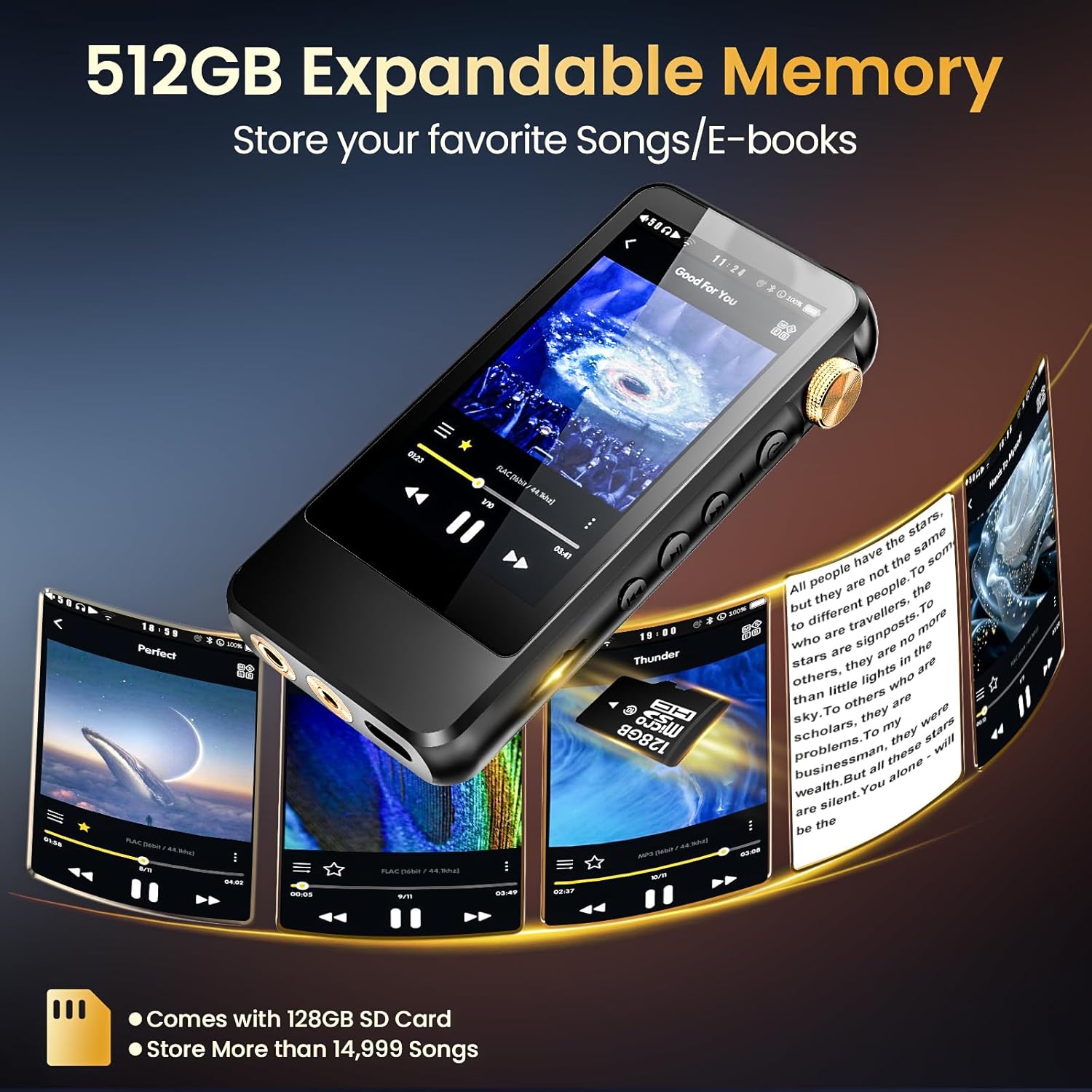
Image: A Micro SD card being inserted into the dedicated slot on the HIFI WALKER H20 Pro player.
The H20 Pro comes with a 128GB Micro SD card pre-installed. To insert or replace a card:
- Locate the TF card slot on the side of the device.
- Gently push the Micro SD card into the slot until it clicks into place.
- To remove, push the card in again until it springs out.
The device supports Micro SD cards up to 512GB.
5. Operating Instructions
5.1 Power On/Off
Press and hold the Power button on the side of the device until the screen lights up or turns off.
5.2 Music Playback
Video: A demonstration of the HIFI WALKER H20 Pro's physical controls, port connections, and user interface for music playback, including volume adjustment and sound settings.
The H20 Pro supports a wide range of audio formats including WAV, FLAC, APE, M4A, DSF, DFF, ISO, and MP3. It offers hardware decoding for DSD256 and 32-bit/192kHz master quality playback.
- Transfer music files to the Micro SD card via USB connection (see section 5.5).
- Navigate the touchscreen interface to browse your music library by artist, album, genre, or folder.
- Tap on a song to begin playback.
- Use the physical buttons or touchscreen controls for play/pause, skip tracks, and volume adjustment.
5.3 Bluetooth Connectivity
Video: This video showcases the HIFI WALKER H20 Pro's Bluetooth pairing process, wired audio output to external speakers, and general music listening scenarios.
The H20 Pro features bi-directional Bluetooth 5.1, supporting LDAC, AAC, SBC, and CSR APT-X codecs for high-quality wireless audio. It can act as both a Bluetooth audio source and a decoding amplifier.
- Go to 'Wireless settings' on the device.
- Enable Bluetooth.
- Select 'Search devices' to find your Bluetooth headphones or speaker.
- Tap on your device name to pair.
You can also use the HiBy Link app on your smartphone to control playback and volume via Bluetooth or Wi-Fi.
5.4 Sound Effects and Equalizer
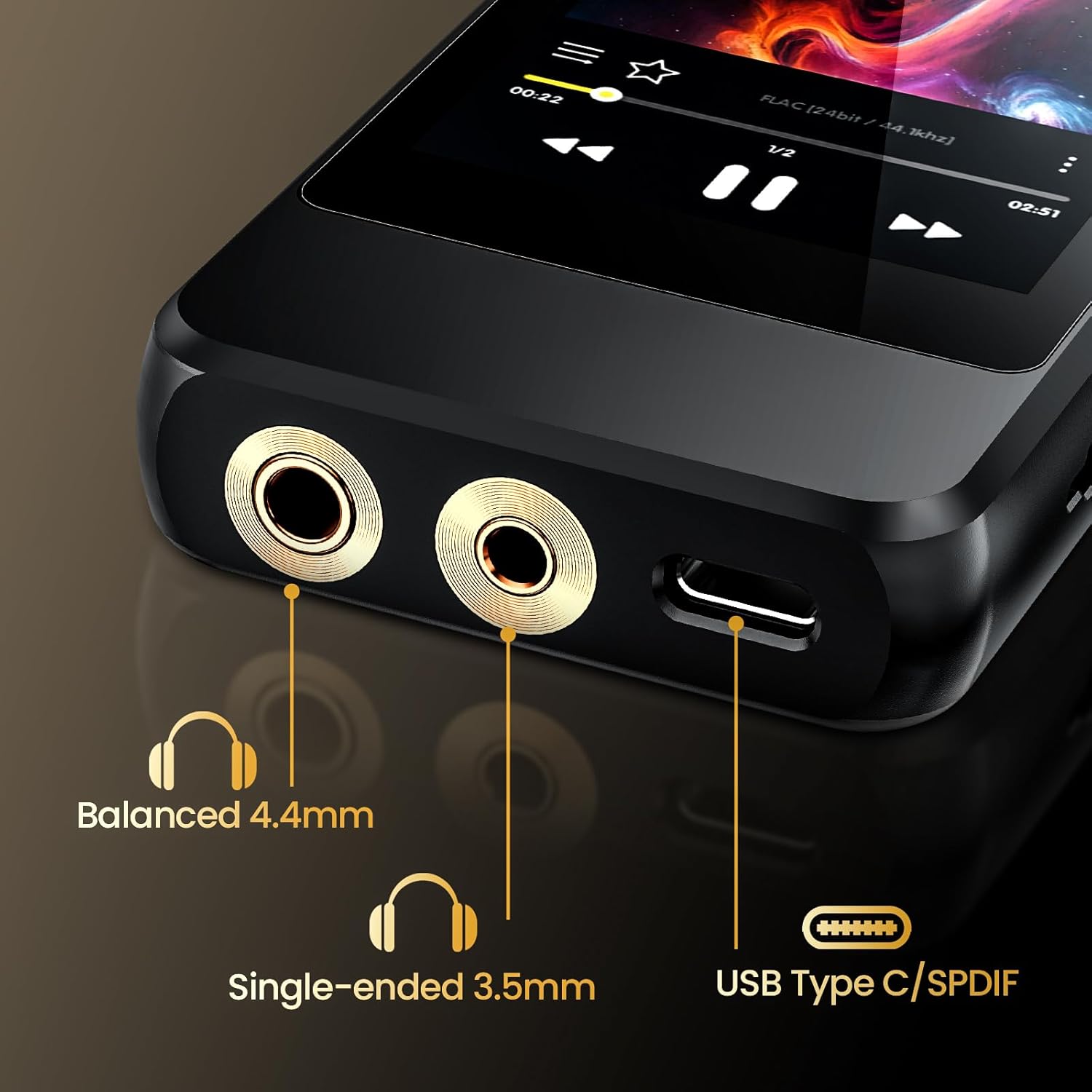
Image: The HIFI WALKER H20 Pro's touchscreen interface showing the MSEB (Mage Sound 8-Ball) sound effects menu, allowing users to fine-tune various audio characteristics.
The H20 Pro offers extensive sound customization options, including MSEB sound effects and an equalizer.
- MSEB: Access the MSEB settings to adjust parameters like overall timbre, bass extension, note thickness, and vocal presence.
- Equalizer: Utilize the 8-band equalizer to fine-tune the audio frequency response to your preference or choose from preset modes like Rock, Classical, Jazz, Pop, Blues, Metal, Dance, and Voice.
5.5 USB Modes

Image: The HIFI WALKER H20 Pro connected to a laptop via its USB-C port, demonstrating its capability to function as a USB device.
The USB Type-C port supports multiple modes:
- Storage Mode: Connect to a computer to transfer music files to and from the Micro SD card.
- USB-DAC Mode: Use the H20 Pro as an external DAC (Digital-to-Analog Converter) for your computer, enhancing its audio output quality.
- USB SPDIF Output: Output digital audio signals to compatible external DACs or amplifiers.
To switch USB modes, go to 'System settings' and select 'USB mode'.
5.6 E-Book Functionality

Image: A user enjoying an e-book on the HIFI WALKER H20 Pro, highlighting the device's e-book reading capability.
The H20 Pro supports e-book reading. Transfer compatible e-book files to the Micro SD card and access them through the device's interface.
6. Maintenance
6.1 Battery Life
The H20 Pro offers up to 10 hours of high-resolution audio playback. Battery life may vary based on volume level, file format, and usage of features like Bluetooth or screen brightness. To optimize battery life, adjust screen timeout settings and reduce screen brightness.
6.2 Storage Expansion
While the device includes a 128GB Micro SD card, you can expand storage up to 512GB using a larger Micro SD card. Additionally, the device supports USB OTG for connecting external storage devices (OTG cable not included).
7. Troubleshooting
7.1 Device Not Powering On
- Ensure the device is fully charged. Connect it to a power source and wait a few minutes before attempting to power on.
- Try holding the power button for a longer duration (10-15 seconds) for a hard reset.
7.2 No Music Found
- Verify that the Micro SD card is correctly inserted and recognized by the device.
- Check if music files are in supported formats and stored in accessible folders on the SD card.
- Ensure the music library has been scanned or updated.
7.3 Bluetooth Connection Issues
- Ensure Bluetooth is enabled on both the H20 Pro and the receiving device.
- Delete previous pairings on both devices and attempt to re-pair.
- Move the devices closer to each other to avoid interference.
- Some users report needing to re-connect Bluetooth devices after powering off the player. This is a known characteristic; ensure to re-establish the connection in the Bluetooth settings if needed.
7.4 Wired Audio Output Problems
- Ensure the headphone or cable is fully inserted into the correct port (3.5mm or 4.4mm).
- Test with a different pair of headphones or cable to rule out accessory issues.
- Check the volume level on the device.
8. Specifications
| Feature | Description |
|---|---|
| Brand | HIFI WALKER |
| Model Name | H20 Pro |
| Screen Size | 3.2 Inches |
| Connectivity Technology | Bluetooth 5.1 (Bi-directional, aptX/LDAC support) |
| Special Features | 3.5mm LO, 4.4mm Balanced Output, DSD256, USB-DAC, USB SPDIF |
| Compatible Devices | Headphones, Personal Computer, Smartphone |
| Battery Type | Lithium-polymer |
| Rechargeable Battery | Yes |
| Memory Storage Capacity | 128 GB (Micro SD card included), expandable up to 512 GB |
| Audio Formats Supported | WAV, FLAC, APE, M4A, DSF, DFF, ISO, MP3, AIFF, AAC, OGG, WMA Lossless, etc. |
| DAC Chips | Dual ES9219 |
9. Warranty and Support
For warranty information and technical support, please refer to the warranty card included in your product packaging or visit the official HIFI WALKER website. Keep your proof of purchase for warranty claims.


