
1. Introduction
Thank you for choosing the Midea Portasplit Mobile Air Conditioner. This innovative 4-in-1 unit provides efficient cooling, heating, dehumidification, and ventilation, designed for optimal comfort in spaces up to 42 m² (105 m³). Its unique split design offers superior performance compared to traditional mobile air conditioners, combining the flexibility of a portable unit with the power of a fixed split system. Please read this manual thoroughly before installation and operation to ensure safe and effective use.

Image: The Midea Portasplit Mobile Air Conditioner, showing both the indoor and outdoor units, along with a smartphone displaying the control app interface.
2. Safety Information
Always adhere to basic safety precautions when using electrical appliances to reduce the risk of fire, electric shock, or injury. This appliance uses R-290 refrigerant, which is flammable. Ensure proper ventilation and avoid ignition sources.
- Do not operate the unit with a damaged cord or plug.
- Do not block air inlets or outlets.
- Ensure the unit is placed on a stable, level surface.
- Keep children and pets away from the unit during operation.
- Unplug the unit before cleaning or maintenance.
- Do not attempt to repair or modify the unit yourself. Contact qualified service personnel.
3. Product Overview and Components
The Midea Portasplit consists of two main units: an indoor unit and an outdoor unit, connected by a flexible refrigerant hose. The package also includes essential accessories for installation and operation.
3.1. Unit Components

Image: A visual representation of the separate indoor unit and outdoor unit of the Midea Portasplit system.
3.2. Included Components
The standard package includes:

Image: An exploded view showing all items included in the Midea Portasplit package, such as the main units, remote control, window mounting bracket, and connecting hose.
- Indoor Unit
- Outdoor Unit
- Remote Control
- Window Mounting Bracket
- Refrigerant Hose (flat, approx. 2.7 cm thick)
- Window Sealing Kit
- Drainage Hose
- Safety Cable
- User Manual
4. Installation Guide
The Midea Portasplit features a Plug & Play design, requiring no professional installation or drilling. Follow these simple steps for quick setup:

Image: A visual guide illustrating the three quick steps for setting up the Midea Portasplit: attaching the window bracket, placing the outdoor unit onto the bracket, and finally plugging in the system.
- Step 1: Attach the Window Mounting Bracket. Securely attach the provided bracket to your window frame. Ensure it is level and stable. The bracket is designed to hold the outdoor unit safely.
- Step 2: Place the Outdoor Unit. Carefully lift and place the outdoor unit onto the installed window bracket. Ensure the unit's feet click securely into place on the bracket.
- Step 3: Connect and Power On. Connect the refrigerant hose from the indoor unit to the outdoor unit. Ensure all connections are secure. Plug the power cord into a suitable electrical outlet. The unit is now ready for operation.
Important Considerations:
- Use the provided window sealing kit to minimize air leakage around the hose, improving efficiency.
- Ensure the drainage hose is positioned to allow condensate water to drain properly, ideally outdoors or into a suitable container. The unit features an integrated pump for efficient water removal.
- For added safety, use the included safety cable to secure the outdoor unit to the indoor unit, preventing accidental falls.
5. Operating Instructions
The Midea Portasplit offers versatile operation modes and convenient control options.
5.1. Operation Modes
- Cooling: Provides powerful cooling with an A++ energy efficiency rating. Ideal for hot weather.
- Heating: Utilizes efficient heat pump technology for effective and economical heating, rated A+ for energy efficiency.
- Dehumidification: Reduces excess moisture in the air, improving comfort and preventing mold growth.
- Ventilation: Circulates air without cooling or heating, providing fresh air circulation.
5.2. Control Options
- Remote Control: Use the included remote control to adjust settings, change modes, and set temperatures.
- SmartHome App: Download the Midea SmartHome app for intelligent control from anywhere. The app allows for precise fan speed adjustments (e.g., 1% increments) and access to advanced features like the iEco function.
5.3. Special Features
- Silent Mode: Operates at a low noise level of only 39 dB(A), ensuring comfortable sleeping and working environments.
- iEco Function: An intelligent energy-saving feature that uses AI to regulate power consumption, optimizing efficiency. It is recommended to enable this function via the SmartHome app.

Image: A chart illustrating the noise levels of the Midea Portasplit in various modes (e.g., Silent Mode at 39 dB(A)) compared to common sounds like alarms, conversations, and traditional mobile air conditioners.

Image: The Midea Portasplit indoor unit operating in a room, with text indicating it is 4 times stronger and 3 times more efficient than other mobile air conditioners.
6. Maintenance
Regular maintenance ensures optimal performance and longevity of your Midea Portasplit unit.
- Filter Cleaning: Regularly clean the air filters of the indoor unit to maintain air quality and efficiency. Refer to the specific instructions in the full manual for filter removal and cleaning.
- Condensate Drainage: The unit features an integrated pump that automatically drains condensate water through the hose connected to the outdoor unit. Ensure the drainage hose is clear and unobstructed.
- Exterior Cleaning: Wipe the exterior of both units with a soft, damp cloth. Do not use harsh chemicals or abrasive cleaners.
- Seasonal Storage: If storing the unit for an extended period, ensure it is thoroughly cleaned and dried. Store in a cool, dry place.
7. Troubleshooting
If you encounter issues with your Midea Portasplit, refer to the following common troubleshooting tips:
- Unit Not Turning On: Check if the power cord is securely plugged in and if there is power to the outlet. Ensure the remote control batteries are not depleted.
- Insufficient Cooling/Heating: Verify that the correct mode is selected and the temperature setting is appropriate. Check if air filters are clean and not blocked. Ensure windows and doors are closed to prevent air leakage.
- Unusual Noise/Vibration: Ensure the unit is placed on a stable surface. If vibration noises occur, particularly when the compressor starts or water is pumped, check if the back flap of the indoor unit is vibrating. Ensure the hose is not touching the casing too closely; gently bend it slightly outwards if needed to create clearance. Confirm the outdoor unit is correctly seated and locked into the window bracket.
- Water Leakage: Check if the drainage hose is properly connected and not kinked or blocked. Ensure the outdoor unit is level on the bracket to prevent water accumulation.
- App Connectivity Issues: Ensure your Wi-Fi network is stable and the unit is within range. Restart the unit and your mobile device if necessary.
For persistent issues not resolved by these steps, please contact Midea customer support.
8. Technical Specifications
Detailed specifications for the Midea Portasplit Mobile Air Conditioner:
| Feature | Specification |
|---|---|
| Brand | Midea |
| Model Number | PortaSplit |
| Dimensions (L x W x H) | 57.5 x 74.5 x 85 cm |
| Weight | 45.5 Kilograms |
| Cooling Capacity | 12000 BTU / 3.5 kW |
| Power | 3500 Watts |
| Voltage | 230 Volts (AC) |
| Energy Efficiency (Cooling) | A++ |
| Energy Efficiency (Heating) | A+ |
| Refrigerant | R-290 |
| Noise Level (Silent Mode) | 39 dB(A) |
| Suitable Room Size | Up to 42 m² / 105 m³ |
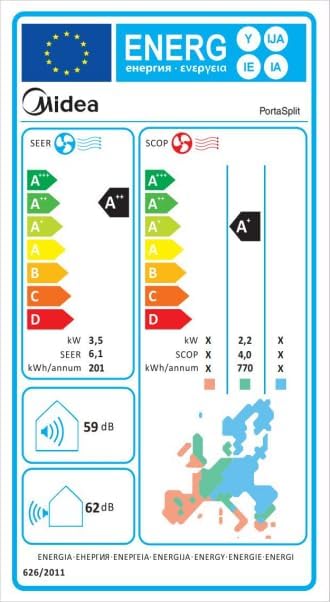
Image: The EU Energy Label for the Midea PortaSplit, indicating its energy efficiency ratings of A++ for cooling and A+ for heating, along with power consumption and noise levels.
9. Warranty and Support
Midea products are manufactured to the highest quality standards. For warranty information, please refer to the warranty card included with your product or visit the official Midea website. For technical support, spare parts, or service inquiries, please contact Midea customer service or your authorized dealer.
Please have your model number (PortaSplit) and purchase date ready when contacting support.


