
1. Introduction
This manual provides detailed instructions for the installation, operation, and maintenance of your RUNNING PANTHER Motorcycle Phone Mount. This universal holder is designed to securely attach your smartphone to various motorcycle models, including Harley Davidson, Yamaha, Kawasaki, Suzuki, Indian, and Honda Goldwing GL1800/GL1500 series. It accommodates devices from 2 1/8 inches to 3 1/2 inches wide, offering a reliable solution for GPS navigation and communication on the road.

Image 1.1: RUNNING PANTHER Motorcycle Phone Mount installed on a motorcycle, alongside its main components.
2. Package Contents
Before installation, please verify that all components are present:
- Smartphone Holder
- Black Perch Mount
- Mounting Hardware (screws, spacers)

Image 2.1: All components included in the RUNNING PANTHER Motorcycle Phone Mount package.
3. Setup and Installation
The RUNNING PANTHER Motorcycle Phone Mount is designed for straightforward installation, typically completed within 5 minutes without requiring modifications to your motorcycle. Ensure your motorcycle is stable and turned off before beginning installation.
- Identify Mounting Location: The mount is designed to attach to the clutch or brake perch on your motorcycle's handlebars. Select a location that provides a clear view of your phone without obstructing controls or gauges.
- Attach Perch Mount: Secure the black perch mount to the chosen location using the provided screws and spacers. Ensure it is tightened firmly but do not overtighten to avoid damaging your motorcycle's components.
- Connect Phone Holder: Attach the smartphone holder to the ball joint on the perch mount. Tighten the collar around the ball joint to secure the holder in place.
- Adjust Angle: Loosen the collar slightly to adjust the angle of the phone holder for optimal viewing. Once the desired angle is achieved, tighten the collar securely.
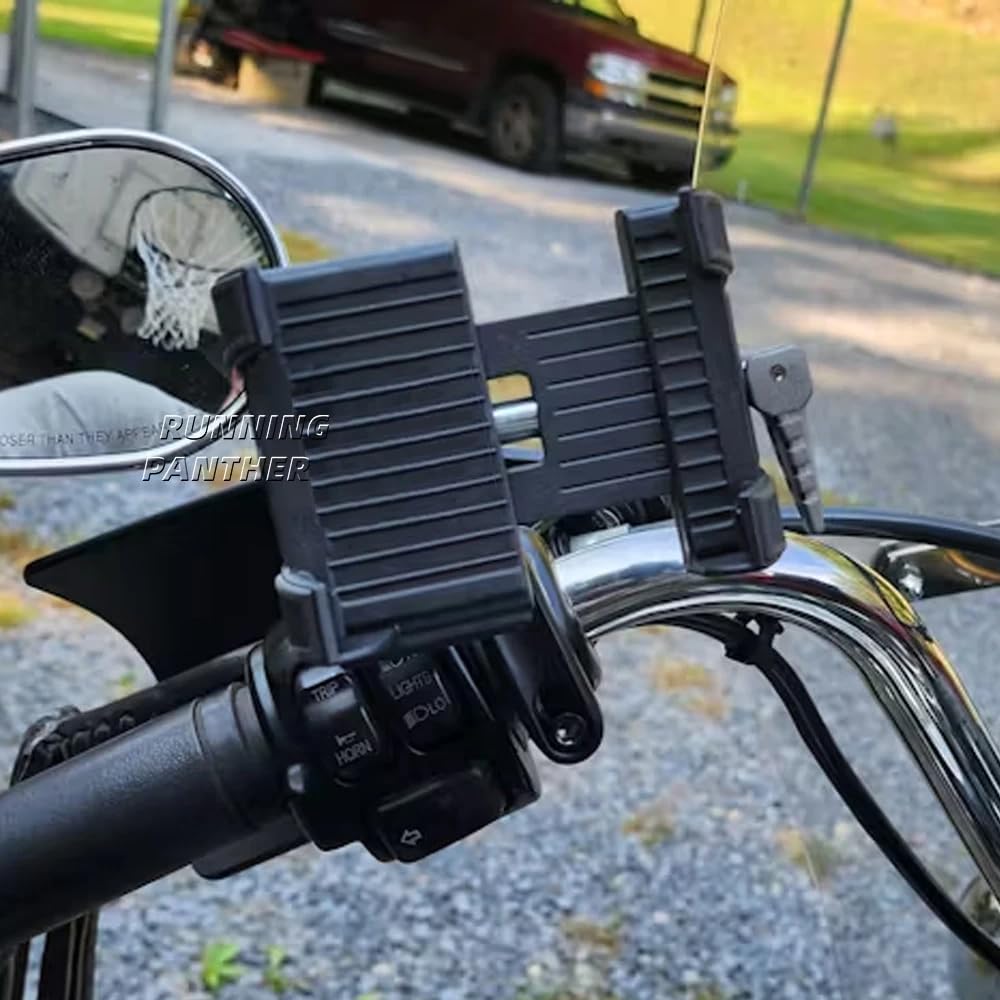
Image 3.1: Phone mount installed on a motorcycle handlebar, ready for use.
4. Operating Instructions
Using your RUNNING PANTHER Motorcycle Phone Mount is simple and efficient:
- Insert Smartphone: Gently pull apart the clamping components of the phone holder. Place your smartphone into the holder, ensuring it is centered and securely gripped by the anti-slip pads. The holder expands up to 3.25 inches wide.
- Secure Smartphone: Flip the side handle (control lever) to lock the smartphone firmly in the holder. This mechanism ensures a secure grip, preventing accidental release during rides.
- Adjust Viewing Angle: The mount features a 360-degree rotating ball joint. You can adjust your phone's orientation (portrait or landscape) and tilt it to achieve the best viewing angle for navigation or other applications. Ensure the adjustment knob is tightened after positioning.

Image 4.1: Clamping components and flip handle for securing the smartphone.

Image 4.2: The 360-degree rotatable ball mount allows for flexible angle adjustments.
5. Maintenance
To ensure the longevity and optimal performance of your RUNNING PANTHER Motorcycle Phone Mount, follow these maintenance guidelines:
- Regular Cleaning: Wipe the mount with a soft, damp cloth to remove dust and grime. Avoid harsh chemicals or abrasive cleaners that could damage the ABS plastic and aluminum alloy finish.
- Check Tightness: Periodically inspect all screws and connections, especially the perch mount and the ball joint collar, to ensure they remain securely tightened. Vibrations from motorcycle operation can sometimes loosen fasteners over time.
- Inspect for Wear: Check the anti-slip pads and clamping components for any signs of wear or damage. Replace the mount if any critical parts show significant deterioration to maintain secure phone retention.
6. Troubleshooting
If you encounter issues with your phone mount, consider the following:
- Mount feels loose or vibrates excessively:
- Ensure all mounting screws for the perch mount are securely tightened.
- Verify the collar around the ball joint is fully tightened after adjusting the phone holder's angle.
- Check if the phone is properly seated and locked into the holder using the flip handle.
- Phone does not fit securely:
- Confirm your phone's width is within the supported range of 2 1/8" to 3 1/2".
- Ensure the flip handle is fully engaged to lock the phone in place.
- Difficulty with installation hardware:
- Verify that the correct hardware (screws, spacers) is being used for your specific motorcycle model's perch mount. Some models may require specific thread types or lengths.
- If screws strip easily, ensure they are aligned correctly before tightening and avoid excessive force.
7. Specifications
| Model Number | Motorcycle Smartphone Holder Mount |
| Brand | RUNNING PANTHER |
| Compatible Devices | Smartphones (2 1/8" to 3 1/2" wide) |
| Mounting Type | Handlebar (Clutch or Brake Perch) |
| Material | High-quality ABS Plastic, Aluminum Alloy |
| Special Features | 360° Rotatable, Adjustable, Cold Resistant, Heat Resistant, Non-Slip, Rust Resistant, Shock Resistant, Scratch Resistant |
| Color | Black |
| Item Weight | 9.6 ounces |
8. Compatibility
This phone mount is designed for a wide range of motorcycles. Please verify your model against the list below:
- For Gold Wing: 2018-2024 Gold Wing DCT, 2018-2024 Gold Wing Tour DCT, 2018-2024 Gold Wing Tour DCT Airbag, 2001-2024 Gold Wing GL1800, 2013-2024 Gold Wing F6B
- For Honda: All Goldwing GL1800, F6B, Goldwing GL1500, All VTX1300/1800 models, '14-up Valkyrie, Shadow 750 Aero, Ace & Spirit, Shadow 1100
- For Harley-Davidson: All '82-up H-D model clutch or brake perch mounts (except '14-up Street Models)
- For Yamaha: All Road Star & Warrior models, all V Star models, all Venture models, all Bolt models, all Stryker models
- For Kawasaki: All Vulcan 900 models, Vulcan 1500/1600 including Mean Streak, all Vulcan 2000 models
- For Suzuki: Boulevard M/C50/C90/M109
- For Indian: All '14-up models
9. Support
Your satisfaction is important to us. If you have any questions regarding the installation, operation, or compatibility of your RUNNING PANTHER Motorcycle Phone Mount, please do not hesitate to contact our customer support. We are committed to resolving any inquiries within 24 hours.