
1. Introduction
Thank you for purchasing the TOPTECH Audio Blade-4 Portable Bluetooth Speaker. This device is designed to provide high-quality audio with versatile connectivity options and dynamic LED lighting. Please read this manual carefully to ensure proper use and to maximize your listening experience.
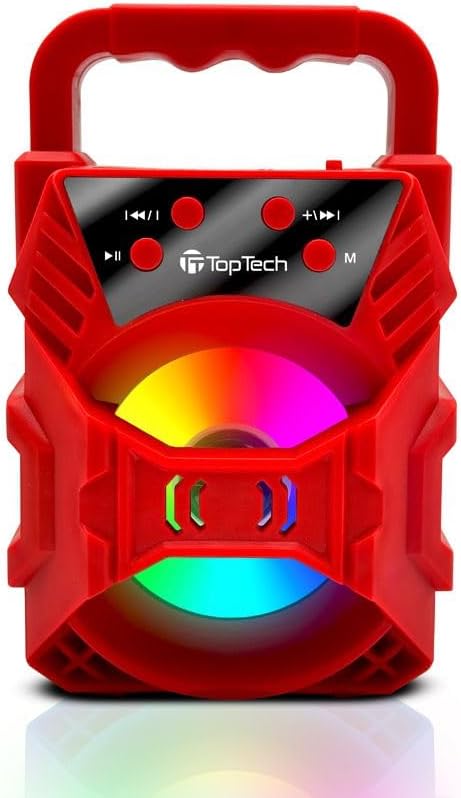
Image 1.1: The TOPTECH Audio Blade-4 speaker, showcasing its portable design and front-facing LED light panel.
2. Safety Information
- Do not expose the speaker to extreme temperatures, direct sunlight, or high humidity.
- This product is not water resistant. Avoid contact with water or other liquids.
- Do not disassemble, repair, or modify the device. This will void the warranty.
- Keep the speaker away from medical devices, as it may interfere with their operation.
- Use only the provided charging cable or a certified equivalent.
- Avoid listening at high volumes for extended periods to prevent hearing damage.
3. Package Contents
Please check the package for the following items:
- TOPTECH Audio Blade-4 Bluetooth Speaker
- Charging Cable
- User Manual (this document)
4. Product Overview
4.1 Control Panel

Image 4.1: Detailed view of the speaker's control buttons, including mode, play/pause, and track/volume controls.
The control panel is located on the top of the speaker and features several buttons for managing playback, volume, and modes.
- M (Mode) Button: Press to switch between Bluetooth, FM Radio, AUX, USB, and TF Card modes.
- Play/Pause Button: Press to play or pause audio. In FM mode, press and hold to auto-scan for stations.
- Previous Track / Volume Down Button: Press to go to the previous track. Press and hold to decrease volume.
- Next Track / Volume Up Button: Press to go to the next track. Press and hold to increase volume.
4.2 Ports and Indicators
The speaker includes various ports for connectivity and a charging indicator.
- USB Port: For USB drive playback.
- TF Card Slot: For TF (Micro SD) card playback.
- AUX Input: For connecting external audio devices via a 3.5mm audio cable.
- Charging Port: For connecting the charging cable.
- LED Indicator: Shows charging status and Bluetooth pairing status.
5. Setup
5.1 Charging the Speaker
Before first use, fully charge the speaker. Connect the provided charging cable to the speaker's charging port and a suitable USB power adapter (not included). The LED indicator will show charging status and turn off or change color when fully charged. A full charge provides up to 6 hours of playtime.

Image 5.1: Visual representation of the speaker's rechargeable battery and charging process.
5.2 Power On/Off
Locate the power switch on the speaker. Slide the switch to the "ON" position to power on the device. You will hear an audible prompt, and the LED lights will activate. To power off, slide the switch to the "OFF" position.
6. Operating Instructions
6.1 Bluetooth Pairing
- Power on the speaker. It will automatically enter Bluetooth pairing mode, indicated by a flashing LED light and an audible prompt.
- On your mobile device (smartphone, tablet, etc.), enable Bluetooth and search for available devices.
- Select "Blade-4" from the list of devices.
- Once paired, the LED light will stop flashing, and you will hear a confirmation sound.
- You can now play audio from your device through the speaker. The Bluetooth range is approximately 100 feet (30 meters).

Image 6.1: The Blade-4 speaker wirelessly connected to a smartphone, demonstrating Bluetooth audio streaming.
6.2 True Wireless Stereo (TWS) Function
The TWS function allows you to pair two Blade-4 speakers together for a stereo sound experience.
- Ensure both Blade-4 speakers are powered on and in Bluetooth mode, but not yet paired to any device.
- On one of the speakers (this will be the primary speaker), press and hold the M (Mode) button for a few seconds until you hear a pairing tone.
- The two speakers will automatically connect to each other. Once connected, you will hear a confirmation sound.
- Now, connect your mobile device to the primary speaker via Bluetooth as described in Section 6.1. The audio will play in stereo through both speakers.

Image 6.2: Two Blade-4 speakers wirelessly linked, illustrating the True Wireless Stereo (TWS) functionality for enhanced audio.
6.3 USB Drive / TF Card Playback
Insert a USB drive or TF (Micro SD) card into the corresponding port. The speaker will automatically switch to USB/TF mode and begin playing audio files (MP3, WAV formats supported). Use the Previous/Next Track buttons to navigate songs.
6.4 AUX Input
Connect an external audio device (e.g., MP3 player, laptop) to the speaker's AUX port using a 3.5mm audio cable (not included). Press the M (Mode) button until you select AUX mode. Audio will then be played through the speaker from your connected device.
6.5 FM Radio
Press the M (Mode) button to switch to FM Radio mode. To auto-scan and save available stations, press and hold the Play/Pause button. Use the Previous/Next Track buttons to switch between saved stations.
6.6 Karaoke Mode
The Blade-4 speaker supports karaoke functionality. Connect a compatible microphone (not included) to the designated microphone input port (if available on your specific unit, refer to physical ports). Adjust microphone volume as needed. Play music from any source (Bluetooth, USB, TF, AUX) and sing along.

Image 6.3: The Blade-4 speaker shown with a microphone, indicating its karaoke feature.
6.7 LED Lights Control
The speaker features dynamic LED lights that sync with the music. The lights activate automatically when the speaker is powered on. There is no specific button mentioned for controlling the LED lights, suggesting they operate automatically or cycle through patterns.
7. Maintenance
- Clean the speaker with a soft, dry cloth. Do not use abrasive cleaners or solvents.
- Keep the ports free from dust and debris.
- Store the speaker in a cool, dry place when not in use for extended periods.
- Charge the battery at least once every three months to maintain its lifespan if not used regularly.
8. Troubleshooting
| Problem | Possible Cause | Solution |
|---|---|---|
| Speaker does not power on. | Battery is depleted. | Charge the speaker using the provided charging cable. |
| No sound. | Volume is too low; incorrect mode selected; device not paired. | Increase volume on both speaker and connected device. Ensure correct mode (Bluetooth, AUX, USB, TF) is selected. Re-pair Bluetooth device. |
| Bluetooth pairing fails. | Speaker is too far from device; speaker already paired to another device; Bluetooth not enabled on device. | Ensure speaker and device are within 100 feet. Disconnect from other devices. Enable Bluetooth on your device and try pairing again. |
| FM Radio reception is poor. | Weak signal; environmental interference. | Move the speaker to a location with better reception. Re-scan for stations. |
| Distorted sound or unexpected noises. | Volume too high; audio source issue; interference. | Reduce volume. Check audio source for quality. Move speaker away from other electronic devices. |
9. Specifications
| Model Name | Blade-4 |
| Brand | TOPTECH |
| Speaker Type | Built-In |
| Speaker Size | 3 Inches |
| Speaker Maximum Output Power | 10 Watts |
| Wireless Communication Technology | Bluetooth |
| Bluetooth Range | 100 Feet (30 meters) |
| Connectivity Technology | Bluetooth, Micro SD Card, USB, AUX |
| Audio Output Mode | Stereo (with TWS) |
| Power Source | Battery Powered (Rechargeable) |
| Battery Life | Up to 6 hours (at moderate volume) |
| Special Features | LED Light, Lightweight, Portable, TWS Functionality, Karaoke Mode, FM Radio |
| Control Method | Touch buttons |
| Product Dimensions (L x W x H) | 3.5"D x 3.5"W x 6.5"H (approximate, based on 3-inch speaker size and typical portable speaker form factor) |
| Item Weight | 12.8 ounces (approx. 0.36 kg) |
| Water Resistance Level | Not Water Resistant |
| UPC | 752574407913 |
10. Warranty and Support
10.1 Limited Warranty
The TOPTECH Audio Blade-4 speaker comes with a limited warranty. Please refer to the warranty card included in your package or contact TOPTECH customer support for details regarding warranty coverage and terms.
10.2 Customer Support
For technical assistance, troubleshooting, or any questions regarding your TOPTECH Audio Blade-4 speaker, please contact TOPTECH customer support. Contact information can typically be found on the product packaging or the official TOPTECH website.
Please have your model number (Blade-4) and purchase information ready when contacting support.


