
1. Product Overview
The Maxspect Jump SK200 Protein Skimmer is an advanced filtration device designed for marine reef aquariums, suitable for volumes ranging from 260 to 650 liters. It features an innovative design that deviates from conventional skimmers, incorporating dual water intakes and a patented dual needle wheel system for superior foam production and efficiency.
Key features include an integrated air silencer for quiet operation, a special bubble trap to prevent microbubbles from entering the main display tank, and a precise water level control dial integrated into the skimmer body. The skimmer is powered by a DC pump, ensuring smooth and nearly silent operation, and includes a soft start function with overflow protection for enhanced safety and reliability. Its quick-release design simplifies maintenance and cleaning.

Figure 1: The Maxspect MJ-SK200 Protein Skimmer, fully assembled, showcasing its compact and integrated design.

Figure 2: This diagram highlights the integrated air silencer, special integrated bubble trap, and the precise water level adjustment dial, key innovations of the SK Series protein skimmer.
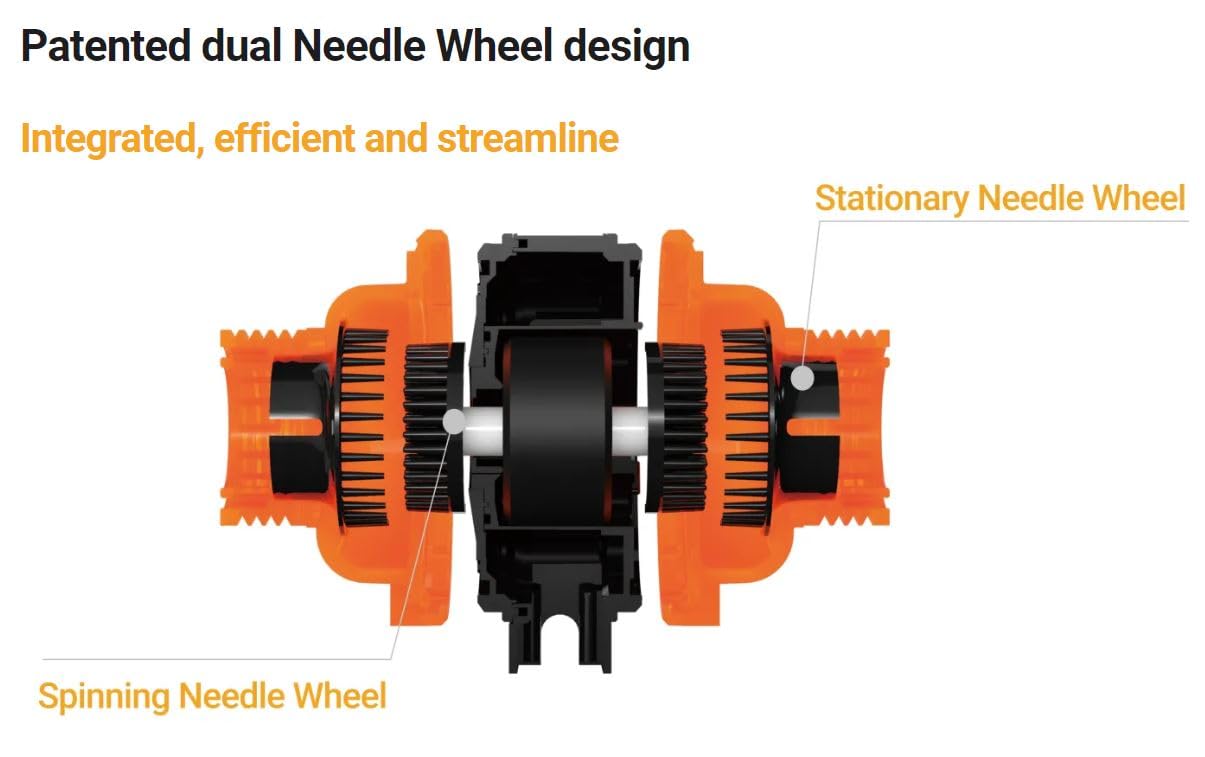
Figure 3: An exploded view illustrating the unique patented dual needle wheel design, featuring both a spinning and a stationary needle wheel for highly efficient bubble production.
2. Safety Instructions
- Keep out of reach of children. This device is not a toy.
- Always disconnect power before performing any maintenance or cleaning.
- Ensure the skimmer is placed on a stable, level surface within your sump or aquarium setup.
- Do not operate the skimmer dry. Ensure the pump is fully submerged in water before powering on.
- Inspect the power cord and plug for any damage before each use. Do not use if damaged.
- This product is designed for indoor use in marine aquarium environments only.
3. Setup and Installation
The Maxspect MJ-SK200 is a standalone protein skimmer designed for in-sump operation. Follow these steps for proper installation:
- Unpacking: Carefully remove all components from the packaging. Inspect for any signs of damage during transit.
- Assembly: The skimmer comes largely pre-assembled. Attach the collection cup to the skimmer body by aligning the cup with the top of the skimmer and twisting gently until secure. Ensure the air line is properly connected to the air silencer.
- Placement: Place the skimmer in your aquarium sump. Ensure the skimmer is on a stable, level surface.
- Water Level: The optimal operating water level for the MJ-SK200 is between 16 cm and 20 cm (approximately 6.3 to 7.9 inches) from the bottom of the skimmer base. Adjust your sump's water level or use a skimmer stand if necessary to achieve this range.
- Power Connection: Connect the skimmer pump's power cable to the intelligent controller. Then, connect the controller's power adapter to a suitable power outlet. Do not power on yet.

Figure 4: This image shows the robust pump assembly and the stable base of the skimmer, indicating the water intake points.
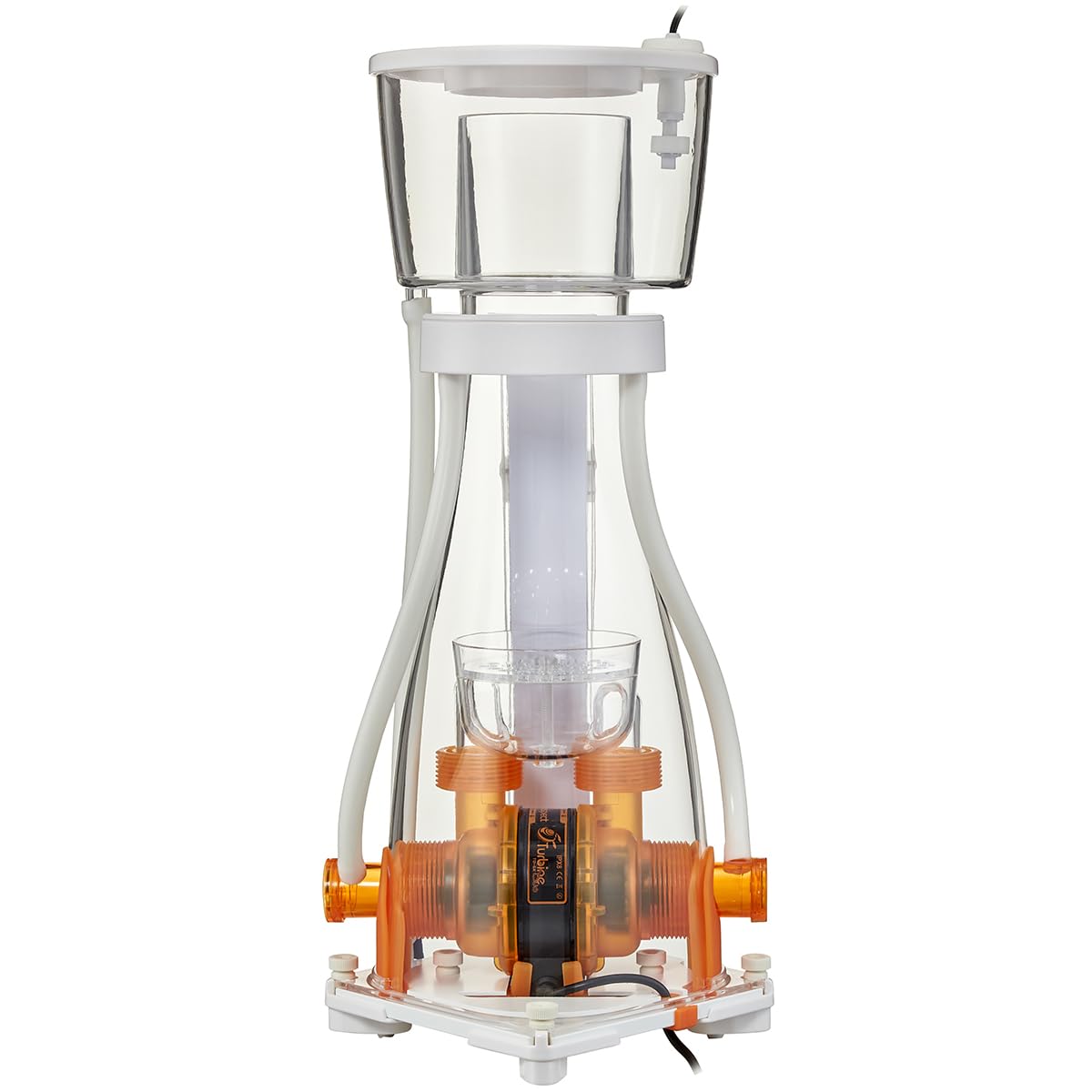
Figure 5: The skimmer body with the collection cup removed, providing a view of the internal reaction chamber and the central column.
4. Operating Instructions
The MJ-SK200 is controlled via its intelligent inline controller.
- Power On: Once the skimmer is properly placed and submerged in water, plug the controller's power adapter into a wall outlet. The skimmer will initiate a soft start sequence.
- Initial Break-in: A new skimmer requires a break-in period, typically 1-2 weeks, during which it may produce inconsistent foam. This is normal as manufacturing residues dissipate.
- Adjusting Water Level (Internal): The skimmer features an integrated dial on the front for precise internal water level adjustment. Turn the dial clockwise to raise the internal water level (for wetter foam) and counter-clockwise to lower it (for drier foam).
- Controller Functions:
- Power Button (Ⓘ): Press to turn the skimmer on or off.
- +/- Buttons: Adjust the pump speed and thus the foam production. Refer to the controller's display for current settings.
- Feed Mode Button (⏱): Activates a temporary shutdown for feeding, typically for 10 minutes, after which the skimmer resumes operation automatically.
- Mode Button (Ⓜ): Cycles through different operating modes or settings if available.
- Foam Consistency: Aim for a consistent, dark tea-colored skimmate in the collection cup. Adjust the internal water level and pump speed as needed to achieve this. Wetter foam is lighter in color and more liquid, while drier foam is darker and thicker.

Figure 6: The intelligent inline controller for the MJ-SK200 skimmer, featuring buttons for power, adjustment, and mode selection, enabling precise control over skimmer operation.

Figure 7: A detailed view of the water level indicator on the skimmer body, showing both centimeter and inch markings for accurate adjustment.
5. Maintenance
Regular maintenance ensures optimal performance and longevity of your protein skimmer. The MJ-SK200's quick-release design simplifies these tasks.
- Collection Cup Cleaning (Daily/Weekly):
- Turn off the skimmer using the controller.
- Remove the collection cup by twisting and lifting it off the skimmer body.
- Empty the skimmate and rinse the cup thoroughly with fresh water. Use a brush if necessary to remove stubborn residue.
- Reattach the collection cup securely.
- Skimmer Body and Pump Cleaning (Monthly/Bi-monthly):
- Disconnect the skimmer from power.
- Remove the skimmer from the sump.
- Utilize the quick-release mechanisms to disassemble the skimmer body and access the pump.
- Carefully remove the pump and impeller assembly. Clean all components, including the impeller, volute, and pump housing, using a brush and fresh water. For stubborn calcium deposits, a mild vinegar solution can be used, followed by thorough rinsing.
- Clean the skimmer body, reaction chamber, and air intake line.
- Reassemble all components, ensuring all O-rings and seals are properly seated to prevent leaks.
- Return the skimmer to the sump and reconnect power.

Figure 8: This diagram demonstrates the quick-release points on the skimmer, allowing for easy disassembly and simplified cleaning and maintenance.

Figure 9: A view of the collection cup from above, showing its design for efficient foam collection and easy removal.
6. Troubleshooting
| Problem | Possible Cause | Solution |
|---|---|---|
| No Foam Production / Low Foam |
|
|
| Excessive Foam / Overflowing Cup |
|
|
| Noisy Operation |
|
|
| Pump Not Starting |
|
|
7. Specifications
| Model Number | MJ-SK200 |
| Recommended Aquarium Volume | 260 - 650 Liters (approx. 68 - 172 US Gallons) |
| Power Consumption | 15 W |
| Voltage | 220 V - 50 Hz |
| Air Intake | 300 L/h |
| Minimum Water Level | 16 - 20 cm (approx. 6.3 - 7.9 inches) |
| Dimensions (L x W x H) | 16.5 x 16.5 x 47.4 cm (6.5 x 6.5 x 18.7 inches) |
| Material | Plastic |
| Special Feature | Inline controller for precise adjustment |
| Installation Type | Standalone (In-Sump) |
8. Warranty and Support
Maxspect products are manufactured to high standards. In the unlikely event of an issue, please refer to the following information:
- Spare Parts Availability: Spare parts for the MJ-SK200 are available for a period of 5 years from the date of manufacture.
- Technical Support: For technical assistance, troubleshooting beyond this manual, or warranty claims, please contact your authorized Maxspect dealer or visit the official Maxspect website for support contact information.
- Proof of Purchase: Always retain your proof of purchase for any warranty-related inquiries.

