Thank you for choosing the SODI KB036 Bluetooth Keyboard. This wireless keyboard is designed to enhance your typing experience across various Apple devices, including MacBooks, iMacs, Mac Minis, iPads, and iPhones. Featuring a sleek aluminum alloy design, backlit keys, a full numeric keypad, and a long-lasting rechargeable battery, the KB036 offers both functionality and aesthetic appeal. This manual provides detailed instructions to help you set up, operate, and maintain your new keyboard.
Image: The SODI KB036 Bluetooth Keyboard, showcasing its full layout and sleek design.
2. What's in the Box
Wireless Bluetooth Keyboard
Type C Cable
User Manual
3. Setup Guide
3.1 Powering On
To power on the keyboard, locate the power switch on the side of the keyboard and slide it to the 'On' position. A blue indicator light will illuminate briefly, confirming the keyboard is active.
Image: Side view of the keyboard highlighting the power switch and USB-C port.
3.2 Bluetooth Pairing
Follow these steps to pair your SODI KB036 keyboard with your Mac, iPad, or iPhone:
Ensure the keyboard is powered on.
Press and hold the Fn key and the C key simultaneously until the blue Bluetooth indicator light on the keyboard starts blinking. This indicates the keyboard is in pairing mode.
On your Apple device (Mac, iPad, or iPhone), navigate to System Settings (or Settings on iOS/iPadOS) > Bluetooth.
In the Bluetooth device list, locate and select "SODI Wonder Keyboard" (or similar name).
Once connected, the blue indicator light on the keyboard will stop blinking and remain solid. Your keyboard is now ready for use.
Image: Visual guide demonstrating the Bluetooth pairing process for the keyboard.
Video: Official product video demonstrating the SODI Wireless Bluetooth Keyboard's features and compatibility with Mac, iPad, and iPhone devices.
4. Operating Your Keyboard
4.1 Compatibility
The SODI KB036 keyboard is specifically designed for Mac OS systems and is compatible with a wide range of Apple devices, including:
MacBook, MacBook Air, MacBook Pro
iMac, iMac Pro, Mac Pro/Mini
iPad (10th/9th/8th/7th Generation)
iPhone (16, 15, 14, 13, 12 series)
Note: This keyboard is NOT compatible with Windows or other PC operating systems.
Image: The keyboard seamlessly connected to a MacBook, iPad, and iPhone, demonstrating multi-device compatibility.
4.2 Key Features
Backlit Keys: The keyboard features a white backlight with 3 adjustable brightness levels, allowing for comfortable typing in various lighting conditions.
Image: Close-up of the keyboard showcasing its white backlit keys.
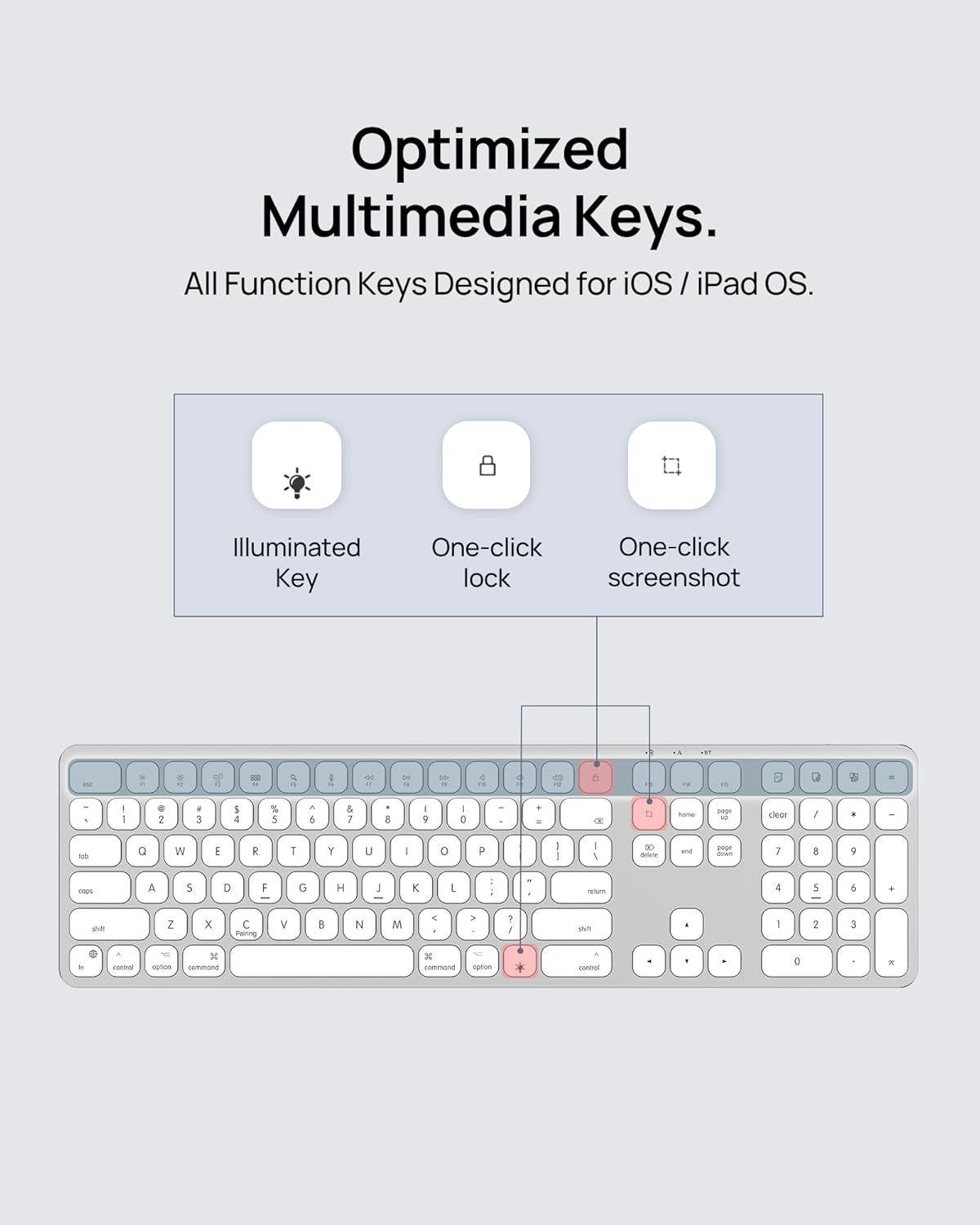
Optimized Multimedia Keys: The keyboard includes dedicated hotkeys for various functions, such as Calculator, Fn lock, Mute, Volume up/down, quick screenshot, and one-click lock, enhancing workflow and productivity.
Image: Diagram illustrating the optimized multimedia keys and their functions.
Quiet Scissor Switch Keys: The low-profile scissor switch keys provide a responsive, quiet, and tactile typing experience, minimizing noise and preventing debris from getting stuck.
Image: A diagram illustrating the scissor switch key mechanism for quiet and responsive typing.
Power-Saving Mode: To conserve battery life, the keyboard automatically enters a power-saving sleep mode after 15 minutes of inactivity. It will reactivate upon key press.
4.3 Battery Life and Charging
The keyboard is equipped with a built-in 650mAh rechargeable Lithium-ion battery. A full charge can last up to 2 months, depending on usage and backlight settings. To charge the keyboard, connect the included USB-C cable to the charging port on the keyboard and to a suitable USB power source.
Image: The keyboard highlighting its long battery life capabilities.
Image: Close-up of the USB-C charging port on the keyboard.
5. Maintenance
5.1 Cleaning
Due to its low-profile keys, the SODI KB036 keyboard is easy to clean. Use a soft, lint-free cloth slightly dampened with water or a mild cleaning solution to wipe down the keys and surface. Avoid excessive moisture and do not spray cleaners directly onto the keyboard. For debris between keys, use compressed air.
6. Troubleshooting
6.1 Connectivity Issues
Keyboard not connecting: Ensure the keyboard is powered on and fully charged. Re-enter pairing mode by holding Fn + C and re-attempt pairing from your device's Bluetooth settings.
Intermittent connection: Ensure your device is within the effective range of the keyboard (typically up to 10 meters). Avoid obstacles or other wireless devices that may cause interference.
6.2 Keys Not Responding
Specific keys not working: Check for any debris lodged under the keys. Gently try to dislodge it. If the issue persists, ensure the keyboard is fully charged.
All keys not working: Verify the keyboard is powered on and successfully paired. Try turning the keyboard off and on again, then re-pairing.
6.3 Battery and Charging
Keyboard not charging: Ensure the USB-C cable is securely connected to both the keyboard and the power source. Try a different USB-C cable or power adapter.
Battery draining quickly: Reduce the backlight brightness or turn it off when not needed. Ensure the keyboard is entering power-saving mode when inactive.
7. Specifications
Feature
Detail
Product Dimensions
17 x 4.5 x 0.5 inches
Item Weight
15.9 ounces
Item Model Number
KB036
Batteries
1 Lithium Polymer battery (included)
Connectivity Technology
Bluetooth, RF, USB-C
Number of Keys
110
Keyboard Backlighting Color Support
Single Color
Color
Silver
Manufacturer
Dongguan Zhengyun Electronic Technology Co.,Ltd
8. Warranty and Support
For warranty information and technical support, please refer to the contact details provided by the manufacturer, Dongguan Zhengyun Electronic Technology Co.,Ltd, or visit the official SODI website. Keep your purchase receipt for warranty claims.
Related Documents - KB036
SODI BM-330 Robot iPhone Stand: Continuity Camera Mount & MagSafe Stand Discover the SODI BM-330 Robot iPhone Stand, a versatile accessory for your Apple devices. Use it as a continuity camera mount for iMac, MacBook, or Studio Display, a magnetic phone stand, or for MagSafe charging. Compatible with iPhone 14/13/12 series and macOS Ventura.
SODI S1 Magnetic Wireless Charger Power Bank User Manual Comprehensive user manual for the SODI S1 magnetic wireless charger and power bank, detailing product features, safety warnings, specifications, charging indicators, and FCC compliance.