1. Introduction
The Hugolog S7 4K 3-Channel Dash Cam is designed to provide comprehensive video surveillance for your vehicle. Featuring 4K front recording, 1080P interior, and 1080P rear cameras, it captures critical moments from multiple perspectives. Equipped with 5G Wi-Fi, built-in GPS, IR night vision, and various recording modes, the S7 ensures enhanced security and peace of mind during your journeys.
2. Package Contents
Please check the box for the following items:
- 1*S7 4K Dash Cam
- 1080P Rear Camera
- 1*Car Charger with Cable
- 1*Car Wire Trim Tool
- 2*Electrostatic Sticker
- 5*Cable Clips
- 2*Adhesive
- 1*User Manual

3. Product Overview
The Hugolog S7 Dash Cam features a compact design with a 3-inch IPS touch screen for easy operation. It includes a front-facing camera, an interior cabin camera, and a separate rear camera for comprehensive coverage.
3.1. Main Unit Features
- 3" IPS Touch Screen: For intuitive navigation and control.
- Front Camera: Records in 4K UHD with a 150° field of view.
- In-Car Camera: Records in 1080P with a 160° field of view, featuring 4 IR lights for night vision.
- Built-in GPS: Provides precise location and speed data.
- 5G Wi-Fi: For fast data transfer and app connectivity.
- MicroSD Card Slot: Supports memory cards for video storage.
- Power Button: To turn the device on/off.
- Control Buttons: Menu, Left, Right, OK, and Reset buttons for alternative control.
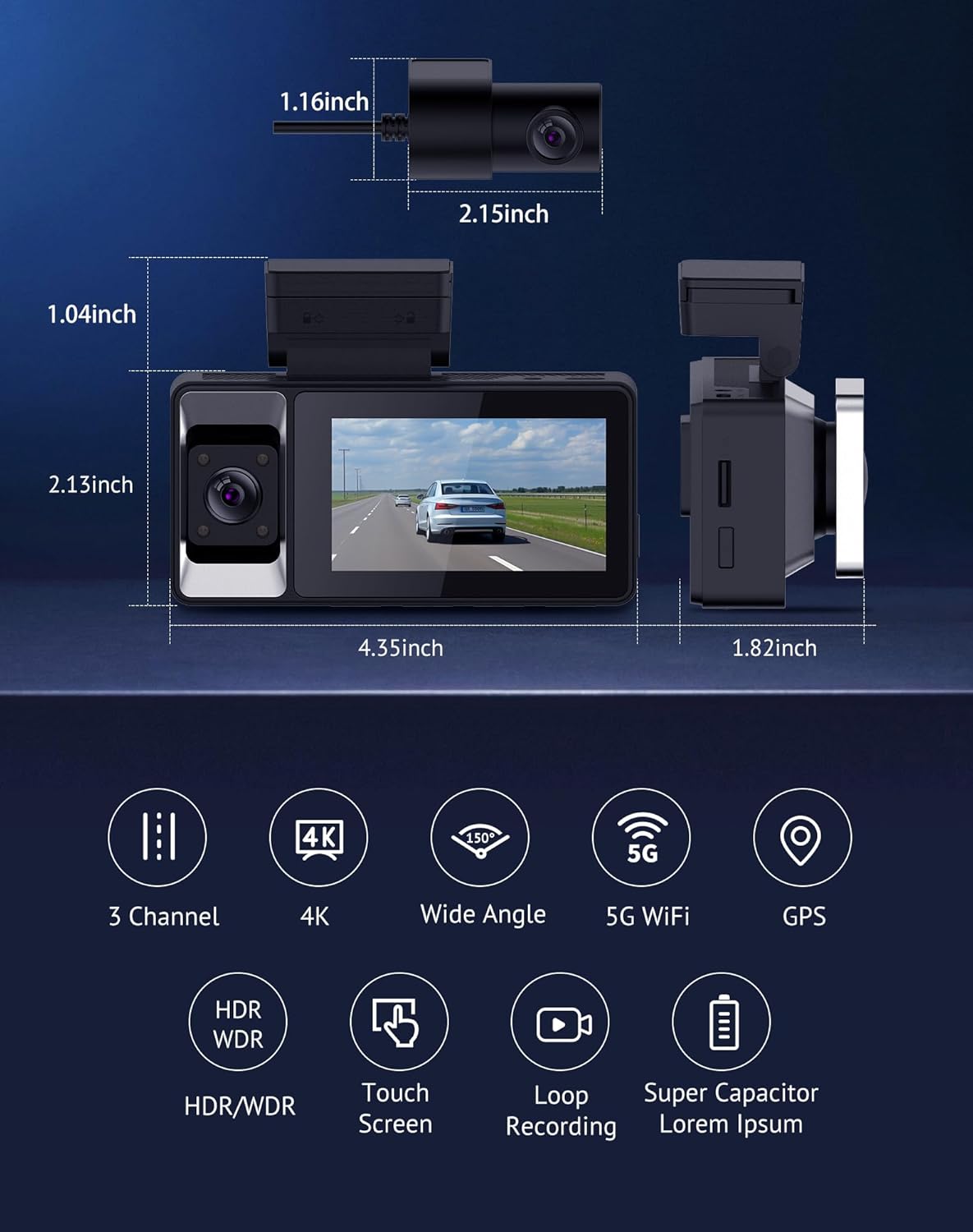
3.2. Rear Camera Features
- Rear Camera: Records in 1080P with a 155° field of view.
- Adjustable Mount: Allows for 360° rotation and vertical/mirror flip for optimal positioning.

4. Setup & Installation
Proper installation ensures optimal performance and clear recording. Follow these steps for a secure setup.
4.1. Preparing for Installation
- Clean the windshield area where the main unit will be mounted.
- Insert a compatible MicroSD card (not included with this variant) into the main unit's slot.
4.2. Mounting the Main Unit
- Attach an electrostatic sticker to your windshield at the desired location, ensuring it does not obstruct your view.
- Peel off the adhesive backing from the main unit's mount.
- Firmly press the main unit onto the electrostatic sticker on the windshield.
- Adjust the front camera lens to capture the desired view of the road.
4.3. Installing the Rear Camera
- Identify a suitable location on your rear windshield for the rear camera, ensuring a clear view.
- Clean the area and attach an electrostatic sticker.
- Peel off the adhesive backing from the rear camera mount and firmly press it onto the electrostatic sticker. Ensure the camera is mounted right-side up.
- Connect the rear camera cable to the main unit's AV-IN port.
4.4. Wiring and Power Connection
- Connect the car charger cable to the main unit's Type-C power port.
- Plug the car charger into your vehicle's 12V power outlet.
- Use the provided car wire trim tool and cable clips to neatly route and conceal the power cable and rear camera cable along the vehicle's interior trim. Start from the main unit, route along the top edge of the windshield, down the A-pillar, and under the dashboard to the power outlet. Route the rear camera cable along the headliner and side pillars to the rear windshield.

4.5. Installation Video Guide
For a visual guide on the installation process, please refer to the official seller video below:
5. Operating Instructions
Learn how to use your Hugolog S7 Dash Cam's various functions.
5.1. Powering On/Off
- The dash cam will automatically power on and begin recording when your vehicle's ignition is turned on.
- It will automatically power off when the ignition is turned off.
- To manually power on/off, press and hold the Power Button.
5.2. Touch Screen Operation
The 3-inch IPS touch screen allows for easy navigation through menus and settings.
- Tap icons to select options.
- Swipe left/right to browse through video files or settings pages.
- Tap the screen to switch between different camera views (front, interior, rear, or combined).

5.3. Recording Modes
- Loop Recording: The camera continuously records, overwriting the oldest footage when the memory card is full. You can set loop recording intervals (e.g., 1/3/5 minutes).
- G-Sensor: Detects sudden impacts or collisions. When triggered, it automatically locks and saves the current video segment to prevent it from being overwritten, preserving crucial evidence.
- Parking Monitor: Protects your vehicle when parked. It offers two modes: time-lapse recording (continuously records at a low frame rate) and impact detection (records only when an impact is detected). An additional hardwire kit is required for this feature to function when the vehicle is off.

5.4. Wi-Fi & App Connectivity
Connect your S7 Dash Cam to the "Hugolog Dash" app via 5GHz Wi-Fi for fast data transfer and remote control.
- Download the "Hugolog Dash" app from your smartphone's app store.
- Enable Wi-Fi on your dash cam and connect your smartphone to the dash cam's Wi-Fi network.
- Through the app, you can view live footage, access recorded videos, download files to your phone, and adjust settings.


5.5. GPS Tracking
The built-in GPS module records your vehicle's location and speed data, which can be viewed on the mobile app or a dedicated GPS player on a computer.

6. Features
The Hugolog S7 Dash Cam offers a range of advanced features:
- 3-Channel Full Protection: Captures 4K front, 1080P inside, and 1080P rear views with wide coverage (150° front, 160° cabin, 155° rear).
- Enhanced 5GHz Wi-Fi & GPS Integration: Fast data transfer and easy access to footage and GPS data via the "Hugolog Dash" app.
- Clear Night Vision: Equipped with a smart sensor, 4 IR lights, WDR, and AI technology for superior clarity in low-light conditions.
- Loop Recording & G-Sensor: Ensures continuous recording and automatic locking of impact-triggered footage.
- Parking Monitor: Offers time-lapse and impact detection modes for 24-hour vehicle protection (requires additional hardwire kit).

7. Maintenance
To ensure the longevity and optimal performance of your dash cam, follow these maintenance guidelines:
- Cleaning: Regularly wipe the camera lenses with a soft, lint-free cloth to ensure clear video quality. Avoid using abrasive cleaners.
- MicroSD Card: Format the MicroSD card periodically (e.g., once a month) to prevent data corruption and ensure smooth loop recording. Back up any important footage before formatting.
- Temperature: Avoid exposing the dash cam to extreme temperatures for extended periods.
- Firmware Updates: Check the Hugolog website or app for any available firmware updates to improve performance and add new features.
8. Troubleshooting
If you encounter any issues with your Hugolog S7 Dash Cam, please refer to the following common troubleshooting steps:
- Camera not powering on: Ensure the car charger is properly connected to both the dash cam and the vehicle's power outlet. Check if the vehicle's 12V outlet is functioning.
- Recording issues: Ensure a MicroSD card is inserted and properly formatted. Check if the card is full; if so, back up and format it.
- Poor video quality: Clean the camera lenses. Ensure the resolution settings are appropriate (e.g., 4K for front).
- Wi-Fi connection problems: Ensure Wi-Fi is enabled on the dash cam and your smartphone. Try restarting both devices.
- GPS not working: Ensure the dash cam has a clear view of the sky. Check GPS settings in the menu.
- G-Sensor too sensitive/not sensitive enough: Adjust the G-Sensor sensitivity setting in the dash cam's menu.
- Parking Monitor not working: Verify that an additional hardwire kit is correctly installed and connected for continuous power.
9. Specifications
Detailed technical specifications for the Hugolog S7 Dash Cam:
| Feature | Specification |
|---|---|
| Model Name | HU-S7-B |
| Product Dimensions | 4 x 1.5 x 5 inches |
| Item Weight | 1.43 pounds |
| Front Video Resolution | 4K (2160p) |
| Interior Video Resolution | 1080P |
| Rear Video Resolution | 1080P |
| Front Field of View | 150 Degrees |
| Interior Field of View | 160 Degrees |
| Rear Field of View | 155 Degrees |
| Connectivity Technology | 5G Wi-Fi |
| Special Feature | Built-In GPS, IR Night Vision, WDR, Parking Mode, G-Sensor, Loop Recording, 3" IPS Touch Screen |
| Mounting Type | Windshield Mount |
| Color | Black |
| Batteries | 1 Lithium Metal batteries required |
10. Warranty & Support
All Hugolog products come with a 1-year warranty. For any product questions or technical support, please contact customer service.
- Technical Support: +1 (213) 992-4747
- Email: support@hugolog.com


