
1. Introduction
The GESKE LED Sonic Full-Body Brush is a versatile skincare device designed for comprehensive body cleansing and exfoliation. It features SmartSonic Pulsations, flexible silicone tips, and Red LED Light Active Regeneration Technology to promote skin renewal and smoothness. The adjustable handle ensures full body coverage, making it easy to reach all areas.

Image: The GESKE LED Sonic Full-Body Brush, showcasing its design and Starlight color.
2. Setup
2.1 Charging the Device
Before first use, fully charge your GESKE LED Sonic Full-Body Brush. The device uses a rechargeable Lithium-Ion battery. Connect the charging cable to the device and a suitable power source. Ensure the charger is securely connected. A full charge typically takes a few hours.
2.2 Attaching the Cleansing Head
The device comes with an Easy-Exchange Cleansing Head. Align the cleansing head with the main unit and gently press until it clicks into place. Ensure it is firmly attached before use.

Image: Labeled diagram of the GESKE LED Sonic Full-Body Brush components, including SmartSonic Pulsations, flexible silicone bristles, adjustable telescoping handle, deep exfoliation surface, Red Light LED, and exchangeable heads.
3. Operating Instructions
Follow these steps for effective use of your GESKE LED Sonic Full-Body Brush:
- Prepare Your Skin: Wet your skin and apply your preferred body wash or cleanser.
- Power On: Press the power button to turn on the brush. The SmartSonic Pulsations will activate.
- Deep Cleansing: Use the soft, flexible silicone tips to gently cleanse your entire body. Move the brush in circular motions, paying attention to areas requiring deep cleansing. The Red LED Light Active Regeneration Technology will simultaneously work to promote skin renewal.
- Intensive Exfoliation: For exfoliation, flip the brush to use the intensive exfoliation surface. Gently scrub away dead skin cells from rough areas such as feet, knees, and elbows.
- Reach Difficult Areas: To access your back or other hard-to-reach areas, extend and rotate the telescoping handle as needed. The detachable cleansing head can also be used individually for targeted cleansing and exfoliation.
- Smart App Integration: For a personalized skincare routine, download the GESKE Smart App. Scan your skin within the app to receive customized routines and access video-guided sessions for optimal device usage.

Image: A user demonstrating the application of the GESKE LED Sonic Full-Body Brush on the shoulder area.
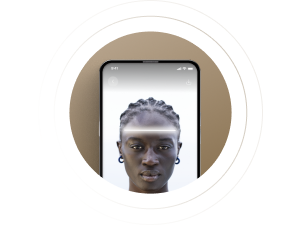
Image: The GESKE Smart App displaying a skin scan feature and personalized beauty routine suggestions.
4. Maintenance
4.1 Cleaning the Device
After each use, detach the cleansing head and wash it with mild soap and water. Rinse thoroughly. Clean the main unit with a damp cloth. Avoid submerging the entire device in water. Ensure all parts are dry before storage.
4.2 Storage
Store the GESKE LED Sonic Full-Body Brush in a clean, dry place. The device includes a wall hook for hygienic storage. Ensure the device is fully dry before placing it on the hook.

Image: The GESKE LED Sonic Full-Body Brush shown with its magnetic wall mount for convenient storage.

Image: GESKE Organic Device Cleanser, recommended for thorough cleaning of GESKE devices.
5. Troubleshooting
| Problem | Possible Cause | Solution |
|---|---|---|
| Device does not turn on. | Low battery or no charge. | Ensure the device is fully charged before use. Verify the charging cable is securely connected. |
| Charger does not stay in place. | Improper connection or foreign object in port. | Ensure the charging cable is inserted correctly and fully. Check the charging port for any obstructions. |
| Cleansing head detaches during use. | Head not securely attached. | Ensure the Easy-Exchange Cleansing Head is firmly clicked into place before starting your routine. |
| Vibration feels weak. | Low battery or incorrect mode. | Charge the device fully. Refer to the Smart App for guidance on different pulsation modes and intensities. |
6. Specifications
- Model Name: GESKE Sonic Full-Body Brush
- Model Number: GK000708SL01
- Product Dimensions: 3.15 x 1.38 x 11.89 inches
- Item Weight: 214 Grams (7.55 ounces)
- Material: Silicone
- Power Source: Rechargeable Lithium Ion Battery (1 included)
- Operation Mode: Automatic
- Product Benefits: Deep Cleansing, Exfoliating, Skin Renewal
- Skin Type: All
- Product Care Instructions: Wash with Mild Soap, Detach and Clean Cleansing Head, Avoid Submerging in Water
- Manufacturer: GESKE Beauty Tech Inc.
7. Warranty & Support
7.1 Warranty Information
The GESKE LED Sonic Full-Body Brush comes with a 15-year guarantee. Please retain your proof of purchase for warranty claims. For detailed warranty terms and conditions, refer to the official GESKE website or contact customer support.

Image: Dermatest 'Sehr Gut' (Very Good) seal, indicating product quality and approval.
7.2 Customer Support & Smart App
For further assistance, product registration, or to explore personalized skincare routines and video guides, download the official GESKE Smart App. The app provides comprehensive support and enhances your device experience.
Download the GESKE Smart App: www.geske.com/app

Image: Overview of the GESKE Smart App guidance, showcasing various app features and QR codes for downloading from app stores.