
1. Product Overview
The Rtktoup 45W RGBW Par LED Stage Light is a versatile lighting fixture designed for various events and architectural illumination. It features 9 high-power RGBW LED beads, offering a wide range of color mixing and dynamic lighting effects. This manual provides essential information for safe and effective use of your device.

Image 1.1: Rtktoup 45W RGBW Par LED Stage Light and Remote Control.
Key Features:
- RGBW Color Mixing: 9 LED lamp beads provide full-color mixing capabilities for vibrant visual effects.
- Multiple Control Modes: Supports DMX, Automatic, Master-Slave, and Remote Control operation.
- Sound Activation: Reacts to music for dynamic light shows.
- Adjustable Effects: Includes strobe, jump, and gradient lighting effects.
- Compact and Portable: Lightweight plastic housing (0.85 kg) with an adjustable bracket for flexible placement.
- Efficient Cooling: Equipped with heat dissipation holes for extended product lifespan.
2. Safety Information
WARNING: To prevent fire, electric shock, and injury, always follow these basic safety precautions:
- Do not operate the device if the power cord is damaged.
- Ensure proper ventilation to prevent overheating.
- Keep away from flammable materials.
- Do not open the housing; there are no user-serviceable parts inside.
- Disconnect from power before cleaning or maintenance.
- This product is for indoor use only unless otherwise specified.
For information on recycling and cleaning light bulbs, please refer to local guidelines and regulations.
3. Package Contents
Carefully unpack your Rtktoup 45W RGBW Par LED Stage Light and check that all items are present and in good condition. If any items are missing or damaged, contact your retailer immediately.
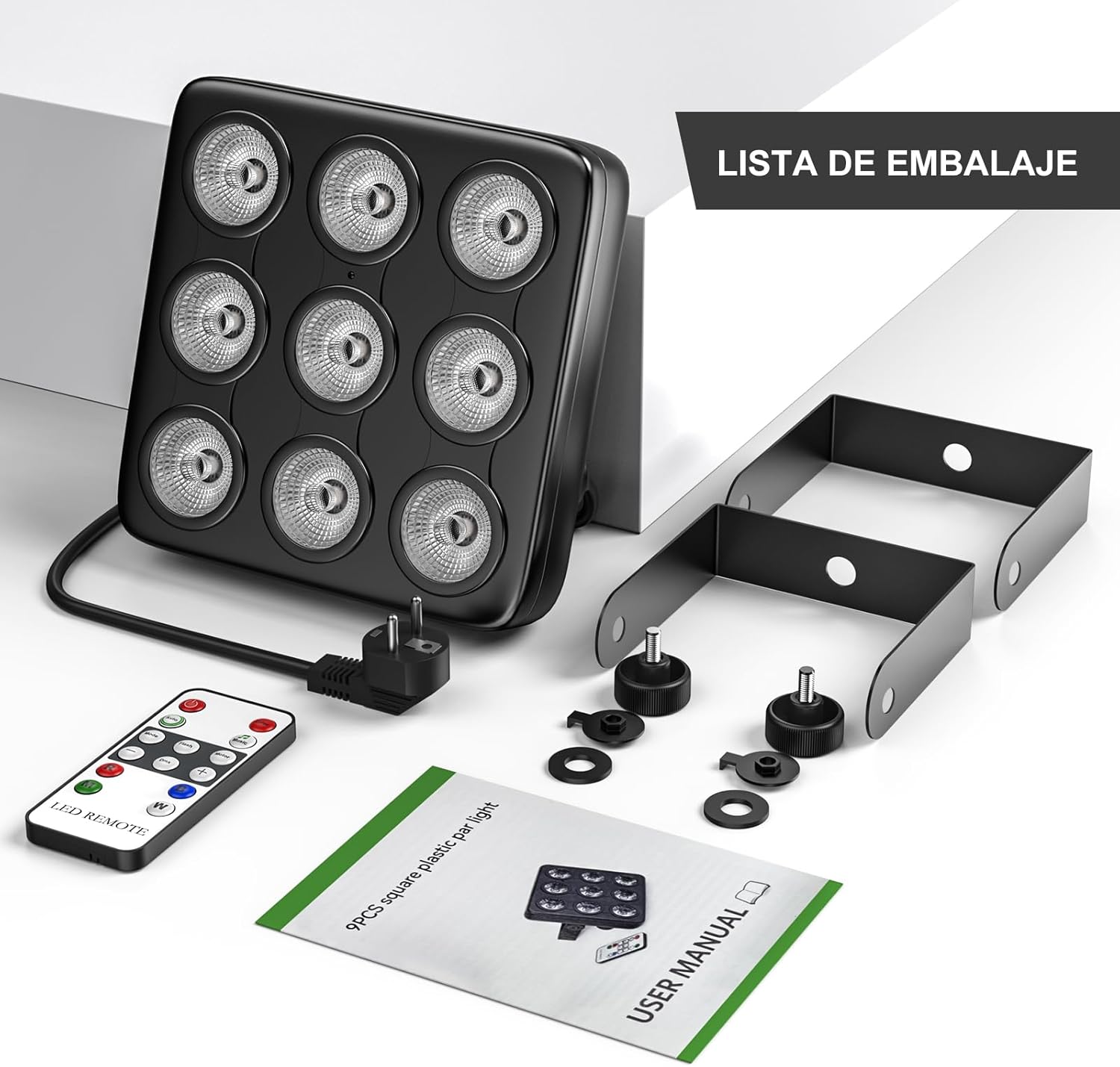
Image 3.1: Package Contents.
Included in the box:
- 1 x Rtktoup 45W RGBW Par LED Stage Light
- 1 x Remote Control
- 1 x Power Cable
- 2 x Mounting Brackets
- 2 x Screws
- 1 x User Manual (this document)
4. Setup and Installation
4.1 Mounting Options
The Rtktoup Par LED light is designed for flexible placement. It comes with an adjustable bracket that allows it to be placed on various surfaces or mounted.

Image 4.1: Flexible Mounting Options.
- Floor Placement: Use the adjustable bracket to position the light on a flat surface like a stage floor or DJ booth.
- Wall Mounting: Securely attach the bracket to a wall using appropriate screws and anchors (not included).
- Ceiling/Truss Hanging: The bracket can also be used to hang the light from a ceiling or lighting truss. Ensure the mounting point can support the weight of the fixture and use safety cables if required (not included).
4.2 Power Connection
- Ensure the light is positioned securely.
- Connect the provided power cable to the power input on the back of the light.
- Plug the power cable into a standard AC 110V power outlet.
5. Operating Instructions
The Rtktoup Par LED light offers four primary control modes for various applications.

Image 5.1: Available Control Modes.
5.1 Control Panel and Digital Display
The back of the unit features a digital display and control buttons (MENU, ENTER, UP, DOWN) for direct configuration.

Image 5.2: Rear Panel Controls.
5.2 Remote Control Operation
The included remote control provides convenient access to various functions.

Image 5.3: Remote Control.
- ON/OFF: Power the unit on or off.
- AUTO: Activates automatic program mode.
- MUSIC: Activates sound-activated mode.
- MODE: Cycles through different built-in programs.
- FLASH: Activates strobe effect.
- MOTOR: Adjusts motor speed (if applicable, for certain effects).
- R/G/B/W: Directly select Red, Green, Blue, or White colors.
- +/-: Adjusts speed or other parameters depending on the active mode.
5.3 DMX Control
For professional lighting setups, the unit can be controlled via DMX512 protocol. Connect a DMX controller to the DMX IN port and use the DMX OUT port to daisy-chain multiple units.

Image 5.4: DMX Control Ports.
Refer to the DMX channel chart (usually found in a separate DMX manual or advanced section of this manual) for specific channel assignments and functions.
5.4 Automatic Mode
In automatic mode, the light cycles through pre-programmed lighting sequences without external input.

Image 5.5: Automatic Mode.
5.5 Sound-Activated Mode
The sound-activated mode uses a built-in microphone to synchronize light effects with ambient music or sounds.

Image 5.6: Sound-Activated Mode.
5.6 Master-Slave Mode
Connect multiple Rtktoup Par LED lights using DMX cables. Configure one unit as the 'Master' and others as 'Slaves'. The slave units will then mirror the master unit's lighting effects.
6. Maintenance
6.1 Cleaning
Regular cleaning helps maintain optimal performance and extends the lifespan of your light fixture.
- Always disconnect the power before cleaning.
- Use a soft, lint-free cloth to wipe the exterior of the unit.
- For stubborn dirt, a slightly damp cloth with mild soap can be used, followed by a dry cloth.
- Do not use harsh chemicals or abrasive cleaners.
- Ensure the ventilation holes are free from dust and debris to maintain proper airflow.
6.2 Heat Dissipation
The unit is designed with heat dissipation holes to prevent overheating. Ensure these vents are not blocked during operation.

Image 6.1: Integrated Fan Outlet for Heat Dissipation.
7. Troubleshooting
If you encounter issues with your Rtktoup Par LED Stage Light, refer to the following common problems and solutions.
7.1 No Power / Light Not Turning On
- Check that the power cable is securely connected to both the light fixture and the power outlet.
- Verify that the power outlet is functional by plugging in another device.
- Ensure the unit's power switch (if present) is in the 'ON' position.
7.2 Remote Control Not Responding
- Ensure there are no obstructions between the remote control and the light's IR receiver.
- Check the battery in the remote control and replace it if necessary.
- Ensure you are within the effective range of the remote control.
7.3 Inconsistent or Malfunctioning Light Effects
- If using DMX, verify DMX cable connections and DMX address settings.
- In sound-activated mode, ensure the microphone is not obstructed and the music volume is sufficient.
- Try resetting the unit by disconnecting and reconnecting power.
7.4 Overheating
- Ensure all ventilation holes are clear and unobstructed.
- Operate the light in a well-ventilated area.
- Avoid prolonged use in extremely hot environments.
IMPORTANT SAFETY NOTE: If the device emits smoke, unusual odors, or shows signs of damage, immediately disconnect it from the power source and cease use. Do not attempt to repair it yourself. Contact customer support for assistance.
8. Specifications
| Feature | Specification |
|---|---|
| Brand | Rtktoup |
| Model Number | MC-01028EU |
| Dimensions | 18.2 x 10 x 18.2 cm |
| Weight | 800 g |
| Material | Aluminum (housing) |
| Light Source | 9 x LED (RGBW) |
| Power Consumption | 45W |
| Voltage | 110V (AC) |
| Luminous Flux | 2700 lumen |
| Color Temperature | 6000 Kelvin |
| Color Rendering Index (CRI) | 90 |
| Beam Angle | 25 Degrees |
| Control Modes | DMX, Automatic, Master-Slave, Remote Control, Sound Activated |
| Energy Efficiency Class | E |
| Batteries | 1 Lithium-metal battery (included, for remote) |

Image 8.1: EU Energy Label. For more details, visit EPREL Database.
9. Warranty and Support
9.1 Warranty Information
Specific warranty details for this product are not provided in the available information. Please refer to your purchase documentation or contact your retailer for warranty terms and conditions.
9.2 Customer Support
For technical assistance, troubleshooting beyond this manual, or inquiries regarding your product, please contact Rtktoup customer support or your point of purchase. Keep your purchase receipt and model number (MC-01028EU) ready when contacting support.


