
Introduction
This manual provides detailed instructions for the installation, operation, and maintenance of your CO-Z 200W Sliding Gate Opener Kit. Please read this manual thoroughly before installation and use to ensure proper function and safety. Keep this manual for future reference.
Safety Instructions
Always prioritize safety during installation and operation. Failure to follow these instructions may result in serious injury or damage to property.
- Ensure all electrical connections are performed by a qualified electrician and comply with local regulations.
- Keep children and pets away from the gate area during operation.
- Do not attempt to repair the unit yourself. Contact qualified service personnel.
- Regularly inspect the gate and opener for signs of wear, damage, or misalignment.
- The system is equipped with infrared sensors for obstacle detection. Ensure these sensors are clear and functioning correctly.
- In case of power failure, use the manual release keys to operate the gate.

Figure 1: Safety features of the CO-Z Sliding Gate Opener, including pedestrian mode, smooth operation, automatic reversal upon obstruction, buzzer alarm, overheat protection, and infrared sensors.
Package Contents
Verify that all components listed below are present and undamaged before beginning installation.

Figure 2: Complete package contents of the CO-Z Sliding Gate Opener Kit.
| Quantity | Item |
|---|---|
| 1 | Motor Unit |
| 2 | Manual Release Keys |
| 2 | Remote Controls |
| 8 | Rack Sections |
| 2 | Limit Switches |
| 2 | Photocells (Infrared Sensors) |
| 4 | M6x18 Mounting Bolts |
| 4 | M8 Foundation Bolts |
| 4 | Mounting Flat Washers |
| 9 | M8 Spring Washers |
| 9 | M8 Flat Washers |
| 8 | M8 Nuts |
| 16 | Screws, Washers, and Mounting Nuts |
| 4 | M4 Self-tapping Screws |
| 1 | Instruction Manual |
Specifications
Technical details for the CO-Z Sliding Gate Opener Kit.
| Feature | Value |
|---|---|
| Rated Power | 280W |
| Operating Temperature | -20°C to 70°C |
| Max. Noise Level | 56 dB |
| Torque | 14 N·m |
| Max. Gate Weight | 600 kg (1320 lbs) |
| Max. Remote Controls Supported | 40 |
| Waterproof Rating | IP44 |
| Max. Gate Length | 8 m (26 ft) |
| Gate Opening Speed | 13 m/min |
| Remote Control Range | 30 m (100 ft) |
| Product Dimensions (L x W x H) | 34.39 x 27.99 x 52.81 cm (13.54 x 11.02 x 20.79 inches) |
| Product Weight | 16.3 kg (35.9 lbs) |
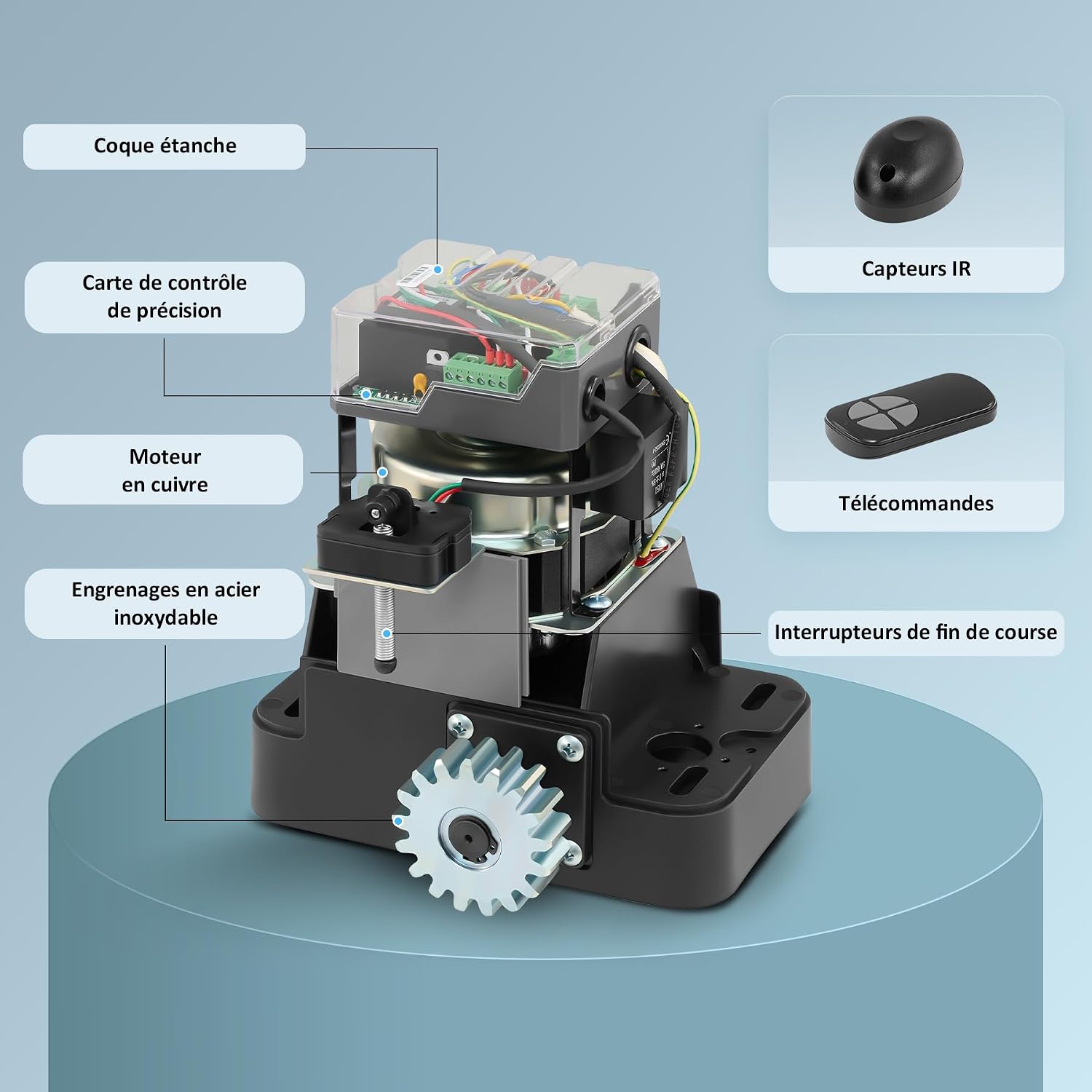
Figure 3: Internal components and accessories of the CO-Z Sliding Gate Opener.
Setup and Installation
This section outlines the general steps for installing your sliding gate opener. Professional installation is recommended for electrical wiring.
1. Mounting the Motor Unit
- Choose a stable, level surface near the gate for mounting the motor unit.
- Use the provided foundation bolts to secure the motor unit firmly to the ground. Ensure the unit is aligned correctly with the gate's path.
2. Installing the Rack Sections
- Attach the rack sections to the gate, ensuring they are level and parallel to the ground.
- Maintain a small clearance (approximately 1-2 mm) between the motor's gear and the rack to allow for smooth operation and prevent binding.
3. Wiring and Electrical Connections
- Connect the power supply according to the wiring diagram provided in the full instruction manual (not included in this summary).
- Install the limit switches at the desired open and closed positions of the gate.
- Connect the photocells (infrared sensors) to ensure safety. Position them to detect obstacles in the gate's path.

Figure 4: Main components for installation: motor unit, rack, remote controls, and photocells.
Operating Instructions
Your CO-Z gate opener offers convenient and secure operation.
1. Remote Control Operation
- The system supports up to 40 remote controls.
- Press the designated button on the remote control to open or close the gate. The remote control has a range of up to 30 meters (100 feet).
2. Automatic Closing Function
- The gate opener can be configured for automatic closing after 2, 10, or 35 seconds. Refer to the full manual for programming instructions.
3. Pedestrian Mode
- A pedestrian mode allows the gate to open partially for foot traffic. Consult the detailed manual for activation and adjustment.

Figure 5: Operational features including opening direction, pedestrian mode, remote range, speed, and auto-close settings.

Figure 6: Remote control operation for convenient gate access.
Maintenance
Regular maintenance ensures the longevity and reliable operation of your gate opener.
- Monthly: Inspect the gate and opener for any loose fasteners, signs of wear, or obstructions. Clean the photocell lenses to ensure proper function.
- Quarterly: Lubricate the gate rollers and hinges if applicable. Check the rack and gear for excessive wear.
- Annually: Have a qualified technician inspect the electrical connections and motor for optimal performance.
- Keep the motor unit free from dirt, debris, and moisture. The IP44 rating provides protection against splashes, but direct water exposure should be avoided.
Troubleshooting
This section provides solutions to common issues. For more complex problems, contact customer support.
| Problem | Possible Cause | Solution |
|---|---|---|
| Gate does not move | No power; Remote control battery low; Obstruction; Limit switch issue | Check power supply; Replace remote battery; Remove obstruction; Inspect limit switches |
| Gate stops unexpectedly | Obstruction detected by photocells; Motor overheating; Loose wiring | Clear photocell path; Allow motor to cool; Check wiring connections |
| Remote control not working | Battery dead; Out of range; Remote not programmed | Replace battery; Move closer to gate; Reprogram remote control (refer to manual) |
| Gate opens/closes partially | Limit switches incorrectly set; Obstruction | Adjust limit switch positions; Check for obstructions |
Warranty and Support
For warranty information and customer support, please refer to the documentation included with your purchase or contact CO-Z directly through their official website or the retailer where the product was purchased.
Note on Videos: The provided product data indicates the presence of videos. However, specific video URLs and creator types were not available to allow for embedding according to the specified criteria.


