Introduction
Thank you for purchasing the YESIDO YSW14 Portable Wireless Bluetooth Speaker. This speaker combines high-quality audio with vibrant RGB lighting and versatile playback options, including Bluetooth, TF card, and USB disk support. Please read this manual carefully to ensure proper use and to maximize your listening experience.
Product Overview
Key Features
- Portable Design: Compact and easy to carry for music on the go.
- Wireless Bluetooth 5.0: Stable and rapid signal transmission for seamless connectivity.
- Dynamic RGB Lights: Adds visual ambiance with various lighting effects.
- Powerful Subwoofer: Delivers rich bass and immersive sound quality.
- Multi-Playback Modes: Supports Bluetooth, TF card, and USB disk (U disk) playback.
- Long-lasting Battery: Integrated 1200mAh lithium battery for extended use.
Speaker Components
Familiarize yourself with the main components of your YESIDO YSW14 speaker:
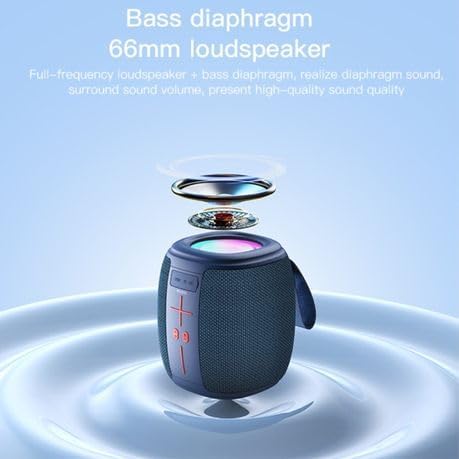
Image: Front view of the YESIDO YSW14 speaker, highlighting the control panel with volume buttons, play/pause, and mode selection, along with the integrated carrying handle.
- Control Panel: Includes power, volume, play/pause, and mode buttons.
- RGB Light Strip: Located around the top of the speaker, providing dynamic lighting effects.
- Charging Port (DC5V): For connecting the charging cable.
- TF Card Slot: For inserting a MicroSD (TF) card.
- USB Port: For connecting a USB disk (U disk).
- Bass Diaphragm/Loudspeaker: Located at the top, responsible for sound output.
Setup
1. Charging the Speaker
Before first use, fully charge the speaker. A full charge takes approximately 4 hours.
- Connect the provided charging cable to the DC5V charging port on the speaker.
- Connect the other end of the cable to a USB power adapter (not included) or a computer's USB port.
- The charging indicator light will illuminate. It will turn off or change color once charging is complete.
The speaker can be used while charging. A fully charged battery provides approximately 2-5 hours of music playback, depending on volume and RGB light usage.
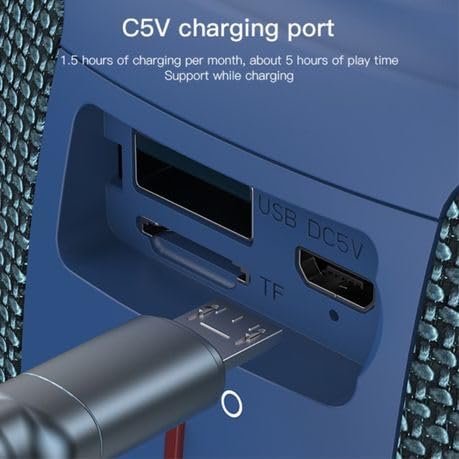
Image: Detailed view of the USB DC5V charging port, TF card slot, and USB port on the side of the speaker, with a charging cable inserted into the DC5V port.
2. Powering On/Off
- To Power On: Press and hold the Power button (usually marked with a power symbol) for a few seconds until you hear an audible prompt or see the indicator light illuminate.
- To Power Off: Press and hold the Power button again for a few seconds until you hear an audible prompt or the indicator light turns off.
Operating Instructions
1. Bluetooth Pairing
The YESIDO YSW14 uses Bluetooth 5.0 for a stable wireless connection up to 10 meters.
- Ensure the speaker is powered on and in Bluetooth mode. If not, press the Mode button (if available) to switch to Bluetooth mode. The speaker will typically announce "Bluetooth mode" or have a blinking blue indicator light.
- On your device (smartphone, tablet, computer), enable Bluetooth and search for available devices.
- Select "YSW14" or a similar name from the list of devices.
- Once paired, the speaker will indicate a successful connection (e.g., "Connected" voice prompt, solid blue indicator light).
- You can now play audio from your device through the speaker.
Note: The speaker will automatically attempt to reconnect to the last paired device when powered on.
2. TF Card / USB Disk Playback
The speaker supports direct playback from TF (MicroSD) cards and USB disks (U disk) with MP3, WAV, WMA, FLAC, and APE music formats.

Image: Detailed view of the speaker's side panel showing the USB port with a USB drive inserted and the TF card slot, indicating multiple playback options.
- Insert a TF card into the TF card slot or a USB disk into the USB port.
- The speaker will automatically detect the storage device and switch to the corresponding playback mode, or you may need to press the Mode button to select it.
- Music playback will begin automatically. Use the speaker's control buttons to play/pause, skip tracks, or adjust volume.
3. RGB Lighting Control
The speaker features dynamic RGB lights to enhance your audio experience.
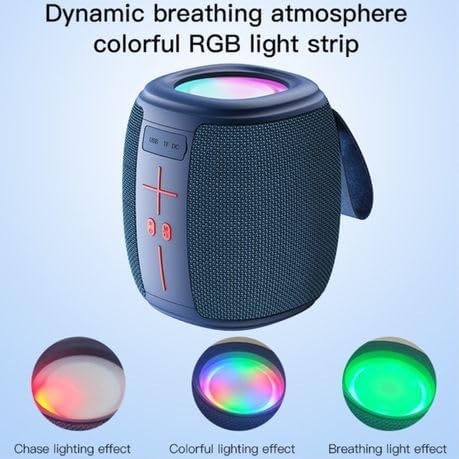
Image: The YESIDO YSW14 speaker showcasing different RGB lighting effects, including chase, colorful, and breathing light modes, illustrating its dynamic visual features.
- The RGB lights typically activate automatically when the speaker is powered on.
- To cycle through different lighting modes (e.g., chase, colorful, breathing) or to turn the lights off/on, locate the dedicated light control button (if available) or press and hold a specific button as indicated in the quick start guide (often the 'M' or Mode button, or a dedicated light icon).
4. Volume Control
- Increase Volume: Press the '+' button.
- Decrease Volume: Press the '-' button.
- Note: Volume can also be controlled from your connected Bluetooth device.
Maintenance
- Keep the speaker away from water, moisture, and extreme temperatures.
- Clean the speaker with a soft, dry cloth. Do not use abrasive cleaners or solvents.
- Avoid dropping the speaker or subjecting it to strong impacts.
- If not used for an extended period, charge the speaker at least once every month to maintain battery health.
Troubleshooting
| Problem | Possible Solution |
|---|---|
| Speaker does not power on. | Ensure the battery is charged. Connect the speaker to a power source and try again. |
| Cannot pair via Bluetooth. |
|
| No sound from TF card/USB disk. |
|
| Sound quality is poor or distorted. |
|
Specifications
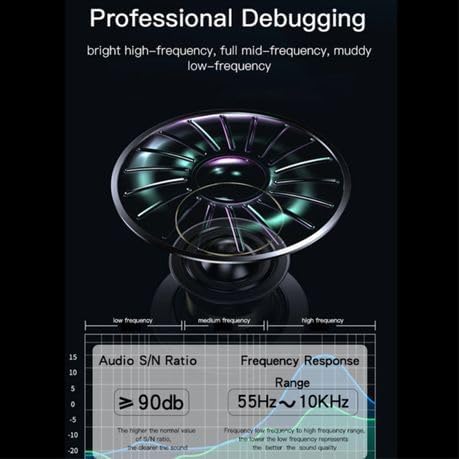
Image: Technical diagram illustrating the speaker's audio performance, including a Signal-to-Noise Ratio (S/N Ratio) of ≥90dB and a Frequency Response Range of 55Hz ~ 10KHz.
| Model Name: | YESIDO YSW14 |
| Bluetooth Version: | V5.0 (JL6965E chip) |
| Bluetooth Distance: | Up to 10 meters |
| Speaker Output: | 5W x 1 |
| Impedance: | 3Ω |
| Frequency Response: | 55Hz ~ 10KHz |
| Signal-to-Noise Ratio (S/N): | ≥90dB |
| Battery Capacity: | 1200mAh Lithium Battery |
| Charging Input: | DC5V |
| Charging Time: | Approximately 4 hours |
| Music Playback Time: | Approximately 2-5 hours (depending on usage) |
| Supported Audio Formats: | MP3, WAV, WMA, FLAC, APE |
| Material: | ABS+PC+PU+Silicone |
| Product Dimensions: | 10D x 9W x 8H centimetres |
| Special Features: | Bass Boost, RGB Light |
Warranty and Support
The YESIDO YSW14 Portable Wireless Bluetooth Speaker comes with a 1-year manufacturer's warranty from the date of purchase. This warranty covers manufacturing defects and workmanship under normal use.
For warranty claims or technical support, please contact your retailer or the YESIDO customer service department with your purchase receipt and product model number.
Please note that the warranty does not cover damage caused by misuse, accidents, unauthorized modifications, or normal wear and tear.


