
1. Product Overview
The OtterBox Symmetry Series Folio Case is designed to protect your iPad Pro 11-inch (M4 and M5) while maintaining a sleek profile. This case features a clear, scratch-resistant back to showcase your iPad, a versatile folio cover with an interior accent color, and integrated storage for your Apple Pencil.
Key features include:
- Precision Fit: Engineered specifically for iPad Pro 11-inch (M4 and M5) models.
- Drop Protection: Rigorously tested to defend against drops.
- Slim Design: Ultra-slim profile for easy portability.
- Magnetic Sleep/Wake: Folio magnets activate sleep and wake modes automatically.
- Multi-Position Stand: Folding cover converts to various stand angles for typing and viewing.
- Apple Pencil Storage: Integrated holder for secure storage and charging.

Figure 1: OtterBox Symmetry Series Folio Case installed on an iPad Pro, showing the clear back and side profile.
2. Setup and Installation
To install your iPad Pro 11-inch (M4 or M5) into the Symmetry Series Folio Case, follow these steps:
- Ensure your iPad screen is clean and free of debris.
- Align the iPad with the clear back shell of the case, ensuring the camera cutout matches the iPad's camera.
- Gently press the iPad into the case, starting from one corner and working your way around until all edges are securely seated within the case's frame.
- Verify that all buttons, ports, and speakers are accessible and aligned with the case's cutouts.
- If using an Apple Pencil, place it in the integrated storage slot on the side of the case.

Figure 2: Demonstrating the insertion of the iPad Pro into the Symmetry Series Folio Case.
Video 1: Official OtterBox video demonstrating the installation of an iPad into a Symmetry Case.
3. Operating Instructions
3.1. Folio Cover Functionality
The folio cover provides screen protection and enhances usability:
- Automatic Sleep/Wake: Opening the cover will automatically wake your iPad, and closing it will put your iPad to sleep, conserving battery life.
- Screen Protection: The cover shields your iPad's screen from scratches and minor impacts when closed.

Figure 3: The Symmetry Series Folio Case with the cover closed, providing screen protection.
3.2. Multi-Position Stand
The folding cover can be configured into multiple stand angles for various activities:
- Viewing Mode: Fold the cover into a triangular stand to prop up your iPad for hands-free viewing of videos, presentations, or video calls.
- Typing Mode: Fold the cover into a lower angle to create an ergonomic position for comfortable typing or drawing with your Apple Pencil.

Figure 4: iPad Pro positioned in the Symmetry Series Folio Case for hands-free viewing.
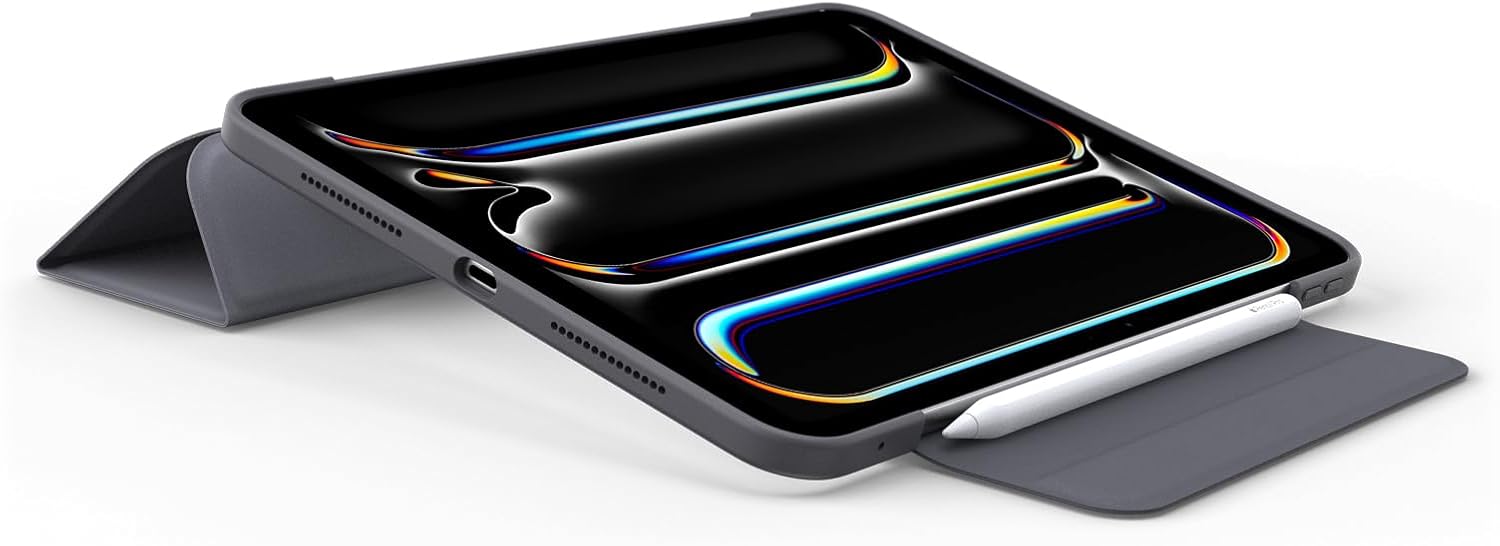
Figure 5: iPad Pro positioned in the Symmetry Series Folio Case for comfortable typing.
3.3. Apple Pencil Storage
The case includes a dedicated slot for your Apple Pencil, ensuring it is securely stored and can charge wirelessly when placed in the slot.

Figure 6: Apple Pencil securely stored and charging in the integrated slot of the Symmetry Series Folio Case.
4. Maintenance
To ensure the longevity and appearance of your OtterBox Symmetry Series Folio Case, follow these maintenance guidelines:
- Cleaning: Wipe the case regularly with a soft, damp cloth to remove dust and smudges. Avoid harsh chemicals or abrasive cleaners, as these can damage the material.
- Avoid Extreme Conditions: Do not expose the case to extreme temperatures, direct sunlight for prolonged periods, or corrosive liquids.
- Inspect Regularly: Periodically check the case for any signs of wear or damage. If the case is significantly damaged, consider replacing it to ensure continued protection for your iPad.
5. Troubleshooting
If you encounter any issues with your Symmetry Series Folio Case, consider the following:
- Stand Instability: If the multi-position stand does not hold your iPad securely, ensure the folds are fully engaged and placed on a flat, stable surface. Some users have noted that the stand may require some breaking in or may not be suitable for all angles or surfaces.
- Apple Pencil Flap Interference: If the Apple Pencil storage flap obstructs the camera, ensure the flap is properly secured or folded away when using the camera.
- Screen Protector Bubbling: If you are using a screen protector and experience bubbling or lifting after installing the case, ensure the screen protector is correctly applied and that the case is not overly tight or misaligned.
6. Specifications
| Feature | Detail |
|---|---|
| Product Dimensions | 10.05 x 7.21 x 0.47 inches |
| Item Weight | 9.5 ounces |
| Item Model Number | 77-95257 |
| Compatible Devices | Apple iPad Pro 11-inch (M4 and M5) |
| Form Factor | Case |
| Color | Black (Thunderstorm) |
| Special Features | Lightweight, Scratch Resistant, Shockproof |
| Shell Type | Hard |
| Manufacturer | OtterBox |
| Date First Available | May 8, 2024 |
7. Warranty and Support
OtterBox products are known for their quality and protection. For specific warranty information and support, please refer to the official OtterBox website or contact their customer service directly.
If you believe your product has an incorrect size or fit, or if you received the wrong item, you may be eligible for a free replacement without returning the original item. Follow these steps:
- Visit your orders page on Amazon and locate the order with the issue. Open the order details.
- Click the product title to go to the product detail page.
- Scroll down to the 'Sold by' section and click on the seller's name.
- On the seller's page, click "Ask a question" to open a chat window. Follow the messaging assistant's instructions to leave a message.
- Include your order ID, iPad model (e.g., iPad Pro 11-inch M4), and preferred shipping address.
The seller will contact you and send a replacement within 24 hours. To find your device model, go to Settings > General > About > Model Name/Model Number on your iPad.
Video 2: Instructions on how to request a replacement for incorrect size/fit issues without returning the item.


