
MONSTER Xkt16
Contents
MONSTER XKT16 TWS Bluetooth Earphones User Manual
Model: XKT16
Introduction
Thank you for choosing the MONSTER XKT16 TWS Bluetooth 5.3 Earphones. This manual provides detailed instructions on how to set up, operate, and maintain your new earphones to ensure optimal performance and longevity. Please read this manual carefully before using the product.
The MONSTER XKT16 earphones offer wireless freedom with advanced acoustic drivers for rich sound quality, a built-in microphone for clear calls, and a long battery life supported by a compact charging case. Their ergonomic design ensures a comfortable and secure fit for various activities.
Package Contents
- MONSTER XKT16 TWS Bluetooth Earphones (Left and Right)
- Charging Case
- USB Charging Cable
- User Manual
- Silicone Ear Tips (various sizes)
Product Overview

Figure 1: Front view of the MONSTER XKT16 charging case in green. The case features the "MONSTER" logo and "16" branding, indicating the model number. It has a metallic bar for carrying or attachment and blue LED indicators on the sides.
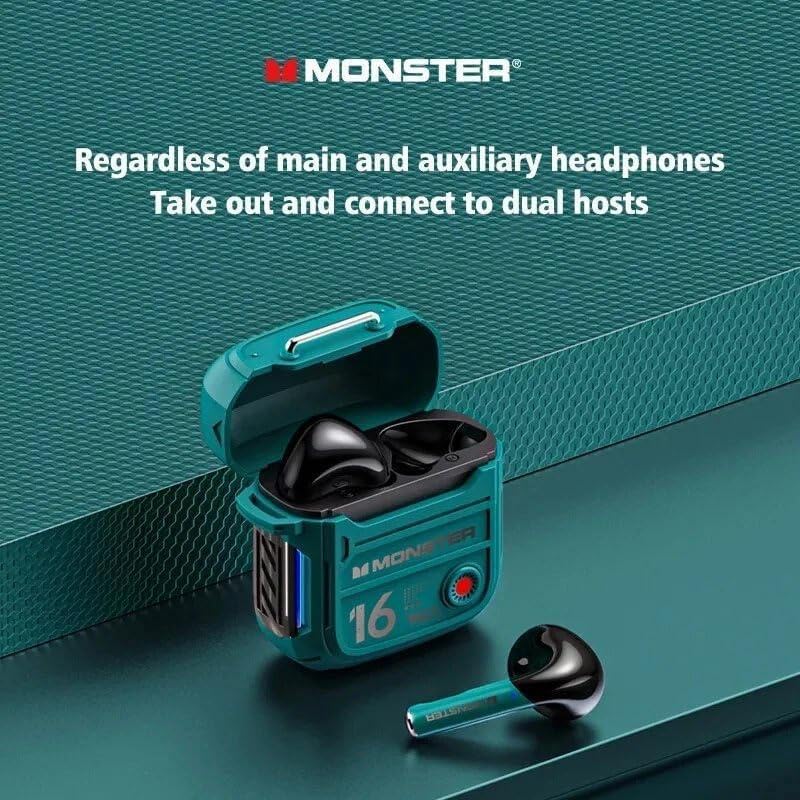
Figure 2: The MONSTER XKT16 charging case opened, revealing the two earphones nestled inside. One earphone is shown outside the case, highlighting its design. This image illustrates the "Regardless of main and auxiliary headphones, Take out and connect to dual hosts" feature, emphasizing independent earbud use.

Figure 3: A detailed close-up illustration of the 13mm composite diaphragm used in the MONSTER XKT16 earphones. This component is responsible for delivering high-quality sound and restoring sound texture with precision.
Setup
1. Initial Charging
Before first use, fully charge the earphones and the charging case. Connect the provided USB charging cable to the charging port on the case and a compatible USB power source (e.g., computer USB port, wall adapter). The indicator lights on the case will show charging status and turn off or change color when fully charged.
- Charging Case Battery: 300mAh
- Headset Battery: 30mAh*2
2. Pairing with a Bluetooth Device
- Ensure the earphones are charged.
- Open the charging case. The earphones will automatically enter pairing mode (indicator lights may flash).
- On your device (smartphone, tablet, computer), go to Bluetooth settings.
- Turn on Bluetooth.
- Search for available devices.
- Select "MONSTER XKT16" from the list.
- Once connected, a voice prompt will confirm successful pairing, and the indicator lights on the earphones will stop flashing.
Note: The earphones support dual host connection, meaning you can use either earbud independently after initial pairing.
Operating Instructions
Power On/Off
- Power On: Open the charging case, or long-press the touch control area on each earbud for a few seconds.
- Power Off: Place the earphones back into the charging case and close the lid, or long-press the touch control area on each earbud until they power off.
Touch Controls
The MONSTER XKT16 earphones feature intuitive touch controls. The specific functions may vary slightly depending on your device and application.
| Action | Function |
|---|---|
| Single Tap (Left/Right) | Play/Pause Music, Answer/End Call |
| Double Tap (Right) | Next Track |
| Double Tap (Left) | Previous Track |
| Triple Tap (Left/Right) | Activate Voice Assistant (Siri, Google Assistant, etc.) |
| Long Press (2 seconds) | Reject Call |
Making Calls
The built-in microphone allows for hands-free calling.
- Answer Call: Single tap either earbud.
- End Call: Single tap either earbud during a call.
- Reject Call: Long press either earbud for 2 seconds.
Maintenance
Cleaning
- Regularly clean the earphones and charging case with a soft, dry, lint-free cloth.
- Do not use abrasive cleaners, alcohol, or chemical solvents.
- Gently remove any earwax or debris from the ear tips and speaker mesh using a small, soft brush or cotton swab.
Storage
- When not in use, always store the earphones in their charging case to protect them and keep them charged.
- Store in a cool, dry place, away from extreme temperatures and direct sunlight.
Battery Care
- Avoid fully discharging the battery frequently.
- Charge the earphones regularly, even if not in frequent use, to maintain battery health.
Troubleshooting
| Problem | Possible Cause | Solution |
|---|---|---|
| Earphones not pairing | Low battery; Not in pairing mode; Device Bluetooth off; Interference | Charge earphones and case; Ensure case is open; Turn on device Bluetooth; Move away from other wireless devices; Try re-pairing. |
| Only one earbud working | One earbud not charged; Not properly connected to each other | Ensure both earbuds are charged; Place both earbuds back in the case, close, then reopen to re-sync. |
| Poor sound quality | Ear tips not sealed; Earbuds dirty; Device volume too low; Out of Bluetooth range | Adjust ear tips for a snug fit; Clean earbuds; Increase device volume; Stay within 10 meters of your device. |
| Earphones not charging | Charging cable faulty; Charging port dirty; Power source issue | Try a different USB cable and power source; Clean charging contacts on earphones and case. |
Factory Reset
If you experience persistent issues, a factory reset may resolve them. Consult the specific instructions for your model, as this often involves a combination of button presses or placing them in the case for a certain duration.
Specifications
| Feature | Specification |
|---|---|
| Brand | MONSTER (Generic) |
| Model | XKT16 |
| Bluetooth Version | V5.3 |
| Charging Case Battery Capacity | 300mAh |
| Headset Battery Capacity | 30mAh*2 |
| Speaker Size | 13mm |
| Sensitivity | 108dB+3dB |
| Power | 5mW*2 |
| Frequency Response | 20Hz-20kHz |
| Color | Green (also available in White/Beige) |
| Ear Placement | In Ear |
| Form Factor | In Ear |
| Impedance | 300.15 Ohm |
| Package Dimensions | 15 x 7 x 3 cm |
| Package Weight | 85 g |
| Country of Origin | China |
Warranty and Support
This product is covered by a standard manufacturer's warranty. Please refer to your purchase documentation for specific warranty terms and conditions. For technical support, troubleshooting assistance, or warranty claims, please contact the retailer or manufacturer's customer service.
For additional support, you may visit the official MONSTER website or contact their customer service channels. Keep your proof of purchase for warranty validation.
Note: Extended warranty plans may be available from your retailer.
Ask a question about this manual
Ask about setup, troubleshooting, compatibility, parts, safety, or missing instructions. Manuals+ will review the question and use this page’s manual context to help answer it.