
1. Introduction
This manual provides essential instructions for the safe and efficient installation, operation, and maintenance of your FAUOSWUK ZXB3 125W Metering Circuit Breaker. This smart circuit breaker is designed for commercial applications, offering advanced features such as remote control, voice control, scheduled switching, and prepaid limiting functions. Please read this manual thoroughly before installation and use, and retain it for future reference.
2. Product Features
- Smart Remote Control: Control the circuit breaker remotely via the Tuya APP from any location at any time.
- Leakage Protection: Features an isolated structure and damp-resistant circuit board for anti-interference and safe use in wet environments. Rapidly cuts off power within 0.04 seconds in case of leakage.
- Voice Control: Compatible with most AI smart speakers, allowing for convenient voice-activated control of connected appliances.
- Scheduled Switching: Utilize the timer switch function to program appliance operation schedules, enhancing energy management.
- Prepaid Limiting Function: Continuously monitors power consumption for 24 hours and automatically trips the breaker to cut off power if prepaid limits are exceeded or payments are overdue.
- Metering Capabilities: Provides real-time monitoring and recording of electricity consumption, including Kwh, Voltage, Current, and Power.
- Durable Construction: Built with high-strength PC flame retardant material for the shell and galvanized high carbon steel terminal blocks, ensuring reliability and safety.
3. Package Contents
Upon opening the package, please verify that all the following items are included:
- 1 x Metering Circuit Breaker (Model ZXB3 125W)
- 2 x Antenna
- 1 x Antenna Base
- 1 x Terminal
- 1 x Instruction Manual
4. Specifications
| Parameter | Value |
|---|---|
| Model | ZXB3 125W |
| Rated Voltage | AC400V 50/60HZ |
| Rated Current | In 63A |
| Frame Pole Current | 125A |
| Mechanical Life | 10,000 times |
| Electrical Life | 6,000 times |
| Overvoltage Action Value Setting Range | AC240-300V |
| Overvoltage Recovery (Uvor) | AC220-250V |
| Undervoltage Action Value Setting Range | AC140-190V |
| Undervoltage Recovery Value (Uvur) | AC170-220V |
| Undervoltage Delay | 0.5-6s |
| Installation | 35.5 x 75mm standard rail |
| RS485 Communication Baud | 9600 |
| Communication Address Range | 1-247 |
| Material | PC flame retardant |
| Dimensions (Approx.) | 72mm (width) x 100mm (height) / 2.8in x 3.9in |
| Weight (Approx.) | 1.17 Pounds (0.53 kg) |
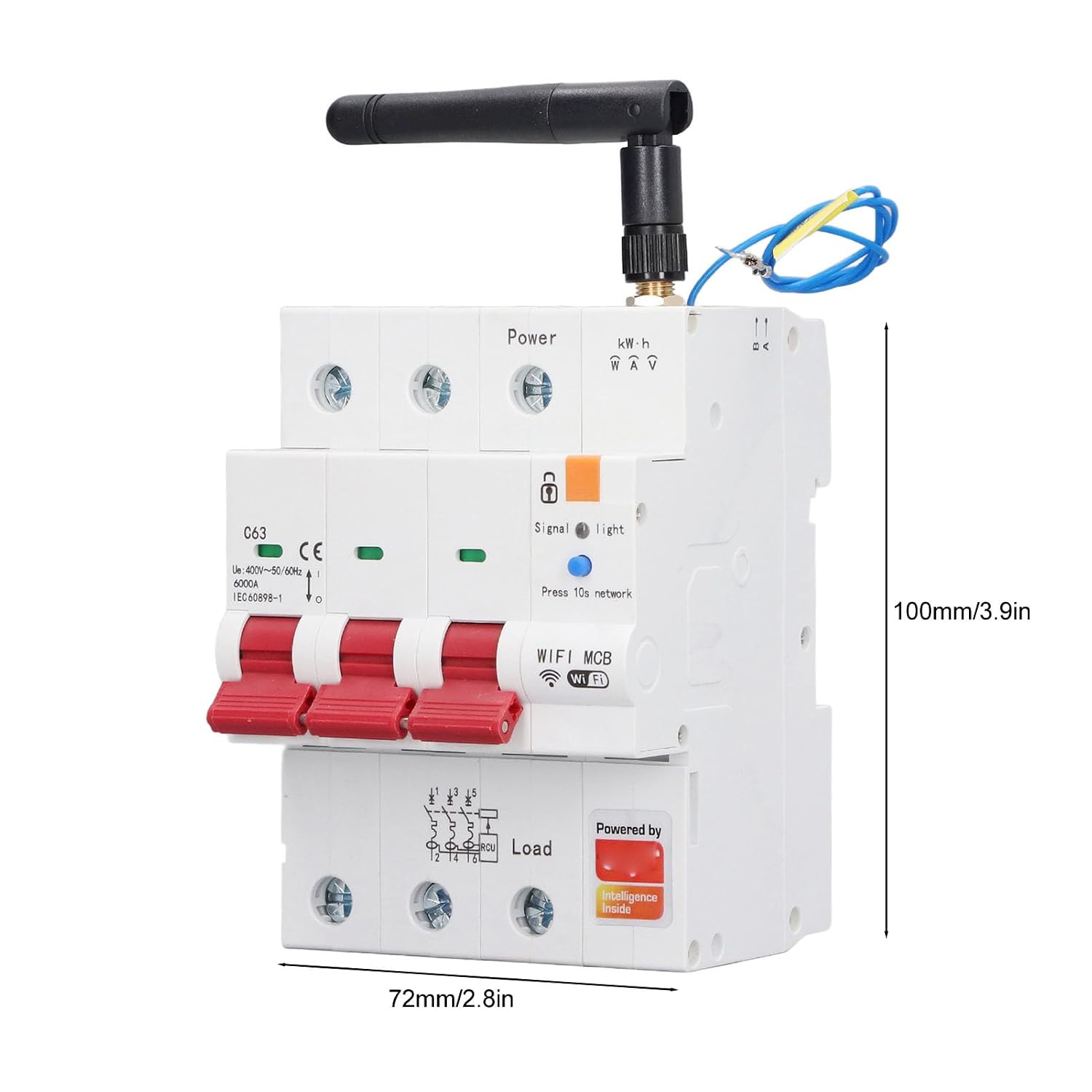
Image: Front view of the circuit breaker with dimensions indicated as 72mm width and 100mm height.
5. Installation
Warning: Installation should only be performed by a qualified electrician in accordance with all local and national electrical codes. Ensure power is disconnected at the main service panel before beginning any installation work.
- Power Disconnection: Turn off the main power supply to the electrical panel where the circuit breaker will be installed. Verify power is off using a voltage tester.
- Mounting: Mount the ZXB3 125W Metering Circuit Breaker onto a standard 35.5 x 75mm DIN rail within the electrical panel. Ensure it is securely fastened.
- Wiring:
- Connect the incoming power lines (Line/Phase) to the "Power" terminals at the top of the breaker.
- Connect the load lines (to appliances/circuits) to the "Load" terminals at the bottom of the breaker.
- Ensure all connections are tight and secure to prevent loose contacts and overheating.
- Antenna Installation: Attach the provided antenna to the designated port on the circuit breaker. Secure the antenna base if necessary for optimal signal reception.
- Power Restoration: Once all connections are verified and secure, restore power to the main service panel.

Image: Front view of the FAUOSWUK ZXB3 125W Metering Circuit Breaker, showing the main switches, power and load terminals, and the attached antenna.

Image: Close-up view highlighting the terminal block made of galvanized high carbon steel, the high-strength shell material, and the internal MCU core chip, indicating robust construction.
6. Operating Instructions
6.1. Initial Setup and Network Connection
- Download App: Download the Tuya Smart Life App from your smartphone's app store (iOS or Android).
- Account Registration: Register for a new account or log in to an existing one.
- Add Device: In the app, tap "Add Device" or the "+" icon. Follow the on-screen instructions to add the circuit breaker. You may need to press the "Press 10s network" button on the breaker to put it into pairing mode (indicated by a blinking light).
- Wi-Fi Connection: Connect the device to your 2.4GHz Wi-Fi network. Ensure your phone is also connected to the same network during setup.
- Device Renaming: Once connected, you can rename the device for easier identification in the app.
6.2. Smart Remote Control
After successful network connection, you can use the Tuya App to remotely turn the circuit breaker on or off from anywhere with an internet connection. The app interface will display the current status of the breaker.

Image: Screenshot of the Tuya App displaying real-time electricity consumption data (Current, Active Power, Voltage) and options for prepaid limiting and scheduling.
6.3. Voice Control
Integrate the circuit breaker with compatible AI smart speakers (e.g., Amazon Alexa, Google Assistant) through the Tuya App settings. Once linked, you can use voice commands to control the breaker.
- Example Commands:
- "Alexa, turn on [Device Name]"
- "Hey Google, turn off [Device Name]"

Image: The circuit breaker positioned above various smart speakers, illustrating its compatibility with voice control systems.
6.4. Scheduled Switching
Use the Tuya App to set up schedules for automatic turning on or off of the circuit breaker. This feature is useful for managing power to specific circuits or appliances at predetermined times.
- Navigate to the "Schedule" or "Timer" section within the device settings in the Tuya App.
- Set desired ON/OFF times and repeat days.

Image: The circuit breaker shown in an environment with an air conditioner, demonstrating its ability for timed switching of appliances like lights, air conditioners, and humidifiers for energy saving.
6.5. Prepaid Limiting Function
This function allows you to set a power consumption limit. The circuit breaker will monitor usage and automatically trip if the set limit is exceeded or if a prepaid balance (if configured) runs out.
- Access the "Prepaid" or "Current Limit" settings in the Tuya App.
- Configure your desired power consumption limits or recharge options.

Image: The circuit breaker next to a checklist indicating its functions: Kwh, Voltage, Current, Timer, On/off Switch, Current Limit, Metering Function, and Prepaid Recharge.
7. Maintenance
- Regular Inspection: Periodically inspect the circuit breaker for any signs of physical damage, loose connections, or discoloration.
- Cleaning: Ensure the device is clean and free from dust and debris. Use a dry, soft cloth for cleaning. Do not use liquids or abrasive cleaners.
- Firmware Updates: Check the Tuya App regularly for any available firmware updates for the device to ensure optimal performance and security.
- Professional Check: For any complex issues or concerns, consult a qualified electrician.
8. Troubleshooting
| Problem | Possible Cause | Solution |
|---|---|---|
| Device not powering on | No main power; Incorrect wiring; Breaker tripped. | Check main power supply; Verify wiring connections; Reset the breaker manually. |
| Cannot connect to Wi-Fi | Incorrect Wi-Fi password; Router too far; 5GHz Wi-Fi network; Device not in pairing mode. | Ensure correct 2.4GHz Wi-Fi password; Move router closer or use a Wi-Fi extender; Ensure device is in pairing mode (blinking light). |
| Remote control not working | No internet connection on phone or device; App issue. | Check internet connectivity for both phone and device; Restart the app; Re-pair the device if necessary. |
| Voice control not responding | Incorrect voice command; Smart speaker not linked to Tuya; Network issue. | Use correct commands; Ensure Tuya account is linked to your smart speaker app; Check network connection. |
| Breaker trips unexpectedly | Overload; Short circuit; Leakage; Prepaid limit reached. | Identify and reduce load; Check for short circuits; Inspect for leakage; Check prepaid settings in the app. Consult an electrician if issues persist. |
9. Warranty and Support
For warranty information and technical support, please refer to the documentation provided with your purchase or contact FAUOSWUK customer service through their official channels. Keep your purchase receipt as proof of purchase.