
JONR JONR ED12 Pro
JONR ED12 Pro Wet Dry Vacuum Instruction Manual
Model: JONR ED12 Pro
Introduction
Welcome to the JONR ED12 Pro Wet Dry Vacuum instruction manual. This document provides detailed guidance on the setup, operation, maintenance, and troubleshooting of your new JONR ED12 Pro. This versatile 2-in-1 appliance functions as both a vacuum cleaner and a floor cleaner, designed to simplify your cleaning routine.
Key features include a self-cleaning roller brush, dual-sided edge cleaning, hot water cleaning, hot air drying, and a vertical pause function for convenience. The integrated voice prompt system and LED display provide real-time information and operational guidance.

Image: The JONR ED12 Pro Wet Dry Vacuum Cleaner, showcasing its sleek design and primary components.
Important Safety Instructions
Before using the JONR ED12 Pro, please read all safety instructions carefully to prevent injury or damage. Keep this manual for future reference.
- Always disconnect the appliance from the power supply before cleaning or performing maintenance.
- Do not immerse the main unit in water or other liquids.
- Use only the charging adapter supplied by the manufacturer.
- Do not use the appliance to pick up flammable or combustible liquids, or hot ashes.
- Keep hair, loose clothing, fingers, and all parts of the body away from openings and moving parts.
- Ensure the filter is properly installed before operation.
- Store the appliance indoors in a dry place.
- This appliance is for household use only.
What's Included
Verify that all components are present in the packaging:
- JONR ED12 Pro Wet Dry Vacuum Main Unit
- Charging Adapter
- Charging Station (3-in-1 dock)
- Cleaning Brush
- Cleaning Tablets (if included)
- User Manual
Setup and Initial Use
1. Assembly
Carefully unpack all components. Insert the handle into the main unit until it clicks into place. Ensure all parts are securely connected before use.
2. Charging the Battery
Place the JONR ED12 Pro on its charging station. Connect the charging adapter to the station and plug it into a power outlet. The LED display will indicate the charging status. A full charge takes approximately 3.5 hours.
The vacuum is powered by 6 Lithium-ion batteries, which are included.
3. Filling the Water Tank
The JONR ED12 Pro features a dual water tank system. Locate the clean water tank (capacity: 850 Milliliters). Remove the tank, fill it with clean water (and cleaning solution if desired, ensuring it's compatible with wet/dry vacuums), and reattach it securely to the main unit.

Image: A hand filling the 850ml clean water tank of the JONR ED12 Pro under a faucet. Note: Do not use strong foaming, alcohol-based, or fragranced cleaners. It is best to use JONR cleaning tablets.
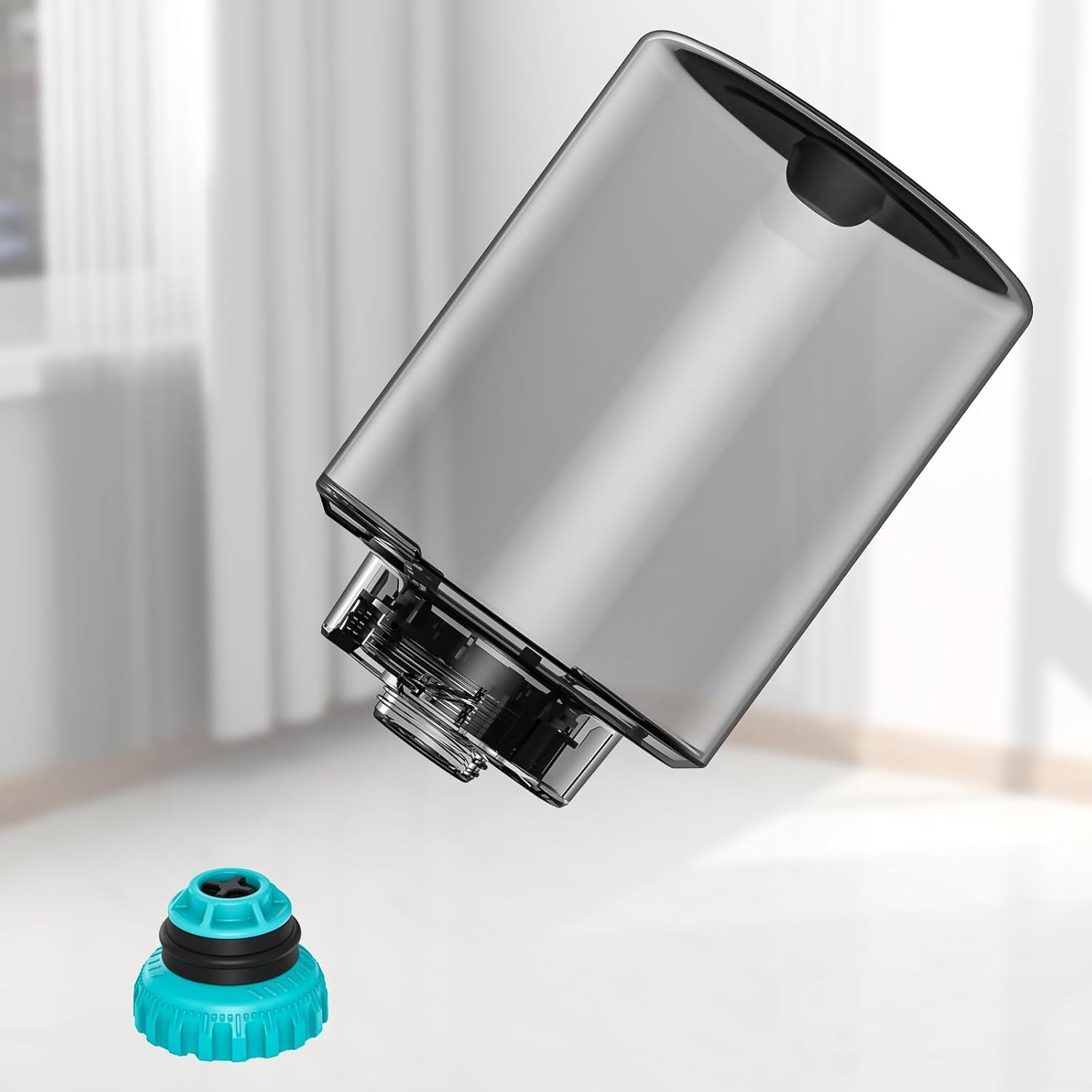
Image: The clean water tank detached from the vacuum, with its turquoise cap shown separately, illustrating how to access the tank for filling or cleaning.
Operating Instructions
1. Powering On/Off
Press the power button to turn the vacuum on. Press it again to turn off. The LED display will illuminate upon activation.
2. Cleaning Modes and Features
- 2-in-1 Smart Wiper Function: The dual water tank system allows for simultaneous vacuuming of dry debris and wet mopping of spills in a single pass.
- Dual-Sided Edge Cleaning: The upgraded design enables thorough cleaning along walls and into corners, minimizing missed spots. The unique roller brush structure provides forward traction, enhancing cleaning efficiency.
- Hot Water Cleaning: This feature helps to effectively remove stubborn stains and reduce bacteria and odors, contributing to a fresher home environment.
- Vertical Pause Function: To temporarily pause cleaning, gently step on the floor brush and adjust the handle. The vacuum will enter standby mode, allowing you to attend to other tasks or reposition without fully turning off the device. Lower the handle to resume cleaning instantly.
3. Voice Prompts and LED Display
The JONR ED12 Pro provides voice prompts to inform you about the cleaning process, status, and operational instructions. It supports multiple languages. The LED screen clearly displays different cleaning modes and the remaining battery capacity, making operation intuitive.
The typical runtime on a full charge is approximately 40 minutes.
Maintenance
1. Auto-Cleaning and Hot Air Drying
After completing a cleaning task, place the vacuum on its charging station. Press the one-click auto-cleaning button. The wet dry vacuum will automatically clean the roller brush with hot water. This eliminates the need to manually touch the dirty roller.
Following the hot water cleaning, the system will initiate a hot air drying process for the roller brush, preventing odors and bacterial growth.
2. Emptying the Dirty Water Tank
Regularly empty the dirty water tank after each use. Remove the tank, dispose of the contents, and rinse it with clean water. Ensure it is dry before reattaching.
3. Filter Maintenance
The JONR ED12 Pro uses a sponge filter element. Periodically remove and clean the filter according to the instructions in the full manual (not provided here). Ensure the filter is completely dry before reinserting it to maintain optimal suction and prevent damage.
4. Roller Brush Cleaning
While the auto-cleaning function is effective, occasionally inspect the roller brush for tangled hair or debris. Remove and clean it manually if necessary using the provided cleaning brush.
Troubleshooting
If you encounter issues with your JONR ED12 Pro, refer to the following common problems and solutions:
| Problem | Possible Cause | Solution |
|---|---|---|
| Vacuum not turning on | Low battery; Not properly charged; Power button issue | Charge the battery fully; Ensure charger is connected; Contact support if issue persists |
| Poor suction | Clogged filter; Full dirty water tank; Blocked roller brush | Clean or replace filter; Empty dirty water tank; Clear any blockages from roller brush |
| Water leakage | Water tank not properly installed; Damaged tank seal | Reinstall water tanks securely; Inspect seals for damage and contact support if needed |
| Unusual noise | Debris caught in roller brush; Motor issue | Check and remove any debris from roller brush; Contact support if noise persists |
For more complex issues or if troubleshooting steps do not resolve the problem, please contact JONR customer support.
Specifications
| Brand | JONR |
| Model Number | JONR ED12 Pro |
| Color | Navy Blue |
| Product Dimensions (L x W x H) | 5 x 5 x 10 cm (approx. 2 x 2 x 4 inches) |
| Item Weight | 3.8 Kilograms (approx. 8.38 lbs) |
| Clean Water Tank Capacity | 850 Milliliters |
| Battery Type | 6 Lithium-ion (included) |
| Runtime | Up to 40 minutes |
| Charging Time | 3.5 hours |
| Filter Type | Sponge filter element |
| Recommended Surface | Tile, hardwood, and other floor materials |
| Special Feature | Cordless operation |

Image: A diagram illustrating the dimensions of the JONR ED12 Pro's water tank and its cap, showing measurements in inches.
Warranty and Support
For warranty information, technical support, or to inquire about spare parts, please refer to the warranty card included with your product or visit the official JONR website. You can also contact JONR customer service directly for assistance.
Manufacturer: Suzhou New Ebao Technology Co., Itd
ASIN: B0D3HWHYH8
Date First Available on Amazon.com.be: May 7, 2024
Related documentsJONR ED12 Pro


Ask a question about this manual
Ask about setup, troubleshooting, compatibility, parts, safety, or missing instructions. Manuals+ will review the question and use this page’s manual context to help answer it.