
erabros RS1
erabros RS1 Robot Vacuum Cleaner User Manual
Model: RS1 | Brand: erabros
1. Introduction
Thank you for choosing the erabros RS1 Robot Vacuum Cleaner. This manual provides essential information for the safe operation, maintenance, and troubleshooting of your new robotic vacuum. Please read this manual thoroughly before using the product and retain it for future reference.
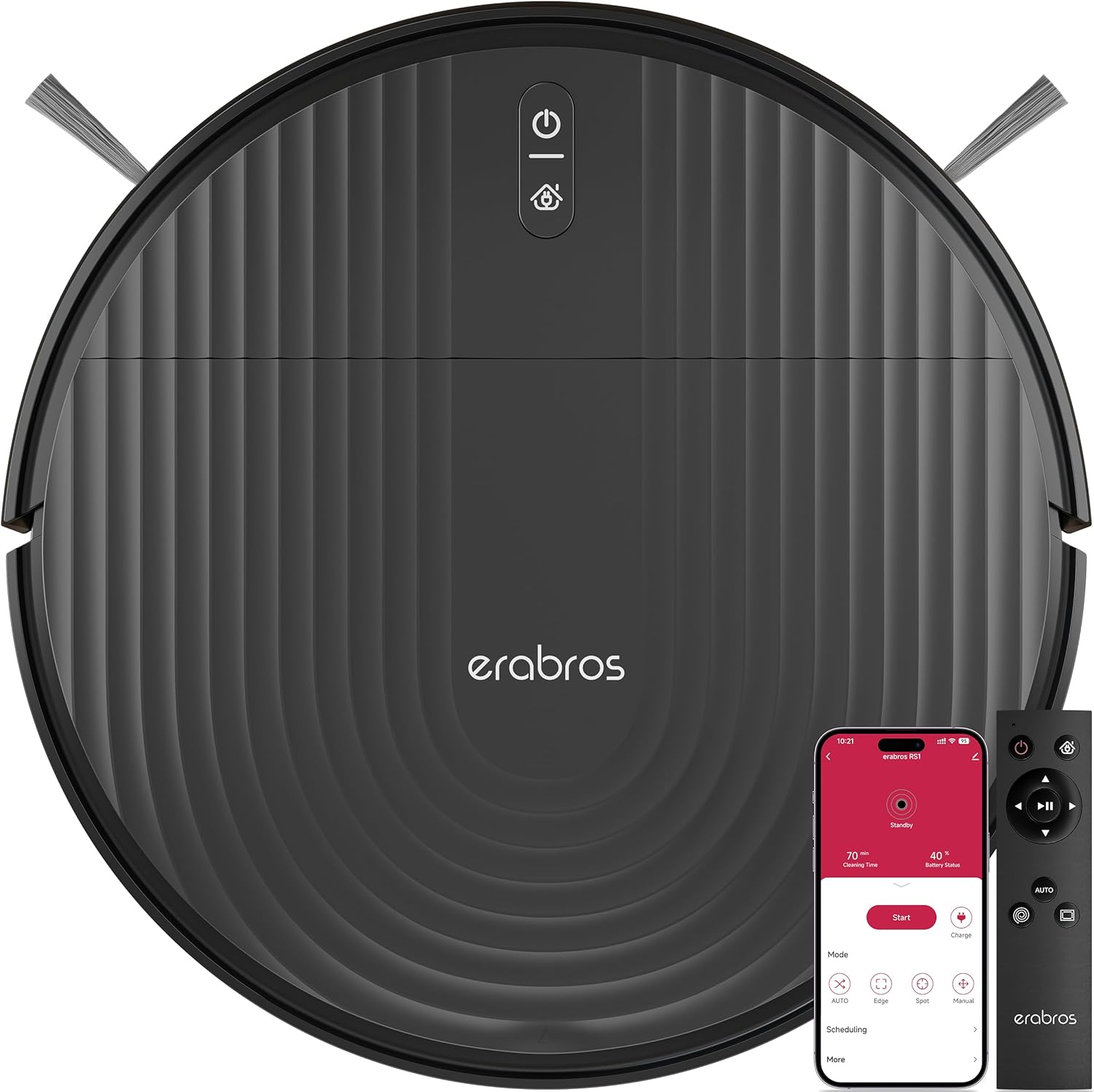
Figure 1.1: The erabros RS1 Robot Vacuum Cleaner, showcasing its sleek design, accompanying remote control, and smartphone application interface for convenient operation.
2. Important Safety Instructions
WARNING: To reduce the risk of injury or damage, read these safety instructions carefully and keep them at hand when setting up, using, and maintaining your robot.
- The robot is for indoor use only. Do not use it outdoors or on commercial or industrial surfaces.
- Do not use the robot on wet surfaces or surfaces with standing water.
- Before using the robot, pick up objects like clothing, loose papers, pull cords for blinds or curtains, power cords, and any fragile objects.
- Do not sit on the robot or place objects on it.
- Keep the robot away from children and pets.
- Use only the original charger provided by the manufacturer.
- Do not handle the robot or charger with wet hands.
- Ensure the charging dock is placed against a wall on a level surface.
3. Package Contents
Verify that all components are present and in good condition:
- erabros RS1 Robot Vacuum Cleaner
- Charging Dock
- Power Adapter
- Side Brushes (2 pairs)
- Remote Control (with batteries)
- Cleaning Tool
- User Manual
4. Product Overview
4.1 Robot Vacuum Components
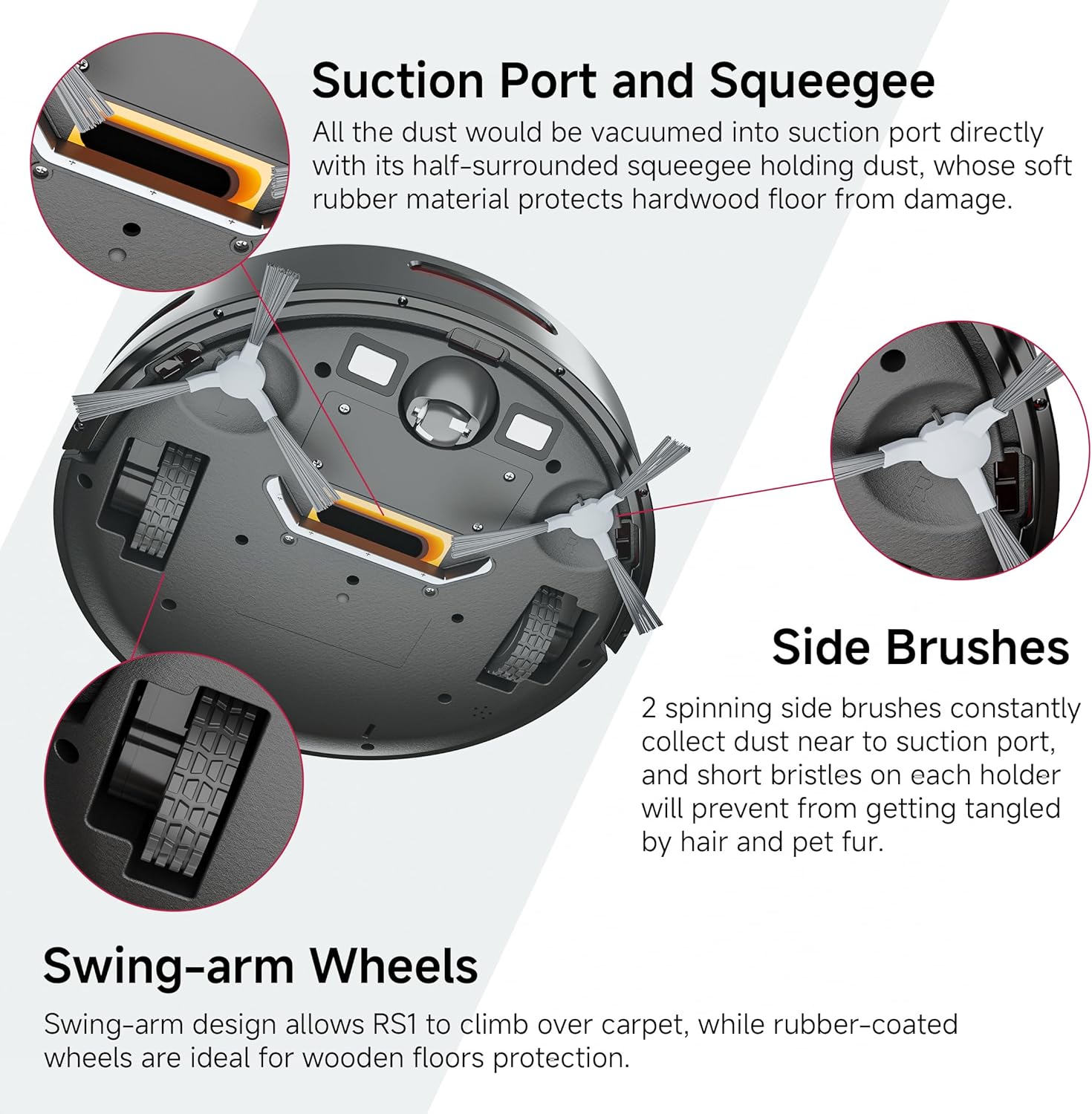
Figure 4.1: Key components of the RS1 robot vacuum, highlighting the direct suction port with squeegee, spinning side brushes, and robust swing-arm wheels designed for various floor types.
- Suction Port and Squeegee: Features a half-surrounded squeegee made of soft rubber material to protect hardwood floors while effectively collecting dust directly into the suction port.
- Side Brushes: Two spinning side brushes constantly collect dust near the suction port. Their short bristles are designed to prevent tangling by hair and pet fur.
- Swing-arm Wheels: The swing-arm design allows the RS1 to climb over carpets, while the rubber-coated wheels provide protection for wooden floors.
- Dustbin: Located at the rear of the robot, easily removable for emptying.
- Sensors: Equipped with 3 sets of anti-fall and anti-collision sensors to detect obstacles and prevent drops.
4.2 Charging Dock
The charging dock serves as the home base for your robot, where it automatically returns to recharge after cleaning or when its battery is low.
4.3 Remote Control
The remote control provides convenient access to most functions, including starting/stopping, changing cleaning modes, and sending the robot back to its charging dock.
5. Setup and Initial Use
5.1 Charging Dock Placement
- Place the charging dock against a wall in an open, uncluttered area.
- Ensure there is at least 0.5 meters (1.6 feet) of clear space on both sides of the dock and 1.5 meters (4.9 feet) in front of it.
- Plug the power adapter into the charging dock and then into a wall outlet.
5.2 Installing Side Brushes
Align the side brushes with the square posts on the bottom of the robot and press down until they click into place.
5.3 Initial Charging
Place the robot on the charging dock, ensuring the charging contacts on the robot align with those on the dock. The robot will begin charging automatically. For first-time use, fully charge the robot for at least 6 hours.

Figure 5.1: The RS1 robot vacuum automatically returning to its charging dock, illustrating its self-recharging capability when cleaning is complete or battery is low.
5.4 Connecting to the App (Optional)
For enhanced control and scheduling features, download the "Smart Life" or "Tuya Smart" app from your smartphone's app store. Follow the in-app instructions to connect your RS1 robot vacuum to your home's 2.4G Wi-Fi network.

Figure 5.2: The RS1 offers flexible control options, including a dedicated smartphone application, a physical remote control, and integration with voice assistants such as Amazon Alexa and Google Home.
6. Operating Your Robot Vacuum
6.1 Starting a Cleaning Cycle
- Press the Power/Clean button on the robot.
- Alternatively, use the remote control or the mobile app to start cleaning.
6.2 Cleaning Modes
The RS1 offers three distinct cleaning modes to suit various needs:

Figure 6.1: The RS1 robot vacuum features three primary cleaning modes: Auto for general area cleaning, Spot for concentrated cleaning of specific dirty areas, and Edge for thorough cleaning along walls and corners.
- Auto Mode: Ideal for entire home cleaning. The robot navigates systematically to cover the maximum area.
- Spot Mode: For particular area(s) cleaning. The robot cleans in a concentrated spiral pattern for intense cleaning of a small, dirty area.
- Edge Mode: For corners and edges. The robot cleans along walls and furniture edges to ensure thorough coverage.
6.3 Automatic Recharging
The RS1 is designed to automatically return to its charging dock when cleaning is finished or when the battery level is low, ensuring it's always ready for the next cleaning cycle.
6.4 Navigation and Obstacle Avoidance
Equipped with 3 sets of anti-fall and anti-collision sensors, the RS1 intelligently detects and avoids obstacles, stairs, and drops, ensuring safe and efficient cleaning.

Figure 6.2: The RS1 robot vacuum demonstrates its advanced sensor capabilities by effectively avoiding falling down steps and bumping into furniture, ensuring safe and efficient navigation.
6.5 Low Profile Design
With a height of less than 3 inches (2.99 inches), the erabros RS1 can easily access and clean areas under beds, furniture, and other hard-to-reach hidden spaces, ensuring comprehensive cleaning.

Figure 6.3: The low-profile design of the erabros RS1 allows it to effortlessly clean under furniture such as sofas and beds, reaching dust and debris in otherwise inaccessible areas.
6.6 Versatile Floor Cleaning
The RS1 boasts a 0.6-inch climbing capability, allowing it to seamlessly transition and vacuum debris from both hard floors and carpets, providing versatile cleaning for various home environments.

Figure 6.4: The erabros RS1 robot vacuum demonstrates its ability to clean across different floor types, seamlessly transitioning from hard floors to carpets to ensure comprehensive debris collection.
7. Maintenance and Care
Regular maintenance ensures optimal performance and extends the lifespan of your robot vacuum.
7.1 Emptying the Dustbin
- Press the dustbin release button and pull out the dustbin.
- Open the dustbin cover and empty its contents into a trash can.
- Rinse the dustbin with water if necessary (ensure it is completely dry before re-installing).
7.2 Cleaning the Filter
- Remove the filter from the dustbin.
- Tap the filter against a trash can to remove dust and debris.
- Do not wash the filter with water. Replace the filter every 3-6 months, depending on usage.
7.3 Cleaning Side Brushes
- Periodically check the side brushes for tangled hair or debris.
- Carefully pull off any tangled hair or threads. Use the provided cleaning tool if necessary.
- The RS1 features a tangle-free suction design, minimizing the need to clean tangled brush rollers, especially beneficial for homes with pets.

Figure 7.1: The innovative tangle-free design of the erabros RS1 (left) compared to traditional brush roller systems (right), illustrating how direct suction prevents hair and pet fur from tangling, reducing maintenance.
7.4 Cleaning Sensors and Charging Contacts
- Wipe the anti-drop sensors, anti-collision sensors, and charging contacts on both the robot and the charging dock with a clean, dry cloth.
- Ensure these components are free of dust and debris for proper operation.
8. Troubleshooting
If your robot vacuum encounters an issue, refer to the following table for common problems and solutions:
| Problem | Possible Cause | Solution |
|---|---|---|
| Robot does not turn on. | Battery is low or depleted. | Place the robot on the charging dock and ensure it is charging. Allow several hours for a full charge. |
| Robot does not charge. | Charging contacts are dirty or misaligned. | Clean the charging contacts on both the robot and the dock with a dry cloth. Ensure the robot is properly seated on the dock. |
| Robot gets stuck frequently. | Obstacles in the cleaning path (cords, rugs, furniture). | Clear the area of loose cables, small rugs, or other objects. Use virtual walls if available. |
| Poor cleaning performance. | Dustbin is full, filter is clogged, or side brushes are tangled. | Empty the dustbin. Clean or replace the filter. Clean the side brushes. |
| Robot does not return to charging dock. | Charging dock is blocked or not powered. | Ensure the charging dock is plugged in and has clear space around it. Clean charging contacts. |
9. Specifications
| Feature | Detail |
|---|---|
| Model | RS1 |
| Brand | erabros |
| Battery Type | 4400 mAh Li-ion |
| Runtime | Up to 140 minutes |
| Cleaning Area | Up to 1500 sqft |
| Height | 2.99 inches (approx. 7.6 cm) |
| Climbing Capability | 0.6 inches (approx. 1.5 cm) |
| Special Features | Tangle Free Suction, Automatic Recharge, Anti-fall & Anti-collision Sensors |
| Control Options | App, Remote Control, Voice Control (Alexa, Google Home) |
| Color | Black |
| Item Weight | 3.27 kg |
| Parcel Dimensions | 43.61 x 34.8 x 11.4 cm |
10. Warranty and Customer Support
erabros products are manufactured to the highest quality standards. For warranty information or technical support, please refer to the warranty card included in your package or contact erabros customer service through the official website or your purchase platform.
Please have your model number (RS1) and purchase details ready when contacting support.
Related documentsRS1


Ask a question about this manual
Ask about setup, troubleshooting, compatibility, parts, safety, or missing instructions. Manuals+ will review the question and use this page’s manual context to help answer it.