
1. Introduction
This manual provides instructions for the Haroar remote control, designed for use with specific Kaisai room air conditioner models. Please read this manual thoroughly before using the remote control to ensure proper operation and to maximize the lifespan of your device.
This remote control allows you to manage various functions of your Kaisai air conditioner, including power, mode selection, temperature adjustment, fan speed, and timer settings.
2. Product Overview
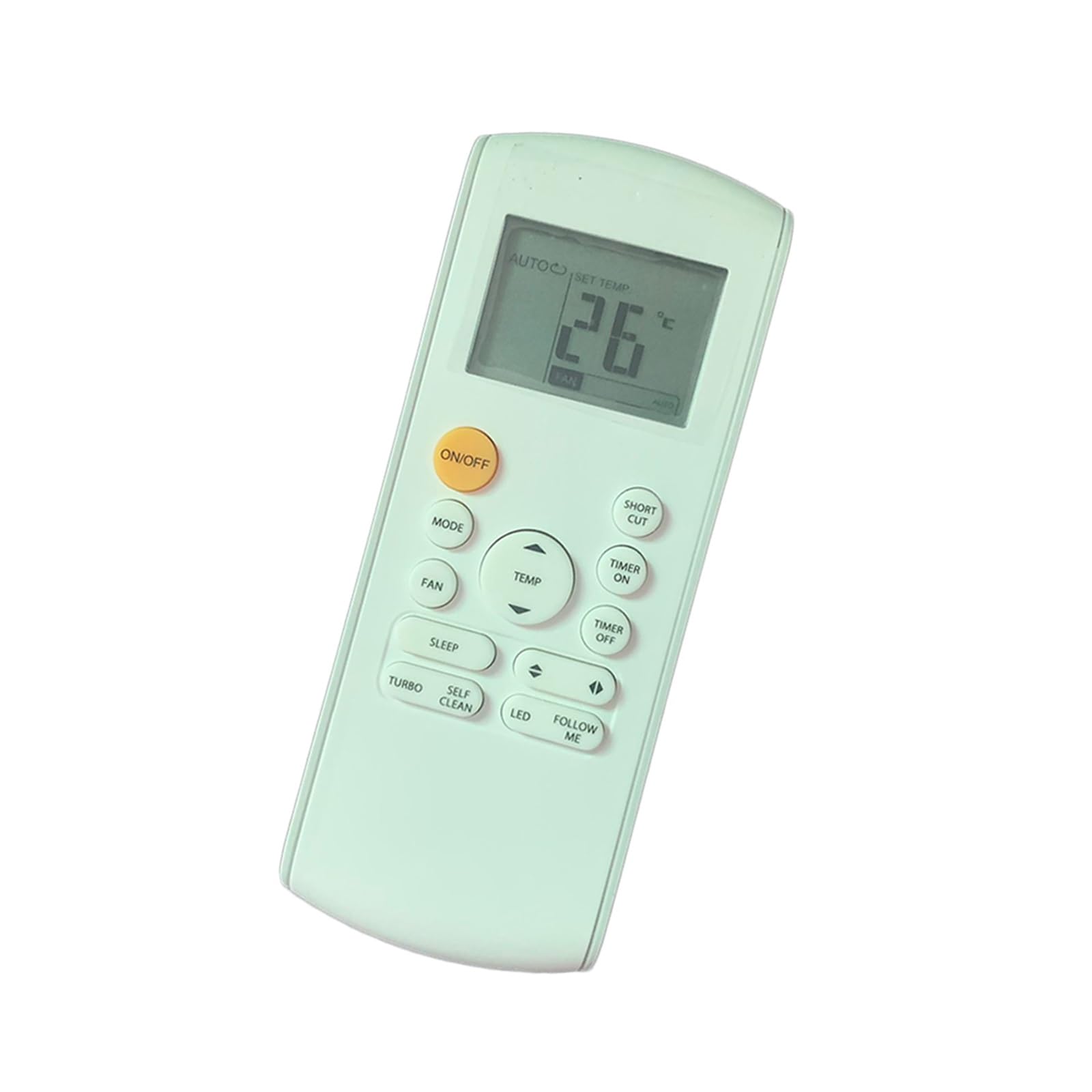
Image 1: Front and back view of the Haroar remote control. The front displays an LCD screen and various control buttons, while the back shows the battery compartment cover.
The remote control features an LCD display at the top, showing current settings such as temperature, mode, and fan speed. Below the display are various buttons for controlling the air conditioner's functions.
3. Setup
3.1 Battery Installation
- Open the battery compartment cover on the back of the remote control by sliding it downwards.
- Insert two AAA 1.5V batteries (not included), ensuring the positive (+) and negative (-) terminals match the markings inside the compartment.
- Close the battery compartment cover by sliding it back into place until it clicks securely.
Note: Replace batteries when the remote control's display dims or its operating range decreases. Do not mix old and new batteries, or different types of batteries.
4. Operating Instructions
Point the remote control directly at the air conditioner's receiver when operating. Ensure there are no obstructions between the remote control and the air conditioner.
4.1 Button Functions
- ON/OFF: Press to turn the air conditioner on or off.
- MODE: Press repeatedly to cycle through available operating modes: AUTO, COOL, DRY, FAN, HEAT (if applicable to your AC model).
- FAN: Press to adjust the fan speed. Options typically include AUTO, LOW, MEDIUM, HIGH.
- TEMP ▲ / ▼: Press the up arrow (▲) to increase the temperature setting, and the down arrow (▼) to decrease it.
- SLEEP: Activates or deactivates the Sleep mode, which adjusts temperature and fan speed for comfortable sleep and energy saving.
- TURBO: Activates or deactivates the Turbo mode for rapid cooling or heating.
- SELF CLEAN: Initiates the self-cleaning function of the indoor unit (if supported by your AC model).
- LED: Turns the display light on the indoor unit on or off.
- FOLLOW ME: Activates the Follow Me function, allowing the remote control to act as a thermostat, sensing the temperature at its location and adjusting the AC accordingly.
- SHORT CUT: Saves your current settings (mode, temperature, fan speed) as a shortcut. Pressing it again recalls these settings.
- TIMER ON: Sets a timer for the air conditioner to turn on automatically.
- TIMER OFF: Sets a timer for the air conditioner to turn off automatically.
5. Maintenance
5.1 Cleaning the Remote Control
Wipe the remote control with a soft, dry cloth. Do not use liquid cleaners, waxes, or solvents, as these may damage the surface or internal components.
5.2 Battery Replacement
Refer to section 3.1 for instructions on replacing batteries. Always dispose of used batteries responsibly according to local regulations.
6. Troubleshooting
- Remote control not working:
- Check if the batteries are inserted correctly with the correct polarity.
- Replace old batteries with new ones.
- Ensure there are no obstructions between the remote control and the air conditioner's receiver.
- Make sure you are within the effective operating range (typically 8 meters).
- Display is dim or blank:
- Batteries are low; replace them.
- Air conditioner not responding to specific commands:
- Verify that the air conditioner is powered on.
- Ensure the remote control is compatible with your specific Kaisai AC model.
7. Specifications
| Brand | Haroar |
| Compatible Devices | Kaisai Air Conditioners (RG57A1B/BGEF, RG57A7B/BGEF, RG57BB/BGE, RG57K7/BGEF) |
| Model Number | Haroar |
| Product Dimensions | 3 x 2 x 1 cm |
| Item Weight | 50 Grams |
| Power Source | 2 x AAA Batteries (not included) |
| Color | One Color |
| Country of Origin | China |