
Aigostar B0D3HP1J15
Aigostar Energy-Saving PTC Ceramic Fan Heater User Manual
Brand: Aigostar | Model: B0D3HP1J15
1. Introduction
Thank you for choosing the Aigostar Energy-Saving PTC Ceramic Fan Heater. This manual provides essential information for the safe and efficient operation of your new appliance. Please read it thoroughly before use and keep it for future reference.
This fan heater utilizes advanced PTC ceramic heating technology for rapid and efficient warmth. It features multiple operating modes, a convenient remote control, wide oscillation, a programmable timer, and comprehensive safety mechanisms to ensure a comfortable and secure heating experience.

Figure 1: Aigostar PTC Ceramic Fan Heater, showcasing its sleek black design and warm air output.
Video 1: Overview of the Aigostar Energy-Saving Fan Heater, demonstrating its rapid heating and oscillation features.
2. Important Safety Instructions
To reduce the risk of fire, electric shock, or injury, always follow these basic safety precautions:
- Read all instructions before using this heater.
- Do not use this heater outdoors.
- This heater is hot when in use. To avoid burns, do not let bare skin touch hot surfaces.
- Keep combustible materials, such as furniture, pillows, bedding, papers, clothes, and curtains at least 3 feet (0.9 m) from the front of the heater and keep them away from the sides and rear.
- Extreme caution is necessary when any heater is used by or near children or invalids and whenever the heater is left operating and unattended.
- Always unplug heater when not in use.
- Do not operate any heater with a damaged cord or plug or after the heater malfunctions, has been dropped or damaged in any manner.
- Do not run cord under carpeting. Do not cover cord with throw rugs, runners, or similar coverings. Arrange cord away from traffic area and where it will not be tripped over.
- To disconnect heater, turn controls to off, then remove plug from outlet.
- Do not insert or allow foreign objects to enter any ventilation or exhaust opening as this may cause an electric shock or fire, or damage the heater.
- To prevent a possible fire, do not block air intakes or exhaust in any manner. Do not use on soft surfaces, like a bed, where openings may become blocked.
- A heater has hot and arcing or sparking parts inside. Do not use it in areas where gasoline, paint, or flammable liquids are used or stored.
- Use this heater only as described in this manual. Any other use not recommended by the manufacturer may cause fire, electric shock, or injury to persons.
- Always plug heaters directly into a wall outlet/receptacle. Never use with an extension cord or relocatable power tap (outlet/power strip).
Built-in Safety Features:
- Overheat Protection: The heater is equipped with an automatic overheat protection system. If the internal temperature exceeds 50°C, the heater will automatically shut off to prevent damage and ensure safety.
- Tip-Over Protection: For added safety, the heater includes a tip-over switch. If the heater is accidentally knocked over or tilted by more than 45 degrees, it will automatically power off.

Figure 2: Visual representation of the heater's dual safety features: automatic shutdown upon overheating (above 50°C) and automatic shutdown if tipped over (beyond 45°).
3. Product Components
The Aigostar PTC Ceramic Fan Heater consists of the main unit and a remote control for convenient operation.
- Main Heater Unit: Contains the PTC ceramic heating elements, fan, LED display, touch control panel, and safety sensors.
- Remote Control: Allows for convenient adjustment of settings from a distance.
Control Panel and Display:
The top of the heater features an intuitive touch control panel with an LED display that shows the current temperature and selected mode.

Figure 3: Close-up view of the heater's LED display and touch control panel, alongside the remote control. Icons indicate Power, Oscillation, Mode, and Timer functions.
4. Setup
Setting up your Aigostar fan heater is quick and easy:
- Unpack: Carefully remove the heater and all accessories from the packaging. Retain packaging for future storage or transport.
- Placement: Place the heater on a firm, level surface. Ensure there is at least 3 feet (0.9 meters) of clear space around the heater to allow for proper airflow and prevent fire hazards. Do not place it on soft surfaces like carpets with long pile, or near curtains or other flammable materials.
- Power Connection: Plug the power cord into a standard 220-240V AC, 50/60Hz electrical outlet. Ensure the outlet is in good condition and not overloaded.
The heater is designed with a convenient top handle for easy portability, allowing you to move it between rooms as needed.

Figure 4: A person carrying the heater by its integrated top handle, illustrating its compact dimensions (57.7cm height, 17.5cm width) and ease of portability.
5. Operating Instructions
Your Aigostar fan heater can be operated using either the touch control panel on the unit or the included remote control.
Power On/Off:
- Press the Power button (⑂) on the control panel or remote control to turn the heater on or off.
Mode Selection:
The heater offers four distinct operating modes:
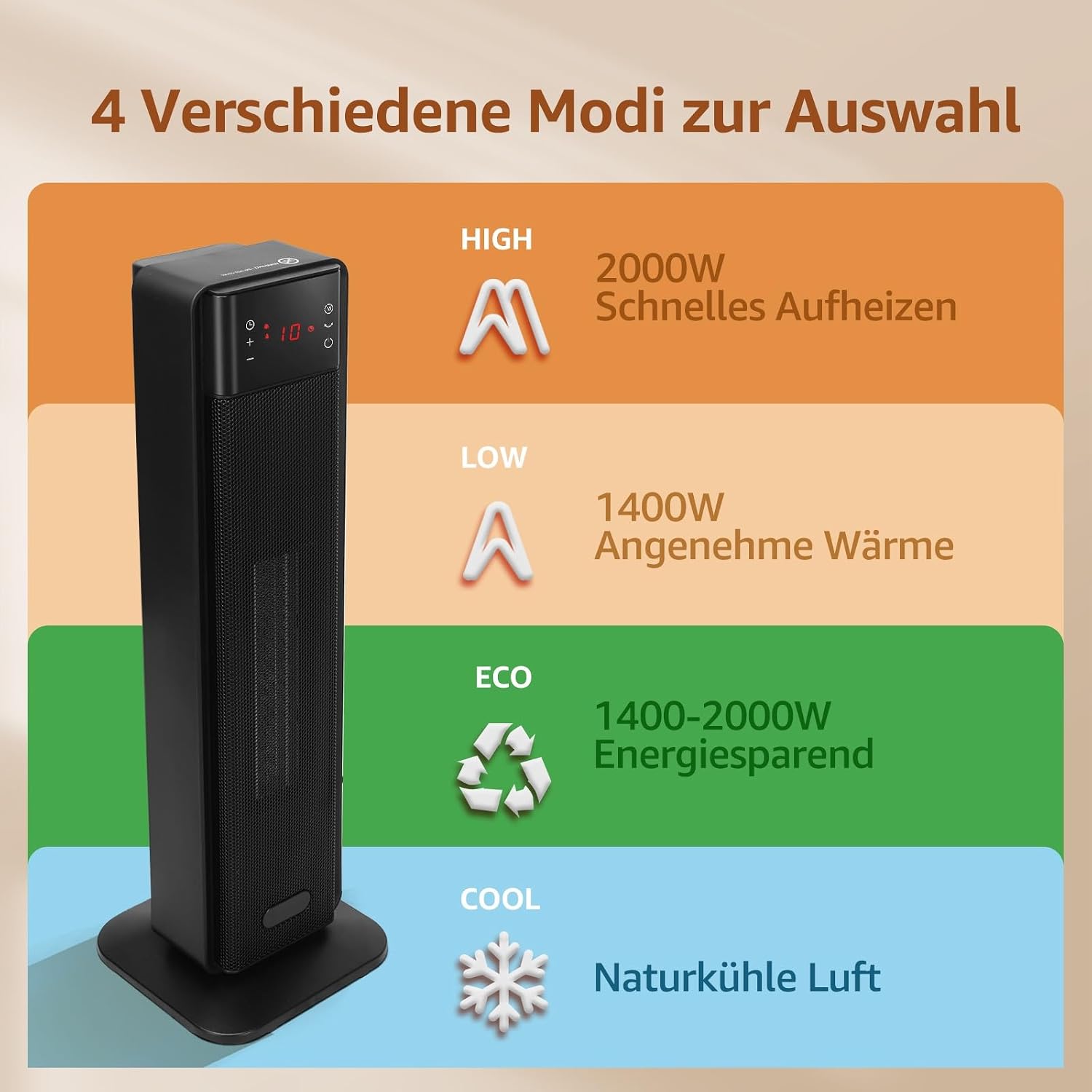
Figure 5: Diagram illustrating the four available modes: HIGH (2000W fast heating), LOW (1400W comfortable warmth), ECO (1400-2000W energy-saving), and COOL (natural cool air).
- Press the Mode button (M) repeatedly to cycle through the modes: HIGH → LOW → ECO → COOL.
- HIGH (2000W): Provides maximum heating power for rapid room warming.
- LOW (1400W): Offers comfortable, continuous warmth at a lower power consumption.
- ECO (1400-2000W): Automatically adjusts heating power to maintain the set temperature, optimizing energy efficiency.
- COOL: Operates as a fan, circulating natural cool air without heating.
Temperature Adjustment:
- In heating modes (HIGH, LOW, ECO), use the '+' and '-' buttons on the control panel or remote to set your desired temperature between 5°C and 35°C.
Oscillation Function:
- Press the Oscillation button (↻) to activate the 70° wide-angle oscillation, distributing heat evenly across the room. Press again to stop oscillation.
24-Hour Timer:
- The timer function allows you to set a specific time for the heater to automatically turn on or off within a 24-hour period.
- Press the Timer button (⏱) and use the '+' and '-' buttons to set the desired hours.

Figure 6: The heater displaying the 24-hour timer function, allowing users to pre-set power-on or power-off times.
Video 2: Demonstration of the Aigostar fan heater's remote control and timer functions, showing how to adjust settings and utilize the automatic screen dimming feature for quiet operation.
6. Maintenance and Cleaning
Regular cleaning and maintenance will help prolong the life of your heater and ensure optimal performance.
- Always unplug the heater from the power outlet and allow it to cool down completely before cleaning.
- Exterior Cleaning: Wipe the exterior surfaces of the heater with a soft, damp cloth. Do not use abrasive cleaners, waxes, or polishes as they may damage the finish.
- Air Intake/Outlet: Use a vacuum cleaner with a brush attachment to gently remove dust and lint from the air intake and outlet grilles. Do not attempt to disassemble the heater for cleaning.
- Storage: If storing the heater for an extended period, cover it with a plastic bag or return it to its original packaging to protect it from dust. Store in a cool, dry place.
Do not immerse the heater in water or any other liquid. Do not allow water to drip into the interior of the heater, as this could create an electric shock hazard.
7. Troubleshooting
If you experience issues with your Aigostar fan heater, please refer to the following common problems and solutions:
| Problem | Possible Cause | Solution |
|---|---|---|
| Heater does not turn on. |
|
|
| Heater produces no heat. |
|
|
| Oscillation not working. |
|
|
| Remote control not working. |
|
|
If the problem persists after trying these solutions, please contact customer support.
8. Specifications
| Feature | Detail |
|---|---|
| Brand | Aigostar |
| Model | B0D3HP1J15 |
| Power | 2000W |
| Heating Technology | PTC Ceramic |
| Material | Ceramic |
| Dimensions (L x W x H) | 17.5 x 17.5 x 57.7 cm |
| Item Weight | 2.69 Kilograms |
| Oscillation Angle | 70° |
| Temperature Range | 5°C - 35°C |
| Timer | 24-Hour |
| Safety Features | Overheat Protection, Tip-Over Protection |
9. Warranty and Support
Aigostar products are manufactured to the highest quality standards. This product comes with a standard manufacturer's warranty. Please refer to the warranty card included in your product packaging for specific terms and conditions.
For technical support, troubleshooting assistance, or warranty claims, please contact Aigostar Customer Service through the retailer where you purchased the product or visit the official Aigostar website for contact information.
Please have your model number (B0D3HP1J15) and purchase date ready when contacting support.
Related documentsB0D3HP1J15

Ask a question about this manual
Ask about setup, troubleshooting, compatibility, parts, safety, or missing instructions. Manuals+ will review the question and use this page’s manual context to help answer it.