
DONGFXK f1d3e4cd-c133-461b-8f3d-077a05f2e88f
Motorized Zebra Blinds User Manual
Model: f1d3e4cd-c133-461b-8f3d-077a05f2e88f
Introduction
This manual provides comprehensive instructions for the installation, operation, and maintenance of your DONGFXK Motorized Zebra Blinds. Please read this manual thoroughly before installation and use to ensure proper function and longevity of your product.
These motorized zebra blinds feature advanced solar charging technology, high-density woven fabric for light control and privacy, and a cordless design for safety and aesthetics. They offer multiple control methods including remote, app, and voice commands.
Product Features
- Advanced Solar Charging: Equipped with rechargeable batteries and complimentary solar panels for sustainable, eco-friendly power.
- High-Density Woven Fabric: Provides excellent light shading, durability, and easy cleaning, allowing for precise light and privacy control.
- Cordless Design: Features a one-piece housing for a seamless look and enhanced safety for homes with children and pets.
- Multiple Control Methods: Supports group remote control (up to 15 blinds), app control, and voice commands via a hub (up to 30 blinds).
- Quiet Operation: The smart motor operates silently, ensuring a peaceful living environment.
Package Contents
Please verify that all components are present before beginning installation.
- Motorized Zebra Blind Unit
- Remote Control
- Solar Panel (Complimentary)
- Mounting Brackets and Hardware
- User Manual
Installation Guide
1. Measuring Your Window
Accurate measurements are crucial for a perfect fit. Determine whether you will use an Inside Mount or Outside Mount.
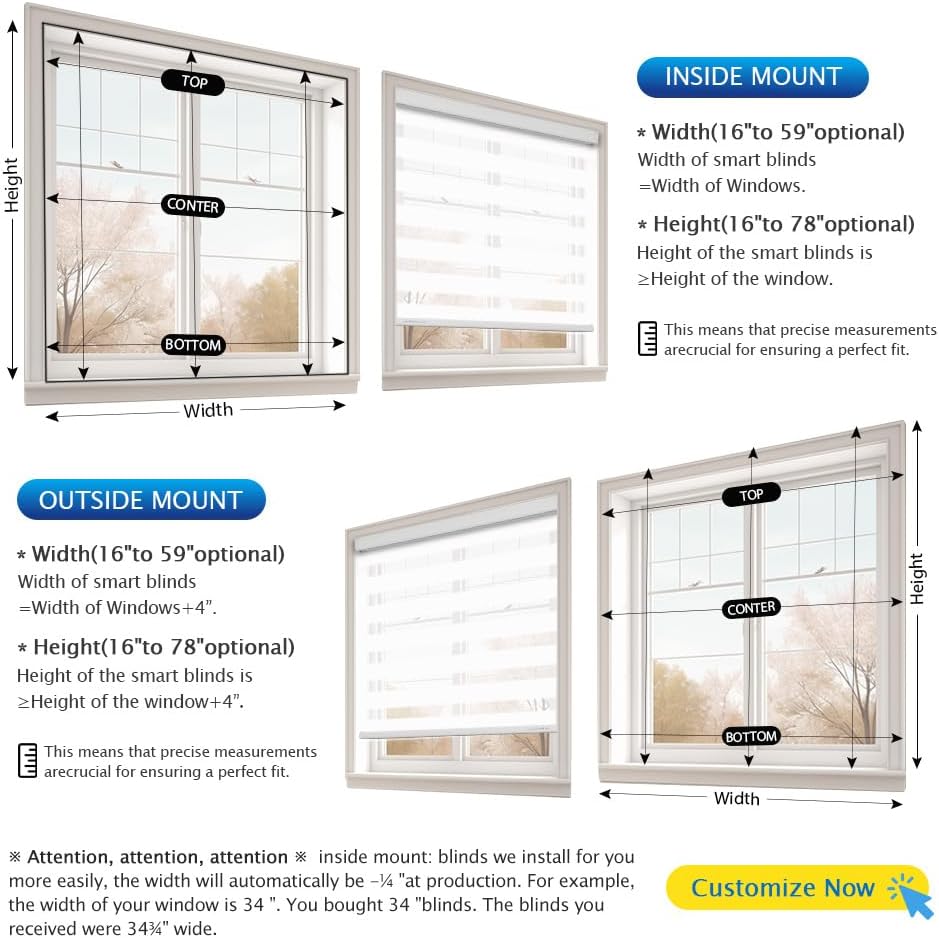
Image: Diagram showing how to measure for inside and outside window mounts for blinds.
- Inside Mount: Measure the exact inside width and height of your window frame. The smart blinds width will be the width of your window. The height should be equal to or greater than the window height. Note: For inside mount, the actual fabric width will be approximately ¼ inch less than the ordered width for easier installation.
- Outside Mount: Measure the desired width and height to cover your window opening. The smart blinds width should be the width of your window plus 4 inches. The height should be the height of your window plus 4 inches.
2. Mounting the Blinds
Follow the specific instructions provided with your mounting hardware. Ensure the brackets are securely fastened to the wall or window frame.
3. Attaching the Solar Panel
If using the solar charging option, ensure the solar panel is placed in an area that receives direct sunlight. The depth of your window frame should be at least 2.5 inches for solar panel installation.

Image: Illustration showing solar panel and USB-C charging options for the blinds.
For first-time use, it is recommended to fully charge the blinds using the solar panel or a USB charger for at least 12 hours.
Operating Instructions
1. Remote Control Operation
The included remote control allows for individual or group control of your blinds.

Image: Hand holding a remote control, demonstrating lowering blinds in a living room.
- Raise/Lower: Use the up and down arrows on the remote to adjust the blinds' position.
- Stop: Press the stop button to halt the blinds at any desired position.
- Group Control: A single remote can control up to 15 blinds simultaneously. Refer to the remote's specific pairing instructions for group setup.
2. App Control (Tuya App)
For advanced control and smart home integration, download the Tuya app on your smartphone.

Image: Smartphone screen displaying the Tuya app interface for controlling blinds in a kitchen setting.
- Download the "Tuya Smart" or "Smart Life" app from your device's app store.
- Register or log in to your account.
- Add your motorized blinds as a new device within the app. Follow the on-screen pairing instructions.
- Once paired, you can control individual blinds, set schedules, and create scenes.
3. Voice Control
Integrate your blinds with smart home assistants like Amazon Alexa or Google Assistant via a compatible hub (sold separately).

Image: Person using voice commands to open blinds in a kitchen, with a smart speaker visible.
- Ensure your blinds are successfully paired with the Tuya app.
- Link your Tuya account to your smart assistant (e.g., Alexa app, Google Home app).
- Use commands such as "Alexa, open the blinds" or "Hey Google, close the living room blinds."
Maintenance
To ensure the longevity and optimal performance of your motorized zebra blinds, follow these maintenance guidelines:
- Cleaning: Spot clean the fabric with a damp cloth as needed. Avoid harsh chemicals or abrasive cleaners.
- Dusting: Regularly dust the blinds and housing with a soft, dry cloth or a vacuum cleaner with a brush attachment.
- Battery Charging: Ensure the solar panel is clean and unobstructed to maximize charging efficiency. If solar charging is insufficient, use the USB charger to fully charge the blinds.
- Motor Care: The motor is designed for quiet operation and requires no user maintenance. Do not attempt to open or repair the motor housing.
Troubleshooting
If you encounter issues with your motorized zebra blinds, refer to the following common problems and solutions:
| Problem | Possible Cause | Solution |
|---|---|---|
| Blinds not responding to remote/app/voice commands. | Low battery; Remote not paired; App/hub connectivity issue. |
|
| Blinds stop working after a period of use. | Power shortage due to long storage/transportation or insufficient charging. | This is often due to low power. Follow these steps:  Image: Close-up of the blind's motor housing with an indicator light, labeled "Firstly". Firstly: Due to the long transportation time, there might be low power inside the battery of the motor. If your curtains stop working after a period of use, there are two ways to try to fix them.  Image: Solar panel connected to the blind, receiving sunlight, labeled "Secondly". Secondly: Place the solar panel under sunlight and plug it in tightly.  Image: Close-up of the blind's motor housing with a red indicator light, labeled "Thirdly". Thirdly: If the motor indicator light is on instead of flashing, then it's charging. Please test after 6-12 hours.  Image: Text box indicating a free charger service, labeled "Fourthly". Fourthly: We can send you a free motor-specific charger ASAP which can solve 99% of charging problems. Please feel free to consult at any time. |
| Blinds not moving smoothly or making unusual noises. | Obstruction in the track; Motor issue. | Check for any obstructions in the blind's path. If the issue persists, contact customer support. |
Specifications
| Feature | Detail |
|---|---|
| Brand | DONGFXK |
| Model Number | f1d3e4cd-c133-461b-8f3d-077a05f2e88f |
| Product Dimensions | 20"L x 16"W (for 16"W x 20"H size) |
| Color | Customized (as per order) |
| Opacity | 0.9 unitless (Light Filtering/Blackout Dual Layer) |
| Operation Mode | Automatic |
| Closure Type | Cordless, Motorized |
| Mounting Type | Inside Mount, Outside Mount |
| Control Type | Individual, Group, Voice, App |
| Power Source | Rechargeable Battery (Solar Charged / USB Charged) |
| Product Care | Spot Clean |
Warranty and Support
DONGFXK is committed to providing high-quality products and excellent customer service. Your motorized zebra blinds come with a manufacturer's warranty covering defects in materials and workmanship.
For any questions, technical assistance, or to request replacement accessories (such as solar panels or chargers), please contact our customer support. We are here to assist you.
Contact information for support is typically found on the product packaging or the seller's official website.
Related documentsf1d3e4cd-c133-461b-8f3d-077a05f2e88f


Ask a question about this manual
Ask about setup, troubleshooting, compatibility, parts, safety, or missing instructions. Manuals+ will review the question and use this page’s manual context to help answer it.