
Liiiyuan F1-807-blue
Contents
Liiiyuan F1-807-blue Throttle Response Controller User Manual
Model: F1-807-blue
1. Introduction
The Liiiyuan F1-807-blue Electronic Throttle Accelerator is designed to enhance your vehicle's driving experience by controlling the throttle opening. It improves throttle response speed and instantaneous acceleration, adapting to various driving habits and conditions. This device offers multiple driving modes to optimize performance and fuel efficiency.
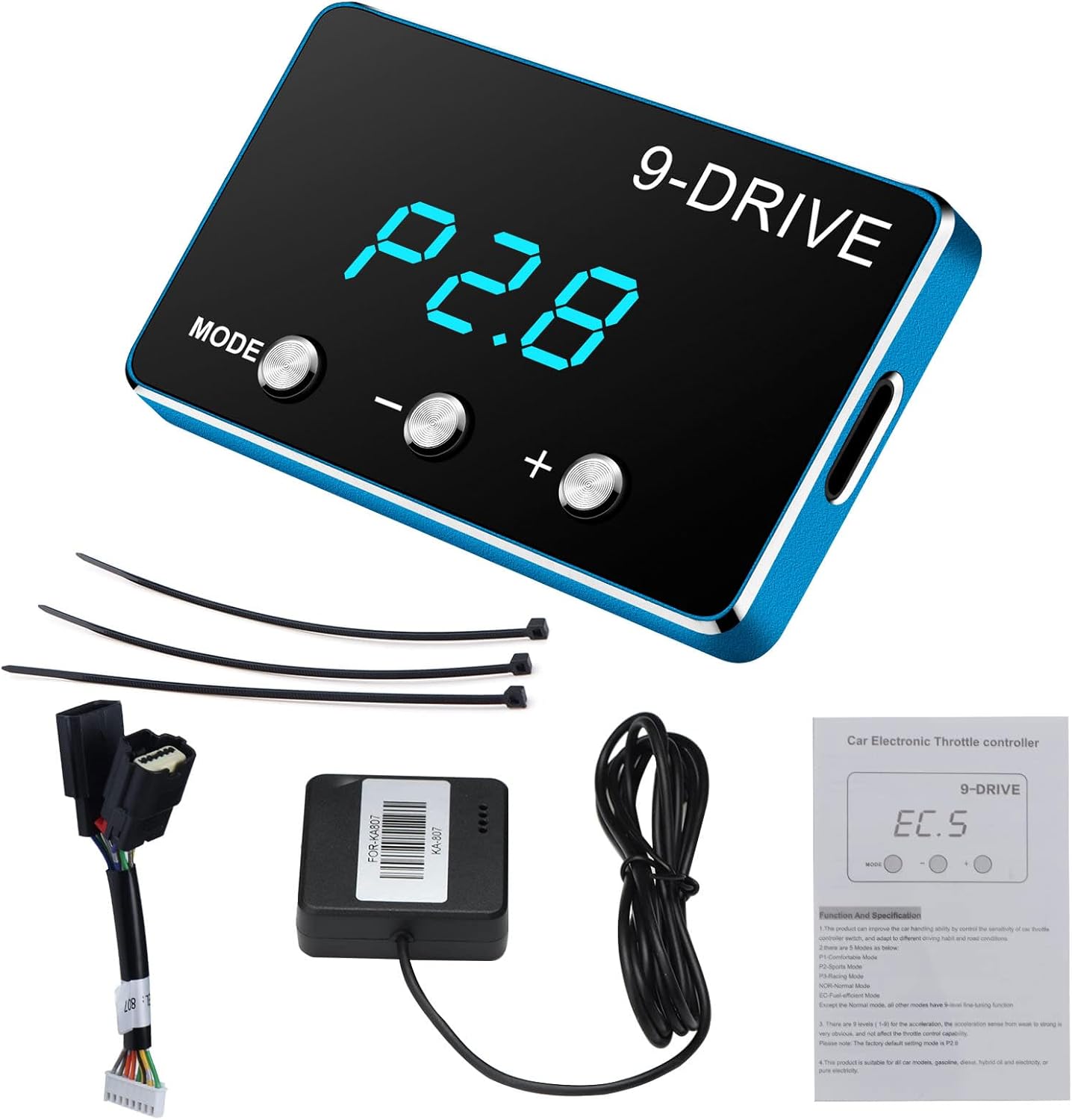
Image: The Liiiyuan F1-807-blue Throttle Response Controller display unit, wiring harness, connector, cable ties, and user manual.
2. Product Features and Modes
The F1-807-blue controller features a three-digit display and offers nine distinct driving modes, each with nine adjustable intensity levels. This allows for fine-tuning the throttle response to match specific driving preferences and road conditions.

Image: Detailed view of the controller's display and buttons. The display shows "P2.8", indicating a mode and intensity level. Buttons are labeled "MODE", "-", and "+".
Available Modes:
- N Original Mode: Returns to the vehicle's factory throttle settings.
- M Manual Mode: General manual transmission comfort mode.
- E Anti-skid Mode: Designed for slippery conditions to prevent wheel spin.
- C Comfort Mode (P1): Speeds up throttle response, enables smoother starts, and improves performance by approximately 15%.
- A Auto Mode: Automatic transmission comfort mode.
- T Intelligent Mode: (Information not detailed in provided data, assumed to be an adaptive mode).
- P Power Mode (P2): Improves instant acceleration and cornering performance, increasing performance by approximately 45%.
- S Sport Mode: Manual gear sport mode.
- E Fuel Saving Mode (EC): Optimizes fuel economy, potentially saving 3-8% fuel.
- R Race Mode (P3): Maximizes throttle response for racing, improving performance by approximately 60%.
- K Parking Mode: (Information not detailed in provided data, assumed to be a low-response mode for parking).
- Anti-theft Mode: (Information not detailed in provided data, assumed to be a security feature).
- Learning Mode: (Information not detailed in provided data, assumed to be for adapting to driving style).
- Carbon Removal Mode: (Information not detailed in provided data, assumed to be for engine cleaning).

Image: Overview of the nine driving modes, including Manual Comfort, Automatic Transmission Comfort, Manual Gear Sport, Automatic Sport, Manual Transmission Racing, Auto Racing, Manual Transmission Fuel-Saving, Automatic Transmission Fuel-Saving, and Original Car Mode.
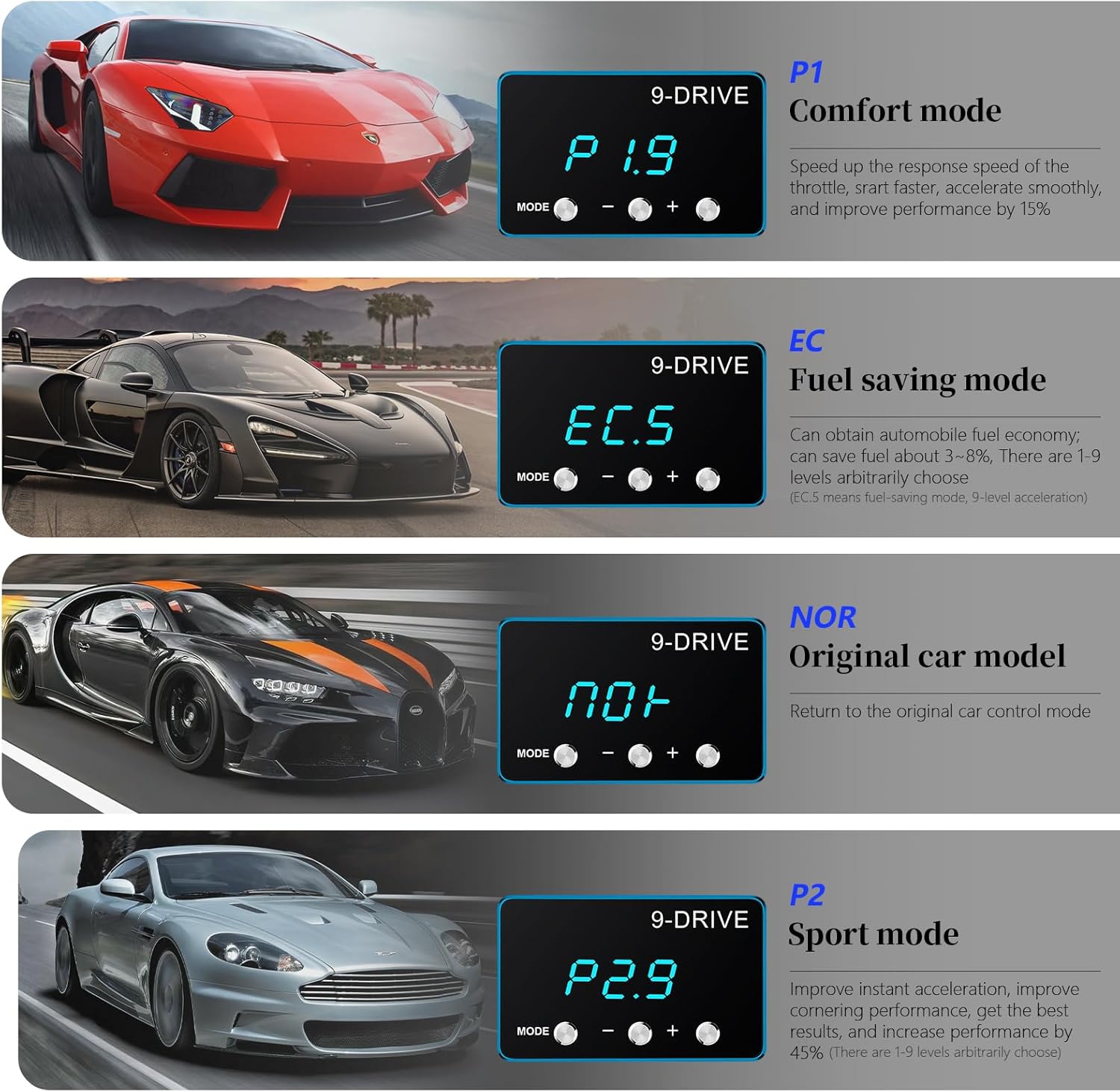
Image: Visual representation of Comfort (P1), Fuel Saving (EC), Original Car (NOR), and Sport (P2) modes with their respective display readings and brief descriptions.
3. Compatibility
The Liiiyuan F1-807-blue Throttle Response Controller is compatible with a wide range of vehicle makes and models. It is essential to verify compatibility by comparing your car's accelerator pedal electronic connection with the provided images to ensure a proper fit.
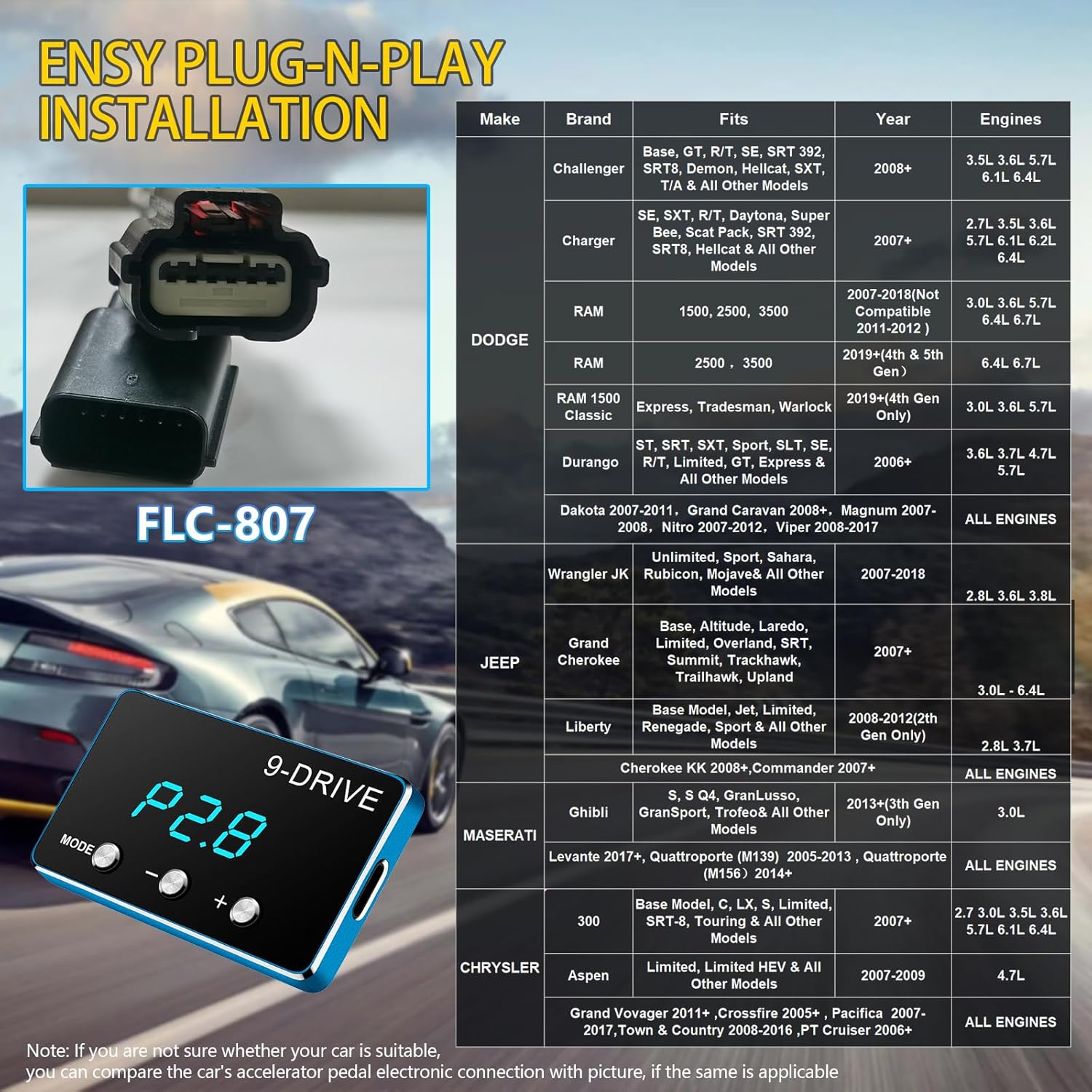
Image: A detailed chart listing compatible vehicle makes (Dodge, Jeep, Maserati, Chrysler), specific models (e.g., Challenger, Charger, RAM, Grand Cherokee, Ghibli), applicable years, and engine types. A close-up of the FLC-807 connector is also shown for visual verification.
4. Installation Guide
Installation of the throttle response controller is a straightforward plug-and-play process. Ensure your vehicle is turned off before beginning the installation.
- Step 1: Locate the Accelerator Pedal Interface. Identify the electronic connector on your car's accelerator pedal.
- Step 2: Unplug the Vehicle Accelerator Pedal Interface. Carefully disconnect the existing connector from the accelerator pedal.
- Step 3: Connect the Controller. Plug the accelerator controller's harness into the vehicle's accelerator pedal interface. Ensure a secure connection.
- Step 4: Mount the Display Unit. Securely attach the throttle controller display unit close to the dashboard using the provided ties or adhesive, ensuring it does not obstruct driving.

Image: A visual step-by-step guide showing the process: 1) Locating the pedal, 2) Unplugging the connector, 3) Connecting the new harness, and 4) Mounting the display unit on the dashboard.
All adjustments and mode changes should only be made under safe driving conditions or while the vehicle is stationary.
5. Operation Guide
The controller features a simple interface for mode selection and intensity adjustment.
- Switch Mode Button: Press the "MODE" button to cycle through the nine available driving modes.
- Reduce Intensity Button (-): Press the "-" button to decrease the intensity level within the current mode. Each mode has 1-9 fine adjustments.
- Increase Strength Button (+): Press the "+" button to increase the intensity level within the current mode. Each mode has 1-9 fine adjustments.
- Three-digit Display: The first two digits indicate the selected mode (e.g., P1, P2, EC, NOR), and the last digit indicates the intensity level (1-9).
6. Troubleshooting
If you encounter issues with your throttle response controller, please refer to the following common problems and solutions:
- Loss of Throttle Control or Check Engine Light:
This can occur if the unit is not properly installed or if there is a compatibility issue. Ensure all connections are secure and that the correct model is used for your vehicle. If the issue persists, disconnect the unit, turn off the vehicle, wait a few minutes, and then restart the vehicle to reset the system. If the problem continues, it may indicate an incompatibility or a faulty unit. Consult the manufacturer for further assistance.
- Cruise Control Deactivation:
In some rare cases, the controller may interfere with cruise control functionality. Verify the installation steps and ensure the unit is correctly seated. If the problem persists, it may be a specific vehicle interaction. Disconnecting the unit should restore original functionality.
- Unit Not Powering On:
Check all cable connections to ensure they are firmly seated. Verify that the vehicle's ignition is on. If the unit still does not power on, the cable or the unit itself may be faulty.
Always ensure the vehicle is safely parked and turned off before attempting any troubleshooting steps involving disconnecting or reconnecting the device.
7. Specifications
| Attribute | Detail |
|---|---|
| Brand | Liiiyuan |
| Model | F1-807-blue |
| Item Weight | 0.64 ounces |
| Product Dimensions | 0.16 x 0.1 x 0.02 inches |
| Manufacturer Part Number | F1 |
| Exterior Finish | Machined |
| Certification | FCC and other product certifications |

Image: The controller unit held in a hand, illustrating its small and exquisite design, with dimensions of 50mm (1.97in) length, 30mm (1.18in) width, and 5.8mm (0.23in) thickness.
8. Package Contents
The product package includes the following items:
- F1-Throttle Controller (Display Screen)
- Adapters (Wiring Harness)
- 3 x Cable Ties
- User Manual

Image: A visual breakdown of the package contents: the display screen, adapters (wiring harness), three cable ties, and the user manual.
9. Care and Maintenance
To ensure the longevity and proper functioning of your Liiiyuan Throttle Response Controller, follow these general care and maintenance guidelines:
- Keep the device clean and free from dust and debris. Use a soft, dry cloth for cleaning.
- Avoid exposing the device to extreme temperatures, direct sunlight for prolonged periods, or excessive moisture.
- Ensure all connections remain secure. Periodically check the wiring for any signs of wear or damage.
- Do not attempt to disassemble or modify the device, as this will void any warranty and may cause damage.
10. Warranty and Support
The product has FCC and other relevant product certifications. For any questions regarding the use of the product, you may send an email to the manufacturer. The standard return policy allows for refund or replacement within 30 days of purchase.
For support, please refer to the contact information provided with your purchase documentation or on the official Liiiyuan website.
Ask a question about this manual
Ask about setup, troubleshooting, compatibility, parts, safety, or missing instructions. Manuals+ will review the question and use this page’s manual context to help answer it.