1. Introduction
This manual provides essential information for the safe and effective operation, setup, and maintenance of your YESWELDER TIG-200P ACDC 200A AC/DC Aluminum TIG Welder. This versatile machine offers multiple welding processes, including STICK, AC TIG, DC TIG, AC Pulse TIG, DC Pulse TIG, and Spot Welding, making it suitable for a wide range of applications, including aluminum welding. Please read this manual thoroughly before operating the equipment.

Figure 1: YESWELDER TIG-200P ACDC Welder and accessories.
2. Safety Information
Welding operations involve significant risks. Always adhere to safety precautions to prevent injury or damage. This section outlines general safety guidelines. Refer to local and national safety standards for comprehensive information.
- Eye and Face Protection: Always wear a welding helmet with appropriate shade lenses to protect against arc rays and sparks.
- Body Protection: Wear flame-resistant clothing, heavy-duty gloves, and safety shoes. Avoid loose clothing.
- Ventilation: Ensure adequate ventilation to remove welding fumes and gases from the work area.
- Fire Prevention: Keep a fire extinguisher nearby. Remove flammable materials from the welding area.
- Electrical Safety: Ensure proper grounding. Do not operate the welder in wet conditions. Inspect cables for damage before use.
- Gas Cylinder Safety: Secure gas cylinders to prevent tipping. Use appropriate regulators and hoses.
- Work Area: Keep the work area clean and free of clutter. Ensure good lighting.
3. Product Features and Components
The YESWELDER TIG-200P ACDC is designed for versatility and ease of use, featuring a large LED display and multiple welding functions.
3.1 Multi-Process Capabilities
This 6-in-1 welder supports various welding modes to meet diverse project requirements:
- STICK Welding: For general purpose welding with coated electrodes.
- AC TIG (HF TIG): High-frequency TIG welding for aluminum and magnesium.
- DC TIG (HF TIG): High-frequency TIG welding for stainless steel, carbon steel, and copper.
- AC Pulse TIG: Enhanced control for thin aluminum materials, reducing heat input.
- DC Pulse TIG: Improved control for thin materials, reducing distortion.
- Spot Welding: For quick, precise spot welds.

Figure 2: The 6-in-1 multi-process capabilities of the TIG-200P ACDC welder.
3.2 Control Panel and Display
The large LED display provides clear visibility of welding parameters, function modes, and current settings, allowing for precise adjustments.

Figure 3: Enhanced LED Panel for clear parameter display and adjustment, featuring Downslope & Post control for improved weld quality.
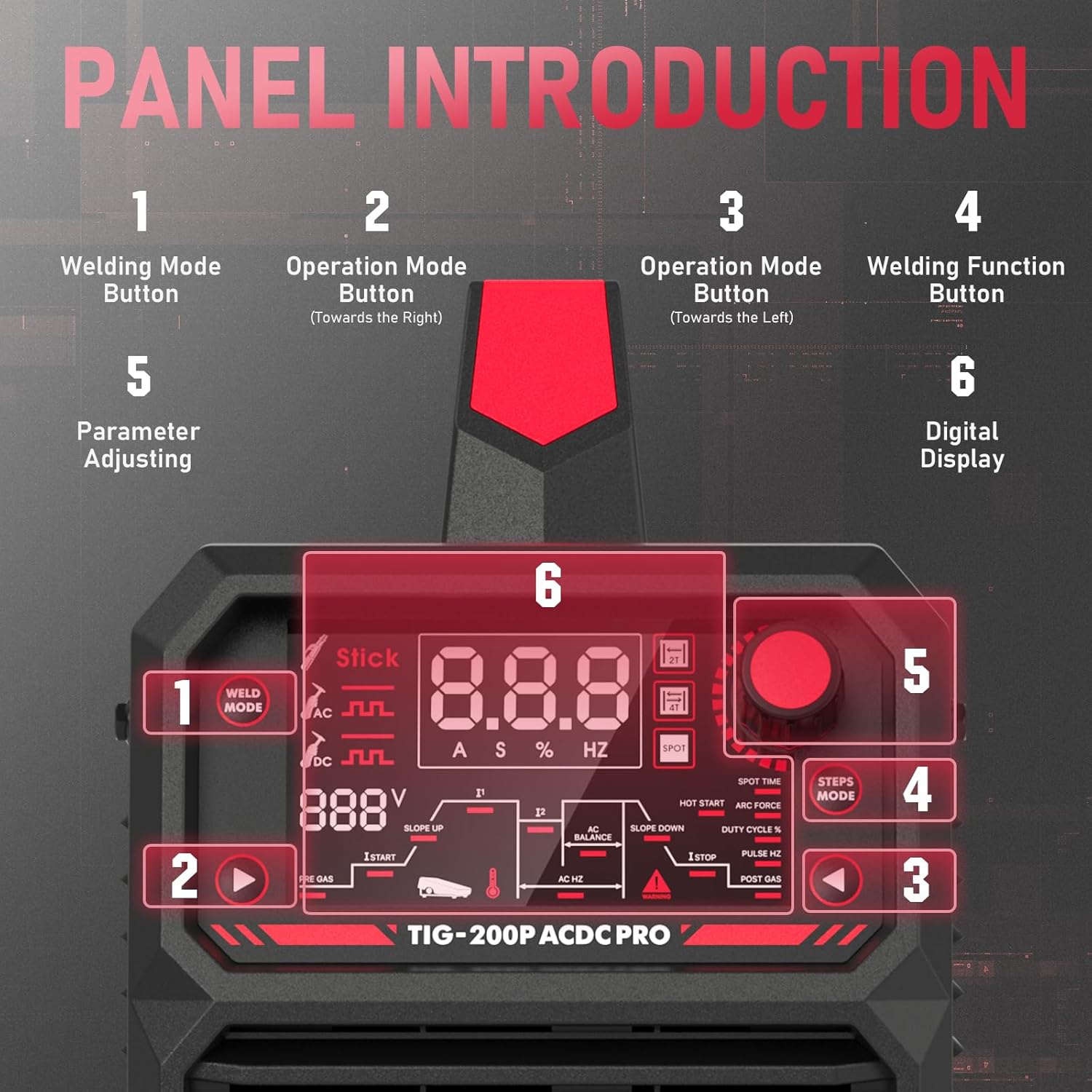
Figure 4: Detailed view of the control panel with numbered functions for easy navigation and parameter adjustment.
3.3 Portability
Weighing only 16.47 lbs, the TIG-200P ACDC is designed for easy transport and maneuverability in various work environments.

Figure 5: The compact and lightweight design of the TIG-200P ACDC welder.
3.4 Gas Regulator
The included Argon/CO2 flow meter gas regulator provides precise gas flow control, essential for quality TIG and MIG welding. It features a flow tube reading from 0-60 CFH and a pressure gauge from 0-4000 PSI.
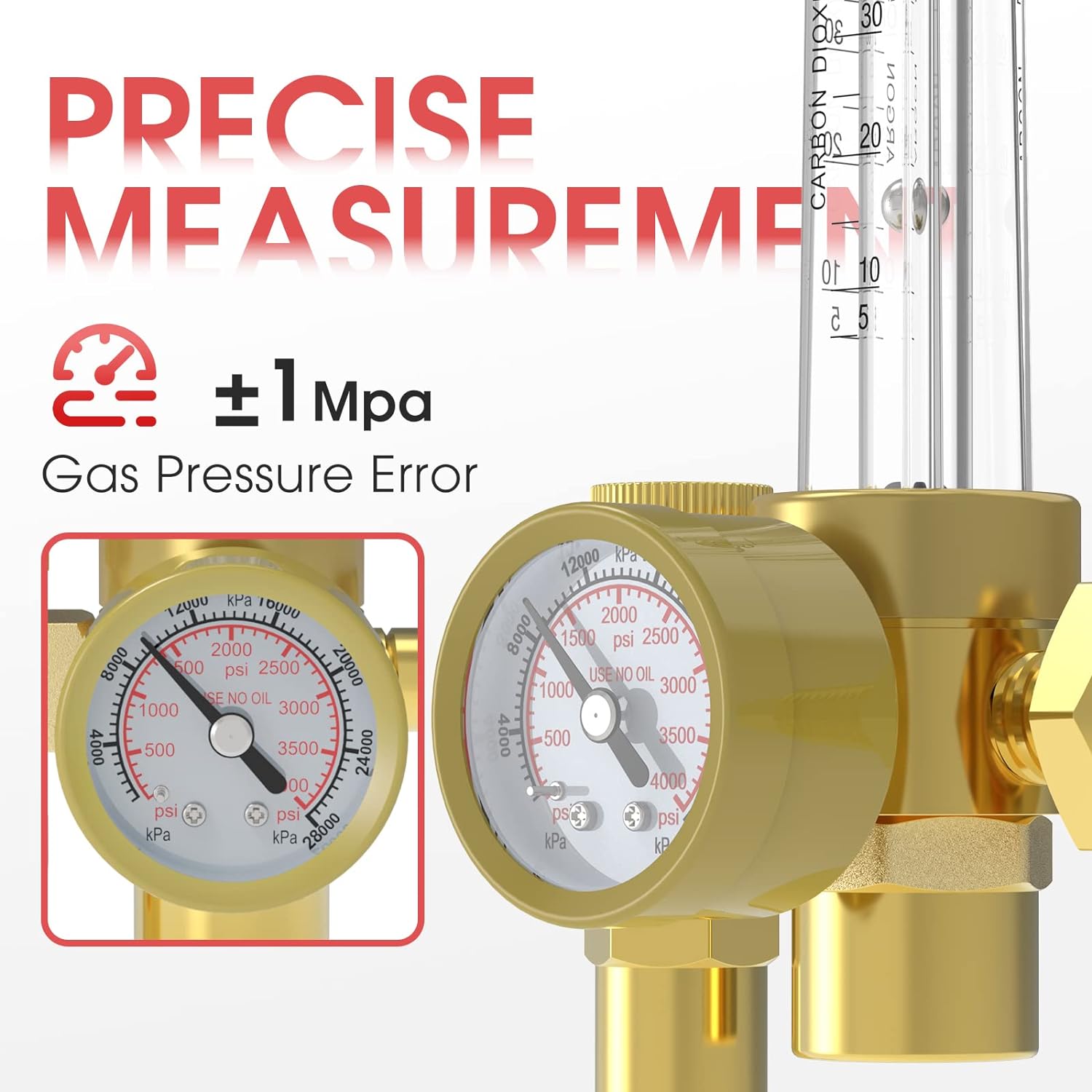
Figure 6: The gas regulator for precise gas flow and pressure measurement.
4. Setup
Proper setup is crucial for safe and efficient operation.
4.1 Power Connection
- The TIG-200P ACDC supports dual voltage input (110V/220V). Ensure the correct power cord and plug are used for your power supply.
- Connect the welder to a dedicated circuit with appropriate overcurrent protection.
4.2 Ground Clamp Connection
- Connect the ground clamp cable to the appropriate terminal on the welder.
- Attach the ground clamp securely to the workpiece or a sturdy metal workbench that is electrically connected to the workpiece.
4.3 TIG Torch Connection
- Connect the TIG torch cable to the designated TIG torch connector on the front panel.
- Ensure the connection is tight and secure.
4.4 Gas Regulator and Cylinder Connection
Connect the gas regulator to your Argon or Argon/CO2 gas cylinder. The regulator comes with various connection options for compatibility.
- Ensure the gas cylinder is secured upright.
- Attach the regulator to the cylinder valve, ensuring a tight seal.
- Connect the gas hose from the regulator to the gas inlet on the welder.

Figure 7: Three common connection types for the gas regulator.
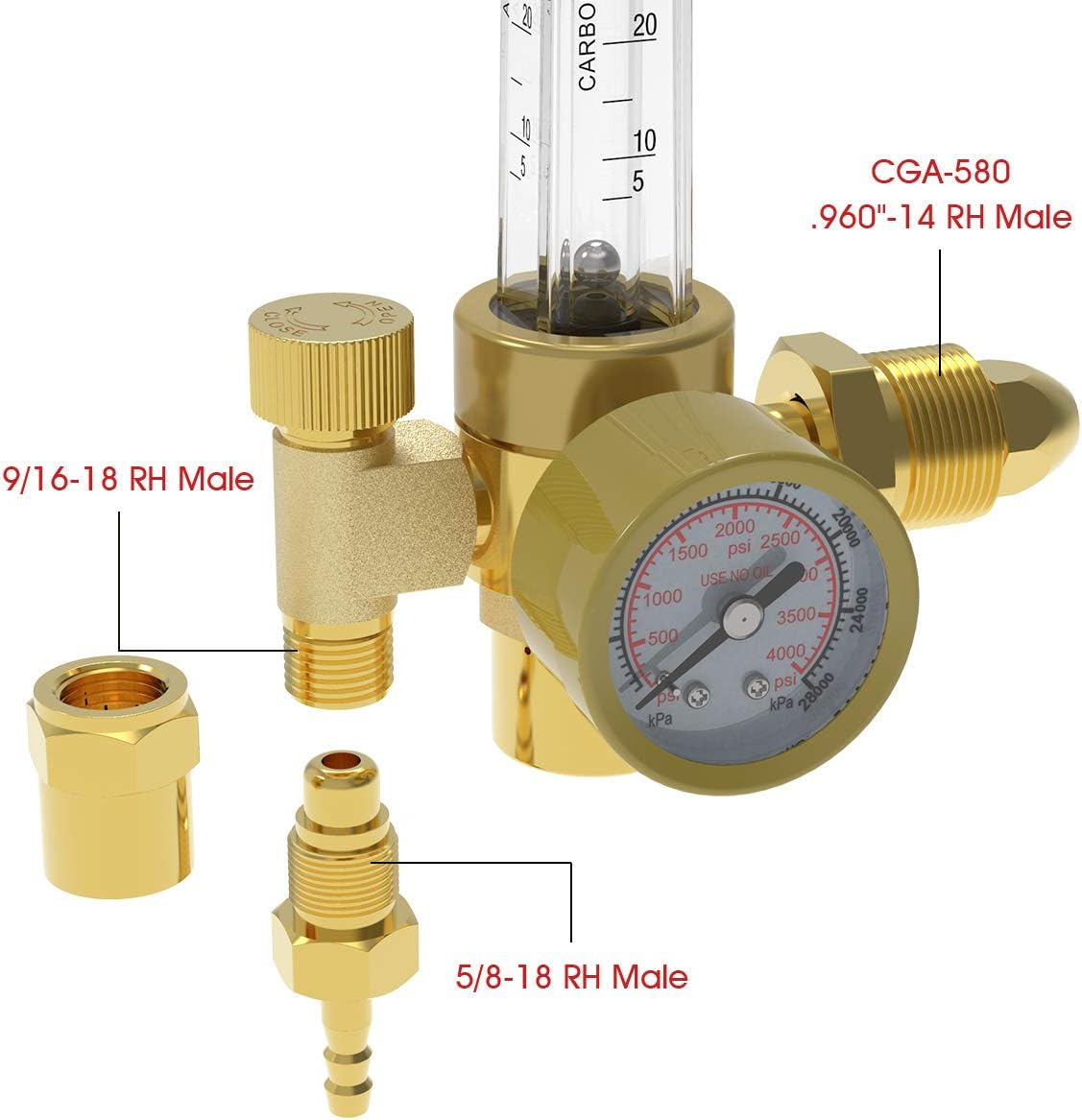
Figure 8: Detailed view of the gas regulator's connection points and detachable accessories.
5. Operating Instructions
Follow these steps for basic operation of your TIG-200P ACDC welder.
5.1 Power On and Mode Selection
- Turn on the main power switch located on the rear of the machine.
- Use the Welding Mode Button (1 in Figure 4) to cycle through STICK, AC TIG, DC TIG, AC Pulse TIG, DC Pulse TIG, and Spot Welding modes.
- Use the Operation Mode Buttons (2 and 3 in Figure 4) to navigate through sub-modes or parameter groups.
5.2 Parameter Adjustment
The large LED display (6 in Figure 4) will show the current selected parameter. Use the Parameter Adjusting knob (5 in Figure 4) to modify values.
- Current (A): Adjust welding amperage based on material thickness and type.
- Pulse Features: For Pulse TIG modes, adjust pulse frequency (Hz), pulse width, and background current.
- AC Balance: For AC TIG, adjust the AC balance to control cleaning action and penetration.
- Downslope & Post Gas: Adjust downslope time to gradually reduce current at the end of a weld, and post-gas flow time to protect the cooling weld puddle and tungsten.
- Hot Start & Arc Force: For STICK welding, these parameters assist with arc ignition and prevent electrode sticking.
5.3 Aluminum Welding (AC TIG)
The TIG-200P ACDC utilizes a software-controlled square wave for AC TIG, which is ideal for welding aluminum up to 4/25" (approximately 4mm). Adjusting the AC balance and frequency is key to achieving optimal results with aluminum.
5.4 Gas Flow Adjustment
- Slowly open the gas cylinder valve.
- Adjust the regulator knob to set the desired gas flow rate (CFH) as indicated by the ball in the flow tube. Typical TIG welding flow rates range from 10-20 CFH.
6. Maintenance
Regular maintenance ensures the longevity and optimal performance of your welder.
- Cleaning: Periodically clean the welder's exterior with a dry, soft cloth. Use compressed air to blow out dust from inside the machine, especially from cooling vents. Ensure the machine is unplugged before cleaning.
- Cable Inspection: Regularly inspect all welding cables, power cords, and gas hoses for cuts, cracks, or damage. Replace damaged components immediately.
- Consumables: Check and replace TIG torch consumables (tungsten electrodes, collets, collet bodies, nozzles) as needed. Ensure tungsten is properly ground.
- Connections: Verify that all electrical and gas connections are tight and secure.
7. Troubleshooting
This section addresses common issues you might encounter. For problems not listed here, contact customer support.
7.1 No Power
- Check Power Cord: Ensure the power cord is securely plugged into both the welder and the power outlet.
- Circuit Breaker: Verify that the circuit breaker has not tripped.
- Main Switch: Confirm the welder's main power switch is in the 'ON' position.
7.2 No Arc
- Ground Clamp: Ensure the ground clamp is securely attached to the workpiece and has good electrical contact.
- TIG Torch Connection: Check that the TIG torch is properly connected to the welder.
- Welding Mode: Verify that the correct welding mode is selected for the application.
- Consumables: Inspect the tungsten electrode for proper installation and condition.
7.3 Poor Weld Quality
- Gas Flow: Check the gas flow rate on the regulator. Insufficient or excessive gas flow can lead to porosity.
- Material Cleanliness: Ensure the workpiece is clean and free of contaminants (oil, rust, paint).
- Parameters: Adjust welding current, pulse settings, and AC balance (for aluminum) according to the material and thickness.
- Tungsten Condition: A contaminated or improperly ground tungsten electrode can cause poor arc stability and weld quality.
8. Specifications
| Feature | Specification |
|---|---|
| Model | TIG-200P ACDC |
| Input Voltage | 110V/220V Dual Voltage |
| Welding Modes | STICK, AC TIG, DC TIG, AC Pulse TIG, DC Pulse TIG, Spot Welding |
| Max Aluminum Thickness (AC TIG) | Up to 4/25" (approx. 4mm) |
| Gas Flow Gauge Range | 0 - 60 CFH |
| Gas Pressure Gauge Range | 0 - 4000 PSI |
| Weight | 16.47 lbs |
| Dimensions (L x W x H) | Approximately 8.66" x 5.91" x 15.35" |
9. Warranty and Support
For warranty information, technical support, or service inquiries, please contact YESWELDER customer service. Keep your purchase receipt as proof of purchase for warranty claims.
Visit the official YESWELDER website or refer to your product packaging for the most current contact information and warranty details.


