Introduction
The WD Elements Portable External Hard Drive offers reliable and expansive storage for your digital life. Designed for convenience and performance, it provides fast data transfers and seamless connectivity with both USB 3.2 Gen 1 and USB 3.0 devices, making it ideal for backing up photos, videos, music, and important documents on the go.
Key Features
- World’s First 6TB 2.5” Portable Hard Drive
- Plug-and-play expandability
- Vast capacities up to 6TB to store your photos, videos, music, important documents and more
- SuperSpeed USB 3.2 Gen 1 (5Gbps)

The WD Elements Portable External Hard Drive, a compact and sleek device for data storage.
What's in the Box
Your WD Elements Portable External Hard Drive package includes the following items:
- WD Elements Portable hard drive
- SuperSpeed USB-A cable (5Gbps)
- Quick install guide
Setup Guide
System Requirements
To ensure optimal performance and compatibility, your computer should meet the following requirements:
- Windows 10, 8.1, or 7
- macOS (requires reformatting)
- Available USB 3.0 or USB 3.2 Gen 1 port (for SuperSpeed performance)
- Backward compatible with USB 2.0 ports (at USB 2.0 speeds)
Connecting Your Drive
Follow these steps to connect your WD Elements Portable External Hard Drive:
- Locate the SuperSpeed USB-A cable included in the box.
- Connect the smaller end of the USB cable to the USB port on your WD Elements drive.
- Connect the larger end of the USB cable to an available USB 3.0 or USB 3.2 Gen 1 port on your computer. If a USB 3.0/3.2 port is not available, you can use a USB 2.0 port, but data transfer speeds will be limited.
- The drive will be automatically detected by your operating system. For Windows, it will appear as a new drive letter in 'This PC' or 'My Computer'. For macOS, it will appear on your desktop or in Finder.
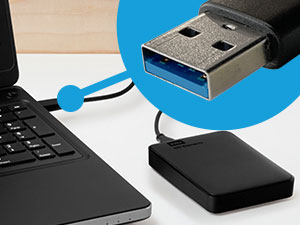
The USB 3.0 cable connecting the WD Elements drive to a laptop, ensuring fast data transfer.
Operating Your WD Elements Drive
Using the Drive
Once connected, your WD Elements drive functions like any other external storage device. You can drag and drop files and folders directly onto the drive, or use it as a destination for backup software.
- Saving Files: Simply drag and drop files or folders from your computer to the WD Elements drive icon.
- Accessing Files: Double-click the drive icon to open it and access your stored data.
- Backups: Use your operating system's built-in backup features or third-party software to create regular backups to your WD Elements drive.

A laptop screen displaying a progress bar for fast data transfers to the WD Elements drive.

The WD Elements drive connected to a laptop, illustrating its compatibility with both USB 3.0 and USB 2.0 ports.
Formatting (Optional)
The drive comes pre-formatted for Windows. If you intend to use the drive primarily with a macOS system, or if you wish to change the file system for specific purposes, you may need to reformat the drive. Please note that reformatting will erase all data on the drive. Refer to your operating system's documentation for instructions on how to format an external drive.
Maintenance and Care
To ensure the longevity and optimal performance of your WD Elements Portable External Hard Drive, follow these care guidelines:
- Handle with Care: Avoid dropping or subjecting the drive to strong impacts, as this can damage the internal components.
- Keep Clean: Use a soft, dry cloth to clean the exterior of the drive. Avoid using liquid cleaners or solvents.
- Temperature and Environment: Store and operate the drive within recommended temperature ranges. Avoid extreme heat, cold, or high humidity.
- Safe Removal: Always safely eject or unmount the drive from your computer before disconnecting the USB cable to prevent data corruption.
- Cable Management: Ensure the USB cable is not bent or kinked excessively, which could damage the cable or the drive's port.
Troubleshooting Common Issues
Drive Not Detected
- Check Connections: Ensure the USB cable is securely connected to both the drive and your computer's USB port.
- Try a Different Port: Connect the drive to a different USB port on your computer.
- Restart Computer: Sometimes a simple restart can resolve detection issues.
- Check Device Manager (Windows) / Disk Utility (macOS): Verify if the drive is listed in your system's disk management tools. If it appears but is uninitialized or unformatted, you may need to format it (this will erase data).
Slow Transfer Speeds
- Use USB 3.0/3.2 Port: Ensure the drive is connected to a SuperSpeed USB 3.0 or USB 3.2 Gen 1 port on your computer for maximum performance. Connecting to a USB 2.0 port will result in slower speeds.
- Avoid USB Hubs: Connect the drive directly to your computer's USB port rather than through an unpowered USB hub.
- Close Other Applications: Close any applications that might be heavily using system resources or other storage devices during transfers.
Drive Not Accessible / Corrupted
- Safely Eject: Always safely eject the drive before disconnecting it. Improper disconnection can lead to data corruption.
- Run Disk Check: On Windows, you can run a disk check (Error Checking) from the drive's properties. On macOS, use Disk Utility's First Aid feature.
- Data Recovery: If data is critical and the drive is corrupted, consider professional data recovery services.
Technical Specifications
| Feature | Specification |
|---|---|
| Brand | WD |
| Model Number | WDBHJS0060BBK-WESN |
| Digital Storage Capacity | 6 TB |
| Hard Disk Interface | USB 3.2 |
| Connectivity Technology | USB |
| Hard Disk Form Factor | 2.5 Inches |
| Hard Disk Description | Mechanical Hard Disk |
| Compatible Devices | Desktop, Laptop, Tablet |
| Installation Type | External Hard Drive |
| Color | Black |
| Item Weight | 1.58 ounces |
| Product Dimensions (LxWxH) | 5.8 x 4.5 x 1.8 inches |
Warranty Information
Your WD Elements Portable External Hard Drive is backed by a 2-Year Limited Warranty, providing peace of mind regarding its durability and reliability. This warranty covers defects in materials and workmanship under normal use.

The WD Elements Portable External Hard Drive comes with a 2-Year Limited Warranty.
Additionally, data recovery plans are available for purchase to protect your valuable data:
- 2-Year Data Recovery Plan
- 3-Year Data Recovery Plan
For returns, the product is eligible for a 30-day refund/replacement policy from the date of purchase, as per Amazon's return policy.
Customer Support
For further assistance, technical support, or warranty claims, please visit the official WD support website. You can also find more information and resources on the WD Store on Amazon.
Official WD Store on Amazon: Visit the WD Store