
Introduction
This manual provides comprehensive instructions for the ProtoArc EK01 Plus Ergonomic Wireless Backlit Keyboard. Please read this guide carefully to ensure proper setup, operation, and maintenance of your device. Keep this manual for future reference.
Package Contents
Verify that all items are present in the package:
- ProtoArc EK01 Plus Ergonomic Wireless Backlit Keyboard
- Wrist Rest
- USB-C Charging Cable
- 2.4G USB Receiver
- User Manual
Product Overview
The ProtoArc EK01 Plus is a full-size ergonomic keyboard designed to enhance typing comfort and reduce muscle strain. Its split and curved keyframe design promotes a natural hand and wrist posture.
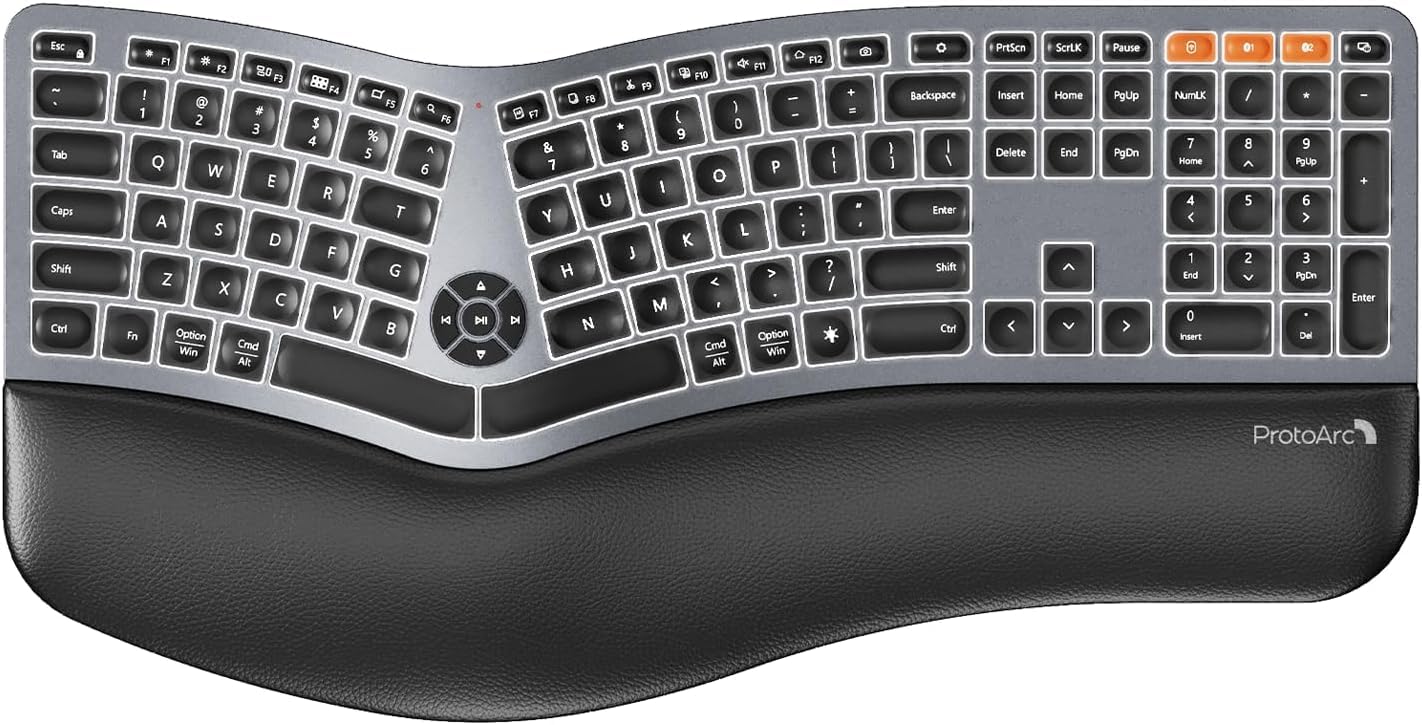
Image 1: ProtoArc EK01 Plus Ergonomic Wireless Backlit Keyboard. This image displays the full keyboard with its split design, integrated wrist rest, and key layout.
Key Features:
- Ergonomic Full-Size Design: Features a split, curved keyframe and integrated wrist rest to minimize muscle fatigue and promote proper posture.
- Adjustable Tilt Feet: Four adjustable tilt feet allow customization of the keyboard angle for optimal comfort.
- Adjustable Backlighting: Soft white LED backlighting with three adjustable brightness levels (low-medium-high) for comfortable typing in various lighting conditions.
- Multi-Device Connectivity: Connects to up to three devices simultaneously via Bluetooth and 2.4G USB. Easily switch between devices with a dedicated key.
- USB-C Rechargeable: Equipped with a 2000 mAh rechargeable lithium battery for extended use.
- Automatic Sleep Mode: Enters sleep mode after 60 minutes of inactivity to conserve power, waking up within 3 seconds upon key press.
- Compatibility: Widely compatible with Windows 7/8/10, Mac OS X 10.12 or higher, and Android 4.3 or higher.
Setup
1. Charging the Keyboard
- Locate the USB-C charging port on the keyboard.
- Connect the provided USB-C cable to the keyboard and the other end to a USB power source (e.g., computer USB port, wall adapter).
- The charging indicator light will illuminate. Once fully charged, the light may change color or turn off.
2. Connecting to Devices
The keyboard supports both 2.4G USB and Bluetooth connectivity.
2.1. 2.4G USB Connection
- Locate the 2.4G USB receiver (dongle). It is usually stored in a compartment on the keyboard or in the packaging.
- Plug the USB receiver into an available USB port on your computer.
- Turn on the keyboard using the power switch.
- The keyboard should automatically connect to your device.
2.2. Bluetooth Connection (Up to 3 Devices)
- Turn on the keyboard.
- Press and hold one of the Bluetooth channel keys (e.g., BT1, BT2, or BT3) for 3-5 seconds until the indicator light flashes, indicating pairing mode.
- On your device (computer, tablet, smartphone), enable Bluetooth and search for new devices.
- Select "ProtoArc EK01 Plus" (or similar name) from the list of available devices.
- Follow any on-screen prompts to complete the pairing process. The indicator light will stop flashing once connected.
- Repeat these steps for up to two additional Bluetooth devices using the other Bluetooth channel keys.
Operation
1. Switching Between Devices
To switch between connected devices, simply press the corresponding connection key:
- Press 2.4G to switch to the device connected via the USB receiver.
- Press BT1 to switch to the first Bluetooth device.
- Press BT2 to switch to the second Bluetooth device.
- Press BT3 to switch to the third Bluetooth device.
2. Adjusting Backlight
The keyboard features a soft white LED backlight with three brightness levels.
- To cycle through brightness levels (low, medium, high, off), press the dedicated backlight key (refer to keyboard layout for specific key).
3. Sleep Mode and Power Saving
To conserve battery life, the keyboard will automatically enter sleep mode after 60 minutes of inactivity. To wake the keyboard, press any key. The keyboard will be ready for use within 3 seconds.
4. Adjustable Tilt
The keyboard includes four adjustable tilt feet. Extend or retract these feet to customize the typing angle to your preference, ensuring comfortable wrist positioning whether sitting or standing.
Maintenance
1. Cleaning the Keyboard
- Disconnect the keyboard from all devices and power sources before cleaning.
- Use a soft, lint-free cloth slightly dampened with water or a mild cleaning solution to wipe the surface of the keyboard.
- Avoid using harsh chemicals, abrasive cleaners, or solvents, as these can damage the keyboard's finish.
- For cleaning between keys, use compressed air to remove dust and debris.
2. Battery Care
- Charge the keyboard regularly to maintain battery health.
- Avoid fully discharging the battery frequently.
- If storing the keyboard for an extended period, charge it to approximately 50% before storage.
Troubleshooting
| Problem | Possible Cause | Solution |
|---|---|---|
| Keyboard not responding | Low battery; Keyboard off; Incorrect connection mode; USB receiver not plugged in (2.4G); Bluetooth not paired. | Charge the keyboard; Turn on the keyboard; Switch to the correct connection mode (2.4G, BT1/2/3); Ensure USB receiver is securely plugged in; Re-pair Bluetooth. |
| Lag or delayed input | Interference; Distance from receiver/device; Low battery. | Move closer to the receiver/device; Ensure no strong interference sources nearby; Charge the keyboard. |
| Backlight not working | Backlight turned off; Low battery. | Press the backlight key to adjust brightness; Charge the keyboard. |
| Cannot connect via Bluetooth | Keyboard not in pairing mode; Device Bluetooth off; Already connected to 3 devices. | Ensure keyboard is in pairing mode (flashing indicator); Enable Bluetooth on your device; Disconnect from an existing Bluetooth device if maximum reached. |
Specifications
| Brand | ProtoArc |
| Model Number | EK01 Plus |
| Connectivity Technology | Bluetooth, 2.4G USB |
| Keyboard Description | Ergonomic, Full Size, Split Design |
| Special Features | Ergonomic, Full Size, Wrist Rest, Backlit, Rechargeable |
| Color | Space Gray |
| Backlight Color Support | Monochromatic (White LED) |
| Material | Plastic |
| Power Source | Battery Powered (2000 mAh Lithium Battery) |
| Switch Type | Membrane |
| Keyboard Layout | QWERTY (UK layout for this variant) |
| Number of Keys | 117 |
| Compatible Devices | Laptop, PC, Tablet, Windows/Mac/Android |
| Item Weight | 1.6 Kilograms |
| Dimensions (Approx.) | 48 cm (Length) x 25 cm (Width) |
Warranty and Support
For warranty information and technical support, please refer to the ProtoArc official website or contact their customer service. Details are typically provided on the product packaging or the official brand store.
ProtoArc Official Store: Visit ProtoArc Store on Amazon


