
1. Introduction
Thank you for choosing the LEDIARY 23 Inch Caged Ceiling Fan with Lights. This manual provides detailed instructions for the safe installation, operation, and maintenance of your new ceiling fan. Please read this manual thoroughly before installation and keep it for future reference.

Image 1.1: The LEDIARY 23 Inch Caged Ceiling Fan, showcasing its unique design and integrated lighting.
2. Safety Information
To reduce the risk of electric shock, fire, or injury to persons, read and follow all instructions carefully.
- Ensure the power is turned off at the circuit breaker before installation or servicing.
- All wiring must be in accordance with national and local electrical codes. If you are unfamiliar with wiring, consult a qualified electrician.
- The mounting structure must be capable of supporting the weight of the fan (approximately 5.28 kg).
- Do not operate the fan with damaged wiring or if it is not functioning properly.
- Keep hands, hair, and clothing away from the fan blades when the fan is in operation.
3. Package Contents
Verify that all components are present before beginning installation:
- Caged Ceiling Fan Unit (with integrated motor and light sockets)
- Remote Control
- Wall Plate for Remote Control
- Mounting Hardware (screws, wire nuts, etc.)
- User Manual (this document)
Note: 4*E26 bulbs are NOT included and must be purchased separately. Recommended bulbs: A19 ST19 T45, Incandescent light bulb-Max 60W, LED light bulb-Max 10W.
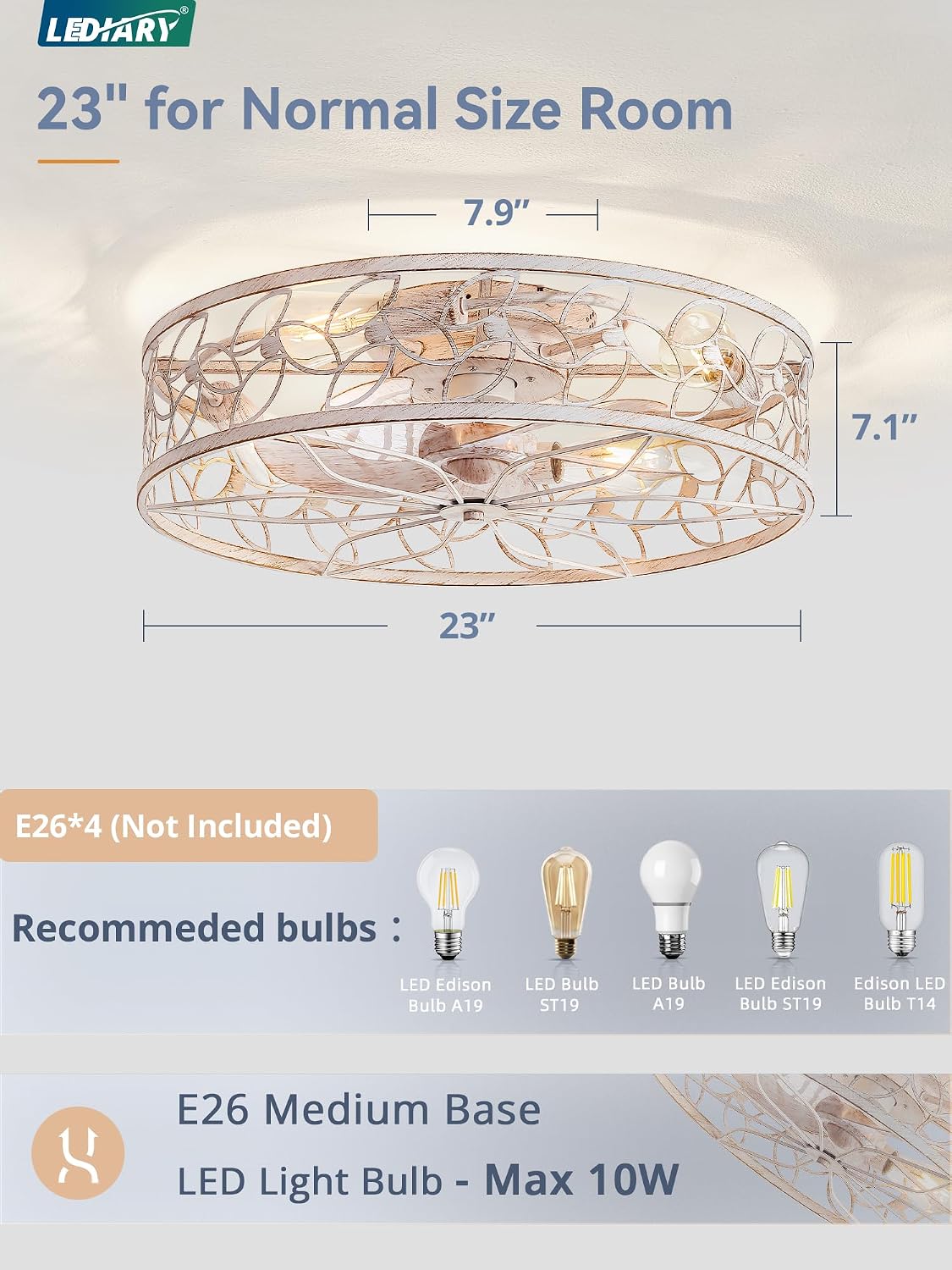
Image 3.1: Diagram showing the 23-inch diameter of the fan and the E26 bulb requirements.
4. Setup and Installation
Follow these steps for proper installation. It is recommended to have two people for installation due to the size and weight of the unit.
4.1 Pre-Installation Checklist
- Turn off power at the main circuit breaker.
- Ensure the junction box is securely mounted and capable of supporting the fan's weight.
- Gather necessary tools: screwdriver, wire strippers, electrical tape, ladder.
4.2 Mounting the Fan
- Attach the mounting bracket to the ceiling junction box using the provided screws. Ensure it is firmly secured.
- Carefully lift the fan unit and connect the safety cable (if present) to the mounting bracket to temporarily support the fan during wiring.
4.3 Wiring Instructions
- Connect the fan's wires to the household electrical wires using wire nuts:
- Black (Live) to Black (Live)
- White (Neutral) to White (Neutral)
- Green or Bare Copper (Ground) to Green or Bare Copper (Ground)
- Ensure all connections are secure and insulated with electrical tape.
- Carefully tuck all wires into the junction box.
4.4 Securing the Fan
- Align the fan unit with the mounting bracket and secure it with the screws provided.
- Install the 4 E26 bulbs (not included) into the sockets.
- Restore power at the circuit breaker.
5. Operating Instructions
Your LEDIARY ceiling fan is controlled by the included remote control. Ensure the battery is installed in the remote.

Image 5.1: Overview of the remote control and its various functions.
5.1 Remote Control Functions
- Light ON/OFF: Press the light button to turn the light on or off.
- Fan ON/OFF: Press the fan button to turn the fan on or off.
- Fan Speed Control: The fan features 6 wind speed levels. Use the speed buttons to adjust from level 1 (soft wind) to level 6 (cool wind).

Image 5.2: Illustration of the 6-speed fan control settings.
- Timer Settings: Set the fan to automatically turn off after 1, 2, or 4 hours using the timer buttons.

Image 5.3: Visual representation of the 1H, 2H, and 4H timer settings.
- Reversible Motor (Forward/Reverse): The fan features a reversible motor for seasonal use.
- Summer Mode (Forward): Blades rotate counter-clockwise, pushing air downward to create a cooling breeze.
- Winter Mode (Reverse): Blades rotate clockwise, drawing air upward to circulate warm air trapped near the ceiling.

Image 5.4: Depiction of airflow direction for summer (downward) and winter (upward) modes.
The fan operates quietly, with a low noise level of 35dB, ensuring a comfortable environment.

Image 5.5: Chart illustrating the low noise level of the fan compared to other common sounds.
6. Maintenance
Regular maintenance ensures the longevity and optimal performance of your ceiling fan.
6.1 Cleaning
- Always turn off the power at the circuit breaker before cleaning.
- Wipe the fan housing and blades with a soft, damp cloth. Do not use abrasive cleaners or solvents.
- Do not immerse the fan in water.
6.2 Bulb Replacement
- Ensure the light is off and has cooled down before attempting to replace bulbs.
- Unscrew the old bulb and screw in the new E26 bulb (Max 60W Incandescent, Max 10W LED).
7. Troubleshooting
If you experience issues with your ceiling fan, refer to the following common problems and solutions:
| Problem | Possible Cause | Solution |
|---|---|---|
| Fan does not start | No power; Loose wire connections; Remote control battery dead. | Check circuit breaker; Verify all wire connections are secure; Replace remote control battery. |
| Light does not turn on | Bulb faulty or loose; No power to light; Remote control issue. | Replace or tighten bulb; Check power supply; Verify remote control functionality. |
| Fan is noisy | Loose screws; Unbalanced blades; Motor issue. | Tighten all mounting screws; Ensure blades are securely attached; If noise persists, contact support. |
| Remote control not working | Battery dead or incorrectly inserted; Remote not paired (if applicable). | Replace battery, ensuring correct polarity; Refer to remote pairing instructions (if provided with product). |
8. Specifications
| Feature | Detail |
|---|---|
| Brand | LEDIARY |
| Model | B0D3G73SBV |
| Dimensions | 23 inch diameter (approx. 20.32 x 45.72 x 20.32 cm) |
| Item Weight | 5.28 kg |
| Material | Metal |
| Color | White Gold |
| Voltage | 120 Volts (AC) |
| Number of Speeds | 6 |
| Special Features | Remote Controlled, Timer, Reversible Motor |
| Bulb Type (Not Included) | 4 x E26 (Max 60W Incandescent, Max 10W LED) |
| Motor Type | DC Motor |
9. Warranty and Support
LEDIARY stands behind the quality of its products.
- Motor Warranty: 5-year support for the motor.
- Other Parts Warranty: 2-year limited support on other parts.
For technical assistance, replacement parts, or warranty claims, please contact LEDIARY customer service through the retailer's platform or the official brand website. Please have your model number (B0D3G73SBV) and purchase date ready when contacting support.
