
1. Introduction
The FLIPSKY 75100 V2.0 with Aluminum PCB is an advanced speed controller based on the VESC 75 series. It is designed for electric skateboards, scooters, and ebikes, offering robust performance and protection features.
This controller is programmable via VESC_tool3.0 (firmware 5.2) and includes overheat and overcurrent protection, as well as regenerative braking capabilities. Its aluminum case ensures efficient heat dissipation. The maximum working voltage supported is 20S (84V).
The 75100 V2.0 supports single serial port functionality and integrates a power on/off switch and a key switch for convenient operation in various electric vehicle applications.
2. Key Features
- Based on VESC 75 series architecture.
- Programmable via VESC_tool3.0 (firmware 5.2).
- Integrated overheat and overcurrent protection.
- Supports regenerative braking.
- Durable aluminum case for enhanced heat dissipation.
- Wide voltage input: 14-84V (4-20S).
- Continuous Current: 100A, Peak Current: 250A.
- Single serial port function.
- Integrated power on/off switch and key switch.
- Multiple control interface ports: USB, CAN, UART.
- Supports various sensors: ABI, HALL, AS5047, AS5048A.
3. Setup and Wiring
Proper wiring is crucial for the safe and correct operation of the FLIPSKY 75100 V2.0 speed controller. Refer to the connection diagram below for detailed port identification and wiring instructions.

Figure 3.1: Detailed connection diagram for the FLIPSKY 75100 V2.0 speed controller, showing various ports and their functions. This diagram illustrates connections for USB, PPM, CAN+POWER, SWD, COMM, UART2, HALL, and POWER SWITCH. It also highlights the motor and battery connections.
3.1. General Wiring Guidelines
- Battery Connection: Connect your battery pack to the main power cables (red for positive, black for negative). Ensure correct polarity to prevent damage.
- Motor Connection: Connect the three motor phase wires to the corresponding outputs on the controller.
- Sensor Connections (Optional): If using sensored motors, connect the motor's Hall sensor wires to the HALL port (7).
- Power Switch: The integrated power switch button (8) allows for convenient power control.
- Data Ports: Utilize the USB (1), PPM (2), CAN+POWER (3), SWD (4), COMM (5), and UART2 (6) ports for configuration, communication, and external input devices.
3.2. Connecting to VESC_Tool
To configure the controller, connect it to a computer via the USB port (1) and use the VESC_tool software (version 3.0 or higher, firmware 5.2 recommended). Follow the VESC_tool instructions for motor detection, input setup, and parameter tuning.
Important Note: When unplugging connectors, always press the release clip first. Do not pull directly on wires to avoid damaging the wires or connectors.
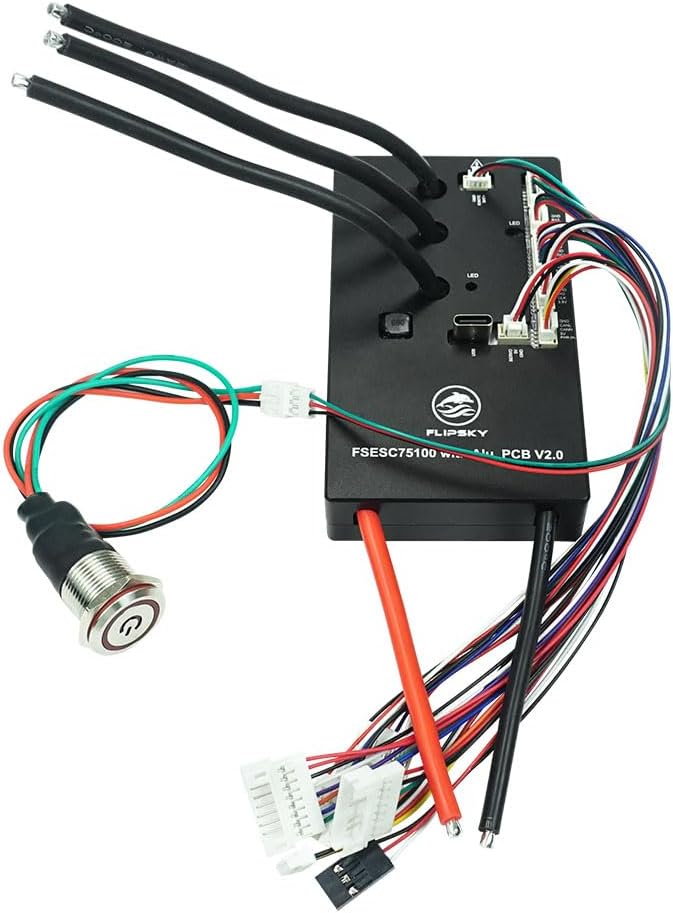
Figure 3.2: Top view of the FLIPSKY 75100 V2.0 speed controller, showing the integrated power switch button and various connection points for motor, battery, and control signals.
4. Operating Instructions
4.1. Powering On/Off
Use the integrated power switch button to turn the controller on or off. Ensure all connections are secure before powering on.
4.2. Control Modes
The controller supports various control modes including DC, BLDC, and FOC (sinusoidal). The specific mode and parameters are configured through VESC_tool based on your motor type and application requirements.
4.3. Input Control
Input signals can be received via PPM (Pulse Position Modulation) for remote controls, ADC (Analog-to-Digital Converter) for throttle inputs, NRF for wireless communication, or UART for serial communication with other devices.
4.4. Regenerative Braking
The controller features regenerative braking, which recharges the battery during braking. This functionality can be configured and adjusted within VESC_tool to suit your preferences and battery specifications.
5. Maintenance
- Regular Inspection: Periodically check all wiring connections for looseness or damage. Ensure the aluminum case is free from obstructions to maintain optimal heat dissipation.
- Cleaning: Keep the controller clean and free from dust, dirt, and moisture. Use a soft, dry cloth for cleaning. Avoid using liquids or solvents.
- Firmware Updates: FLIPSKY may release firmware updates to improve performance or add features. Refer to the official FLIPSKY website or VESC community for the latest firmware and update procedures.
- Firmware 5.03 and Newer: If upgrading to firmware 5.03 or newer, the phase filter needs to be turned off in the VESC_tool settings.
6. Troubleshooting
If you encounter issues with your FLIPSKY 75100 V2.0 speed controller, consider the following common troubleshooting steps:
- No Power: Check battery connections, ensure the power switch is engaged, and verify battery charge level.
- Motor Not Spinning: Verify motor phase wire connections and sensor connections (if applicable). Perform motor detection in VESC_tool. Check for error codes in VESC_tool.
- Intermittent Operation: Inspect all wiring for loose connections or damage. Check for electromagnetic interference (EMI) if applicable.
- Overheating: Ensure the controller has adequate airflow. Reduce continuous current draw if operating in high-stress conditions. Verify motor and battery parameters are correctly set in VESC_tool.
- Communication Issues: Ensure the correct COM port is selected in VESC_tool. Try a different USB cable or port.
For more advanced troubleshooting or specific error codes, consult the VESC community forums or FLIPSKY's official support resources.
7. Specifications
| Feature | Specification |
|---|---|
| Model | FLIPSKY 75100 V2.0 with Aluminum PCB |
| Dimensions (L x W x H) | 103 x 58 x 24 mm |
| Voltage Range | 14-84V (4-20S) |
| Continuous Current | 100A |
| Peak Current | 250A |
| Firmware Version | 5.02 (upgradeable) |
| BEC Output | 5V@1A |
| Control Modes | DC, BLDC, FOC (sinusoidal) |
| Control Interface Ports | USB, CAN, UART |
| Supported Sensors | ABI, HALL, AS5047, AS5048A |
| Input Set Support | PPM, ADC, NRF, UART |
| Wire Size | 12AWG |
| Programmable | Yes |
| Regenerative Capacity | Yes |
| Power Switch Button | Red |
| Material | Aluminum |
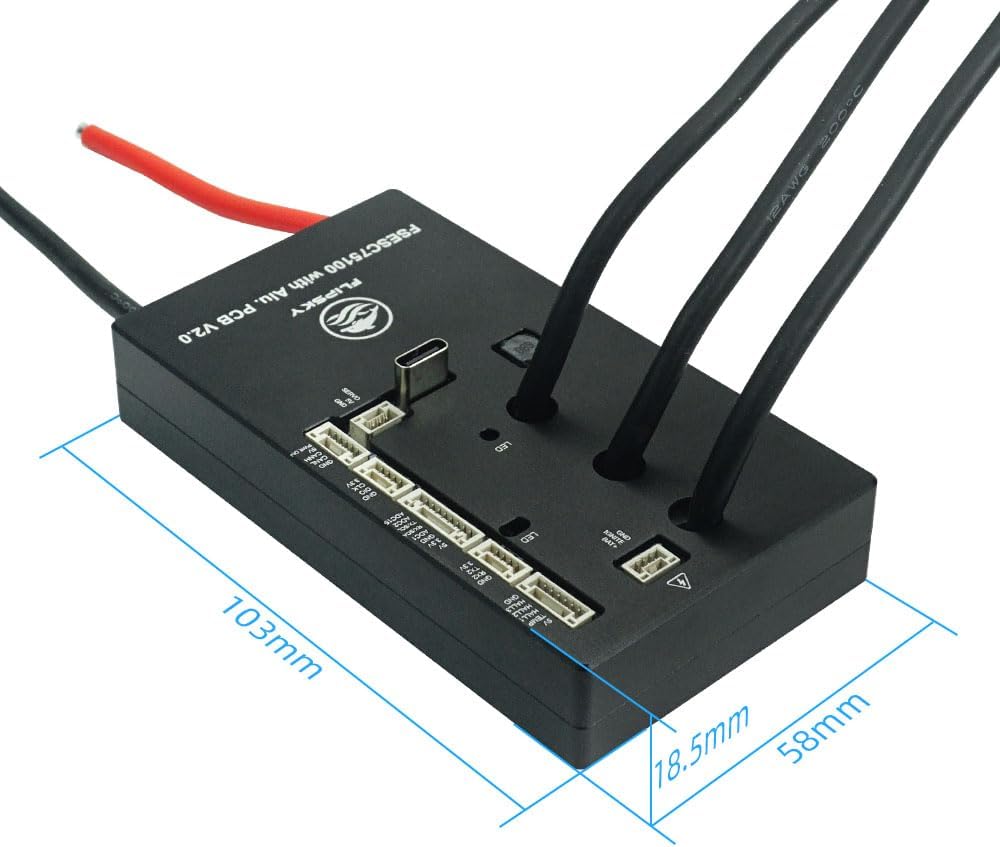
Figure 7.1: Dimensions of the FLIPSKY 75100 V2.0 speed controller, illustrating its length (103mm), width (58mm), and height (18.5mm, excluding connectors).
8. Warranty Information
FLIPSKY products typically come with a limited manufacturer's warranty covering defects in materials and workmanship. The specific terms and duration of the warranty may vary. Please retain your proof of purchase for warranty claims.
For detailed warranty information, including coverage, exclusions, and the claims process, please refer to the official FLIPSKY website or contact their customer support directly.
9. Support
For technical assistance, product inquiries, or support, please visit the official FLIPSKY website. You can often find FAQs, troubleshooting guides, and contact information for their support team.
Additionally, the VESC community forums are an excellent resource for general VESC-related questions, configuration tips, and community-driven support.


