
Introduction
Thank you for choosing the Emerio Vacuum Sealer. This device is designed to preserve the freshness of your food up to 8 times longer by removing air and sealing food in specialized bags. It is suitable for a variety of food types, including fresh meat, fish, vegetables, and fruits, and also helps prevent freezer burn. Please read this manual carefully before operating the device to ensure safe and efficient use.

Figure 1: The Emerio Vacuum Sealer in operation, demonstrating its ability to seal food, such as salmon fillets, in a vacuum bag.
Setup
- Unpacking: Carefully remove the vacuum sealer and all accessories from the packaging. Ensure all components are present: the vacuum sealer unit, a 3-meter roll of film, and 5 vacuum bags (20x30 cm).
- Placement: Place the device on a stable, flat, and dry surface. Ensure there is enough space around the unit for proper ventilation and operation.
- Power Connection: Plug the power cord into a suitable electrical outlet. The device is rated for 120 Watt.
- Foil Roll Installation: The vacuum sealer features an integrated foil roll suspension and cutter. To install a new roll, open the top cover, place the film roll onto the designated holder, and pull the film through to the sealing area.

Figure 2: Top view of the vacuum sealer, illustrating the layout of the control panel and the integrated compartment for the film roll.
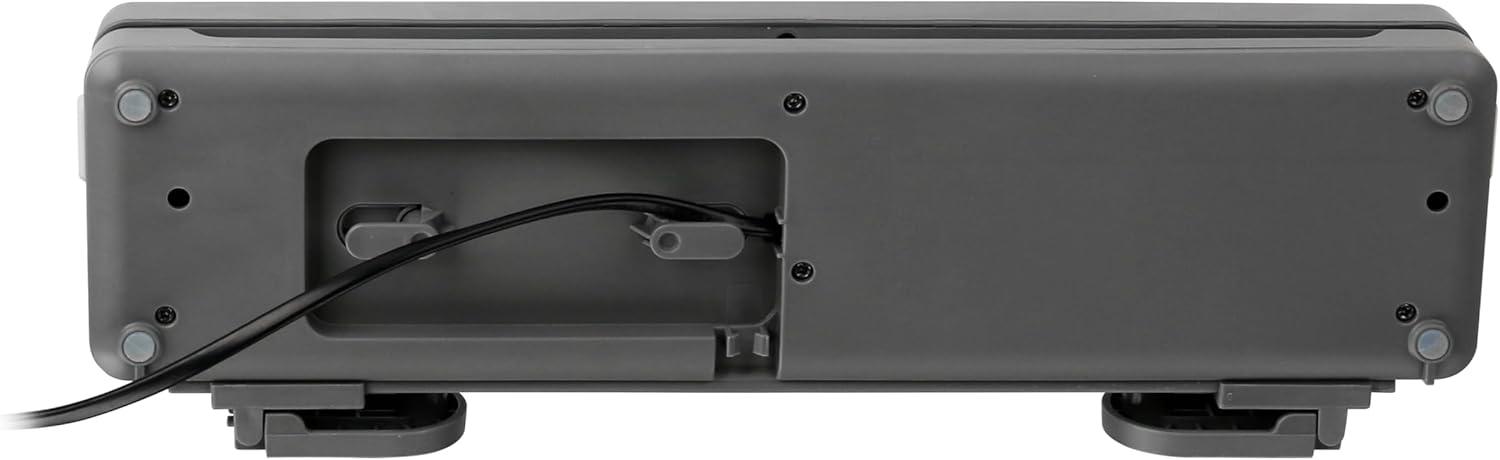
Figure 3: Bottom view of the vacuum sealer, highlighting the convenient power cord storage area.
Operating Instructions
The Emerio Vacuum Sealer offers 6-in-1 functionality for versatile food preservation:
- Sealing: For sealing bags without vacuuming.
- Vacuuming Soft: Gentle vacuuming for delicate foods.
- Vacuum Normal: Standard vacuuming for most food types.
- Vacuum Filling Wet: Designed for foods with some moisture.
- Integrated Cutter: For custom bag sizing from the film roll.
- Foil Roll Holder: Convenient storage and dispensing of film rolls.
General Vacuum Sealing Steps:
- Prepare the Bag: Use the integrated cutter to create a bag from the film roll, ensuring one end is sealed. Alternatively, use one of the pre-made bags. Ensure the bag width does not exceed 30 cm.
- Fill the Bag: Place the food item into the bag, leaving sufficient space (at least 2-3 inches) at the open end for sealing.
- Position the Bag: Place the open end of the bag into the vacuum channel of the device. Ensure it is flat and free of wrinkles.
- Close and Lock: Close the lid firmly until it locks into place.
- Select Function: Choose the appropriate vacuuming mode (Soft, Normal, Wet) or simply the Sealing function if no vacuum is desired.
- Start Operation: Press the corresponding button to start the vacuuming and sealing process. The device works quickly, typically completing the vacuum within 15 seconds.
- Release: Once the process is complete, the device will automatically release or indicate completion. Open the lid and remove the sealed bag.
Maintenance
Regular cleaning and proper care will extend the life of your Emerio Vacuum Sealer.
- Cleaning: After each use, wipe down the sealing bar and vacuum channel with a damp cloth to remove any food residue. Do not immerse the device in water.
- Storage: Store the vacuum sealer in a clean, dry place. The integrated cord storage on the bottom of the unit helps keep your counter tidy.
- BPA-Free Materials: The vacuum film and bags provided with this device are tested and free from BPA (Bisphenol-A), ensuring safe food contact.

Figure 4: The BPA Free Food Contact Material logo, indicating that the vacuum bags and film are safe for food storage.
Troubleshooting
- Device not turning on: Check if the power cord is securely plugged into both the device and the electrical outlet. Ensure the outlet is functional.
- Poor vacuum or seal:
- Ensure the bag is properly placed within the vacuum channel and is flat.
- Check for any wrinkles or debris on the sealing area or inside the bag opening.
- Make sure the lid is firmly closed and locked.
- If sealing wet food, ensure excess liquid is not drawn into the vacuum channel. Use the 'Vacuum Filling Wet' mode.
- Bag melts during sealing: This may indicate the sealing bar is too hot. Allow the device to cool down for a few minutes between seals.
Specifications
| Feature | Specification |
|---|---|
| Model Number | VS-130802 |
| Product Dimensions | 14.65 x 3.82 x 2.44 inches |
| Item Weight | 2.05 pounds |
| Power | 120 Watt |
| Max Bag Width | 30 cm |
| Manufacturer | Emerio |
Warranty and Support
This product is covered by a standard return policy, allowing for refund or replacement within 30 days of purchase. For further assistance, technical support, or inquiries regarding your Emerio Vacuum Sealer, please contact your retailer or visit the official Emerio website for customer service information.