
1. Introduction
The Kiprim GD01A is a portable combustible gas leak detector designed to identify the presence of various flammable gases. It features both visual and audible alarms, high and low sensitivity modes, and a compact design for ease of use and portability. This manual provides essential information for the safe and effective operation and maintenance of your device.
2. Product Features
- Dual Visual & Audio Gas Alarm: Provides instant alerts with a dynamic bar graph display and a distinct beep. The LCD screen turns red at hazardous gas levels.
- Wide Gas Detection Range: Detects LPG, methane, ethane, propane, butane, natural gas, coal gas, gas fuel, and liquefied natural gas (LNG).
- Easy to Operate: Comes with 2 AAA batteries for immediate use. Features a quick 30-second warm-up time.
- Low Battery Indicator: Activates when battery voltage drops below 2.4V.
- Automatic Power-Off: Shuts off after 10 minutes of inactivity or when gas is no longer detected, conserving battery life.
- Compact & Portable Design: Pocket-sized and lightweight with a non-slip texture and included storage bag for easy carrying and transport.
3. What's Included
Upon opening the package, please ensure all items are present:
- 1x Kiprim GD01A Gas Detector
- 2x AAA Batteries
- 1x Screwdriver
- 1x User Manual
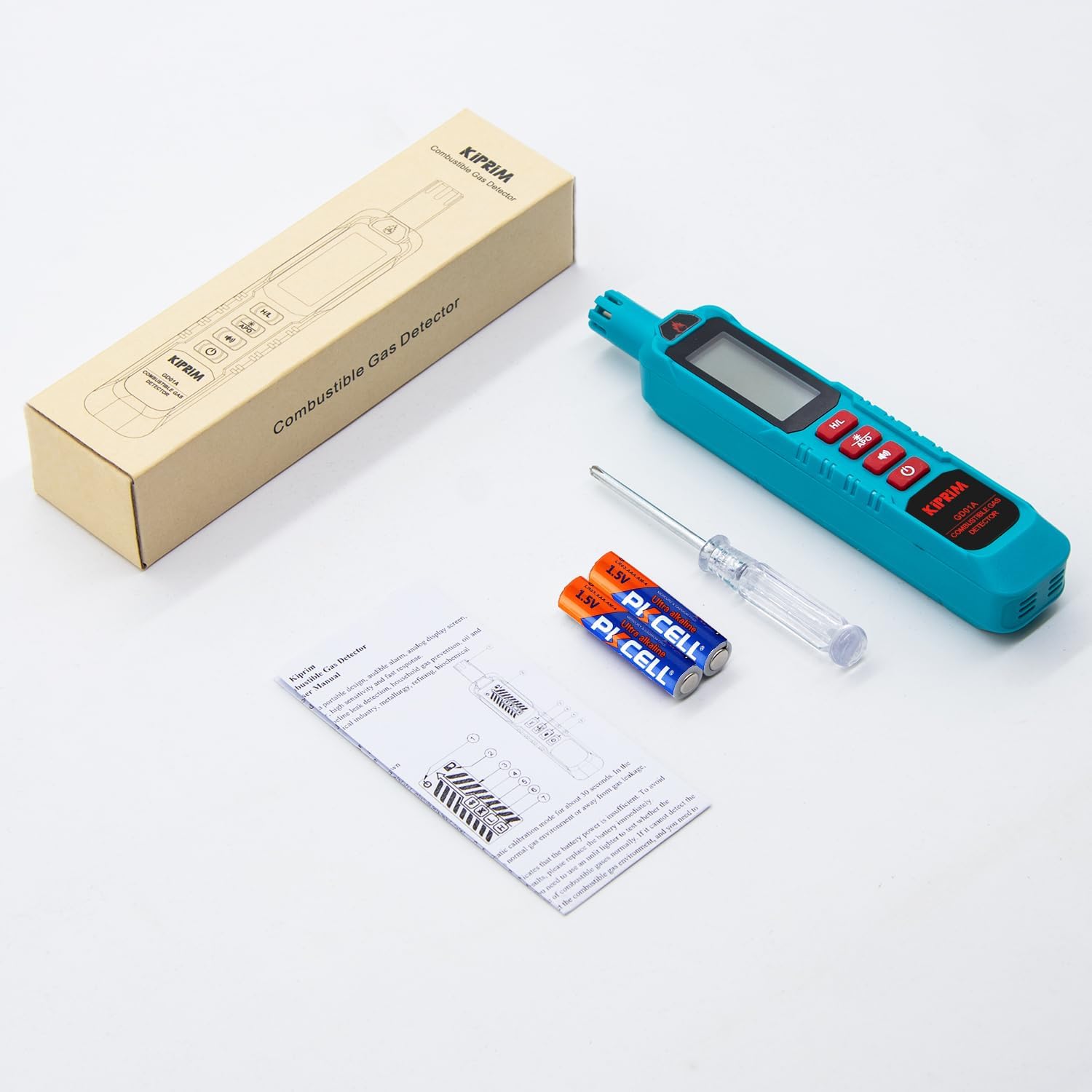
Image: The Kiprim GD01A Gas Detector, two AAA batteries, a screwdriver, and the user manual laid out on a white surface.
4. Parts of the Detector

Image: A detailed diagram of the Kiprim GD01A Gas Detector, highlighting its components such as the sensor, display screen, H/L sensitivity switch, backlight button, alarm sound button, and power button.
- Sensor: Detects combustible gases.
- Display Screen: Shows gas concentration levels, sensitivity mode, battery status, and alarm status.
- H/L Sensitivity Switching Button: Toggles between High and Low sensitivity modes.
- Backlight On/Off / Cancel Automatic Shutdown Button (APO): Short press to toggle backlight; long press to enable/disable auto power-off.
- Alarm Sound On/Off Button: Toggles the audible alarm.
- Power Button: Turns the device on or off.
5. Setup
5.1 Battery Installation
- Locate the battery compartment cover on the device.
- Use the provided screwdriver to open the battery compartment.
- Insert the two AAA batteries, ensuring correct polarity (+/-).
- Securely close the battery compartment cover with the screwdriver.
5.2 Initial Power On and Warm-up
- Press and hold the Power Button (⏻) to turn on the device.
- The detector will undergo a warm-up period of approximately 30 seconds. During this time, the display may show a countdown or a warming-up indicator.
- Once the warm-up is complete, the device is ready for use.
Video: Official Kiprim GD01A Portable Gas Leak Detector demonstration, showing battery installation, power-on sequence, sensitivity switching, backlight operation, and gas detection test.
6. Operation
6.1 Sensitivity Modes (H/L)
The Kiprim GD01A offers two sensitivity modes:
- High Sensitivity (H): Detects gas concentrations from 50 to 500 ppm. Ideal for pinpointing small leaks.
- Low Sensitivity (L): Detects gas concentrations from 500 to 10000 ppm. Useful for initial scanning of larger areas.
To switch between modes, short press the H/L button.
6.2 Backlight Function
The device features a backlight for improved visibility in low-light conditions.
- Short press the APO button to turn the backlight on or off.
- Turning off the backlight can help conserve battery power.
6.3 Automatic Power-Off (APO)
The device has an automatic power-off feature to save battery life.
- Long press the APO button to enable or disable the auto power-off function.
6.4 Alarm Function
The GD01A provides both visual and audible alarms.
- Short press the Alarm Sound button to turn the audible alarm on or off.
- The visual alarm (dynamic bar graph and red screen) will always activate when gas is detected.
6.5 Gas Leak Detection Procedure
- Power on the device and allow it to complete its 30-second warm-up.
- Select the appropriate sensitivity mode (High for small leaks, Low for general scanning) using the H/L button.
- Slowly move the sensor tip towards the area suspected of a gas leak.
- Observe the display and listen for the audible alarm. The bar graph will increase with higher gas concentrations, and the screen will turn red when hazardous levels are detected.
- If a leak is detected, continue to move the sensor slowly to pinpoint the exact source.

Image: The Kiprim GD01A Gas Detector showing a red screen and full bar graph, indicating a gas leak detected near a pipe with a 2-second response time.

Image: The Kiprim GD01A Gas Detector being used to check for leaks around a gas stove burner, showing a red display indicating gas presence.
6.6 Applications
The Kiprim GD01A is suitable for various applications, including:
- Checking gas pipelines.
- Detecting leaks in RV propane tanks.
- Inspecting gas stoves and water heaters.
- General home safety checks for gas appliances.

Image: A collage showing the Kiprim GD01A Gas Detector being used in various settings, including gas pipelines, RV propane tanks, gas stoves, and water heaters.
7. Maintenance
7.1 Cleaning
Wipe the device with a soft, dry cloth. Do not use abrasive cleaners or solvents, as they may damage the casing or internal components.
7.2 Battery Replacement
When the low battery indicator appears on the display, replace the AAA batteries promptly to ensure accurate operation. Refer to section 5.1 for battery installation instructions.
7.3 Storage
Store the detector in a cool, dry place, away from direct sunlight and extreme temperatures. Use the included storage bag for protection when not in use.
8. Troubleshooting
- Device does not power on: Check if batteries are installed correctly and have sufficient charge. Replace batteries if necessary.
- No gas detection: Ensure the device has completed its warm-up period. Verify the sensor is clean and unobstructed. Try switching sensitivity modes.
- False alarms: Ensure the testing area is free from other strong odors or chemicals that might trigger the sensor. Recalibrate by powering off and on in a fresh air environment.
- Audible alarm not working: Check if the alarm sound is turned off using the Alarm Sound On/Off button.
9. Specifications
| Specification | Detail |
|---|---|
| Brand | Kiprim |
| Model Number | GD01A |
| Power Source | Battery Powered (2x AAA, included) |
| Item Weight | 51 Grams (1.8 ounces) |
| Product Dimensions | 0.08"D x 1.1"W x 6.14"H |
| Alarm Type | Visual & Audio Alarm |
| Operating Humidity | 0-70%RH |
| Material | ABS |
| Warm-up Time | 30 seconds |
| Response Time | <2 seconds |
| Low Sensitivity Mode | 500 to 10000 ppm |
| High Sensitivity Mode | 50 to 500 ppm |
10. Warranty and Support
Kiprim products are designed for reliability and performance. For warranty information, technical support, or any inquiries regarding your GD01A Gas Leak Detector, please refer to the contact information provided on the product packaging or visit the official Kiprim website. Keep your purchase receipt as proof of purchase for warranty claims.