
1. Introduction
Thank you for choosing the GOPLUS Turntable Stand. This versatile furniture piece is designed to enhance your living space with its functional storage and integrated charging capabilities. It serves as an ideal solution for organizing your vinyl records, housing your turntable, and charging your electronic devices.
This stand features a 3-tier design with a spacious tabletop, an open shelf, and four divided compartments, offering extensive storage. The integrated charging station includes two AC outlets, one USB port, and one Type-C port, complete with a cable management opening to keep cords tidy. Constructed with stable metal legs and equipped with anti-tip safety kits, this stand ensures both durability and safety.
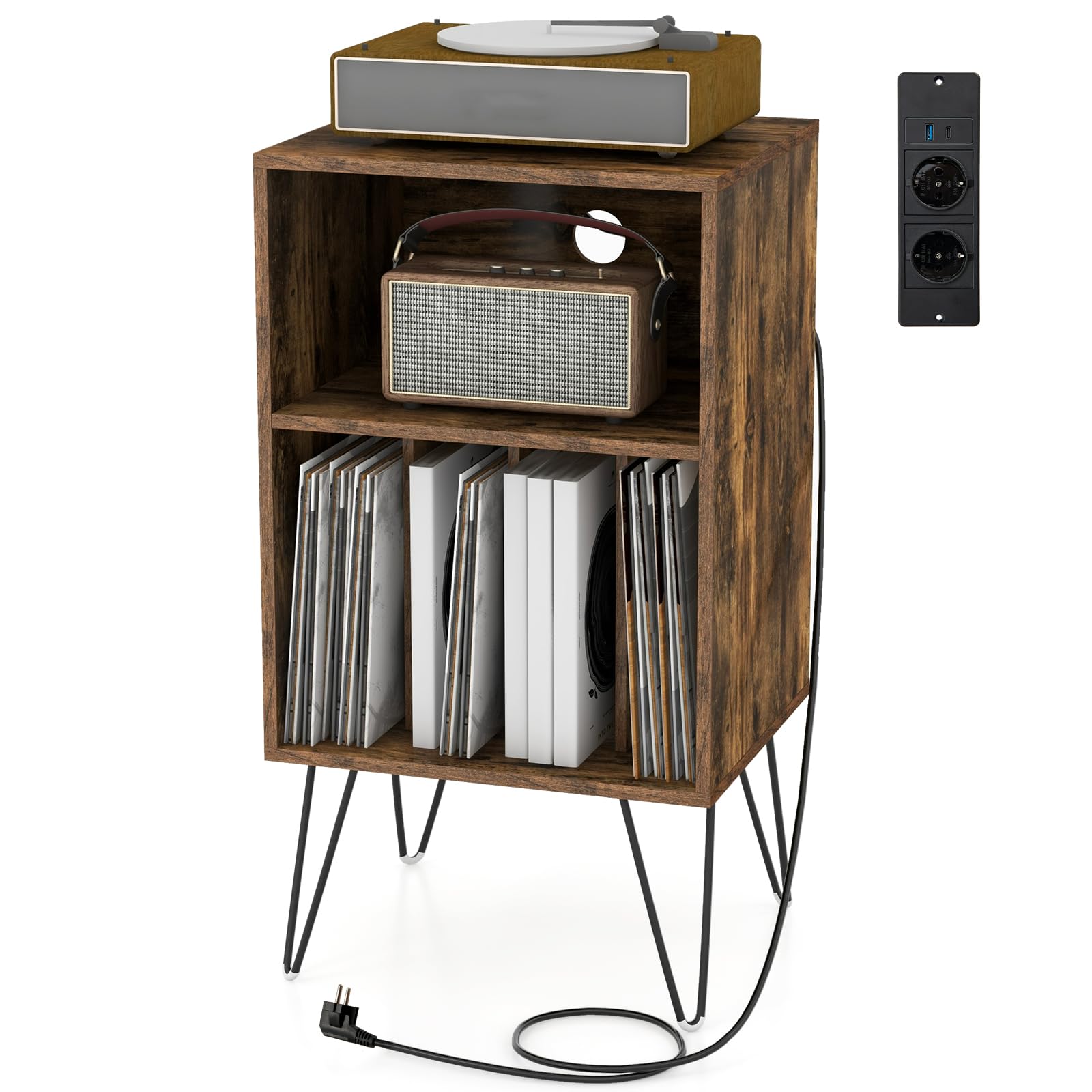
Image 1.1: The GOPLUS Turntable Stand, rustic brown, positioned next to a sofa, with a turntable on top and records stored below.
2. Safety Information
Please read all safety warnings and instructions carefully before assembly and use to prevent injury or damage.
- Weight Limit: Do not place excessively heavy objects on the shelves or tabletop. The tabletop has a maximum load capacity of 50 kg, the open shelf 30 kg, and the divided compartments 40 kg total.
- Anti-Tip Device: Always install the included anti-tip safety kits to secure the stand to the wall, especially in households with children or pets.
- Intended Use: Use the product only as intended. Do not climb on the stand or allow children to hang from it.
- Electrical Safety: Ensure the charging station is connected to a suitable power outlet. Do not overload the outlets. Keep liquids away from the charging station.
- Stable Placement: Place the stand on a flat, stable surface to prevent tipping.

Image 2.1: Detailed view of safety and stability features, including the anti-tip mechanism, cable management opening, sturdy metal legs, and protective foot pads.
3. Package Contents
Please verify that all components are present before beginning assembly. If any parts are missing or damaged, please contact customer support.
- 1 x Turntable Stand (disassembled components)
- 1 x Integrated Charging Station
- 2 x Anti-tip Safety Kits
- Assembly Hardware (screws, connectors, etc.)
- 1 x Instruction Manual
4. Assembly Instructions
Assembly is required for this product. Please follow the steps carefully. Recommended tools for assembly include a hammer, wrench, and screwdriver.
- Unpack Components: Carefully remove all parts from the packaging and lay them out on a clean, soft surface to prevent scratches. Identify each component using the parts list in the included manual.
- Assemble Frame: Attach the metal legs to the main wooden panels according to the diagrams in the detailed manual. Ensure all screws are tightened securely.
- Install Shelves: Insert the shelves and dividers into their designated slots. The stand features a large upper shelf and four smaller divided compartments for organized storage.
- Integrate Charging Station: Install the charging station into the designated opening on the tabletop. Route the power cord through the cable management hole at the back of the stand.
- Attach Anti-Tip Kits: Securely attach the anti-tip safety kits to the back of the stand and to a wall stud using appropriate hardware. This step is crucial for stability and safety.
- Final Check: Ensure all connections are tight and the stand is stable before placing any items on it.

Image 4.1: Product dimensions diagram, illustrating the overall size and internal compartment measurements for assembly reference.
5. Operating Instructions (Charging Station)
The integrated charging station provides convenient power access for your electronic devices.
- Connect to Power: Plug the stand's power cord (150 cm length) into a standard wall outlet.
- AC Outlets: The charging station includes two AC outlets (220-240V/12A). Use these for devices requiring standard power, such as your turntable or speakers.
- USB & Type-C Ports: One USB port and one Type-C port (5V/3.1A) are available for charging smartphones, tablets, and other compatible USB-powered devices.
- Cable Management: Utilize the cable management opening to route power cords and charging cables neatly, preventing tangles and maintaining an organized appearance.

Image 5.1: The integrated power station with 2 AC sockets, 1 USB port, and 1 Type-C port, demonstrating its use for charging multiple electronic devices.
6. Storage and Organization
The GOPLUS Turntable Stand offers multiple storage options to keep your media and accessories organized.
- Spacious Tabletop: Ideal for placing your turntable, a lamp, or decorative items.
- Open Shelf: Suitable for a receiver, speakers, or larger books.
- Divided Compartments: Four individual compartments are perfect for categorizing and storing your vinyl record collection.

Image 6.1: Illustration of the stand's large storage capacity, detailing the tabletop, middle open compartment, and four divided sections for categorized storage of vinyl records.
7. Maintenance
To ensure the longevity and appearance of your GOPLUS Turntable Stand, follow these simple maintenance guidelines:
- Cleaning: The stand features a waterproof surface. Wipe clean with a soft, damp cloth. Avoid harsh chemicals or abrasive cleaners that could damage the finish.
- Spills: Promptly clean up any spills to prevent staining or damage to the wood.
- Dusting: Regularly dust the surfaces with a dry, soft cloth.
- Inspection: Periodically check all screws and connections to ensure they remain tight. Re-tighten if necessary.
- Avoid Direct Sunlight: Prolonged exposure to direct sunlight can cause fading or discoloration of the wood finish.
8. Troubleshooting
If you encounter any issues with your turntable stand, please refer to the following common solutions:
- Stand is Wobbly:
- Ensure all assembly screws are fully tightened.
- Verify the stand is placed on a level surface. Adjust protective foot pads if necessary.
- Confirm the anti-tip kits are properly installed and secured to the wall.
- Charging Station Not Working:
- Check if the main power cord is securely plugged into a functional wall outlet.
- Ensure the charging station unit is correctly installed within the stand.
- Test with different devices to rule out device-specific issues.
- Avoid overloading the outlets.
- Scratches on Floor:
- Ensure the protective foot pads are correctly installed on the metal legs.
- Avoid dragging the stand; lift it when moving.
For further assistance, please contact GOPLUS customer support.
9. Specifications
| Feature | Detail |
|---|---|
| Brand | GOPLUS |
| Model Number | KW22203691DE |
| Color | Rustic Brown |
| Overall Dimensions (L x W x H) | 48 x 40 x 88 cm (18.9 x 15.7 x 34.6 inches) |
| Item Weight | 16 kg (35.3 lbs) |
| Material | Engineered Wood, Metal |
| Tabletop Load Capacity | 50 kg (110 lbs) |
| Open Shelf Load Capacity | 30 kg (66 lbs) |
| Divided Compartments Total Load Capacity | 40 kg (88 lbs) |
| Charging Station | 2 AC Outlets (220-240V/12A), 1 USB Port, 1 Type-C Port (5V/3.1A) |
| Power Cord Length | 150 cm (59 inches) |
| Special Features | Scratch-resistant, Charging Station, Waterproof Surface, Anti-tip Kits |
| Assembly Required | Yes |
10. Warranty and Support
GOPLUS is committed to providing high-quality products. For any questions, concerns, or assistance with your product, please refer to the following resources:
- Customer Support: Please contact the retailer or GOPLUS customer service directly for support.
- Online Resources: Visit the official GOPLUS brand store for additional product information and support: GOPLUS Brand Store.
- Product Documents: A PDF version of the user manual may be available for download from the product page or the brand's website.