
Introduction
Thank you for choosing the Aqiila Airbird C7 Portable Air Pump. This device is designed to provide accurate and effortless inflation for various items, including car tires, bicycle tires, motorcycle tires, and sports balls. It features a high-performance compressor, a built-in battery, a flashlight, and a power bank function. Please read this manual thoroughly before operating the device to ensure safe and optimal performance.
Safety Information
- Always read and understand this manual before use.
- Keep the device away from children and pets.
- Do not operate the device in wet conditions or near flammable liquids or gases.
- Ensure the inflation hose is securely attached to prevent accidental detachment during operation.
- Do not over-inflate items. Always refer to the manufacturer's recommended pressure.
- Avoid prolonged continuous operation to prevent overheating. Allow the device to cool down if it becomes hot.
- Use only the provided charging cable and adapters.
- Do not disassemble or attempt to repair the device yourself. Contact customer support for assistance.
Package Contents
Verify that all items are present in your package:
- Aqiila Airbird C7 Portable Air Pump
- Schrader connect hose
- Presta valve adapter
- Dunlop valve adapter
- Ball needle
- USB-C charging cable
- Storage case

Image: The Aqiila Airbird C7 pump shown with all included accessories: Schrader connect hose, ball needle, Presta valve, Dunlop valve, USB-C charging cable, and storage case.
Product Overview
The Aqiila Airbird C7 features a compact design with an intuitive display and control buttons for easy operation.
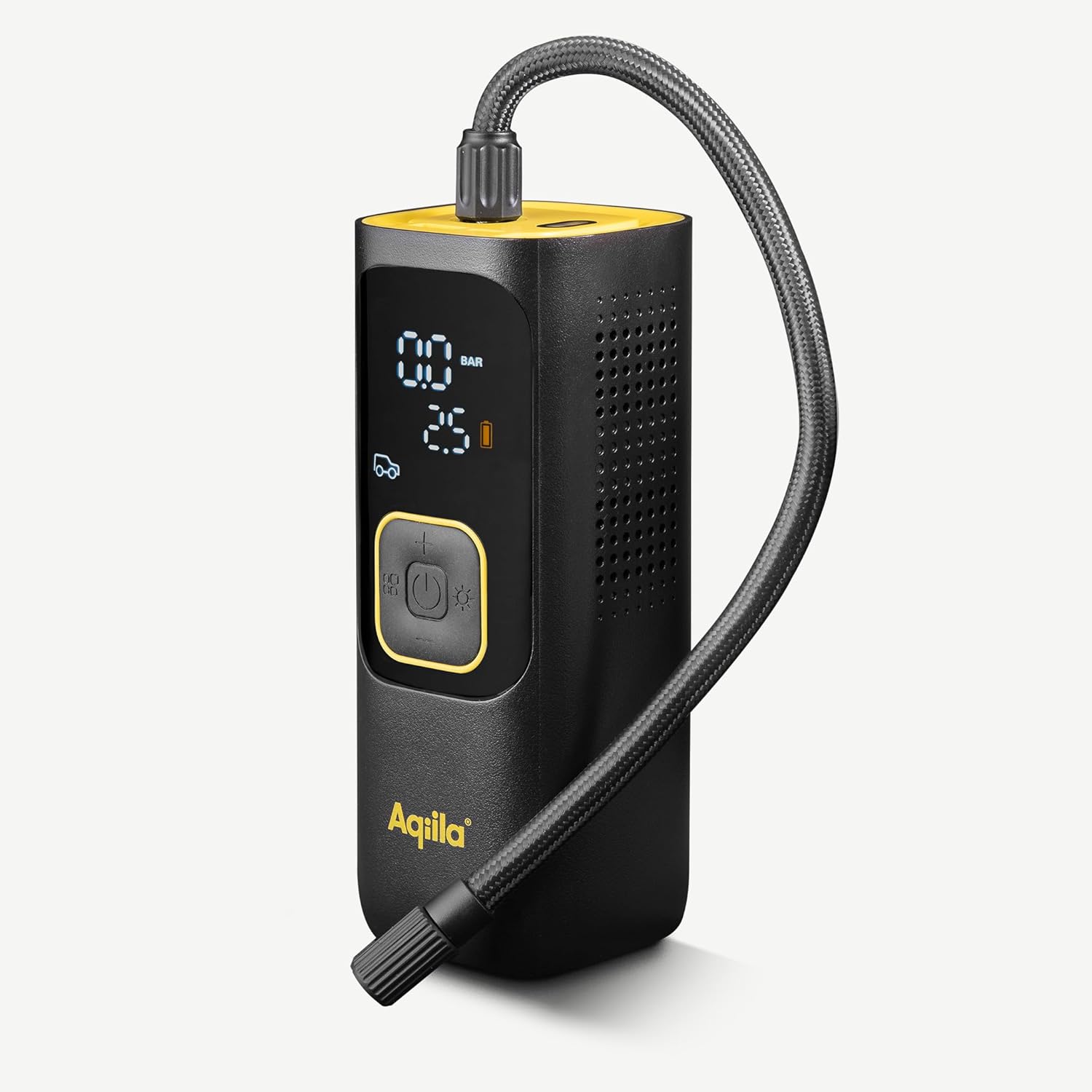
Image: A close-up view of the Aqiila Airbird C7 portable air pump, highlighting its digital display showing pressure readings and battery level, along with the control buttons for power, mode selection, and adjustment.
Key Features:
- Digital Display: Shows current pressure, target pressure, battery level, and selected mode.
- Control Buttons: Power/Start/Stop, Mode Selection, Unit Selection, Increase/Decrease Pressure.
- Inflation Hose Port: For connecting the flexible inflation hose.
- USB-C Charging Port: For recharging the internal battery.
- USB-A Output Port: For using the device as a power bank.
- LED Flashlight: Integrated light for visibility in low-light conditions.
Setup
1. Charging the Device
Before first use, fully charge the Aqiila Airbird C7. Connect the provided USB-C charging cable to the device's USB-C port and plug the other end into a compatible USB power adapter (not included). The display will indicate the charging status. A full charge typically takes several hours.
2. Attaching the Inflation Hose
Screw the Schrader connect hose clockwise into the inflation port at the top of the device until it is finger-tight. Ensure a secure connection to prevent air leakage.
Operating Instructions
1. Powering On/Off
- To power on: Press and hold the power button (U) for 2-3 seconds. The display will light up.
- To power off: Press and hold the power button (U) for 2-3 seconds. The display will turn off. The device will also automatically power off after a period of inactivity.
2. Selecting Pressure Units
With the device powered on, short press the 'M' button to cycle through available pressure units: PSI, BAR, KPA, KG/CM².
3. Selecting Inflation Mode
Short press the 'M' button repeatedly to select the desired inflation mode. The icon on the display will change to indicate the current mode (e.g., car, motorcycle, bicycle, ball). Each mode has a default pressure preset, which can be adjusted.
4. Setting Target Pressure
After selecting a mode, use the '+' and '-' buttons to adjust the target pressure. The set pressure will flash on the display. Once you stop adjusting, the value will be saved.
5. Starting Inflation
Connect the inflation hose to the item you wish to inflate. The display will show the current pressure. Press the power button (U) to start inflation. The device will automatically stop once the target pressure is reached.

Image: A user demonstrating the inflation process, connecting the Aqiila Airbird C7 portable air pump to a car tire valve. The pump's display is visible, showing pressure readings.
6. Using the Flashlight
With the device powered on, short press the flashlight button (☀) to turn the LED flashlight on. Short press again to cycle through different light modes (e.g., steady, flashing, SOS) or to turn it off.
7. Using as a Power Bank
Connect your electronic device (e.g., smartphone) to the USB-A output port on the Aqiila Airbird C7 using a compatible USB cable. The pump's internal battery will then charge your device.
Maintenance
1. Cleaning
Wipe the exterior of the device with a soft, damp cloth. Do not use harsh chemicals or abrasive cleaners. Ensure the device is powered off and disconnected from any power source before cleaning.
2. Storage
Store the Aqiila Airbird C7 and its accessories in the provided storage case in a cool, dry place, away from direct sunlight and extreme temperatures. Ensure the device is fully charged before long-term storage to maintain battery health.

Image: A person carrying the Aqiila Airbird C7 portable air pump securely stored in its compact black zippered case, demonstrating its portability.
3. Battery Care
To prolong battery life, avoid completely draining the battery frequently. Recharge the device regularly, even if not in use, especially if stored for extended periods.
Troubleshooting
| Problem | Possible Cause | Solution |
|---|---|---|
| Device does not turn on. | Low battery. Device is off. | Charge the device. Press and hold the power button for 2-3 seconds. |
| Device does not inflate. | Hose not connected securely. Target pressure not set. Battery too low. | Ensure hose is tightly screwed. Set a target pressure. Charge the device. |
| Inaccurate pressure reading. | Hose connection leak. Sensor issue. | Check hose connection. If problem persists, contact support. |
| Device overheats. | Prolonged continuous use. | Turn off the device and allow it to cool down for at least 15-20 minutes before resuming use. |
Specifications
| Feature | Detail |
|---|---|
| Model | Aqiila Airbird C7 |
| Air Flow Capacity | 28 Liters Per Minute |
| Maximum Pressure | 11 Bars (160 PSI) |
| Power Source | Battery Powered (1 Lithium Ion battery required) |
| Material | Plastic |
| Item Weight | 820 g |
| Parcel Dimensions | 22 x 10.4 x 10.2 cm |

Image: An infographic illustrating the inflation capacity of the Aqiila Airbird C7, showing it can inflate 5 car tires (6 min each), 35 bicycle tires (40s each), 15 motorcycle tires (2 min each), or 80 balls (15s each) on a single charge.
Warranty and Support
The Aqiila Airbird C7 Portable Air Pump comes with a 2-year warranty from the date of purchase, covering manufacturing defects. Please retain your proof of purchase for warranty claims.
For technical support, warranty inquiries, or any questions regarding your product, please contact Aqiila customer support through the retailer's platform or the official Aqiila website.


