
Backnets SXFT-1
Backnets Shower Valve with Digital Temperature Display
Model: SXFT-1
1. Introduction
Thank you for choosing the Backnets Shower Valve with Digital Temperature Display. This advanced shower diverter valve kit is designed for concealed in-wall mounting, offering precise temperature control and a real-time digital display for enhanced comfort and safety. Constructed from solid brass with a brushed gold finish, it ensures durability and a luxurious aesthetic. This manual provides essential information for proper installation, operation, and maintenance to ensure optimal performance and longevity of your shower valve.
2. Safety Information
- Always turn off the main water supply before beginning any installation or maintenance.
- Ensure all connections are secure and watertight to prevent leaks.
- If you are unsure about any part of the installation process, consult a qualified plumber.
- Perform a pressure test after installation to check for leaks and ensure system integrity.
- The digital display is hydro-powered; no batteries or external power are required.
3. Product Overview and Components
The Backnets Shower Valve features a robust design with a digital temperature display for precise control. Key components include the main valve body, the control knob with integrated digital display, and the faceplate.

Figure 3.1: Front view of the Backnets Shower Valve, showcasing the brushed gold finish and the digital temperature display on the control knob.

Figure 3.2: Dimensions of the shower valve, indicating its compact size for concealed installation.

Figure 3.3: The digital display shows real-time water temperature, powered by water flow without external batteries.

Figure 3.4: The pressure balance valve cartridge ensures steady water pressure and features an anti-scalding function.
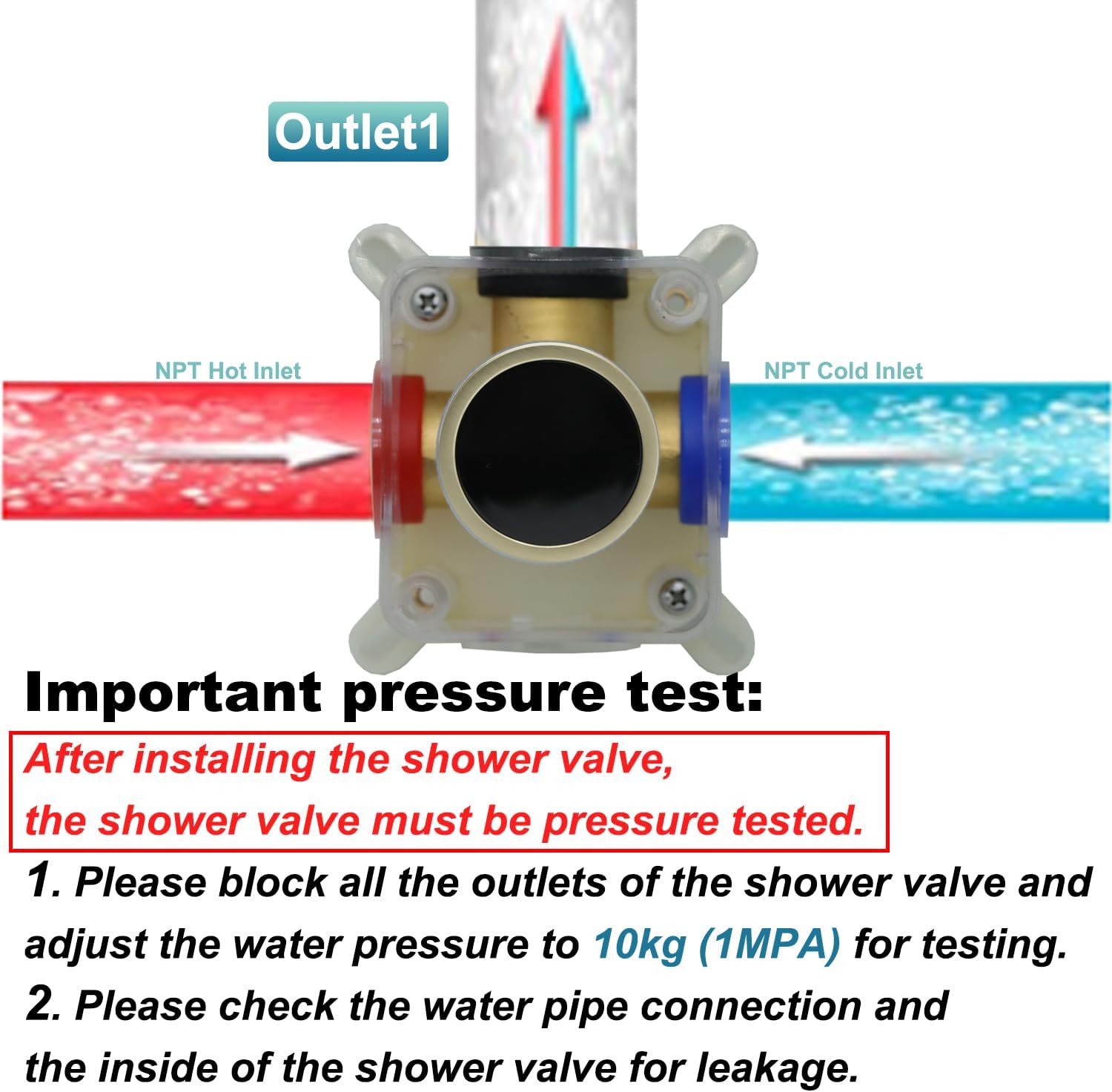
Figure 3.5: Comparison highlighting the high-quality, integrated forged solid brass construction of the Backnets valve for superior durability and corrosion resistance.
4. Installation Guide
This shower valve is designed for concealed in-wall mounting. Professional installation is recommended.
4.1 Pre-Installation Steps
- Ensure all necessary tools and components are available.
- Turn off the main water supply to the installation area.
- Prepare the wall opening according to the valve's dimensions for a secure fit.
4.2 Connecting Water Lines
- The valve is designed with standard 3/4" pipe inlet and 1/2" pipe outlet.
- Connect the hot water supply to the designated hot inlet (typically marked red or 'H').
- Connect the cold water supply to the designated cold inlet (typically marked blue or 'C').
- Connect the outlet pipes to your desired shower fixtures (e.g., rain shower head, body jets, handheld shower).

Figure 4.1: Example connection diagram for a rain shower head setup.

Figure 4.2: Example connection diagram for a handheld shower setup.

Figure 4.3: Example connection diagram for body jets or a tub spout setup.
4.3 Pressure Test
After installing the shower valve, a pressure test is mandatory to ensure there are no leaks.
- Block all outlets of the shower valve.
- Adjust the water pressure to 10kg (1MPa) for testing.
- Carefully check all water pipe connections and the interior of the shower valve for any signs of leakage.

Figure 4.4: Diagram illustrating the pressure test procedure for the shower valve.
4.4 Final Assembly
- Once the pressure test is successful and no leaks are detected, install the faceplate and control knob.
- Ensure the faceplate is flush with the finished wall and securely fastened.
5. Operating Instructions
The Backnets Shower Valve provides intuitive control over water flow and temperature, with a convenient digital display.
5.1 Turning On/Off and Temperature Adjustment
- To turn on the water, rotate the main control knob. The digital display will illuminate and show the real-time water temperature.
- Rotate the knob clockwise for colder water and counter-clockwise for warmer water. The digital display will update instantly, allowing precise temperature selection.
- To turn off the water, rotate the knob back to the 'OFF' position.
5.2 Single Function Control
This valve is designed as a single-function diverter, meaning it can operate one water outlet at a time. If multiple outlets are connected, you will need to select the desired outlet via an external diverter or by connecting only one outlet to the valve.

Figure 5.1: The single-function valve allows operation of one connected shower component at a time.
6. Maintenance
Regular cleaning and maintenance will help preserve the appearance and functionality of your shower valve.
- Cleaning the Surface: Use a soft cloth and mild soap or a non-abrasive cleaner specifically designed for brass or brushed finishes. Avoid harsh chemicals, abrasive cleaners, or scouring pads, as these can damage the finish.
- Digital Display: The digital display panel is waterproof and easy to clean. Wipe gently with a damp cloth.
- Internal Components: The high-quality brass construction ensures longevity. If water flow issues or temperature inconsistencies occur, consult a professional plumber for inspection of internal components or cartridge replacement.
7. Troubleshooting
If you encounter issues with your Backnets Shower Valve, refer to the following common problems and solutions:
| Problem | Possible Cause | Solution |
|---|---|---|
| No water flow or low pressure | Main water supply off; clogged pipes; valve obstruction. | Check main water supply; inspect pipes for blockages; consult a plumber. |
| Inconsistent water temperature | Improper hot/cold water balance; issue with pressure balance cartridge. | Ensure hot and cold water supplies are stable; if problem persists, professional inspection of cartridge may be needed. |
| Digital display not working | Insufficient water flow; debris in flow sensor. | Ensure adequate water flow; if problem persists, professional inspection may be required. |
| Leaks from valve or connections | Loose connections; damaged seals/gaskets. | Tighten all connections; replace worn seals/gaskets; re-perform pressure test. |
8. Specifications
| Feature | Detail |
|---|---|
| Brand | Backnets |
| Model Number | SXFT-1 |
| Material | Solid Brass |
| Exterior Finish | Brushed Gold, Stainless Steel |
| Item Dimensions (L x W x H) | 7.87 x 2.76 x 2.76 inches |
| Item Weight | 3.03 pounds |
| Inlet Connection Size | 0.75 Inches |
| Inlet Connection Type | Female Iron Pipe (FIP) |
| Outlet Connection Size | 0.75 Inches |
| Outlet Connection Type | FIP |
| Number of Ports | 2 |
| Valve Type | Globe Valve with Digital Display |
| Batteries Required | No (Hydro-powered display) |
9. Warranty and Support
Backnets stands behind the quality of its products. For specific warranty information, please refer to the product packaging or contact Backnets customer support directly. If you require assistance with installation, troubleshooting, or parts, please visit the official Backnets website or contact their customer service team.
Contact Information: Please refer to the contact details provided on the product packaging or the official Backnets website for the most up-to-date support information.
Ask a question about this manual
Ask about setup, troubleshooting, compatibility, parts, safety, or missing instructions. Manuals+ will review the question and use this page’s manual context to help answer it.