
SAMVIX Q4 Plus
Samvix iPlatinum Q4 Plus User Manual
Model: Q4 Plus
1. Introduction
This manual provides comprehensive instructions for the operation, maintenance, and troubleshooting of your Samvix iPlatinum Q4 Plus MP3 Player. Please read this manual thoroughly before using the device to ensure proper functionality and to maximize your user experience.
The Samvix iPlatinum Q4 Plus is a Kosher MP3 Player designed for audio playback and various utility applications. It features a metallic body, touchscreen display, and a built-in speaker.
2. Safety Information
- Do not expose the device to extreme temperatures, direct sunlight, or high humidity.
- Avoid dropping or subjecting the device to strong impacts.
- Do not attempt to disassemble or modify the device. This will void the warranty.
- Use only the provided USB Type-C cable for charging and data transfer.
- Clean the device with a soft, dry cloth. Avoid using harsh chemicals or abrasive materials.
- Keep the device away from water and other liquids.
3. Product Overview
3.1 Package Contents
Verify that all items are present in the package:
- Samvix iPlatinum Q4 Plus MP3 Player
- Clear Silicone Case
- Screen Protector
- USB Type-C Cable
3.2 Device Features
- Storage: 16GB internal memory with expansion slot for additional storage via Micro SD card.
- Durability: Includes a screen protector and a plastic case for protection against scratches and accidental drops.
- Kosher MP3 Player: Designed without radio or video capabilities, preloaded with Seforim and Prayers.
- Applications: Features recording, data transfer via Bluetooth, stopwatch, time and date, smart alarm clock, Hebrew calendar, and device lock with password.
- Audio: Built-in speaker for clear sound quality.
- Interface: Touchscreen display with touch keyboard for searching albums and artists.
- Connectivity: Aux and Bluetooth.
3.3 Device Layout

Figure 1: Front view of the Samvix iPlatinum Q4 Plus MP3 Player, showing the touchscreen display and overall design.
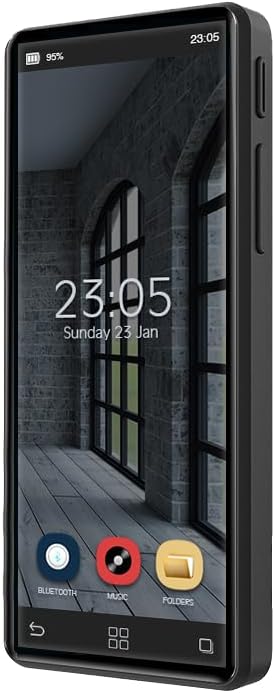
Figure 2: Side view of the Samvix iPlatinum Q4 Plus MP3 Player, highlighting its slim profile and button placement.
Refer to the images above for a visual representation of the device. The touchscreen is the primary interface, while physical buttons are located on the sides for power, volume, and navigation.
4. Setup
4.1 Initial Charging
Before first use, fully charge the device. Connect the provided USB Type-C cable to the MP3 player's charging port and the other end to a USB power adapter (not included) or a computer's USB port. The battery indicator on the screen will show charging progress.
4.2 Installing Screen Protector and Case
- Carefully clean the device screen with a soft, lint-free cloth to remove any dust or smudges.
- Peel off the protective film from the screen protector, aligning it precisely with the device screen. Gently press down from the center outwards to remove air bubbles.
- Insert the MP3 player into the clear silicone case, ensuring all ports and buttons are accessible and aligned correctly.
4.3 Transferring Music and Files
Connect the MP3 player to your computer using the USB Type-C cable. The device will appear as a removable storage drive. You can then drag and drop audio files (MP3, etc.) and other supported files into the appropriate folders on the device's internal memory or an inserted Micro SD card.
The device supports copying files directly from a memory card to the device's internal storage.
5. Operating Instructions
5.1 Power On/Off
To power on, press and hold the Power button until the screen illuminates. To power off, press and hold the Power button, then select "Power Off" on the screen.
5.2 Navigation and Touchscreen Use
The device features a touchscreen interface. Tap icons to open applications, swipe to navigate through menus, and use the on-screen keyboard for text input.
5.3 Music Playback
- Tap the "Music" icon on the home screen.
- Browse your music library by artist, album, song, or folder.
- Tap a song to begin playback.
- Use the on-screen controls for play/pause, skip, and volume adjustment. The built-in speaker will play audio, or connect headphones to the Aux port.
5.4 Bluetooth Connectivity
To connect to Bluetooth headphones or speakers:
- Go to Settings and enable Bluetooth.
- Ensure your Bluetooth device is in pairing mode.
- Select your device from the list of available devices to pair.
5.5 Using Applications
The iPlatinum Q4 Plus includes several built-in applications:
- Recording: Use the voice recorder function to capture audio.
- Seforim and Prayers: Access preloaded religious texts and prayers.
- Stopwatch: A digital stopwatch for timing.
- Time and Date: View and set the current time and date.
- Smart Alarm Clock: Set alarms with customizable options.
- Hebrew Calendar: Access the Hebrew calendar.
- Calculator: Basic arithmetic functions.
- Password Lock: Secure your device with a password.
6. Maintenance
6.1 Cleaning the Device
Gently wipe the screen and body of the MP3 player with a soft, dry, lint-free cloth. For stubborn smudges, slightly dampen the cloth with water. Do not use alcohol, solvents, or abrasive cleaners.
6.2 Battery Care
To prolong battery life, avoid fully discharging the battery frequently. Charge the device regularly, and if storing for an extended period, charge it to about 50% before storage.
6.3 Software Updates
Periodically check the manufacturer's website or contact customer support for information on available software updates. Updates can improve performance and add new features.
7. Troubleshooting
| Problem | Possible Cause | Solution |
|---|---|---|
| Device does not power on. | Low battery; device frozen. | Charge the device for at least 30 minutes. If still unresponsive, perform a hard reset (refer to manual or contact support for specific instructions if available). |
| Cannot transfer files to device. | Incorrect USB connection mode; driver issues; full storage. | Ensure the device is connected in data transfer mode. Try a different USB port or cable. Check available storage space. |
| No sound from speaker/headphones. | Volume too low; faulty headphones; audio file issue. | Increase volume. Test with different headphones. Verify the audio file is not corrupted. |
| Bluetooth device not pairing. | Device not in pairing mode; too far apart; interference. | Ensure both devices are in pairing mode and within range. Turn off and on Bluetooth on both devices. |
8. Specifications
| Feature | Detail |
|---|---|
| Model Name | Music Q4 Plus |
| Internal Memory | 16 GB |
| Expandable Memory | Micro SD slot |
| Connectivity | Aux, Bluetooth |
| Special Features | Built-In Speaker, Equalizer, Touch Screen, Voice Recorder |
| Color | Black |
| Item Weight | 9.1 ounces |
| Package Dimensions | 7.2 x 4.65 x 1.54 inches |
| Included Components | Silicone Case, USB Type-C Cable |
9. Warranty and Support
9.1 Warranty Information
For specific warranty terms and conditions, please refer to the warranty card included with your product or visit the official SAMVIX website. The warranty typically covers manufacturing defects for a specified period from the date of purchase.
9.2 Customer Support
If you encounter any issues not covered in this manual or require further assistance, please contact SAMVIX customer support. Contact information can usually be found on the product packaging or the official SAMVIX website.
Online Support: Visit the SAMVIX Store on Amazon
Related documentsQ4 Plus


Ask a question about this manual
Ask about setup, troubleshooting, compatibility, parts, safety, or missing instructions. Manuals+ will review the question and use this page’s manual context to help answer it.