1. Introduction
The COSTWAY 10000 BTU Portable Air Conditioner (Model: FP10578US-WH) is designed to provide customized comfort year-round. It offers multiple operating modes including auto, cool, dehumidify, and fan. Equipped with smart sleep mode and a 1-24 hour timer, it ensures a peaceful night's sleep. This unit efficiently cools rooms up to 350 sq.ft. and features dual control options via an LED touch panel and a remote control. Its portable design includes 2 built-in handles and 4 universal wheels for easy movement. Maintenance is simplified with removable and washable filters.
Key Features:
- Year-Round Comfort Options: Auto, cool, dehumidify, and fan modes.
- Smart Sleep Mode: Automatically maintains an optimal set temperature at low speed for quiet operation.
- 24H Timer: Allows presetting for automatic unit turn-on or turn-off.
- Efficient Cooling: 10000 BTU capacity cools rooms up to 350 sq.ft.
- Dual Control: LED touch panel and included remote control for easy adjustments.
- Air Circulation: Wide oscillation with 120° auto and 120° manual swing.
- Portability: Equipped with 2 built-in handles and 4 universal wheels.
- Easy Maintenance: Removable and washable filters.
- Stylish Design: Unique color-changing atmosphere light.
2. Package Contents
Please check that all components are present and in good condition:
- 1 x Portable Air Conditioner
- 1 x Air Exhaust Duct
- 1 x Air Exhaust Duct Connector
- 1 x Window Exhaust Adapter
- 1 x Baffle Plate
- 1 x Drain Hose
- 1 x Remote Control
- 1 x User Guide

Image: All components included in the package, laid out next to the main unit.
3. Setup & Installation
The portable AC unit is designed for easy and quick setup. Follow these steps for proper installation:
- Window Kit Assembly: Assemble the window exhaust adapter and baffle plate according to the detailed instructions in the included User Guide. The window kit is compatible with double/single-hung windows and sliding/slash windows with widths/heights between 25"-47".
- Connect Exhaust Duct: Attach the air exhaust duct to the air exhaust duct connector and then to the window exhaust adapter.
- Connect to Unit: Secure the other end of the air exhaust duct to the portable air conditioner unit.
- Positioning: Place the unit on a flat, stable surface near a window. Ensure the exhaust hose is not kinked or blocked to allow proper airflow.
- Power Connection: Plug the unit into a grounded electrical outlet.

Image: Visual guide for window installation, illustrating compatibility with double/single-hung and sliding/slash windows (25"-47" width/height).
4. Operating Instructions
The COSTWAY Portable Air Conditioner offers various modes and settings for optimal comfort. Control the unit using the LED touch panel on top or the included remote control.
Control Panel & Remote:
The unit features an intuitive LED touch panel for direct control. All functions available on the touch panel can also be accessed via the remote control for convenience.
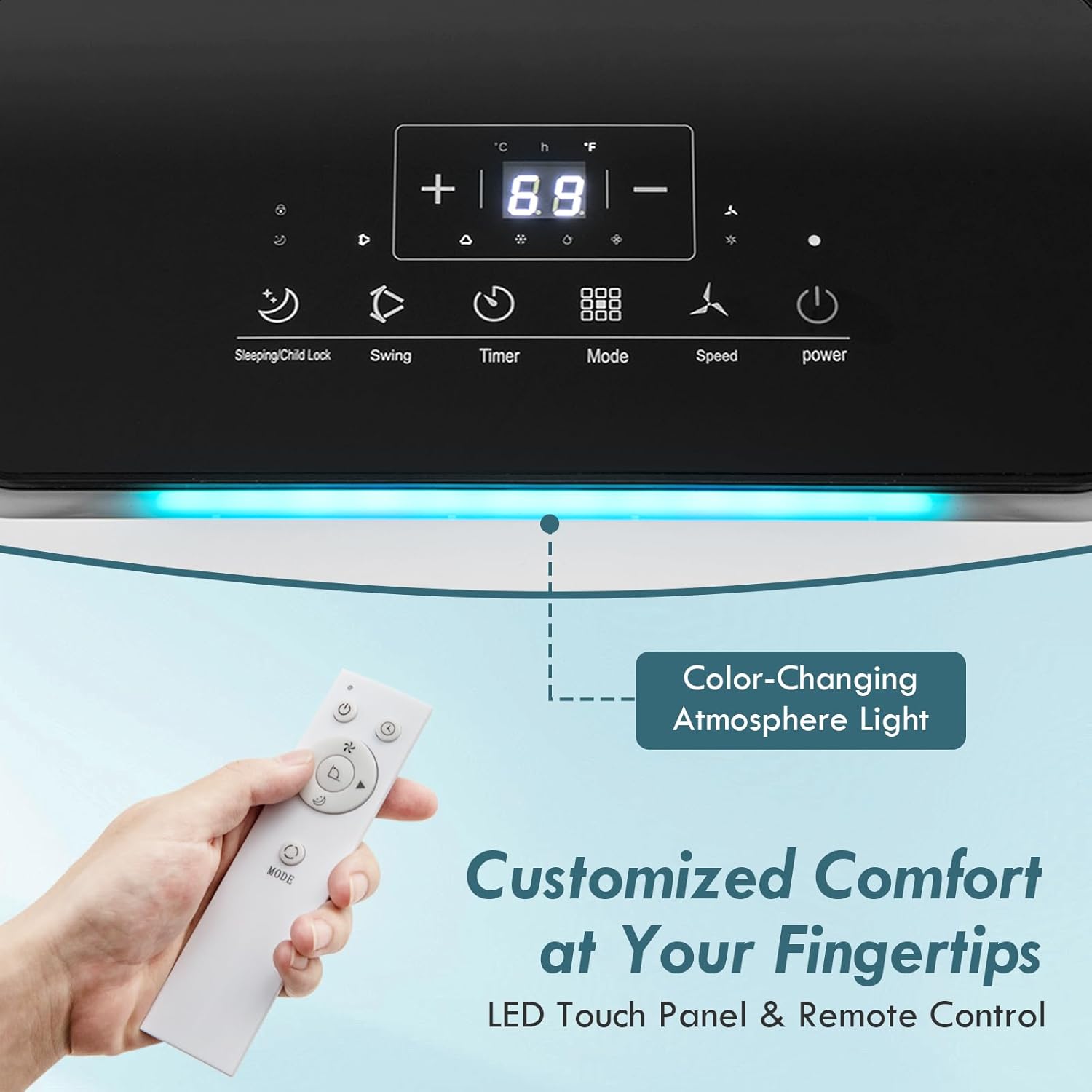
Image: The LED touch panel and remote control, showing various buttons for mode, speed, timer, and temperature adjustment.
Operating Modes:
- Cool Mode: Provides powerful cooling for rapid temperature reduction.
- Fan Mode: Circulates air with two wind speeds (high and low) without cooling.
- Dehumidify Mode: Removes excess moisture from the air (up to 56 Pints/Day). Drainage is required in high humidity environments.
- Auto Mode: Automatically selects the operating mode based on the ambient room temperature for energy saving.
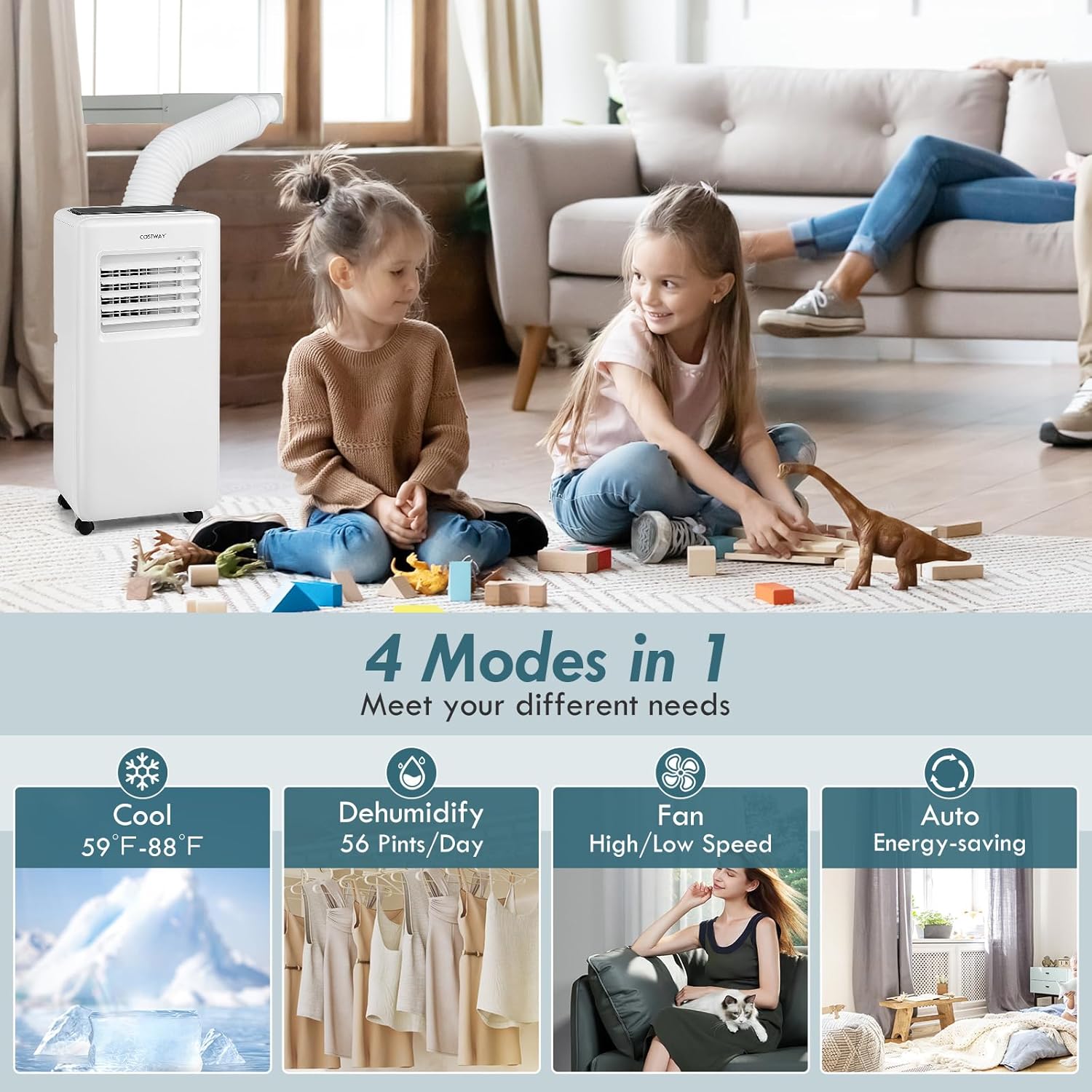
Image: A visual representation of the four modes: Cool (59°F-88°F), Dehumidify (56 Pints/Day), Fan (High/Low Speed), and Auto (Energy-saving).
Special Functions:
- Smart Sleep Mode: Ensures a comfortable sleeping environment by automatically maintaining an optimal set temperature at a low fan speed.
- 1-24H Timer: Program the unit to automatically turn on or off at a specified time.
- Auto Swing: The unit features 120° auto and 120° manual swing to promote air circulation and distribute cool air effectively.

Image: The portable AC in a bedroom, emphasizing low noise operation (less than 54dB) and the benefits of Smart Sleep Mode and the 1-24H Timer.
5. Maintenance
Regular maintenance ensures the longevity and efficient performance of your portable air conditioner.
Filter Cleaning:
The unit is equipped with removable and washable filters. It is recommended to clean the filters regularly to maintain optimal airflow and cooling efficiency. Simply remove the filters, wash them with mild detergent and water, rinse thoroughly, and allow them to dry completely before reinserting.
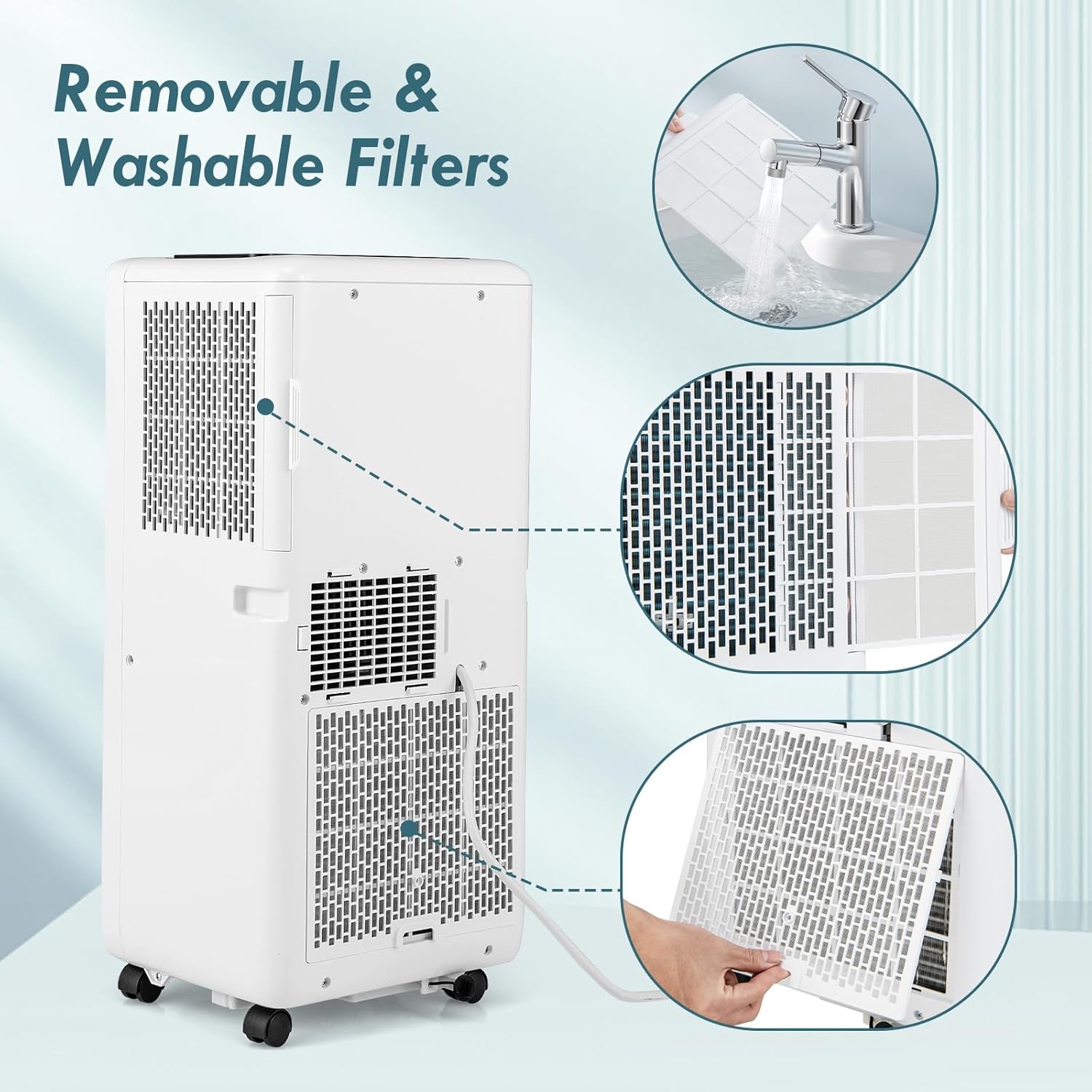
Image: Step-by-step visual guide for removing and cleaning the washable filters of the unit.
Drainage:
For dehumidifying mode or in environments with high humidity, the unit will collect condensed water. The drainage is easy by connecting the included drain hose to the bottom drainage hole. Ensure the drain hose is positioned to allow water to flow into a suitable container or drain.

Image: Close-up of the unit's side, showing the built-in handles, universal wheels, and the drainage hole with the connected drain hose.
6. Troubleshooting
If you encounter any issues with your COSTWAY Portable Air Conditioner, please refer to the following common troubleshooting steps before contacting customer support:
- Unit does not turn on: Check if the power cord is securely plugged into a working outlet. Ensure the unit is not in standby mode and the timer is not set to turn off.
- No cooling or insufficient cooling: Verify that the unit is in Cool mode and the temperature setting is lower than the room temperature. Check if the air filters are clean and not blocked. Ensure the exhaust hose is properly installed and not kinked, and that the window kit is sealed to prevent air leakage.
- Water leakage: If water is leaking, check the drain hose connection for tightness and ensure it is not blocked. If using dehumidify mode, ensure the drain hose is properly routed to a container.
- Unusual noise: Ensure the unit is placed on a flat, stable surface. Check for any obstructions in the air intake or exhaust vents.
For further assistance, please consult the full User Guide or contact COSTWAY customer support.
7. Specifications
| Feature | Detail |
|---|---|
| Brand | COSTWAY |
| Model Info | FP10578US-WH |
| Product Dimensions | 12.5" x 11" x 28" (L x W x H) |
| Item Weight | 44 lbs |
| Cooling Capacity (ASHRAE) | 10000 BTU |
| Cooling Capacity (SACC) | 6500 BTU |
| Coverage Area | Up to 350 sq.ft. |
| Dehumidifying Capacity | 56 Pints/Day |
| Temperature Setting Range | 59℉-88℉ |
| Noise Level | 50-54dB |
| Voltage | 115V/60Hz |
| Wattage | 880 watts |
| Air Flow Rate | 155 CFM |
| Applicable Window Width/Height | 25"-47" |
| Length of Exhaust Hose | 5 ft |
| Diameter of Exhaust Hose | 6" |
| Length of Drain Hose | 3.3 ft |
| Diameter of Drain Hose | 0.4" |
| Length of Power Cord | 6 ft |
| Max Remote Control Distance | 33 ft |
| Material Type | ABS Plastic |
| Refrigerant | R-32 |
8. Warranty & Support
For warranty information, product registration, or customer support, please refer to the contact details provided in your original purchase documentation or visit the official COSTWAY website. Keep your purchase receipt as proof of purchase.


