
1. Introduction
This manual provides essential information for the safe and effective operation of your Mastech MY70 Digital Multimeter. Please read this manual thoroughly before use and retain it for future reference. The Mastech MY70 is a compact, battery-powered digital multimeter designed for measuring AC/DC voltage, AC/DC current, resistance, diode, and transistor hFE. It is suitable for domestic, industrial, and electronics applications.
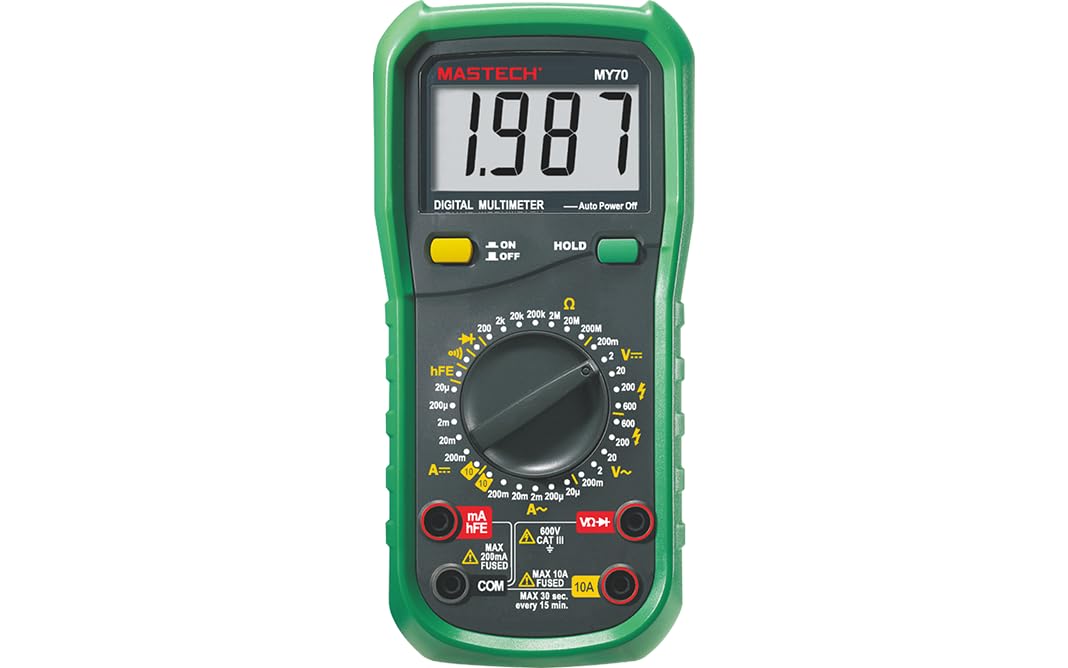
Figure 1: Front view of the Mastech MY70 Digital Multimeter.
2. Safety Information
WARNING: To avoid electric shock or personal injury, and to avoid damage to the meter or to the equipment under test, follow these safety rules:
- Do not apply more than the rated voltage, as marked on the meter, between the terminals or between any terminal and earth ground.
- Use caution when working with voltages above 30V AC RMS, 42V peak, or 60V DC. Such voltages pose a shock hazard.
- Always disconnect the test leads from the circuit before changing functions or ranges.
- Ensure the test leads are in good condition, without any damage to the insulation.
- Do not use the meter if it appears damaged or if the case is open.
- Always use the proper terminals, function, and range for your measurements.
- Replace the battery as soon as the low battery indicator appears to ensure accurate readings.
3. Package Contents
Verify that all items listed below are included in your package:
- Mastech MY70 Digital Multimeter (approx. 188x93x50mm, 380g/0.84lb)
- Test Leads (one red, one black)
- Multi-function Socket
- 1 x 9V 6F22 Battery
- Calibration Certificate
- Quick Start Guide

Figure 2: Mastech MY70 Multimeter, test leads, multi-function socket, battery, and documentation. This image also illustrates the main applications of the multimeter in domestic, industrial, and electronics settings.
4. Setup
4.1 Battery Installation
- Ensure the multimeter is turned off and test leads are disconnected.
- Locate the battery compartment cover on the back of the multimeter.
- Unscrew the retaining screw(s) and remove the cover.
- Insert the 9V 6F22 battery, observing the correct polarity (+ and -).
- Replace the battery compartment cover and secure it with the screw(s).
4.2 Connecting Test Leads
- For most measurements (voltage, resistance, continuity, diode, hFE), insert the black test lead into the "COM" (common) jack.
- Insert the red test lead into the "VΩmA" jack.
- For current measurements exceeding 200mA (up to 10A), insert the red test lead into the "10A" jack.
5. Operating Instructions
The Mastech MY70 features a rotary switch for function selection and a digital display for readings.
5.1 Function Selection
Turn the rotary switch to the desired measurement function (e.g., DCV, ACV, DCA, ACA, Ω, Diode, hFE). The meter will automatically select the appropriate range for most measurements (auto-ranging), or you may need to manually select a range depending on the model variant.
5.2 Taking Measurements
- DC Voltage (DCV): Select the DCV function. Connect the test leads in parallel with the DC voltage source.
- AC Voltage (ACV): Select the ACV function. Connect the test leads in parallel with the AC voltage source.
- DC Current (DCA): Select the DCA function. Connect the meter in series with the circuit. Ensure the red lead is in the correct current jack (mA or 10A).
- AC Current (ACA): Select the ACA function. Connect the meter in series with the circuit. Ensure the red lead is in the correct current jack (mA or 10A).
- Resistance (Ω): Select the Ω function. Ensure the circuit is de-energized. Connect the test leads across the component to measure resistance.
- Diode Test: Select the Diode function. Connect the red lead to the anode and the black lead to the cathode of the diode. The forward voltage drop will be displayed.
- Continuity Test: Select the Continuity function. Connect the test leads across the circuit or component. A buzzer will sound if continuity is detected (resistance less than 50Ω).
- Transistor hFE Test: Insert the transistor into the multi-function socket, ensuring correct pin orientation (EBC for NPN or PNP). Select the hFE function. The hFE value will be displayed.
5.3 Special Features
- Data Hold: Press the "HOLD" button to freeze the current reading on the display. Press again to release.
- Auto Power Off: The meter will automatically power off after a period of inactivity to conserve battery life.
- Low Battery Display: An icon will appear on the display when the battery voltage is low, indicating that the battery needs replacement.
6. Maintenance
6.1 Battery Replacement
When the low battery indicator appears on the display, replace the 9V 6F22 battery as described in Section 4.1. Using a low battery can lead to inaccurate readings.
6.2 Cleaning
Wipe the case with a damp cloth and mild detergent. Do not use abrasives or solvents. Keep the terminals free from dirt and moisture.
6.3 Storage
If the meter is not to be used for an extended period, remove the battery to prevent leakage and damage to the meter.
7. Troubleshooting
- No display or faint display: Check battery installation and replace if necessary.
- Incorrect readings: Ensure correct function and range selection. Check test lead connections and condition. Verify battery level.
- "OL" (Overload) displayed: The measured value exceeds the selected range. Switch to a higher range or a different function if applicable.
- No continuity beep: Check if the resistance is above 50Ω. Ensure test leads are properly connected.
8. Specifications
The following table details the technical specifications of the Mastech MY70 Digital Multimeter:

Figure 3: Detailed specifications for the Mastech MY70, including ranges, resolutions, and accuracies for various measurement functions.
| Parameter | Value |
|---|---|
| Display | 2000 counts |
| Auto Power Off | Yes |
| Data Hold | Yes |
| Low Battery Display | Yes |
| Transistor hFE | 0~1000 |
| Diode Open Voltage | 3.0V |
| Continuity Buzzer | <50Ω |
| Manufacturer | MASTECH |
| Model Number | YQ-MY70 |
| Item Weight | 1 kg |
| Product Dimensions | 20 x 15 x 25 cm |
| Batteries | 2 LR44 batteries (included) - Note: Package contents list 1x9V 6F22 battery. Please verify upon receipt. |
| Material | Acrylonitrile Butadiene Styrene |
| Power Source Type | Battery Powered |
| Measurement Accuracy | 0.4% (typical) |
| Certifications | CE, RoHS, UL |
| Country of Origin | Taiwan |
| Upper Temperature Rating | 50 Degrees Celsius |
For a comparison of features across different Mastech digital multimeters, refer to the following table:

Figure 4: Feature comparison table for various Mastech digital multimeters, including the MY70 model.
9. Warranty and Support
For information regarding warranty coverage, technical support, or service, please refer to the official Mastech website or contact your local distributor. Keep your purchase receipt as proof of purchase.


