
Mastech YQ-MAS830L
MGL MASTECH MAS830L Digital Multimeter User Manual
Model: MAS830L (YQ-MAS830L)
1. Introduction
This user manual provides comprehensive instructions for the safe and effective operation of the MGL MASTECH MAS830L Digital Multimeter. This device is designed for measuring various electrical parameters, offering reliability and precision for both domestic and electronics applications.

Figure 1: Front view of the MGL MASTECH MAS830L Digital Multimeter, displaying its clear LCD screen and rotary dial.
2. Safety Information
Always adhere to the following safety precautions to prevent personal injury or damage to the multimeter:
- Do not exceed the maximum input limits for any measurement range.
- Exercise extreme caution when working with voltages above 30V AC RMS, 42V peak, or 60V DC. These voltages pose a shock hazard.
- Before changing functions, disconnect the test leads from the circuit under test.
- Do not operate the multimeter if it appears damaged or if the test leads are damaged.
- Ensure the battery cover is securely closed before operation.
- Replace the battery when the low battery indicator appears to ensure accurate readings.
- Observe all local and national safety codes.
Warning: Incorrect use of this meter can cause damage, shock, or injury.
3. Product Features
The MGL MASTECH MAS830L Digital Multimeter offers a range of features for versatile electrical measurements:
- Display: 2000 counts for precise readings.
- Diode Test: Open Voltage 3.0V.
- Data Hold: Freezes the displayed reading for convenience.
- Low Battery Display: Indicates when battery replacement is needed.
- Continuity Buzzer: Audible alert for continuity testing (less than 70 ±30Ω).
- Display Backlight: For improved visibility in low-light conditions.
- Compliance: CE, RoHS, UL certified.
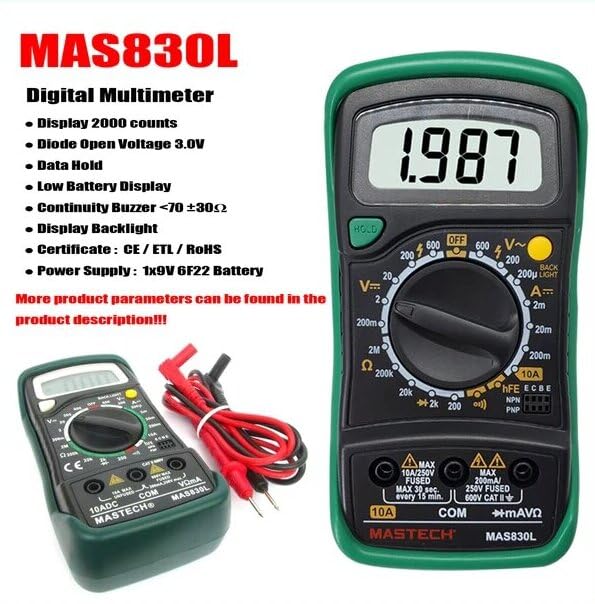
Figure 2: The MAS830L Multimeter highlighting its key features and included test leads.

Figure 3: Detailed view of the multimeter's high-definition LCD screen, designed for clear and easy data reading.
4. Setup
4.1. Unpacking and Inspection
Carefully unpack the multimeter and check for any signs of damage. Verify that all components listed below are present:
- MGL MASTECH MAS830L Digital Multimeter
- Test Leads (Red and Black)
- 1x 9V 6F22 Battery (pre-installed or included)
- Calibration Certificate (if included)
- Quick Start Guide (if included)

Figure 4: Illustration of the MAS830L package contents and typical applications.
4.2. Battery Installation/Replacement
The MAS830L uses one 9V 6F22 battery. If the low battery indicator appears on the display, or if the unit does not power on, replace the battery:
- Ensure the multimeter is turned OFF and disconnect all test leads.
- Locate the battery compartment cover on the back of the unit.
- Unscrew the retaining screw(s) and remove the cover.
- Carefully remove the old battery (if present) and disconnect it from the battery clip.
- Connect the new 9V 6F22 battery to the battery clip, observing correct polarity.
- Place the new battery into the compartment and replace the cover, securing it with the screw(s).
5. Operating Instructions
5.1. General Operation
- Connect the black test lead to the "COM" input jack.
- Connect the red test lead to the appropriate input jack for the desired measurement:
- "VΩmA" for voltage, resistance, and small current measurements.
- "10A" for high current measurements (up to 10A).
- Turn the rotary switch to the desired function and range.
- Connect the test leads to the circuit or component under test.
- Read the measurement value on the LCD display.
5.2. Measurement Functions
DC Voltage Measurement (V–):
- Set the rotary switch to the desired DC Voltage range (e.g., 200mV, 2V, 20V, 200V, 600V).
- Connect the red lead to the positive side and the black lead to the negative side of the DC source.
AC Voltage Measurement (V∼):
- Set the rotary switch to the desired AC Voltage range (e.g., 200V, 600V).
- Connect the test leads across the AC source.
DC Current Measurement (A–):
- Set the rotary switch to the desired DC Current range (e.g., 2mA, 20mA, 200mA, 10A).
- Important: For 10A measurements, move the red lead to the "10A" input jack.
- Connect the multimeter in series with the circuit.
Resistance Measurement (Ω):
- Set the rotary switch to the desired Resistance range (e.g., 200Ω, 2kΩ, 20kΩ, 200kΩ, 2MΩ).
- Ensure the circuit is de-energized before measuring resistance.
- Connect the test leads across the component.
Diode Test (▶):
- Set the rotary switch to the Diode Test position.
- Connect the red lead to the anode and the black lead to the cathode of the diode. The display will show the forward voltage drop. Reverse the leads to check for open circuit.
Continuity Test (♫):
- Set the rotary switch to the Continuity Test position.
- Connect the test leads across the circuit or component. An audible buzzer will sound if continuity exists (resistance less than 70 ±30Ω).
Data Hold:
- Press the "HOLD" button to freeze the current reading on the display. Press again to release.
6. Maintenance
6.1. Cleaning
To clean the multimeter, use a soft, damp cloth and a mild detergent. Do not use abrasives or solvents. Ensure the unit is completely dry before use.
6.2. Fuse Replacement
The MAS830L is equipped with internal fuses to protect against overcurrent. If the current measurement function fails, the fuse may need replacement. Refer to the specifications for fuse ratings.
- Ensure the multimeter is turned OFF and disconnect all test leads.
- Open the battery compartment cover as described in Section 4.2.
- Locate the fuse(s) inside the compartment.
- Carefully remove the blown fuse and replace it with a fuse of the identical type and rating.
- Replace the battery compartment cover and secure it.
Caution: Always use fuses with the specified voltage and current ratings to prevent fire or damage to the meter.
7. Troubleshooting
| Problem | Possible Cause | Solution |
|---|---|---|
| No display when powered on. | Dead or incorrectly installed battery. | Check battery polarity, replace battery. |
| "OL" or "1" displayed. | Overload or out of range measurement. | Select a higher range or check circuit. |
| Inaccurate readings. | Low battery, dirty test leads, or incorrect range. | Replace battery, clean leads, select appropriate range. |
| Current measurement not working. | Blown fuse. | Replace the fuse (refer to Section 6.2). |
8. Specifications
The following table outlines the general and electrical specifications for the MGL MASTECH MAS830L Digital Multimeter:
| Parameter | Specification |
|---|---|
| Display | 2000 counts |
| DC Voltage (V–) | 600V (Max) |
| AC Voltage (V∼) | 600V (Max) |
| DC Current (A–) | 10A (Max) |
| Resistance (Ω) | 2MΩ (Max) |
| Diode Open Voltage | 3.0V |
| Continuity Buzzer | <70 ±30Ω |
| Power Source | 1x 9V 6F22 Battery |
| Dimensions (L x W x H) | 20 x 15 x 25 cm (approx.) |
| Weight | 1 Kilogram (approx.) |
| Safety Rating | CAT III 600V |
| Certifications | CE, RoHS, UL |
| Operating Temperature | Up to 50°C |

Figure 5: Comparative specifications for various Mastech digital multimeters, including the MAS830L.
9. Warranty and Support
The MGL MASTECH MAS830L Digital Multimeter comes with a standard warranty. Please refer to your purchase documentation for specific warranty terms and conditions.
- Spare Parts Availability: 1 Year (as per manufacturer information).
- For technical support or warranty claims, please contact your retailer or the official Mastech customer service.
Related documentsYQ-MAS830L


Ask a question about this manual
Ask about setup, troubleshooting, compatibility, parts, safety, or missing instructions. Manuals+ will review the question and use this page’s manual context to help answer it.