
1. Introduction and Overview
This manual provides essential information for the safe and effective use, maintenance, and care of your HJC i91 Poly Modular Motorcycle Helmet. Please read this manual thoroughly before using your helmet to ensure proper understanding of its features and functions.
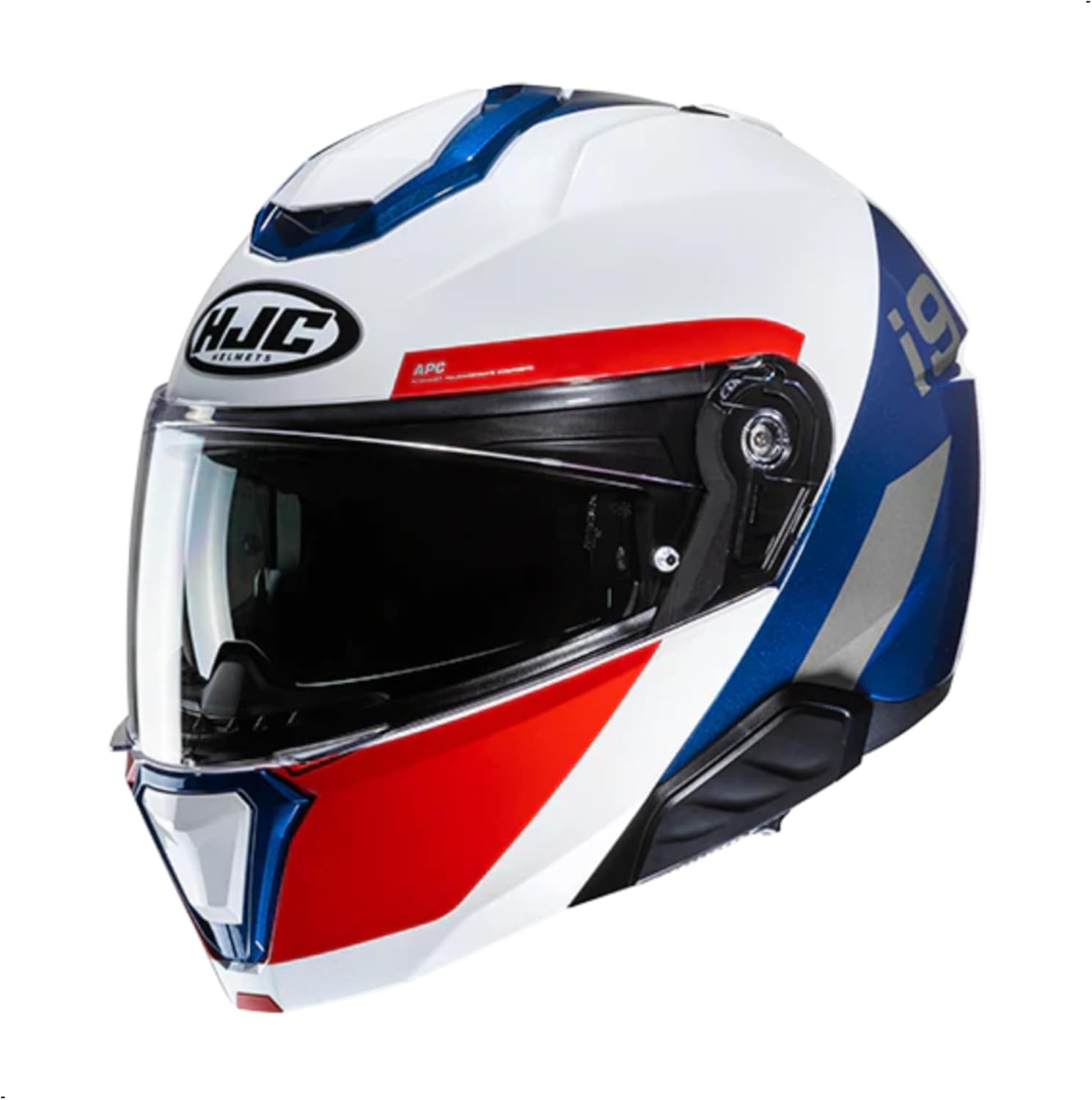
Image: Front-side view of the HJC i91 Modular Motorcycle Helmet in MC21 color scheme (white, blue, red accents).
2. Safety Information
2.1 DOT Certification
The HJC i91 helmet is DOT-approved, meeting stringent DOT FMVSS 218 standards. This certification signifies that the helmet has undergone rigorous testing for:
- Energy absorption
- Penetration resistance
- Secure chin strap testing
- Labeling requirements for on-road motorcycle helmets

Image: A close-up view of a helmet undergoing impact testing, illustrating the DOT certification process.
2.2 Proposition 65 Warning
This product may contain chemicals known to the State of California to cause cancer and birth defects or other reproductive harm. For more information, visit www.P65Warnings.ca.gov.
3. Product Features
3.1 Advanced Polycarbonate Composite Shell
The i91 features an advanced polycarbonate composite shell, engineered with CAD technology. This construction ensures a lightweight design while providing a comfortable and secure fit.

Image: A motorcyclist wearing an HJC helmet, highlighting the helmet's polycarbonate shell design.
3.2 Supercool Interior
The interior of the i91 helmet is designed for maximum comfort during long rides. Key features include:
- Moisture-wicking and quick-drying liner.
- Antibacterial fabric for hygiene.
- Removable and washable cheek and crown pads for easy maintenance.
- Interchangeable cheek pads across all sizes for a customized fit.
- Glasses grooves to enhance comfort for eyewear users.

Image: Hands demonstrating the removal of the helmet's interior lining, showcasing the Supercool fabric.
3.3 HJ-33 Pinlock Ready Shield
The HJ-33 shield provides 99% UV protection and features an anti-scratch coating. It is Pinlock ready for anti-fog insert installation (Pinlock insert included). Optional shields are available separately, including RST Mirrored Pinlock Ready Shield.

Image: A blue HJC helmet with its clear HJ-33 shield in place.
3.4 HJ-V12 Integrated Sun Visor
The helmet includes an integrated HJ-V12 sun visor with an anti-scratch coating. This dynamic multi-step sun visor allows for optimized positioning to reduce eye strain from sunlight while improving peripheral vision.

Image: A motorcyclist wearing an HJC helmet, demonstrating the integrated sun visor in use.
3.5 Advanced Channeling Ventilation System (ACS)
The ACS provides full front-to-back airflow, effectively expelling heat and humidity from the helmet to keep the rider cool and comfortable.
3.6 SMART HJC Bluetooth System Compatibility
The HJC i91 is designed to be compatible with SMART HJC 21B & 50B Bluetooth communication systems (sold separately). These systems offer an all-in-one design fully integrated into the helmet for optimal weight balance and aerodynamic performance.

Image: A person adjusting a SMART HJC Bluetooth communication system integrated into the side of a helmet.
4. Setup and Fitting
4.1 Proper Helmet Fit
A properly fitting helmet is crucial for safety. The helmet should fit snugly around your head without causing pressure points. To check the fit:
- Place the helmet on your head, ensuring the top of your head touches the top of the helmet.
- Fasten the chin strap securely. It should be tight enough that you cannot pull the helmet off your head when tilting it forward or backward.
- With the chin strap fastened, try to rotate the helmet from side to side. Your skin should move with the helmet, indicating a snug fit. If the helmet slides easily, it is too large.
- Check for any uncomfortable pressure points. If present, consider trying a different size or adjusting the interior pads if possible.
4.2 Chin Strap Adjustment
The chin strap uses a quick-release buckle system. Ensure the strap is threaded correctly and tightened so that it is snug under your chin without being restrictive. The strap should not be able to slip over your chin when pulled firmly.
5. Operating Instructions
5.1 Modular Function (Chin Bar Operation)
The i91 is a modular helmet, allowing the chin bar to be raised. To operate:
- To Open: Locate the release button/lever, typically at the center front of the chin bar. Press the button and lift the chin bar upwards until it locks into the open position.
- To Close: Firmly pull the chin bar downwards until it clicks securely into place. Ensure it is fully latched before riding.
Warning: Do not ride with the chin bar in the open position at high speeds or in situations where full face protection is required.
5.2 Shield Operation (HJ-33)
The HJ-33 shield can be opened and closed manually. It features a multi-step ratchet system allowing it to be held in various open positions for ventilation.
- Opening/Closing: Grip the tab on the lower edge of the shield and lift or pull down.
- Shield Removal/Installation: Refer to the detailed instructions provided with your helmet for specific shield removal and installation procedures. This typically involves pressing release levers on the side plates.
5.3 Sun Visor Operation (HJ-V12)
The integrated sun visor is operated by a slider mechanism, usually located on the side or bottom edge of the helmet.
- To Deploy: Slide the lever forward/down to lower the sun visor.
- To Retract: Slide the lever backward/up to raise the sun visor back into the helmet shell.
5.4 Ventilation System
The i91 features adjustable vents to control airflow. Locate the front intake vents (chin and forehead) and rear exhaust vents. Open or close them as needed to regulate internal temperature and humidity.
6. Maintenance and Care
6.1 Cleaning the Exterior Shell
Clean the helmet shell with a soft cloth and mild soap and water. Avoid harsh chemicals, solvents, or abrasive cleaners, as these can damage the helmet's finish and materials.
6.2 Cleaning the Interior Liner
The Supercool interior liner is removable and washable. Hand wash the pads with mild soap and cool water, then air dry completely before reinstalling. Do not machine wash or tumble dry.
6.3 Cleaning the Shield and Sun Visor
Clean the HJ-33 shield and HJ-V12 sun visor with a soft, damp cloth and mild soap. Rinse thoroughly with clean water and allow to air dry. Do not use abrasive materials or chemical cleaners, which can scratch or damage the anti-scratch coating.
6.4 Storage
Store your helmet in a cool, dry place away from direct sunlight and extreme temperatures. Use a helmet bag to protect it from dust and scratches.
7. Troubleshooting
7.1 Fogging Shield
If your shield fogs up, ensure the Pinlock insert is properly installed. If fogging persists, slightly open the shield to the first detent for increased airflow, or ensure ventilation vents are open.
7.2 Loose Fit
If the helmet feels loose over time, check if the interior pads are correctly seated. If the helmet is still too loose, it may be the wrong size. Consider using interchangeable cheek pads for a more customized fit if available for your size.
7.3 Chin Bar Not Latching
Ensure no obstructions are preventing the chin bar from fully closing. Apply firm, even pressure when closing until you hear a distinct click, indicating it is securely latched.
8. Specifications
| Feature | Detail |
|---|---|
| Model Name | i91 |
| Shell Material | Advanced Polycarbonate Composite |
| Safety Standard | DOT FMVSS 218 Approved |
| Main Shield | HJ-33 (Pinlock Ready, 99% UV Protection, Anti-scratch) |
| Sun Visor | HJ-V12 (Integrated, Anti-scratch, Dynamic Multi-step) |
| Interior | Supercool (Moisture-wicking, Removable, Washable, Glasses grooves) |
| Ventilation | Advanced Channeling Ventilation System (ACS) |
| Bluetooth Compatibility | SMART HJC 21B & 50B (Sold Separately) |
| Item Weight | 3.47 pounds |
| Product Dimensions | 15 x 11 x 11 inches |
| Item Model Number | 0848-1021-06 |
| Manufacturer Part Number | 0000408282 |
9. Warranty and Support
For warranty information and customer support, please refer to the official HJC Helmets website or contact your authorized HJC dealer. Keep your proof of purchase for any warranty claims.
For additional resources and product information, visit the HJC Store on Amazon.


