
Introduction
This manual provides instructions for the operation and maintenance of your Timex Ironman Classic 42mm Digital Watch. This watch features a durable design, digital display, and water resistance up to 100 meters, making it suitable for various activities. Please read this manual thoroughly to understand all functions and ensure proper use.

Image: Front view of the Timex Ironman Classic 42mm Watch, showcasing its digital dial and black strap.
Setup and Initial Configuration
1. Setting Time and Date
- Press the MODE button repeatedly until the time setting screen appears (usually indicated by flashing digits).
- Use the SET/RECALL button to select the digit you wish to adjust (hours, minutes, seconds).
- Press the START/STOP button to increase the selected digit.
- Press the LAP/RESET button to decrease the selected digit (if applicable).
- Once the time is set, press MODE to cycle to date settings (month, day, year) and repeat steps 2-4.
- Press MODE again to exit the setting mode.
2. 12/24 Hour Format
While in time setting mode, press the INDIGLO button to toggle between 12-hour and 24-hour (military) time formats.
Operating Instructions
1. Indiglo Night-Light
Press the INDIGLO button (top left) to activate the night-light. The light will illuminate the display for a few seconds, allowing visibility in low-light conditions.
2. Stopwatch Function
- Press the MODE button until the stopwatch screen is displayed (usually indicated by "STP" or a stopwatch icon).
- Press START/STOP to begin timing.
- Press LAP/RESET to record a lap time while the stopwatch continues running.
- Press START/STOP again to pause the stopwatch.
- To reset the stopwatch, press LAP/RESET while the stopwatch is paused.
3. Timer Function
- Press the MODE button until the timer screen is displayed (usually indicated by "TMR" or a timer icon).
- To set the timer, press SET/RECALL and use START/STOP and LAP/RESET to adjust hours, minutes, and seconds.
- Press SET/RECALL to confirm each setting.
- Press START/STOP to begin the countdown.
- An alarm will sound when the timer reaches zero. Press any button to stop the alarm.
4. Alarm Function
- Press the MODE button until the alarm screen is displayed (usually indicated by "ALM" or an alarm clock icon).
- Press SET/RECALL to enter alarm setting mode.
- Use START/STOP and LAP/RESET to adjust the alarm time.
- Press SET/RECALL to confirm the alarm time.
- To activate/deactivate the alarm, press START/STOP while on the alarm screen (outside of setting mode). An alarm icon will appear/disappear on the display.

Image: Side view of the Timex Ironman Classic watch, highlighting the functional buttons on the watch case.
Maintenance and Care
1. Cleaning Your Watch
- Wipe the watch case and strap with a soft, damp cloth.
- For stubborn dirt, use a mild soap solution and rinse thoroughly with clean water.
- Avoid using harsh chemicals or abrasive cleaners, as these can damage the watch's finish or seals.
2. Water Resistance
This watch is water resistant up to 100 meters (330 feet). This means it is suitable for showering, swimming, and snorkeling. Do not press any buttons while the watch is submerged in water, as this can compromise the water resistance seals.
3. Battery Replacement
The watch uses one Lithium Metal battery (CR2016). When the display dims or functions become erratic, the battery may need replacement. It is recommended to have the battery replaced by a qualified watch technician to ensure proper sealing and maintain water resistance. Attempting to replace the battery yourself may void the warranty and compromise water resistance.
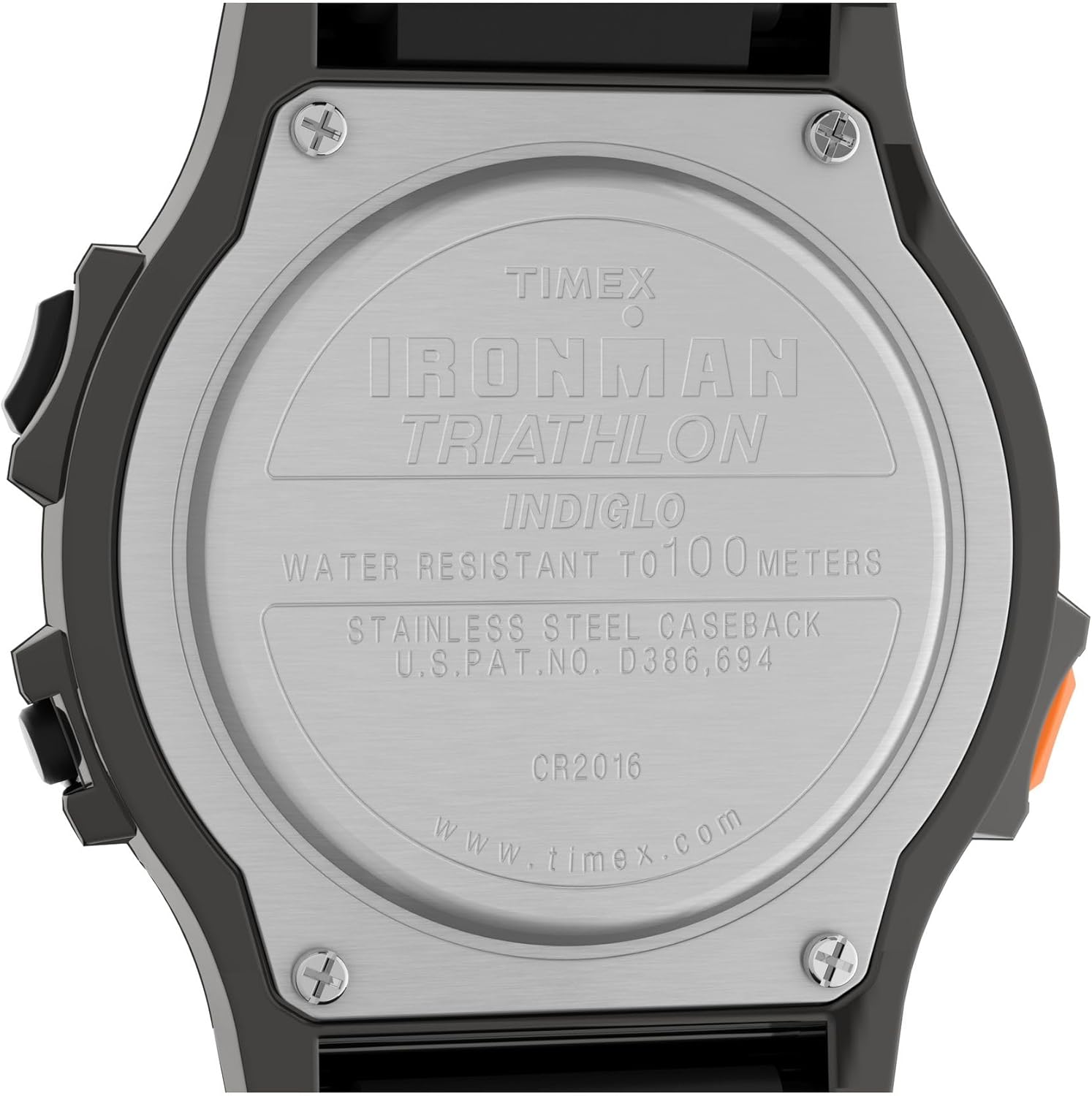
Image: Close-up of the watch's stainless steel case back, showing the "CR2016" battery type and water resistance rating.
Troubleshooting
| Problem | Possible Cause | Solution |
|---|---|---|
| Display is dim or blank. | Low or dead battery. | Replace the battery (CR2016). See Maintenance section. |
| Buttons are unresponsive. | Watch may be in a locked mode or battery is low. | Check if any button is stuck. Replace battery if necessary. If problem persists, contact support. |
| Time is incorrect. | Time needs to be reset. | Follow the "Setting Time and Date" instructions in the Setup section. |
| Water inside the display. | Water resistance seals compromised. | Stop using the watch immediately and take it to a qualified service center for inspection and repair. |
Specifications
- Model Number: TW5M543009J
- Case Diameter: 42mm
- Strap Material: Resin/Silicone
- Lens Material: Acrylic
- Water Resistance: 100 meters (330 feet)
- Battery Type: CR2016 Lithium Metal (included)
- Functions: Time, Date, Stopwatch, Timer, Alarm, Indiglo Night-Light

Image: Angled view of the Timex Ironman Classic 42mm Watch, showing the digital display and case design.
Warranty Information
Your Timex watch is warranted against manufacturing defects for a period of one year from the original date of purchase. This warranty does not cover normal wear and tear, battery life, crystal, strap, or case damage due to improper handling or accidents. For full warranty terms and conditions, please refer to the official Timex website or contact customer support.
Customer Support
For further assistance, technical support, or service inquiries, please visit the official Timex website or contact their customer service department. You can typically find contact information, FAQs, and service center locations on the manufacturer's website.
- Official Website: www.timex.com
- Service Centers: Refer to the website for authorized service locations.


