
Introduction
This manual provides comprehensive instructions for the proper use, setup, operation, and maintenance of your Honor 200 Pro smartphone. Please read this manual thoroughly before using your device to ensure optimal performance and longevity.
The Honor 200 Pro is a high-performance 5G smartphone featuring a powerful 3.0 GHz Octa-core processor, 12GB of RAM, and 512GB of internal storage. It operates on Android 14 and is equipped with a robust 5200mAh non-removable battery.
Setup
Package Contents
Before you begin, ensure all items are present in your Honor 200 Pro package:
- Honor 200 Pro Smartphone
- USB Cable
- Quick Start Guide (not included in this digital manual)
- SIM Ejector Tool (may vary by region)
Inserting SIM Cards and eSIM Activation
The Honor 200 Pro supports Dual SIM functionality, allowing for the use of two physical SIM cards or one physical SIM card and an eSIM. Ensure your device is powered off before inserting or removing SIM cards.
- Locate the SIM card tray on the side of your device.
- Insert the SIM ejector tool into the small hole next to the tray and push gently until the tray pops out.
- Place your Nano-SIM card(s) into the designated slots on the tray, ensuring the gold contacts face downwards.
- Carefully reinsert the tray into the device.
- For eSIM activation, navigate to the device settings after powering on and follow the on-screen instructions provided by your network carrier.

Image: Front view of the Honor 200 Pro, illustrating its sleek design and display. This image helps visualize the device for SIM tray location.
Initial Power On and Basic Setup
To power on your Honor 200 Pro for the first time:
- Press and hold the Power button (located on the right side of the device) until the Honor logo appears.
- Follow the on-screen prompts to select your language, region, connect to a Wi-Fi network, and set up your Google account.
- You will be guided through setting up security features such as fingerprint unlock and facial recognition.
Operating Your Device
Display and User Interface
The Honor 200 Pro features a vibrant 6.78-inch OLED display with 1 billion colors and a resolution of 1224 x 2700 pixels, providing a crisp and immersive visual experience. Navigate the Android 14 operating system using intuitive touch gestures.
Camera Features
The Honor 200 Pro is equipped with an advanced camera system designed for professional-grade photography:
- Rear Camera System:
- 50 MP wide lens (f/1.9, 1/1.3", 1.2µm, PDAF, OIS)
- 50 MP telephoto lens (f/2.4, PDAF, OIS, 2.5x optical zoom)
- 12 MP ultrawide lens (f/2.2, 112°, AF)
- Front Camera System:
- 50 MP wide lens (f/2.1)
- 2 MP depth sensor (f/2.4)
Utilize the Harcourt Portrait Mode for professional studio-quality portraits with perfect control of light and shadow, delivering a classic photographic feel. The device's Studio-Level Portrait AI Camera enhances your photography with intelligent scene recognition and optimization.

Image: The Honor 200 Pro, showcasing its advanced camera system and emphasizing its capabilities as a "Portrait Master."

Image: An example of photography taken with Harcourt Portrait Mode, highlighting its ability to produce studio-quality portraits.
Performance and Storage
Powered by the Qualcomm SM8635 Snapdragon 8s Gen 3 (4 nm) Octa-core processor, the Honor 200 Pro delivers peak efficiency and minimal power usage. This advanced mobile platform provides next-level AI capabilities. With 12GB of RAM and 512GB of internal storage, the device offers ample space and smooth multitasking for all your needs.
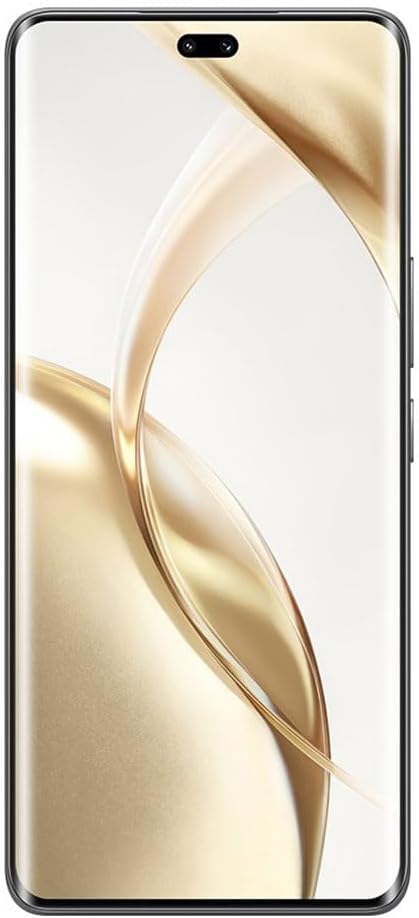
Image: The Snapdragon 8s Gen 3 Mobile Platform, representing the powerful processor within the Honor 200 Pro.

Image: The Honor 200 Pro highlighting its substantial 12GB RAM and 512GB internal storage capacity.
Battery Management
The Honor 200 Pro is powered by a 5200mAh Silicon-Carbon non-removable battery, providing extended usage times. It supports 100W Wired HONOR SuperCharge and 66W Wireless HONOR SuperCharge for rapid power replenishment.
- To optimize battery life, adjust screen brightness, disable unnecessary background apps, and utilize power-saving modes.
- Use only Honor-approved charging accessories to ensure safe and efficient charging.

Image: An internal view illustrating the 5200mAh Silicon-Carbon Battery, emphasizing its capacity and advanced technology.
Connectivity
The Honor 200 Pro offers robust connectivity options, including 5G cellular technology and Dual SIM (SIM + eSIM) support. It features HONOR C1+ RF Enhancement, which significantly improves antenna transmission by up to 17% and antenna reception by up to 35%, ensuring stable and strong network connections.

Image: Visual representation of the HONOR C1+ RF Enhancement, highlighting its role in improving signal strength and network performance.
Maintenance
Cleaning Your Device
To keep your Honor 200 Pro in optimal condition:
- Use a soft, lint-free cloth to wipe the screen and body.
- Avoid using harsh chemicals, abrasive cleaners, or aerosol sprays.
- Do not expose the device to excessive moisture.
Software Updates
Regularly check for and install software updates to ensure your device has the latest features, security patches, and performance improvements. You can typically find update options in the device's Settings menu under "System & updates" or "About phone."
Troubleshooting
This section addresses common issues you might encounter with your Honor 200 Pro. For more complex problems, please refer to Honor's official support channels.
Device Not Turning On
- Ensure the battery is charged. Connect the device to a charger for at least 15 minutes.
- Press and hold the Power button for 10-15 seconds to perform a forced restart.
Network Connectivity Issues
- Check if Airplane Mode is enabled. Disable it if it is.
- Verify that your SIM card is properly inserted and activated.
- Restart your device.
- Reset network settings (Settings > System & updates > Reset > Reset network settings).
Apps Crashing or Freezing
- Close and reopen the app.
- Clear the app's cache and data (Settings > Apps > [App Name] > Storage > Clear cache/Clear data).
- Ensure the app is updated to its latest version.
- Restart your device.
Specifications
Below are the key technical specifications for the Honor 200 Pro:
| Feature | Specification |
|---|---|
| Model Name | Honor 200 Pro |
| Operating System | Android 14 |
| Processor | Qualcomm SM8635 Snapdragon 8s Gen 3 (4 nm) Octa-core (1x3.0 GHz Cortex-X4 & 4x2.8 GHz Cortex-A720 & 3x2.0 GHz Cortex-A520) |
| RAM | 12 GB |
| Internal Storage | 512 GB |
| Display Size | 6.78 inches |
| Display Type | OLED, 1 Billion colors |
| Resolution | 1224 x 2700 pixels |
| Rear Camera | 50 MP (wide, OIS), 50 MP (telephoto, 2.5x optical zoom, OIS), 12 MP (ultrawide) |
| Front Camera | 50 MP (wide), 2 MP (depth) |
| Battery Capacity | 5200 mAh (non-removable) |
| Charging | 100W Wired SuperCharge, 66W Wireless SuperCharge |
| Dimensions | 163.3 x 75.2 x 8.2 mm (6.43 x 2.96 x 0.32 in) |
| Weight | 199 g (7.02 oz) |
| SIM Type | Dual SIM (SIM + eSIM) |
| Connectivity | 5G, Wi-Fi, Bluetooth, GPS |
| Special Features | HONOR C1+ RF Enhancement, Harcourt Portrait Mode |
Warranty and Support
For information regarding the warranty coverage of your Honor 200 Pro, please refer to the warranty card included in your product packaging or visit the official Honor website for your region. This will provide details on warranty terms, conditions, and how to claim warranty services.
For technical support, software updates, and additional resources, please visit the official Honor support website or contact their customer service hotline. Contact information can typically be found on the Honor website or in the documentation provided with your device.
Manufacturer: Honor
Date First Available: May 2, 2025


