
1. Product Overview
The Xhorse 1.0mm Tracer Probe is a precision tool designed for use with Xhorse automatic key cutting machines. Its primary function is to accurately trace the profile of an original key, providing essential data for the machine to cut a precise duplicate. This probe is manufactured from High-Speed Steel (HSS) to ensure durability and consistent accuracy during operation. Each package typically contains 5 tracer probes.

Image: A single Xhorse 1.0mm Tracer Probe shown with its protective plastic casing, indicating its size and brand.

Image: Five Xhorse 1.0mm Tracer Probes, each in its own protective plastic case, arranged to show the quantity included in a pack.
2. Compatibility
This 1.0mm tracer probe is compatible with a range of Xhorse key cutting machines and other specified models. Ensure your machine is listed below for proper functionality:
- Xhorse Dolphin XP-005
- Xhorse Dolphin XP-005L
- Xhorse Condor XC-Mini Plus
- Xhorse Condor XC-MINI Plus II
- Panda Key Machine
- Miracle A4/A5/A6/A7/A9
- SEC-E9z

Image: A collage displaying four different Xhorse key cutting machines (Dolphin XP005, Condor XC-Mini Plus, Condor XC-Mini Plus II, Dolphin XP005L) with a central image of various probes and cutters, illustrating compatibility.
3. Specifications
| Feature | Detail |
|---|---|
| Probe Diameter | 1.0mm |
| Material | High-Speed Steel (HSS) |
| Quantity per Pack | 5 pieces |
| Manufacturer | Xhorse |
| Package Dimensions | 7.28 x 4.65 x 1.1 inches |
| Item Weight | 2.11 ounces |
4. Setup and Installation
Follow these steps to correctly install the 1.0mm tracer probe into your compatible key cutting machine:
- Power Off Machine: Always ensure your key cutting machine is powered off and unplugged from the electrical outlet before attempting any installation or maintenance. This prevents accidental activation and ensures safety.
- Locate Probe Holder: Identify the probe holder on your key cutting machine. This component is typically situated adjacent to the key cutter holder.
- Loosen Fastener: Use the appropriate tool, such as an Allen wrench, to carefully loosen the fastener that secures the existing probe or a blank in the probe holder.
- Remove Old Probe (if applicable): If a probe is already installed, gently remove it from the holder. Dispose of damaged probes responsibly.
- Insert New Probe: Insert the new Xhorse 1.0mm Tracer Probe into the holder. Ensure it is seated correctly and fully inserted into its designated slot.
- Tighten Fastener: Securely tighten the fastener to hold the new probe firmly in place. Avoid overtightening, as this can damage the probe or the holder.
- Calibration: After installation, refer to your specific key cutting machine's user manual for detailed instructions on how to calibrate the new tracer probe. Proper calibration is critical for achieving accurate key duplication results.
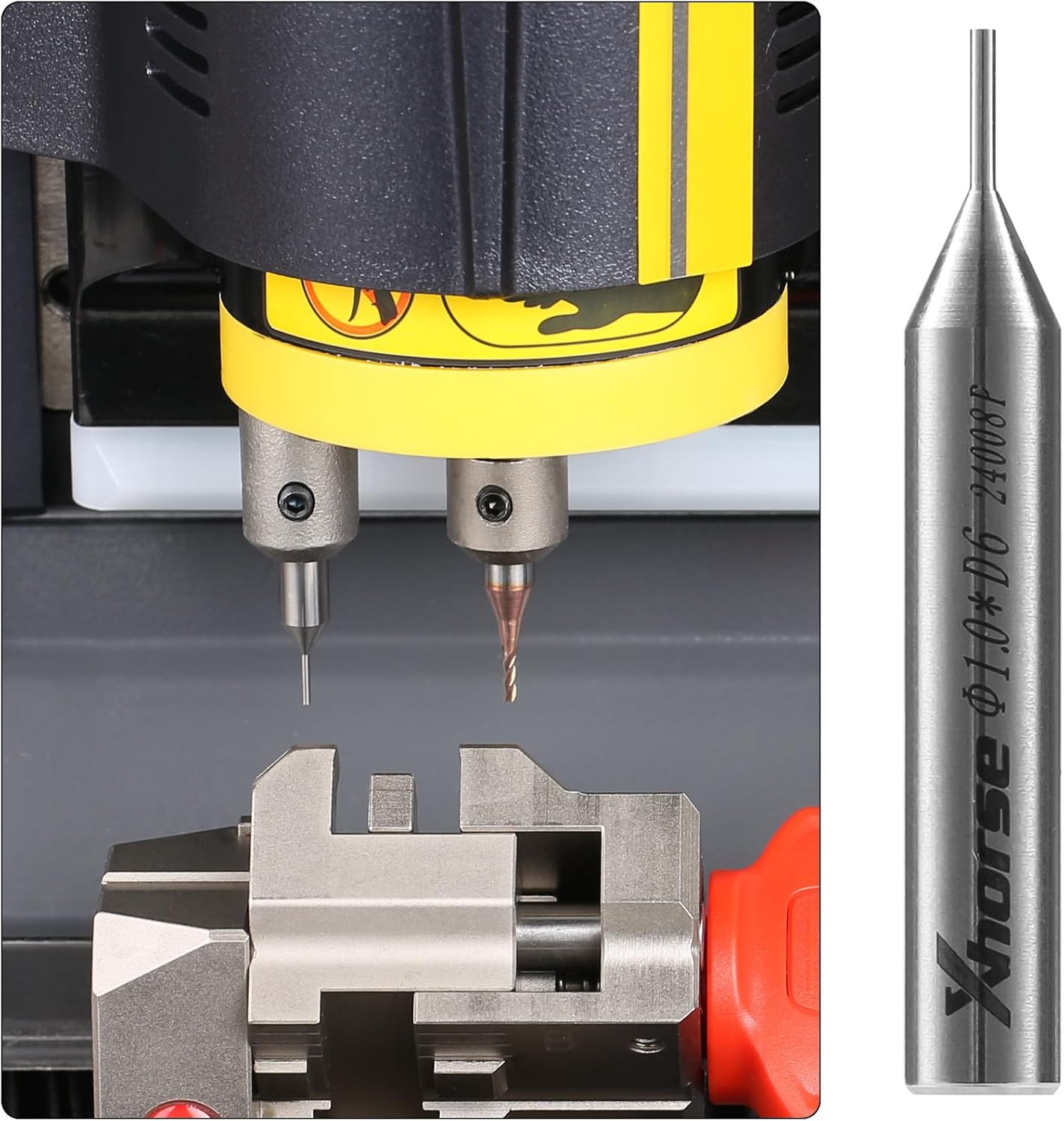
Image: A close-up view of the Xhorse 1.0mm Tracer Probe installed in a key cutting machine, positioned next to a key cutter, ready for operation.
5. Operation
Once the tracer probe is installed and calibrated, you can proceed with key duplication. The general operational steps are as follows:
- Secure Key: Place the original key to be duplicated securely into the key clamp of your key cutting machine. Ensure it is properly aligned and firmly held.
- Select Key Type: On your machine's interface or control panel, select the appropriate key type and any necessary cutting parameters for the key you are duplicating.
- Initiate Tracing: Start the tracing process according to your machine's specific instructions. The tracer probe will then move along the profile of the original key, mapping its unique cuts and grooves.
- Monitor Process: Observe the tracing process to ensure the probe moves smoothly and accurately across the key's surface. Any irregularities should be noted.
- Cutting Process: After the tracing is complete and the machine has acquired all necessary data, it will automatically proceed with the cutting process using the installed key cutter to create the duplicate key.
6. Maintenance
Proper maintenance of your tracer probe ensures its longevity and continued accuracy:
- Regular Cleaning: After each use, gently clean the tip of the tracer probe with a soft cloth or a small brush to remove any accumulated debris, dust, or metal shavings.
- Inspection: Periodically inspect the probe tip for any signs of wear, bending, or damage. A worn or damaged probe can significantly impact the accuracy of key cuts.
- Storage: When not in use, store unused tracer probes in their original protective packaging in a dry, clean environment to prevent damage and corrosion.
- Replacement: Replace the tracer probe if it exhibits significant wear, damage, or if you notice a decrease in tracing accuracy. Timely replacement is crucial for maintaining optimal performance.
7. Troubleshooting
If you encounter issues with your Xhorse 1.0mm Tracer Probe, consider the following troubleshooting steps:
- Inaccurate Tracing:
- Ensure the probe is correctly installed and securely tightened in its holder.
- Perform machine calibration as per your key cutting machine's manual.
- Check the probe tip for any damage or excessive wear; replace if necessary.
- Verify that the original key is clean and securely clamped without any movement.
- Probe Not Moving Smoothly:
- Inspect for any physical obstructions around the probe or within the probe holder mechanism.
- Ensure the machine's moving parts are clean and, if applicable, properly lubricated (refer to your machine's manual).
- Probe Breaking:
- Confirm that the correct probe size (1.0mm) is being used for the specific key type and machine settings.
- Verify that the machine's settings (e.g., tracing speed, pressure) are appropriate and not excessively aggressive.
- Examine the original key for any burrs, deformities, or irregularities that might cause undue stress on the probe during tracing.
8. Warranty and Support
For information regarding product warranty and technical support, please refer to the following resources:
- Warranty: Details concerning the warranty period and terms for Xhorse products are typically available on the official Xhorse website or can be obtained from your authorized Xhorse dealer. Please retain your purchase receipt as proof of purchase for any warranty claims.
- Technical Support: For technical assistance, product inquiries, or general support, it is recommended to visit the official Xhorse website or contact your local Xhorse distributor. They can provide specialized guidance and solutions.
Official Xhorse Website: www.xhorse.com


