
Important Safety Information
Please read all instructions carefully before installing and operating your air conditioner. Keep this manual for future reference. Your safety and the safety of others are very important. We have provided many important safety messages in this manual and on your appliance.
- Electrical Safety: Always plug into a grounded 3-prong outlet. Do not remove the ground prong. Do not use an adapter. Do not use an extension cord.
- Power Cord: Do not pinch, bend, or modify the power cord. Do not pull on the power cord to unplug the unit.
- Ventilation: Ensure proper ventilation around the unit. Do not block air vents.
- Children: This appliance is not intended for use by persons (including children) with reduced physical, sensory or mental capabilities, or lack of experience and knowledge, unless they have been given supervision or instruction concerning use of the appliance by a person responsible for their safety. Children should be supervised to ensure that they do not play with the appliance.
- Cleaning: Always unplug the unit before cleaning or performing any maintenance.
- Service: Do not attempt to repair or replace any part of your air conditioner unless specifically recommended in this manual. All other servicing should be referred to a qualified technician.
Product Overview
The Arctic Wind 3AW8000A is an 8,000 BTU window air conditioner designed to cool rooms up to 350 square feet. It also features dehumidification and fan-only modes for versatile comfort.
Key Features:
- 3-in-1 Functionality: Cool, Dry (Dehumidify), and Fan modes.
- 8,000 BTU Cooling Capacity: Suitable for medium-sized rooms up to 350 sq. ft.
- 3 Fan Speeds: Low, Medium, High for customized airflow.
- Digital Controls: Precise temperature setting and mode selection.
- 24-Hour Timer: Program the unit to turn on or off automatically.
- Sleep Mode: Adjusts temperature and fan speed for comfortable overnight operation and energy saving.
- Auto-Restart: Automatically resumes previous settings after a power outage.
- Washable Filter: Easy-to-clean mesh air filter with a "Clean Filter" indicator light.
- Follow Me Remote Control: Remote acts as a thermostat for consistent temperature across the room.
- 4-Way Adjustable Air Vents: Direct airflow as needed.
Unit Components:
Familiarize yourself with the main components of your air conditioner.

Image: Front view of the Arctic Wind 3AW8000A window air conditioner, highlighting the digital display, control buttons, and horizontal louvers.

Image: A slightly angled front view of the Arctic Wind 3AW8000A unit, showing its compact design and the air intake/output grilles.

Image: Infographic detailing the main features of the Arctic Wind 3AW8000A, including its BTU rating, dimensions, and functional benefits.

Image: A helpful chart illustrating recommended BTU levels for various room sizes, indicating that 8,000 BTU is ideal for rooms up to 350 square feet.
Setup and Installation
Your Arctic Wind window air conditioner comes with a window mounting kit for easy installation. Proper installation is crucial for optimal performance and safety.
Before Installation:
- Window Requirements: Ensure your window is suitable for a window-mounted AC unit. The unit dimensions are 18.5" W x 13.5" H x 15.75" D.
- Electrical Requirements: Verify that your electrical outlet meets the 115V requirement and is a grounded 3-prong outlet.
- Tools Needed: You may need a screwdriver, drill, measuring tape, and level.
Installation Steps (General Guide):
- Prepare the window by cleaning the sill and frame.
- Attach the top mounting rail to the unit.
- Place the unit in the window opening, ensuring it is securely seated on the window sill.
- Extend the side panels to fill the window gap and secure them.
- Install the window sash seal and lock for security and insulation.
- Ensure the unit is slightly tilted outwards to allow for proper condensate drainage.
- Plug the unit into the dedicated 115V, 3-prong grounded outlet.
For detailed, step-by-step instructions, refer to the illustrated guide included in your product packaging.

Image: The Arctic Wind 3AW8000A unit seamlessly installed in a window, demonstrating its appearance within a room environment.
Video: An official video from Arctic Wind showcasing the features and benefits of their window air conditioners, including installation tips.
Operating Instructions
Your air conditioner can be operated using the control panel on the unit or the included remote control.
Control Panel and Remote Control:
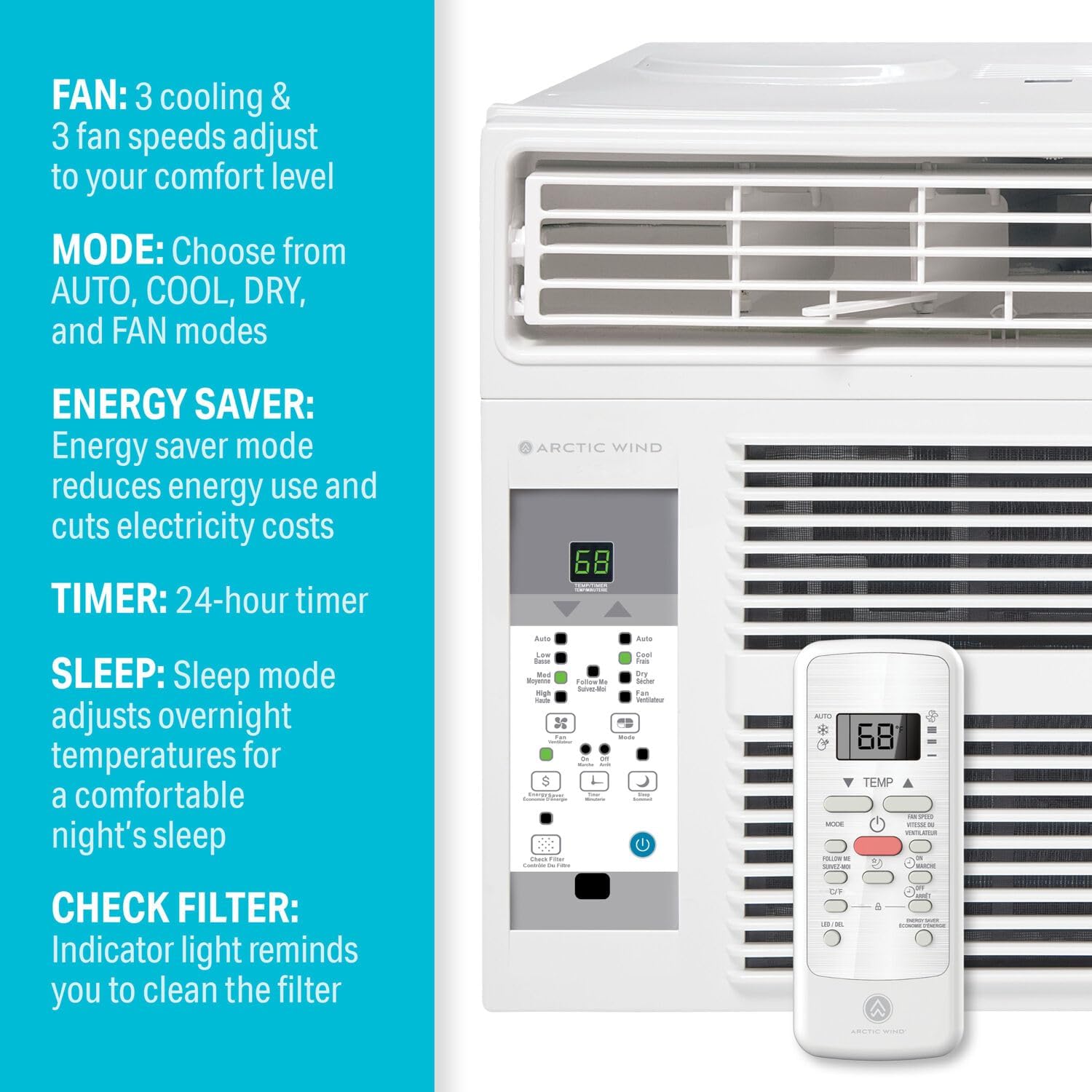
Image: Detailed view of the unit's control panel and the remote control, illustrating the buttons for mode, fan speed, timer, and temperature adjustments.
Basic Operation:
- Power On/Off: Press the POWER button to turn the unit on or off.
- Set Temperature: Use the TEMP UP (▲) or TEMP DOWN (▼) buttons to adjust the desired room temperature. The temperature range is typically 62°F (17°C) to 86°F (30°C).
- Select Mode: Press the MODE button to cycle through available modes:
- Cool: For cooling the room.
- Dry: For dehumidifying the room.
- Fan: For circulating air without cooling.
- Auto: The unit automatically selects the operating mode (Cool, Dry, or Fan) based on the set temperature and the ambient room temperature.
- Adjust Fan Speed: Press the FAN SPEED button to select Low, Medium, or High fan speed.
Advanced Features:
- Timer Function:
- To set Auto-On time: With the unit off, press the TIMER button, then use TEMP UP/DOWN to set the desired delay time (1-24 hours).
- To set Auto-Off time: With the unit on, press the TIMER button, then use TEMP UP/DOWN to set the desired delay time (1-24 hours).
- To cancel the timer, press the TIMER button again.
- Sleep Mode: Press the SLEEP button. In Cool mode, the set temperature will increase by 2°F (1°C) after 30 minutes, and by another 2°F (1°C) after another 30 minutes. The fan speed will be set to Low. This helps save energy and ensures comfortable sleep.
- Auto-Restart: In case of a power interruption, the unit will automatically restart with the last settings once power is restored.
- Follow Me Feature (Remote Control): When activated, the remote control acts as a thermostat, sensing the temperature at its location and adjusting the unit's operation to maintain the set temperature around the remote.
- Energy Saver Mode: This mode cycles the fan on and off with the compressor to reduce energy consumption.
Maintenance
Regular maintenance ensures efficient operation and extends the life of your air conditioner.
Cleaning the Air Filter:
The "Clean Filter" indicator light will illuminate after approximately 250 hours of operation, reminding you to clean the filter. A dirty filter reduces cooling efficiency and airflow.
- Unplug the unit from the power outlet.
- Open the front panel of the unit.
- Grasp the handle of the air filter and pull it out.
- Wash the filter with warm, soapy water. Rinse thoroughly.
- Gently shake off excess water and allow the filter to air dry completely before reinstalling. Do not expose to direct sunlight or heat.
- Once dry, slide the filter back into its slot.
- Close the front panel.
- Plug the unit back in.
- To reset the "Clean Filter" indicator, press the FILTER button on the control panel or remote control.
Cleaning the Unit Casing:
Wipe the unit's casing with a soft, damp cloth. Do not use harsh chemicals, abrasives, or waxes.
Winter Storage:
If storing the unit for an extended period, clean the filter and ensure the unit is dry before covering and storing in a cool, dry place.
Troubleshooting
Before contacting customer service, review this section for common issues and solutions.
| Problem | Possible Cause | Solution |
|---|---|---|
| Unit does not start. | No power, tripped circuit breaker, unit unplugged, fuse blown. | Check power cord connection. Reset circuit breaker. Replace fuse if necessary. Ensure the unit is plugged into a live outlet. |
| Unit blows air but does not cool. | Dirty air filter, temperature set too high, blocked air intake/output, room too large. | Clean air filter. Lower the set temperature. Clear any obstructions from vents. Ensure room size is within unit's capacity (up to 350 sq. ft.). |
| Unit is noisy. | Loose parts, unit not level, fan hitting an obstruction. | Check for loose screws or panels. Ensure the unit is level in the window. Inspect fan for obstructions. |
| Water dripping inside. | Unit not tilted correctly, drain hole blocked. | Ensure the unit is slightly tilted outwards (about 1/4 inch) to allow condensate to drain outside. Check and clear the drain hole. |
| Remote control not working. | Dead batteries, obstruction between remote and unit, remote too far. | Replace batteries. Remove any obstructions. Ensure remote is within operating range. |
Specifications
| Model Number | 3AW8000A |
| Cooling Power | 8,000 BTU |
| Voltage | 115 Volts |
| Floor Area Coverage | Up to 350 Square Feet |
| Product Dimensions (D x W x H) | 15.75" x 18.5" x 13.5" |
| Item Weight | 43.8 pounds |
| Form Factor | Window |
| Special Features | Dehumidifier, Dust Filter, Filter Light Reminder, Remote Controlled |
| Seasonal Energy Efficiency Ratio (SEER) | 10.9 |
| Refrigerant | R-32 |
| Filter Type | Mesh |
| Included Components | Air conditioner, Remote, Batteries, Manual, Warranty, Window Kit |
Warranty Information
This Arctic Wind air conditioner (Model 3AW8000A) comes with a 1 Year Limited Warranty from the date of purchase. This warranty covers defects in materials and workmanship under normal use.
Please retain your proof of purchase for warranty claims. For full warranty terms and conditions, refer to the warranty card included with your product or contact customer support.
Customer Support
If you have any questions, require assistance, or need to report an issue that cannot be resolved using the troubleshooting guide, please contact Arctic Wind customer support.
Contact information (phone number, email, or website) can typically be found on the product packaging, warranty card, or the manufacturer's official website.


