Download PDFFree PDF. The Save button below keeps a bookmark and private notes in your account.
MikroTik CRS326-4C+20G+2Q+RM Cloud Router Switch User Manual
Model: CRS326-4C20G2QRM
1. Introduction
The MikroTik CRS326-4C+20G+2Q+RM is a high-performance 1U rackmount Cloud Router Switch designed for advanced networking environments. It features a combination of Gigabit Ethernet, SFP+, and QSFP+ ports, offering versatile connectivity options. This device runs MikroTik's RouterOS v7, providing extensive configuration and management capabilities for network administrators.
2. Safety Information
Please read the following safety guidelines carefully before installing or operating the device:
Always disconnect power before performing any maintenance or installation procedures.
Ensure proper grounding to prevent electrical shock.
Operate the device within the specified temperature and humidity ranges.
Do not expose the device to water or excessive moisture.
Use only the power cables provided or approved by MikroTik.
Installation should be performed by qualified personnel.
3. Package Contents
Verify that all items are present in your package:
MikroTik CRS326-4C+20G+2Q+RM Cloud Router Switch unit
Two (2) IEC power cables
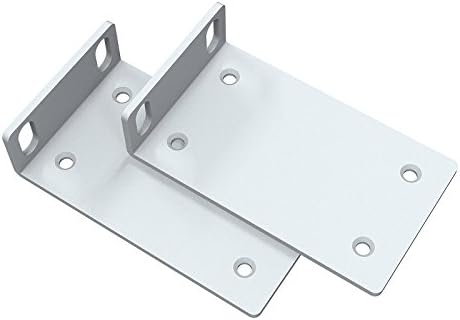
Two (2) Rackmount ears
Set of mounting screws for rackmount ears
Set of rubber feet for desktop placement
Image: Two rackmount ears, typically used for securing the switch in a server rack.
Image: A set of rubber feet and various screws, used for desktop placement or securing rackmount ears.
4. Product Overview
The CRS326-4C+20G+2Q+RM features a comprehensive set of ports and indicators for flexible network deployment.
4.1 Front Panel
Image: Front panel of the CRS326-4C+20G+2Q+RM, showing 20 Gigabit Ethernet ports, 4 combo SFP+/Gigabit Ethernet ports, and 2 QSFP+ ports.
The front panel includes:
20x 1G Ethernet Ports: Standard RJ45 ports for Gigabit Ethernet connectivity.
4x Combo SFP+/1G Ethernet Ports: These ports can function as either 10 Gigabit SFP+ fiber ports or 1 Gigabit RJ45 Ethernet ports. Only one mode can be active at a time per combo port.
2x 40G QSFP+ Ports: High-speed Quad Small Form-Factor Pluggable Plus ports for 40 Gigabit fiber connections.
LED Indicators: Status LEDs for power, activity, and other operational states.
4.2 Rear Panel
Image: Rear panel of the CRS326-4C+20G+2Q+RM, showing two redundant power input sockets.
The rear panel includes:
2x AC Power Inputs: Redundant power inputs (POWER1, POWER2) for increased reliability.
Grounding Screw: For connecting to an earth ground.
5. Setup
5.1 Rack Mounting
To install the switch in a standard 1U server rack:
Attach the two rackmount ears to the sides of the switch using the provided screws.
Secure the switch into the rack using appropriate rack screws (not included).
5.2 Desktop Placement
For desktop use, attach the included rubber feet to the bottom of the switch to prevent scratching surfaces and provide stability.
5.3 Power Connection
Connect one or both of the provided IEC power cables to the AC power inputs on the rear panel of the switch and then to a suitable power source. The device supports redundant power for continuous operation.
5.4 Initial Configuration
The device comes pre-installed with RouterOS v7. For initial configuration:
Connect a computer to any of the Gigabit Ethernet ports.
Open a web browser and navigate to the default IP address (usually 192.168.88.1).
Log in using the default credentials (username: admin, no password). It is highly recommended to set a strong password immediately.
Alternatively, use MikroTik's WinBox utility for a graphical configuration interface or connect via serial console for command-line access.
6. Operating Instructions
The CRS326-4C+20G+2Q+RM operates on MikroTik's RouterOS v7, offering extensive networking features. Key operational aspects include:
Port Management: Configure individual port settings, including speed, duplex, and flow control.
VLAN Configuration: Implement Virtual Local Area Networks (VLANs) for network segmentation and traffic management. Refer to the RouterOS documentation for detailed VLAN setup procedures.
Link Aggregation (LACP): Combine multiple physical links into a single logical link for increased bandwidth and redundancy.
Routing and Firewall: Utilize RouterOS capabilities for static and dynamic routing, as well as firewall rules to secure your network.
Monitoring: Monitor port status, traffic statistics, and system resources through the web interface or WinBox.
For detailed configuration guides and advanced features, consult the official MikroTik RouterOS documentation available on their website.
7. Maintenance
Regular maintenance ensures optimal performance and longevity of your device:
Firmware Updates: Regularly check for and install the latest RouterOS firmware updates to benefit from new features, bug fixes, and security enhancements.
Cleaning: Keep the device and its ventilation openings free from dust and debris. Use a soft, dry cloth for cleaning. Do not use liquid cleaners.
Environmental Control: Ensure the operating environment maintains stable temperature and humidity levels as specified in the product's technical specifications.
Backup Configuration: Periodically back up your device configuration to prevent data loss in case of unforeseen issues.
8. Troubleshooting
If you encounter issues with your CRS326-4C+20G+2Q+RM, consider the following troubleshooting steps:
No Power: Verify that power cables are securely connected and the power source is active. Check the power LEDs on the device.
No Connectivity: Ensure Ethernet cables are properly connected to active ports. Check port link/activity LEDs. Verify IP address configuration on connected devices and the switch.
SFP+/QSFP+ Module Issues: Ensure SFP+/QSFP+ modules are correctly inserted and compatible with the switch and connected devices. Some modules may require specific RouterOS configurations or may not perform optimally with certain cable types or lengths. Refer to MikroTik's compatibility list.
Slow Performance: Check for network bottlenecks, cable quality, and duplex mismatches. Ensure SFP+/QSFP+ modules are operating at their intended speeds.
Accessing Web Interface/WinBox: Confirm your computer's IP address is in the same subnet as the switch's management IP. Try resetting the switch to factory defaults if access is completely lost (refer to MikroTik documentation for the reset procedure).
System Logs: Review the system logs in RouterOS for error messages or warnings that can provide clues to the problem.
9. Specifications
Feature
Detail
Brand
MikroTik
Model Number
CRS326-4C20G2QRM
Series
CRS326-4C
Dimensions (LxWxH)
17.32 x 10.24 x 1.57 inches
Item Weight
8.51 pounds
Color
Black
Ethernet Ports
20x 1G Ethernet
Combo Ports
4x SFP+/1G Ethernet
QSFP+ Ports
2x 40G QSFP+
Operating System
RouterOS v7
Form Factor
1U Rackmount
10. Warranty and Support
This MikroTik product is covered by a manufacturer's warranty. For specific warranty terms and conditions, please refer to the warranty information provided with your purchase or visit the official MikroTik website. For technical support, firmware downloads, and additional documentation, please visit the MikroTik support portal or contact their customer service.
Ask about setup, troubleshooting, compatibility, parts, safety, or missing instructions. Manuals+ will review the question and use this page’s manual context to help answer it.