
Malibu 9604
Malibu Low Voltage Landscape Lighting 9604 User Manual
Model: 9604 | Brand: Malibu
1. Introduction
This manual provides detailed instructions for the installation, operation, and maintenance of your Malibu Low Voltage Landscape Lighting 9604. These 20W 145 Lumens Halogen Outdoor Lights are designed to enhance the appearance of your home and outdoor spaces, providing directional light to highlight specific features. The lights operate on a low voltage system, offering an energy-efficient and effective lighting solution for your landscape.

Figure 1.1: An 8-pack of Malibu Low Voltage Landscape Lighting 9604 units, each with a stake connector.
2. Safety Information
Please read all safety instructions carefully before installing or operating the lights. Failure to follow these instructions may result in electric shock, fire, or other hazards.
- Risk of Fire: Keep flammable materials away from the light fixture. Halogen bulbs generate heat.
- Low Voltage System: These lights operate on a 12V AC low output voltage, which is generally safe for surrounding children or pets. However, always exercise caution during installation and maintenance.
- Power Disconnection: Always turn off the power to the low voltage transformer before installing, maintaining, or replacing bulbs.
- Proper Installation: Ensure all connections are secure and waterproof to prevent electrical hazards.
- Bulb Handling: Do not touch the halogen bulb directly with bare hands, as oils from your skin can cause hot spots and reduce bulb life. Use a clean cloth or gloves.

Figure 2.1: Graphic highlighting the safety features of the 12V low output voltage, making it safe for children and pets.
3. What's in the Box
Each Malibu Low Voltage Landscape Lighting 9604 pack includes the following components:
- Malibu Landscape Light Fixtures (quantity as per pack size, e.g., 8 for an 8-pack)
- Ground Stakes
- Connectors (for connecting to low voltage wiring)
- Halogen Bulbs (pre-installed or included for installation)
- Mounting Hardware
4. Setup and Installation
The Malibu 9604 lights are designed for easy stake-mounted installation. A low voltage transformer (not included) is required to power these lights.
4.1. Pre-Installation Checklist
- Ensure you have a compatible low voltage landscape lighting transformer.
- Plan your lighting layout to determine optimal placement for each light fixture.
- Gather necessary tools: wire strippers (if not using quick connectors), screwdriver, and a small shovel or trowel for preparing the ground.
4.2. Installation Steps
- Assemble the Light: Attach the ground stake firmly to the base of the light fixture.
- Position the Light: Insert the assembled light and stake into the desired location in the ground. Ensure it is stable and upright.
- Connect to Wiring:
- Lay out your low voltage landscape wire from the transformer to each light fixture.
- Using the provided connectors, attach the light fixture's wires to the main low voltage cable. Ensure a secure and tight connection to prevent power loss or short circuits.
- If using wire strippers, carefully strip a small portion of insulation from both the fixture wires and the main cable, then twist them together and secure with waterproof wire nuts (not included, if not using quick connectors).
- Connect to Transformer: Connect the main low voltage cable to your landscape lighting transformer according to the transformer's instructions.
- Test: Once all lights are connected, plug in the transformer and test the lights. Adjust the angle of the light fixture as needed to achieve the desired illumination.

Figure 4.1: Illustration showing a Malibu landscape light connected to a low voltage transformer (transformer not included in this kit).
5. Operating Instructions
The Malibu 9604 landscape lights are designed for straightforward operation once installed.
- Power On/Off: The lights are controlled by the low voltage transformer they are connected to. Most transformers have a timer or remote control feature. Refer to your transformer's manual for specific operating instructions.
- Light Output: Each light produces a bright, warm white light (2800K color temperature) with 145 lumens of brightness from a 20W halogen bulb.
- Adjusting Beam: The light fixture can be manually adjusted to direct the light beam to highlight specific areas or features in your landscape. The angle of illumination is approximately 120 degrees.

Figure 5.1: Details on light performance, including 13 ft illumination distance, 2800K Warm White color temperature, and 120° angle of illumination.
6. Maintenance
Regular maintenance ensures the longevity and optimal performance of your landscape lights.
- Cleaning: Periodically clean the light fixtures with a soft, damp cloth to remove dirt, dust, and debris. Do not use abrasive cleaners.
- Bulb Replacement: The halogen bulbs are replaceable. If a bulb burns out, ensure the power is off at the transformer, allow the bulb to cool, and carefully replace it with a new 20W GU10 halogen bulb. Avoid touching the new bulb with bare hands.
- Wiring Inspection: Annually inspect all wiring and connections for any signs of wear, damage, or corrosion. Repair or replace as necessary.
- Fixture Stability: Ensure the ground stakes remain firmly in place. Re-secure if they become loose due to soil erosion or other factors.
7. Troubleshooting
If you encounter issues with your Malibu landscape lights, refer to the following common troubleshooting steps:
| Problem | Possible Cause | Solution |
|---|---|---|
| Light does not turn on. |
|
|
| Light is dim or flickers. |
|
|
| Light fixture fills with water. |
|
|
8. Specifications
Detailed technical specifications for the Malibu Low Voltage Landscape Lighting 9604:
| Feature | Detail |
|---|---|
| Brand | Malibu |
| Model Number | 9604 |
| Light Source Type | Halogen |
| Wattage | 20W |
| Brightness | 145 Lumens |
| Color Temperature | 2800K (Warm White) |
| Voltage | 12 Volts AC |
| Material | Aluminum |
| Finish Type | Powder Coated |
| Color | Black |
| Product Dimensions | 4.5"L x 2.8"W x 12.25"H |
| Item Weight | 3.76 pounds (for 8-pack) |
| Installation Type | Stake Mounted |
| Indoor/Outdoor Usage | Outdoor |
| Control Method | Remote (via transformer) |
| Bulb Base | GU10 |
| Water Resistance Level | Not Water Resistant (implies suitable for outdoor but not submersible) |

Figure 8.1: Key electrical and material specifications for the lighting unit.
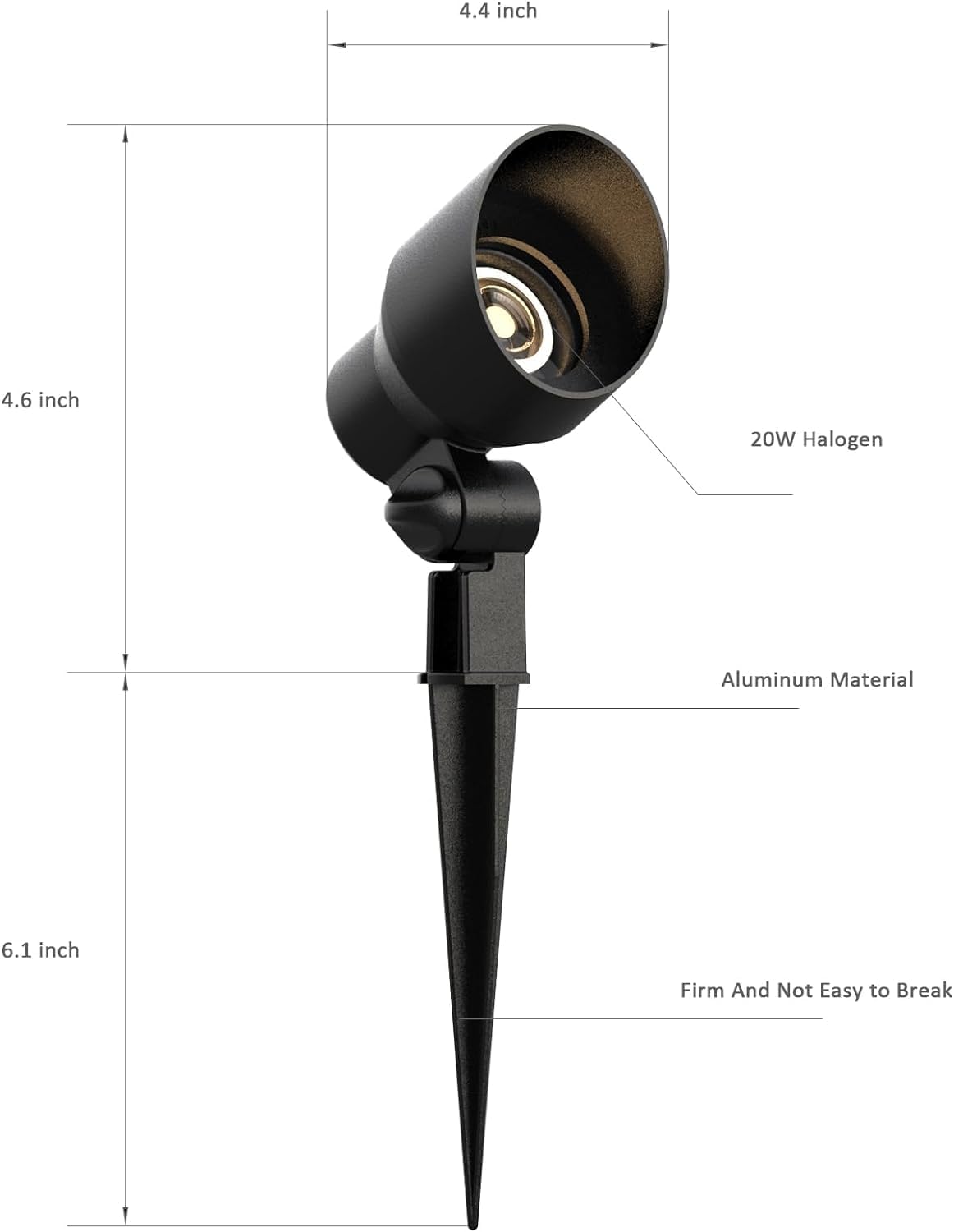
Figure 8.2: Dimensional breakdown of the Malibu 9604 light fixture, including the 20W Halogen bulb, aluminum material, and firm stake design.
9. Warranty Information
Specific warranty details for the Malibu Low Voltage Landscape Lighting 9604 are not provided in this manual. Please refer to the product packaging or the official Malibu website for the most current warranty information.
10. Customer Support
For further assistance, technical support, or inquiries regarding your Malibu Low Voltage Landscape Lighting 9604, please visit the official Malibu website or contact their customer service department. Contact information is typically available on the product packaging or the manufacturer's website.
Related documents9604


Ask a question about this manual
Ask about setup, troubleshooting, compatibility, parts, safety, or missing instructions. Manuals+ will review the question and use this page’s manual context to help answer it.