Introduction
The OUGETHER JQ-006 is a versatile 10-in-1 water quality testing pen designed for comprehensive analysis of various water parameters. This device accurately measures pH, Total Dissolved Solids (TDS), Salinity, Specific Gravity (SG), Oxidation-Reduction Potential (ORP), Electrical Conductivity (EC), Hydrogen (H2), Resistivity, Temperature, and Nutrient levels. It is suitable for a wide range of applications including drinking water, swimming pools, aquariums, hydroponics, and laboratory use.
The tester features a clear LCD display with backlight for easy reading, a rust-resistant probe, and an automatic shutdown function to conserve battery life. Its high-sensitivity probe ensures quick and precise measurements.

Image: The OUGETHER JQ-006 water quality tester shown in various application scenarios, including home drinking water, mountain spring water, laboratory use, aquaculture, swimming pools, and aquariums, highlighting its wide range of utility.
What's in the Box
Upon opening the package, please verify that all components are present:
- 1 x OUGETHER JQ-006 Digital Water Quality Meter (Battery Not Included)
- 4 x Calibration Solution Powders (for pH and ORP calibration)
- 1 x User Manual

Image: The package contents including the JQ-006 tester, its retail box, calibration powders for pH and ORP, and the operation manual.
Product Features
The OUGETHER JQ-006 water quality tester is equipped with several features to ensure accurate and convenient measurements:
- 10-in-1 Multifunction: Measures PH, TDS, SALT, SG, ORP, EC, Hydrogen, Resistivity, Temperature, and Nutrient.
- Smart Design: Features a rust-resistant probe, clear backlit LCD display, compact size, and lightweight for portability.
- Automatic Shutdown: Powers off automatically after 5 minutes of inactivity to save battery.
- High Sensitivity: Built-in high-sensitivity, detachable probe for quick measurements.
- High Precision: Provides a complete measurement range with data retention and low-battery indication.
- Limit Setting: Allows setting maximum or minimum limits for PH, EC, and ORP, with out-of-range values displayed in red.

Image: An illustration highlighting the 10 detection functions of the JQ-006 tester: pH, TDS, S.G, ORP, EC, Temperature, Salt, H2, and Resistivity.

Image: A visual representation of the tester's LCD screen displaying readings for Salinity, S.G, Fertile, pH, H2, TDS, ORP, MΩ (Resistivity), EC, and Temperature, demonstrating the complete range of functions and free switching capability.
Setup
- Battery Installation: The device requires 1 Lithium Polymer battery (included). Open the battery compartment cover, insert the battery according to the polarity markings, and securely close the cover.
- Probe Preparation: Before first use, or if the probe has been dry for an extended period, soak the electrode in distilled water for approximately 30 minutes to ensure optimal performance.
- Initial Power On: Press the ON/OFF button to power on the device. The LCD screen will illuminate.
Operating Instructions
The JQ-006 allows you to switch between 10 different measurement modes. Press the MODE/CAL button to cycle through the functions.
General Measurement Steps:
- Ensure the probe is clean and dry before use, or properly conditioned if dry.
- Press the ON/OFF button to power on the tester.
- Immerse the electrode into the sample solution, ensuring the liquid level is below the cap.
- Gently stir the solution and wait for the reading to stabilize on the LCD display.
- Press the HOLD/TEMP button to lock the displayed value for easier recording. Press again to release.
- After measurement, rinse the electrode with distilled water and dry it with a clean cloth.
- Press the ON/OFF button to power off the device, or it will automatically shut down after 5 minutes of inactivity.
Specific Function Details:
- pH (Potential of Hydrogen): Measures the acidity or alkalinity of a solution. Range: 0-14 pH. For drinking water, a pH value of 7.5-8.5 is generally considered suitable.

Image: The JQ-006 tester displaying a pH reading, alongside a color-coded pH scale indicating acidity, neutrality, and alkalinity, with a note on suitable pH for drinking water.
- TDS (Total Dissolved Solids): Indicates the total concentration of dissolved substances in water. Range: 0-100000ppm. Lower TDS values generally indicate purer water. The device can help assess water purity before and after filtration.

Image: The JQ-006 tester measuring TDS in a glass of water, accompanied by a chart that categorizes water purity based on TDS levels (0-20ppm High Purity, 50-100ppm High Purity, 100-300ppm Average Purity, 300-600ppm Low Purity, 600-1000ppm Lower Purity, 1000 or more Not suitable for drinking).
- Salinity (SALT): Measures the amount of dissolved salts in water. Range: 0-20%. The appropriate salinity for humans is approximately 0.900%. This is useful for various applications including food preparation and aquaculture.

Image: The JQ-006 tester displaying a salinity reading, with icons representing various applications like hotels, restaurants, families, and cafeterias, indicating its use in measuring salt content in food and liquids.
- SG (Specific Gravity): Measures the density of a liquid relative to water. Range: 1.000-1.222. This is particularly relevant for seawater, where the average specific gravity is typically 1.02-1.07.

Image: The JQ-006 tester displaying an S.G reading, with text explaining that S.G specific gravity of seawater is 1.000-1.222, and the average weight difference of dissolved salt is about 3.5%.
- ORP (Oxidation-Reduction Potential): An important indicator of water quality that reflects the aquatic system's ability to oxidize or reduce contaminants. Range: ±1999mV.

Image: The JQ-006 tester displaying an ORP reading, with a chart correlating ORP values to respiratory types (Aerobic, Anaerobic) and microbial species, indicating its role in assessing the aquatic system.
- EC (Electrical Conductivity): Measures the ability of water to conduct electricity, which is directly related to the concentration of ionized solids in the water. Range: 0-200000µS/cm. Higher EC indicates more dissolved ions.

Image: The JQ-006 tester displaying an EC reading, with reference values for various water types (Ultrapure, Distilled, Mountain spring, Tap, Drinking, Mingshui, Salt water), explaining its use in determining water purity and contamination.
- Hydrogen (H2): Measures the concentration of dissolved hydrogen in water, often associated with hydrogen-enriched water. Range: 0-2400PPb.

Image: The JQ-006 tester displaying an H2 reading, with an explanation of hydrogen-enriched water quality testing and its potential to delay oxidation reactions.
- Resistivity (MΩ): Measures the electrical resistance of water, which is the reciprocal of conductivity. It indicates the purity of water. Range: 50Ω-20MΩ.

Image: The JQ-006 tester displaying a Resistivity reading, with text defining resistivity as the ability of a substance to transmit an electric current and its use in indicating water purity.
- Temperature (TEMP): Measures the temperature of the solution. Range: 0-60°C / 32-140°F. Press the HOLD/TEMP button to switch between Celsius and Fahrenheit.

Image: The JQ-006 tester displaying a temperature reading, with text indicating the temperature range and the ability to switch between Celsius and Fahrenheit.
- Nutrient (Fertile): Measures the fertility of nutrient solutions, particularly useful for plant growth. Range: 0-3. A reading of 0-1 indicates too low, 1-3 is moderate, and 3 indicates too high (requires dilution).

Image: The JQ-006 tester displaying a 'Fertile' reading, with text explaining the fertility range for nutrient solutions and guidance for plant growth.
Calibration
Regular calibration ensures the accuracy of your JQ-006 tester. Calibration is typically required for pH and ORP measurements using the provided buffer powders.
pH Calibration:
- Prepare buffer solutions: Dissolve the pH 4.01, pH 6.86, and pH 9.18 buffer powders in 250ml of distilled water each.
- Power on the tester and select the pH mode.
- Immerse the electrode into the pH 6.86 buffer solution.
- Press and hold the MODE/CAL button until the display shows "CAL" and then the target pH value (e.g., 6.86). The device will automatically recognize the buffer and calibrate.
- Rinse the electrode with distilled water.
- Repeat the process for pH 4.01 and pH 9.18 buffer solutions. It is recommended to calibrate with pH 6.86 first, then pH 4.01, and finally pH 9.18 for best accuracy.
ORP Calibration:
- Prepare the ORP 256mV buffer solution by dissolving the powder in 50ml of distilled water.
- Power on the tester and select the ORP mode.
- Immerse the electrode into the ORP 256mV buffer solution.
- Press and hold the MODE/CAL button until the display shows "CAL" and then the target ORP value (e.g., 256). The device will automatically calibrate.

Image: A visual guide demonstrating the pH calibration process using buffer solutions of pH 4.00, pH 6.86, and pH 9.18, showing the tester immersed in each solution.

Image: The JQ-006 tester displayed alongside packets of pH 9.18, pH 6.86, pH 4.01, and ORP 256mV buffer powders, which are essential for calibration.
Maintenance
- Electrode Cleaning: Always rinse the electrode with distilled or deionized water after each use to prevent contamination and residue buildup. Gently wipe with a soft, clean cloth.
- Storage: Store the tester with the electrode cap securely in place. If the electrode is dry, re-soak it in distilled water for 30 minutes before next use. Avoid storing in extreme temperatures or direct sunlight.
- Battery Replacement: Replace the battery when the low-battery indicator appears on the display to ensure accurate readings.
- Avoid Contamination: Do not touch the electrode with bare hands as oils and dirt can affect its performance.
Troubleshooting
| Problem | Possible Cause | Solution |
|---|---|---|
| Inaccurate readings | Uncalibrated device, dirty electrode, expired buffer solutions, low battery. | Perform calibration (see Calibration section). Clean the electrode. Replace buffer solutions if old. Replace battery. |
| Display not turning on | Dead battery, incorrect battery installation. | Replace battery. Check battery polarity. |
| Slow response time | Dry electrode, dirty electrode. | Soak electrode in distilled water for 30 minutes. Clean the electrode thoroughly. |
| Readings fluctuate excessively | Air bubbles around electrode, unstable sample temperature, electrical interference. | Gently stir the solution to remove bubbles. Allow sample to reach stable temperature. Ensure no strong electrical fields nearby. |
| Cannot switch functions | Button malfunction, device frozen. | Press the ON/OFF button to restart the device. If problem persists, contact support. |
Specifications
- Model: JQ-006
- Functions: pH, TDS, Salt, SG, ORP, EC, Hydrogen, Resistivity, Temperature, Nutrient
- pH Range: 0-14
- TDS Range: 0-100000ppm
- Salinity Range: 0-20%
- SG Range: 1.000-1.222
- ORP Range: ±1999mV
- EC Range: 0-200000µS/cm
- Hydrogen Range: 0-2400PPb
- Resistivity Range: 50Ω-20MΩ
- Temperature Range: 0-60°C (32-140°F)
- Power Source: 1 Lithium Polymer battery (included)
- Dimensions: Approximately 8.78 x 3.19 x 2.09 inches
- Weight: Approximately 4.97 ounces
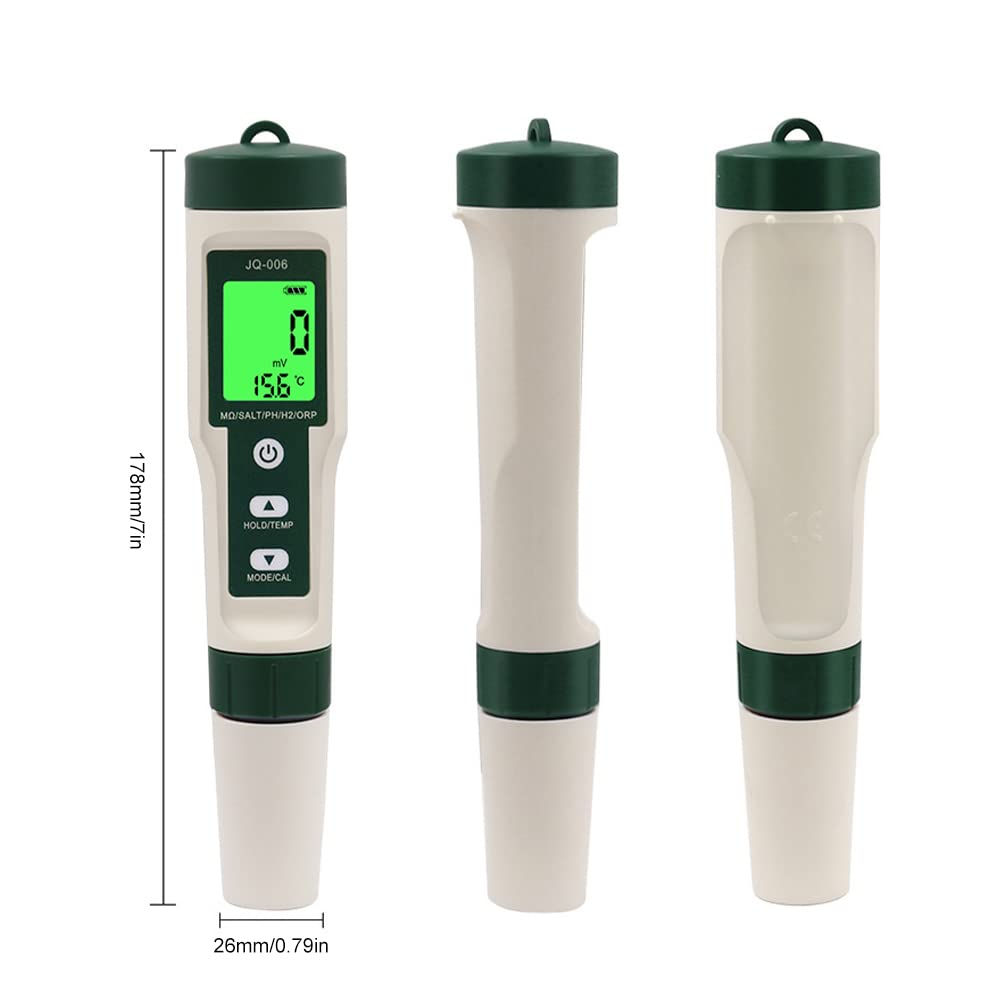
Image: A diagram illustrating the physical dimensions of the JQ-006 water quality tester, showing its length as 178mm (7in) and width as 26mm (0.79in).
Warranty and Support
For warranty information or technical support, please contact OUGETHER directly. You can visit the official OUGETHER store on Amazon for more information and contact options:
Please retain your purchase receipt as proof of purchase for any warranty claims.


