
Westcott Multi-Brand
Westcott FJ80 II Universal Touchscreen 80Ws Speedlight User Manual
Model: Multi-Brand
Introduction
The Westcott FJ80 II Universal Touchscreen 80Ws Speedlight is a versatile and powerful flash unit designed for both on-camera and off-camera use. Featuring a soft round head for even light coverage, a large touchscreen for intuitive control, and multi-brand compatibility, it is an essential tool for photographers seeking reliable and high-performance lighting.
This manual provides detailed instructions for setting up, operating, and maintaining your FJ80 II Speedlight to ensure optimal performance and longevity.
What's in the Box
Upon unboxing your Westcott FJ80 II Speedlight, please verify that all the following components are included:
- (1) FJ80 II M Universal Speedlight
- (1) FJ80 II Lithium Polymer Battery
- (1) FJ80 II Battery Charger and Cord
- (1) FJ80 II AC Adapter
- (1) FJ80 II Shoe Stand
- (1) FJ80 II USB-C Cable
- (1) FJ80 II Travel Case
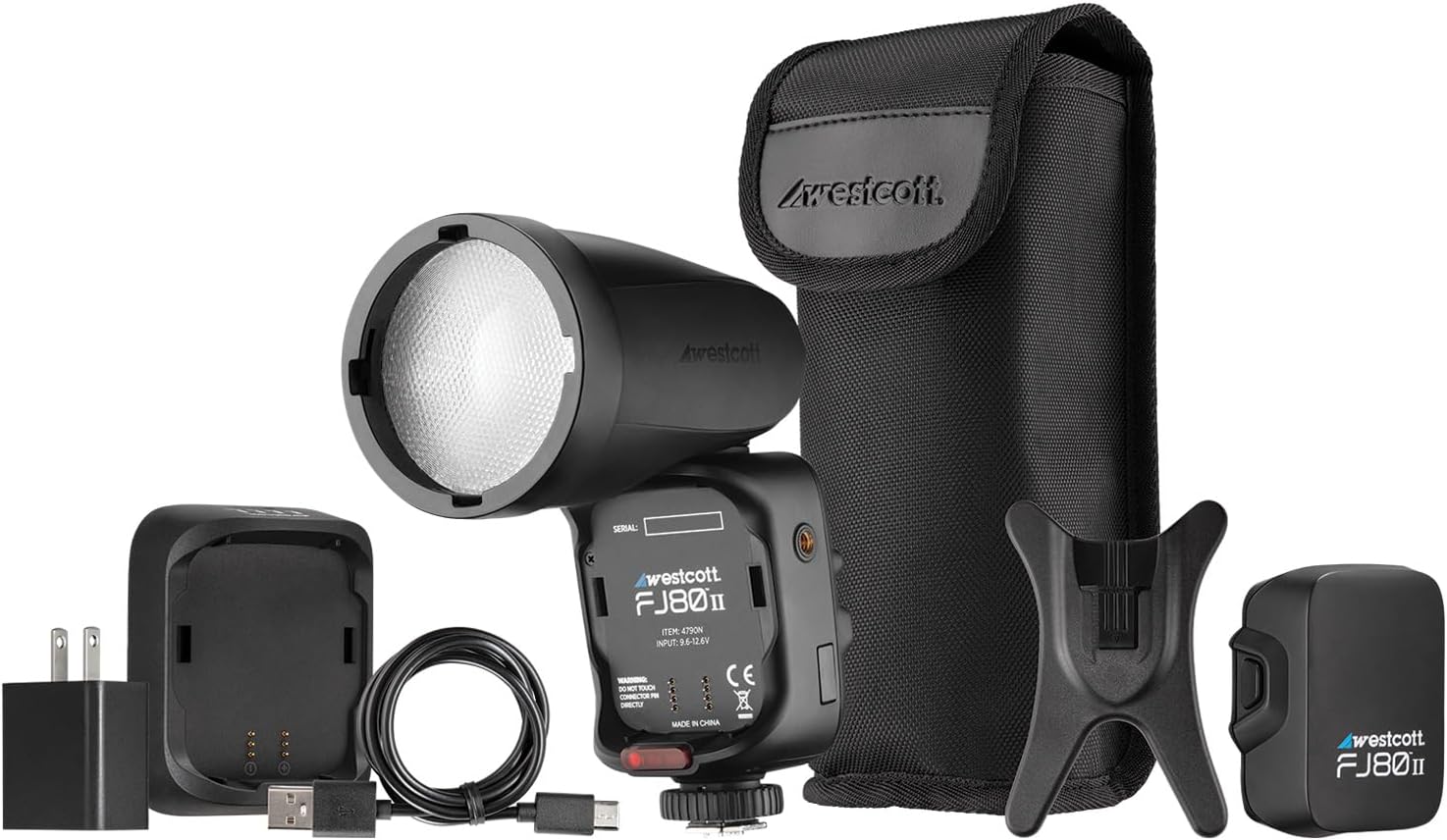
Figure 1: All components included in the Westcott FJ80 II package.
Setup
Battery Installation and Charging
- Insert the FJ80 II Lithium Polymer Battery into the battery compartment of the speedlight. Ensure it clicks securely into place.
- Connect the FJ80 II Battery Charger to the AC Adapter.
- Plug the AC Adapter into a standard wall outlet.
- Connect the battery to the charger. The charging indicator light will show the charging status.
- Allow the battery to fully charge before first use. A full charge provides 500+ full-power flashes.
Mounting the Speedlight
The FJ80 II can be mounted on-camera or used off-camera with the included shoe stand.
On-Camera Mounting:
- Ensure your camera is powered off.
- Slide the FJ80 II's hot shoe mount into your camera's hot shoe.
- Secure the speedlight by tightening the locking mechanism on the hot shoe mount.

Figure 2: FJ80 II mounted on various camera brands, demonstrating multi-brand compatibility.
Off-Camera Use:
- Attach the FJ80 II to the included shoe stand.
- Place the shoe stand on a flat, stable surface or mount it onto a light stand with a compatible adapter (not included).
Operating the Speedlight
Powering On/Off
Press and hold the power button (Ⓢ) on the side of the speedlight to turn it on or off. The touchscreen will illuminate upon power-on.
Touchscreen Interface
The FJ80 II features a large 2.8-inch LCD color touchscreen for easy navigation and control of settings. Tap icons and values to adjust them.

Figure 3: Detailed view of the FJ80 II's touchscreen and control buttons.
Flash Modes
The FJ80 II supports various flash modes for different photographic needs:
- Manual (M) Mode: Allows precise control over flash power output. Adjust power levels directly on the touchscreen.
- TTL (Through-The-Lens) Mode: Automatically adjusts flash output based on camera metering for balanced exposure.
- High-Speed Sync (HSS): Enables flash synchronization at shutter speeds faster than the camera's native sync speed, useful for freezing action or overpowering ambient light.
- Front Curtain Sync: Flash fires at the beginning of the exposure.
- Rear Curtain Sync: Flash fires at the end of the exposure, creating a motion blur effect behind the subject.
Wireless Communication
The FJ80 II features reliable wireless communication with a range of up to 328 feet (100 meters). This allows for flexible off-camera lighting setups. Refer to your camera's manual for specific wireless flash triggering instructions if using it as a master or slave unit.
Compatibility
The Westcott FJ80 II is designed for multi-brand compatibility, supporting a wide range of camera systems. It is compatible with:
- Canon
- Nikon
- Sony (with adapter)
- Fuji
- Lumix (Panasonic)
- Olympus
For dedicated Sony compatibility without an adapter, please refer to Westcott part #4796N.
Maintenance
Proper maintenance ensures the longevity and optimal performance of your FJ80 II Speedlight.
- Cleaning: Use a soft, dry cloth to clean the exterior of the speedlight. For the touchscreen, use a microfiber cloth specifically designed for electronics. Avoid abrasive cleaners or solvents.
- Storage: When not in use, store the speedlight in its travel case in a cool, dry place away from direct sunlight and extreme temperatures. Remove the battery if storing for extended periods.
- Battery Care: Recharge the battery regularly, even if not in frequent use, to maintain its health. Avoid fully depleting the battery before recharging.
- Thermal Performance: The FJ80 II features enhanced thermal performance to avoid overheating during prolonged use. However, continuous high-power flashes may still trigger thermal protection. Allow the unit to cool down if this occurs.
Troubleshooting
| Problem | Possible Cause | Solution |
|---|---|---|
| Speedlight does not power on. | Battery is depleted or not properly inserted. | Ensure battery is fully charged and correctly installed. |
| Flash does not fire. | Incorrect camera settings, speedlight not securely mounted, or in sleep mode. | Check camera flash settings. Re-mount speedlight. Tap touchscreen or press a button to wake from sleep. |
| Flash output is inconsistent. | Battery low, or thermal protection activated. | Recharge battery. Allow speedlight to cool down if used continuously at high power. |
| Wireless communication issues. | Out of range, interference, or incorrect channel/group settings. | Ensure units are within 328 ft range. Change channels/groups to avoid interference. |
Specifications
| Feature | Detail |
|---|---|
| Product Dimensions | 8.28 x 3.11 x 3.11 inches |
| Item Weight | 2.55 pounds |
| Model Number | Multi-Brand |
| Batteries Required | 2 AA batteries (for internal components, main power is Lithium Polymer) |
| Manufacturer | F.J. Westcott |
| Compatible Mountings | Canon, Nikon, Sony (with adapter), Fuji, Panasonic, Olympus |
| Battery Life (Flashes) | 500+ full-power flashes per charge |
| Recycle Time | 0.05-1.5 seconds |
| Wireless Range | 328 feet (100 meters) |
| Color Temperature | 5500K (stable) |
Warranty and Support
Westcott provides a full 1-year pledge for this product. Additionally, lifetime support and US-based customer service are available. For any inquiries or assistance, please contact Westcott customer support directly.
For more information, visit the official Westcott website or refer to the contact details provided with your product packaging.
Related documentsMulti-Brand


Ask a question about this manual
Ask about setup, troubleshooting, compatibility, parts, safety, or missing instructions. Manuals+ will review the question and use this page’s manual context to help answer it.