
1. Important Safety Instructions
Please read these safety instructions carefully before using your SENCOR SRV 6450BK Robot Vacuum Cleaner. Keep this manual for future reference.
- This appliance can be used by children aged 8 years and above and persons with reduced physical, sensory or mental capabilities or lack of experience and knowledge if they have been given supervision or instruction concerning use of the appliance in a safe way and understand the hazards involved.
- Children shall not play with the appliance. Cleaning and user maintenance shall not be made by children without supervision.
- Only use the original power adapter and charging dock provided by the manufacturer.
- Do not use the robot vacuum cleaner in wet environments or on wet surfaces.
- Ensure all loose cables, rugs, and small objects are removed from the floor before operation to prevent entanglement.
- Do not operate the robot vacuum near open flames or flammable materials.
- Do not use the appliance to pick up large debris, sharp objects, or liquids.
- Always turn off the robot vacuum and disconnect it from the power source before cleaning or maintenance.
- Do not attempt to repair the appliance yourself. Contact authorized service personnel for repairs.
2. Package Contents
Carefully unpack the box and ensure all items are present and in good condition. If any items are missing or damaged, contact your retailer.
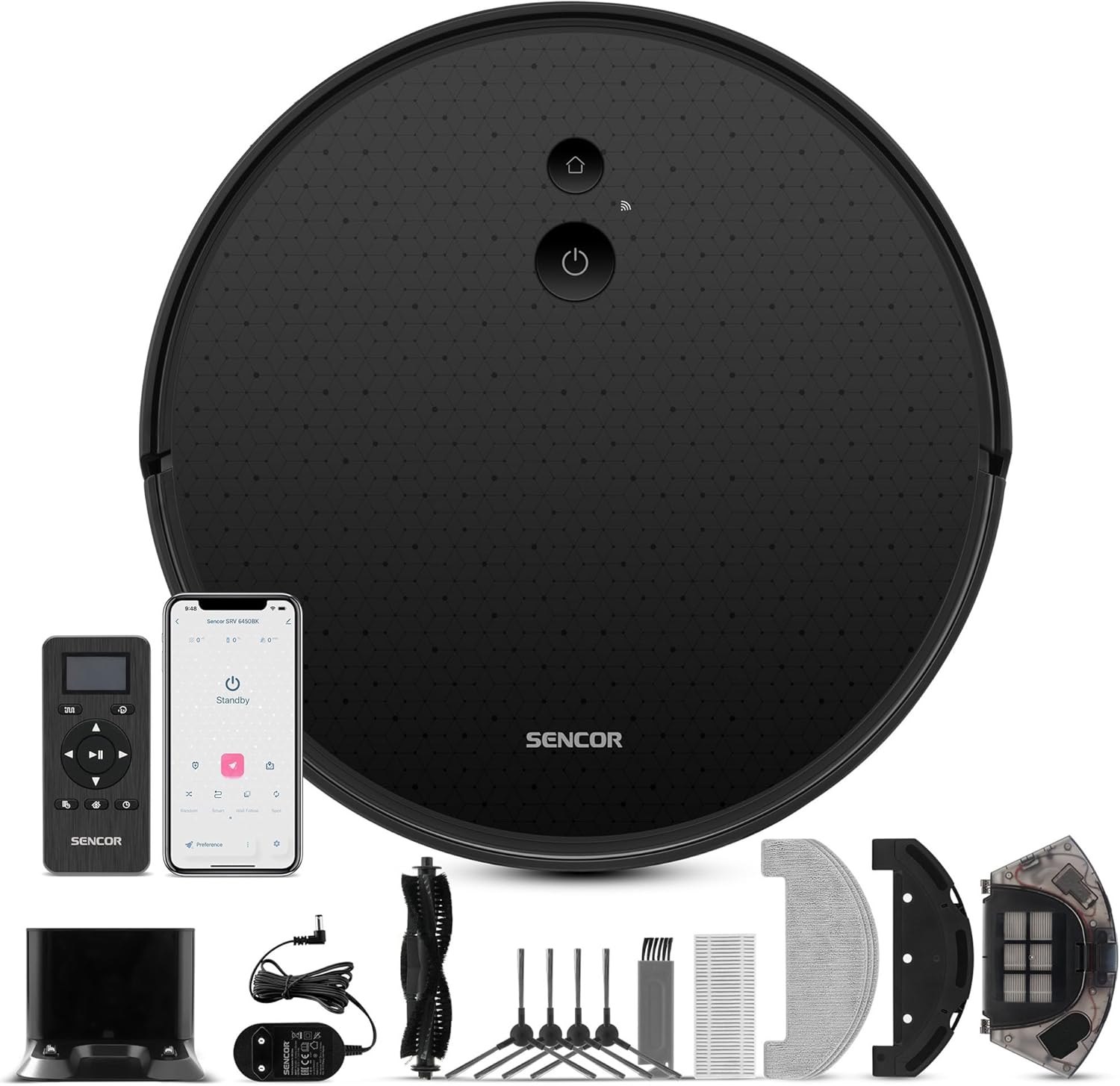
Image: The SENCOR SRV 6450BK Robot Vacuum Cleaner shown with its full set of accessories, including the charging dock, remote control, side brushes, main brush, mop pads, and cleaning tools.
- Robot Vacuum Cleaner Body (with two side brushes and filters installed)
- Charging Dock
- Cleaning Attachment (Mop Module)
- 3x Mop Pads
- Remote Control
- 2x AAA Batteries (for remote control)
- 2x Spare Side Rotating Brushes
- Power Adapter
- 1x Spare HEPA Filter
- 1x Spare Foam Filter
- Cleaning Brush
- Instruction Manual

Image: A close-up view of all individual accessories included with the SENCOR SRV 6450BK, such as the remote, charging base, brushes, filters, and mop pads.
3. Product Overview
The SENCOR SRV 6450BK is a versatile robot vacuum cleaner designed for efficient cleaning of various floor types. It combines vacuuming and mopping functions for comprehensive floor care.
- Suction Power: 3,000 Pa for effective dirt removal.
- Dual Functionality: Simultaneous vacuuming and mopping.
- Cleaning Modes: 4 suction levels and 3 mopping intensity levels.
- Navigation: Sencor Smart Gyro navigation for efficient movement.
- Sensors: Equipped with intelligent impact and fall sensors to prevent collisions and drops.
- Carpet Boost: Automatic performance increase on carpets for deeper cleaning.
- Battery: High-end 2,600 mAh Li-Ion battery providing up to 140 minutes of operation.
- Compact Design: Robot height of only 7.5 cm and diameter of 32 cm allows easy movement under furniture and in tight spaces.
- Control Options: Can be controlled via the included remote control or the Sencor Home mobile application.

Image: The SENCOR SRV 6450BK robot vacuum demonstrating its low profile by cleaning effectively under a glass table, highlighting its ability to access hard-to-reach areas.
4. Setup
4.1 Charging Dock Placement
Place the charging dock against a wall in an open area, ensuring there are no obstacles within 1 meter (3 feet) to the sides and 2 meters (6 feet) in front of the dock. Connect the power adapter to the charging dock and plug it into a power outlet.
4.2 Initial Charging
Place the robot vacuum onto the charging dock. Ensure the charging contacts on the robot align with those on the dock. The indicator light on the robot will illuminate to show it is charging. For first-time use, charge the robot for at least 6 hours or until fully charged.
4.3 Installing Side Brushes
Press the side brushes onto the square posts at the bottom of the robot until they click into place. Ensure the L and R markings on the brushes match the corresponding markings on the robot.
4.4 Remote Control Batteries
Open the battery compartment on the back of the remote control and insert the two AAA batteries, observing the correct polarity.
4.5 Sencor Home App (Optional)
For advanced control and scheduling, download the "Sencor Home" app from your smartphone's app store. Follow the in-app instructions to connect your robot vacuum to your home Wi-Fi network.
5. Operating Instructions
5.1 Starting a Cleaning Cycle
- Manual Start: Press the power button on the robot or the "Start/Pause" button on the remote control. The robot will begin cleaning in Auto mode.
- App Start: Open the Sencor Home app, select your robot, and tap "Start" to initiate a cleaning cycle.

Image: The SENCOR SRV 6450BK robot vacuum systematically cleaning a carpeted area, illustrating its efficient navigation pattern.
5.2 Pausing and Resuming
Press the power button on the robot or the "Start/Pause" button on the remote/app to pause the cleaning cycle. Press again to resume.
5.3 Returning to Charging Dock
Press the "Home" button on the robot, remote control, or app to send the robot back to its charging dock.
5.4 Cleaning Modes
The robot offers various cleaning modes, selectable via the remote control or Sencor Home app:
- Auto Mode: The robot intelligently navigates and cleans the entire floor area.
- Spot Mode: Cleans a specific area more intensely.
- Edge Mode: Cleans along walls and furniture edges.
- Scheduled Cleaning: Set specific times for the robot to automatically start cleaning.

Image: The SENCOR SRV 6450BK robot vacuum effectively cleaning a hard floor, with a visible clean path behind it, demonstrating its dirt removal capability.
5.5 Mopping Function
To use the mopping function, fill the water tank (part of the cleaning attachment) with clean water and attach a mop pad. Slide the cleaning attachment into the designated slot on the robot. The robot will then vacuum and mop simultaneously. Adjust mopping intensity via the app or remote.

Image: A hand holding the remote control for the SENCOR SRV 6450BK robot vacuum, with the robot and its charging dock visible in the background, illustrating the control options.
6. Maintenance
Regular maintenance ensures optimal performance and extends the lifespan of your robot vacuum cleaner.
6.1 Emptying the Dustbin
Open the top cover of the robot, remove the dustbin, and empty its contents into a trash can. It is recommended to empty the dustbin after each cleaning cycle.
6.2 Cleaning Filters
Remove the HEPA filter and foam filter from the dustbin. Tap them gently to remove dust. Do not wash HEPA filters with water. The foam filter can be rinsed with water and air-dried completely before reinstallation. Replace filters every 3-6 months, or as needed.
6.3 Cleaning Main Brush
Remove the main brush cover and lift out the main brush. Use the provided cleaning tool to remove hair and debris tangled around the brush. Reinstall the main brush and cover.
6.4 Cleaning Side Brushes
Periodically check the side brushes for tangled hair or debris. Pull them off their posts to clean. If brushes are worn or damaged, replace them with the spare brushes provided.
6.5 Cleaning Sensors and Charging Contacts
Wipe the anti-drop sensors, bumper sensors, and charging contacts on both the robot and the charging dock with a clean, dry cloth to ensure proper function.
6.6 Cleaning Mop Pads
After each mopping session, remove the mop pad and rinse it thoroughly with water. Allow it to air dry completely before reuse. Mop pads are washable and reusable.
7. Troubleshooting
If your robot vacuum cleaner encounters an issue, refer to the following common problems and solutions:
| Problem | Possible Cause | Solution |
|---|---|---|
| Robot does not start or respond. | Low battery; Power switch off; Remote control batteries dead. | Charge the robot; Ensure power switch is ON; Replace remote control batteries. |
| Robot cannot find charging dock. | Dock is obstructed; Dock is unplugged; Robot is too far from dock. | Clear obstacles around dock; Plug in dock; Manually place robot near dock. |
| Poor cleaning performance. | Dustbin full; Filters clogged; Brushes tangled or worn. | Empty dustbin; Clean/replace filters; Clean/replace brushes. |
| Robot gets stuck frequently. | Loose cables, rugs, or small objects on floor; Robot stuck under furniture. | Clear floor area before cleaning; Use boundary strips (if available) or block off problematic areas. |
| Unusual noise during operation. | Main brush or side brushes tangled; Debris in wheels. | Clean main brush and side brushes; Check wheels for obstructions. |
If the problem persists, please contact SENCOR customer support.
8. Specifications
| Brand | SENCOR |
| Model Number | SRV 6450BK |
| Color | Black |
| Dimensions (L x W x H) | 32 x 32 x 7.5 cm (12.6 x 12.6 x 3 inches) |
| Item Weight | 2.8 Kilograms (6.17 lbs) |
| Dustbin Capacity | 340 Milliliters |
| Voltage | 240 Volts |
| Material | Plastic |
| Auto-stop Function | Yes |
| Noise Level | 65 Decibels |
| Battery Type | Lithium-ion (2600 mAh) |
| Filter Type | HEPA |
| Surface Recommendation | Carpet, Hard Floors |
9. Warranty and Support
Warranty information for the SENCOR SRV 6450BK Robot Vacuum Cleaner is typically provided with the product packaging or on the manufacturer's official website. Please refer to these sources for detailed warranty terms and conditions.
For technical support, service, or spare parts, please contact SENCOR customer service through their official website or the contact information provided in your product documentation.
Note: The product data indicates a 30-day return policy from the seller (Amazon), which is separate from the manufacturer's warranty.


